Facebook Friend List

Plan
Premium
Country
US
Device
XPS 15
Operating System
Windows 10
My Question or Issue
Hello! I seem to be having an issue with connecting to Facebook. I went through the process many times, however no success. I clicked connect to Facebook, I logged in, and now it gives me a red bar with "Sorry we couldn't load friends to follow". I'm not sure how to proceed as I keep getting this error. I've gone through past forum article solutions. I restarted my laptop, reinstalled the app, removed the connection on Facebook, ensured the connection is marked active, and none of these are yielding results. It's like I never connected to Facebook from the Spotify app. Any assistance would be most appreciated!
Accepted answers
All comments

Hi, I also had that.
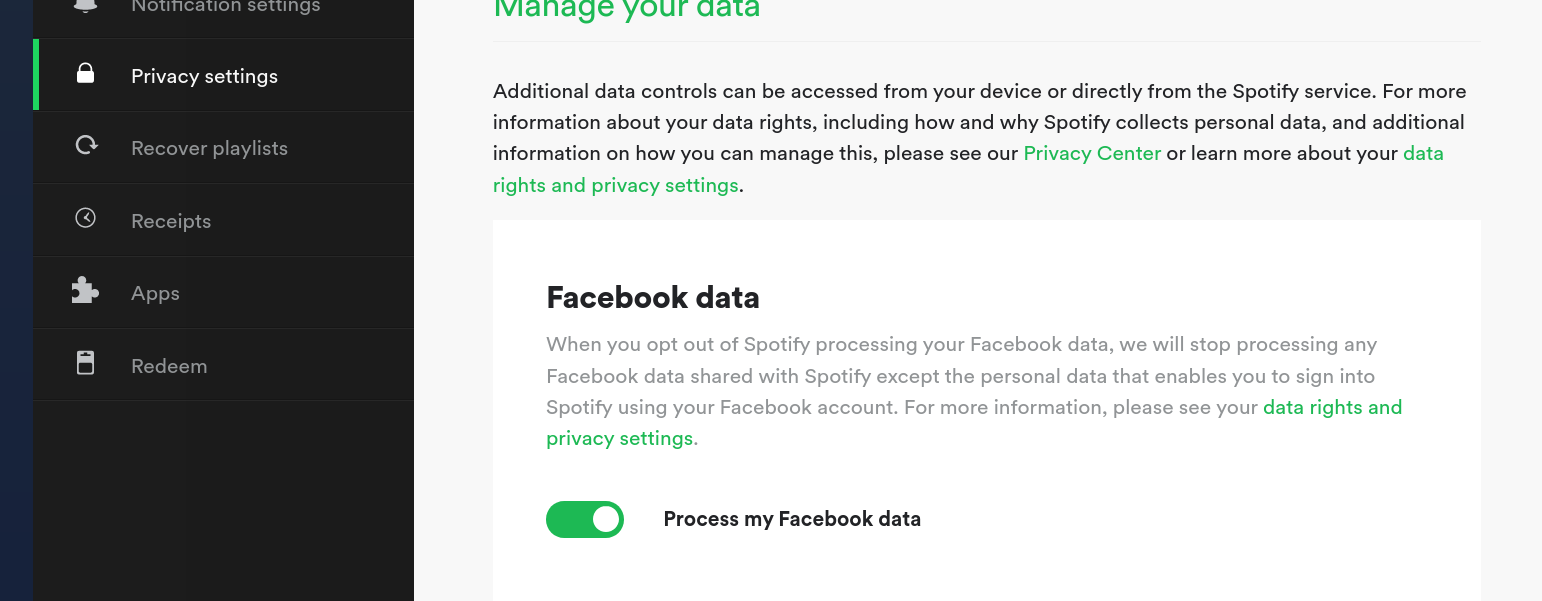
Go to your spotify account settings page ( https://www.spotify.com/us/account/privacy/ ) -> Privacy settings -> Facebook data. Make sure the switch is on.
Don't thank me.
Thank you, however I did have that switched on as of earlier today. Perhaps it takes time to apply the change?
Update: still happening 24 hrs after turning the process facebook switch on.
Ah, guess it took some time to apply. It works now! 😄
Hi, I also had that.
Go to your spotify account settings page ( https://www.spotify.com/us/account/privacy/ ) -> Privacy settings -> Facebook data. Make sure the switch is on.
Don't thank me.