[Desktop][Connect] keyboard shortcut to listen on another device

Please make keyboard shortcuts to listen on devices such as Sonos speakers. I'm always starting music and then the little button on the bottom right and picking from the drop-down to listen to one of my Sonos speakers. How about Option+Command+o for "Office" or Option+Command+k for "Kitchen", or just a number corresponding to their number in the speaker list?
Comments

I would also love this. I made a script that swiches between my phone and desktop with python and autohotkey that works fine as long as spotify manages to keep a connection with both devices. I have not tried this with speakers but it works with devices and it works with my raspberry pi speaker.
You have to install python and autohotkey yourself.
You also need the spotipy library
pip install spotipy
Here is a short-ish guide on how I did it:
- Download these files with the "Download Zip" button: https://gist.****/ludwig234/52fc2cc4384a3af5f3e4603e4ff64c80 and put them in the same folder (I put them here "C:\Users\ludwig\autohotkey" but it doesn't matter)
- Go here: https://developer.spotify.com/dashboard/applications and create a new app.
- In the app overview click edit settings and add "http://localhost:8080" to the "Redirect URIs" and save
- Copy the "Client ID" and the "Client Secret"
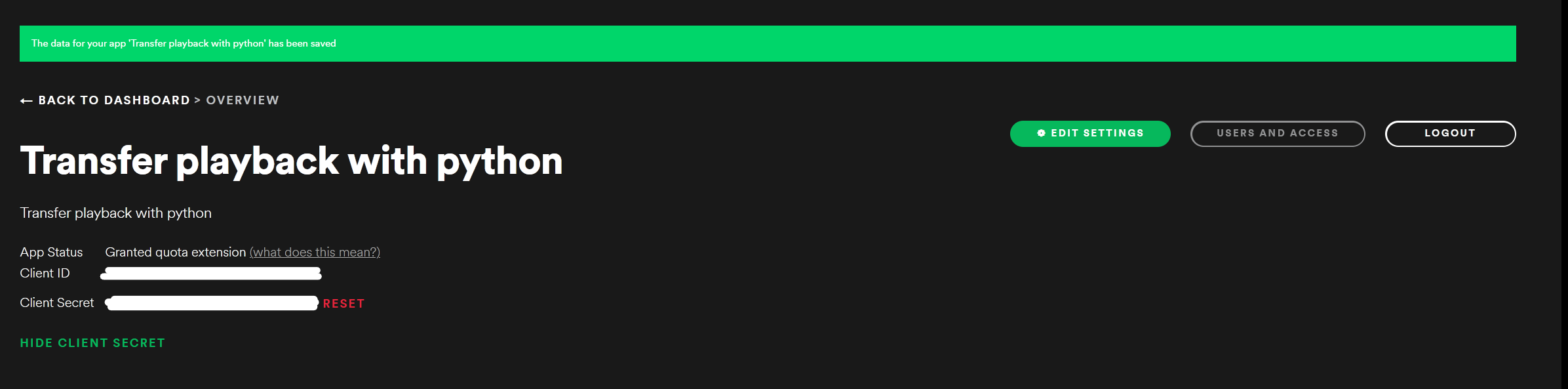
- Paste the ID and Secret in both .py files and save. (Right click the file and click edit)
#paste client id and secret here client_id = '' client_secret = ''
The numberd list beaks here but I'm tired so I don't care
- Now you need to find the device id of your devices. I have not tried this with speakers. It works with my raspberry pi speker so it should work for you.
- Go to this link and click "Get Token" and select the Required scope (user-read-playback-state).
- Click "TRY IT". Something like this should appear
{
"devices": [
{
"id": "5fbb3ba6aa454b5534c4ba43a8c7e8e45a63ad0e",
"is_active": true,
"is_private_session": false,
"is_restricted": false,
"name": "raspotify (raspberrypi)",
"type": "Speaker",
"volume_percent": 100
},
{
"id": "5fbb3ba6aa454b5534c4ba43a8c7e8e45a63ad0e",
"is_active": false,
"is_private_session": false,
"is_restricted": false,
"name": "LUDWIGS-DATOR",
"type": "Computer",
"volume_percent": 100
},
{
"id": "5fbb3ba6aa454b5534c4ba43a8c7e8e45a63ad0e",
"is_active": false,
"is_private_session": false,
"is_restricted": false,
"name": "Android",
"type": "Smartphone",
"volume_percent": 100
}
]
}
- Copy the ids of the devices you want.
- Paste a diffrent id in each .py file and save.
#paste device id device_id = ''
- Now try running the .ah (spotify_switch_device.ah) file and press ctrl+shift+1 and a web browser should start and ask you to login.
- Now press ctrl+shift+2 and login again.
- Now you should be able to switch between the two devices if both are connected to spotify.
- It doesn't work perfectly because spotify is very annoying.
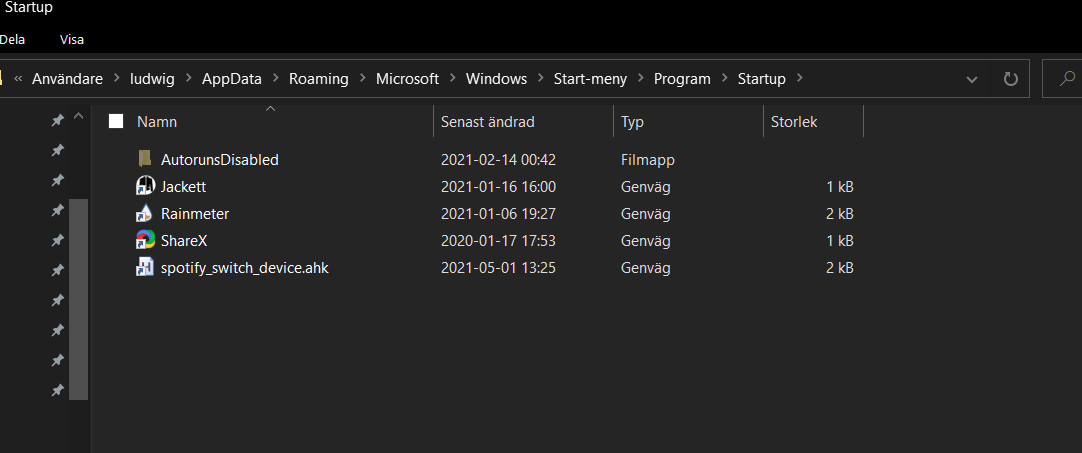
- If you want this script to start on startup then do this:
- create a shortcut of your .ah file
- press win+r and type shell:startup in the run dialog and press enter.
- drag the shortcut to the file explorer window from step 2 like this
You can add more devices if you want and you can also change the shortcut in the .ah file you edit this part "^+1" in the .ah file.

Updated on 2021-07-01
Hey @mgadow
Your Idea has been submitted a while ago, and unfortunately hasn't gathered enough votes (50 votes within 3 months) to keep it active in the Exchange. Be sure to know that this does not mean that your Idea has been declined by Spotify.
Don't worry, your Idea will still be able to gain more votes, and may get a Live Idea status if it receives enough of them.
For more info on how the Ideas Board works, click here. 🙂

Updated on 2022-10-02
Hey!
We've been keeping an eye on this submission for an extended period of time, and it doesn't seem this will reach the votes necessary to put it forward for prioritization.
As such, we're marking this case as closed. This includes any similar suggestions that are received.
If we do have any new information to share, rest assured we'll check back in here with a new status. Have in mind that the idea will continue open for getting votes, so if you still feel strongly about it, continue sharing it with more users.
More information about it can be found here.
Thanks for your comprehension!
Updated on 2021-05-06
Hello @mgadow!
I marked your idea as a New Suggestion. Thanks for bringing your feedback to the Spotify Community. I'd recommend checking out this article for more info on how the Ideas Exchange is managed.
Have a nice day 🙂