Unknown settings for Local Files

Plan
Premium
Country
USA
Operating System
Windows 10
My Question or Issue
If I turn on Local Files in settings, I see a second toggle for each local source that doesn't have a label. What are these toggles for?
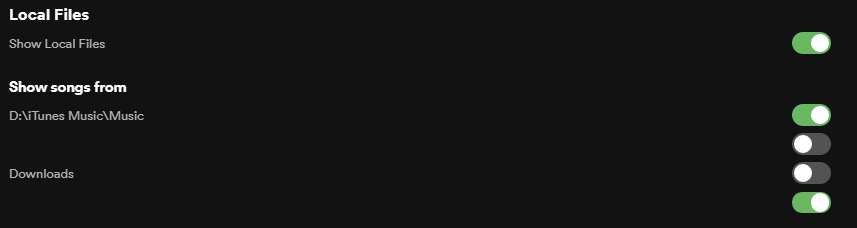
Child Item
Child Item
Child Item
Accepted answers
All comments
I have completely uninstalled, checked my user directory for configuration data and reinstalled with no change. I get the same result with the MS store version and the downloadable version. I tried a separate premium account with the same results.



Child Item
Child Item
Hey there @Nate237,
Welcome to the Community and thanks for reaching out about this.
If you can't see correctly all options below Local Files, we suggest that you try running a clean reinstall of the app to get rid of any cached files that might be causing trouble. This one is more thorough than the usual one. Also, make sure to download the app again from the Microsoft Store.
If this doesn't do the trick, could you ask a friend or a relative to log in to their account in your PC to check if the issue persists with a different account?
Keep us posted on how it goes.