Collaborative Feature Not Working

Plan
Premium
Country
UK
Device
Macbook Pro 2020
Operating System
macOS Big Sur 11.2.3
I recently created a playlist and made it collaborative on the desktop app. I then sent the playlist link to my friend who I intend to build the playlist with, they liked/followed it. When attempting to add songs however, the option was unavailable to them.
None of the information that we've found online has helped in resolving this issue, so I'm hoping I can find some answers here.
It may be worth noting that my friend lives in the US- and while I know licensing can be different between our two countries, I would imagine that would be an issue on a song by song basis rather than something like this.
Thanks in advance for all help/ advice!
Accepted answers
All comments

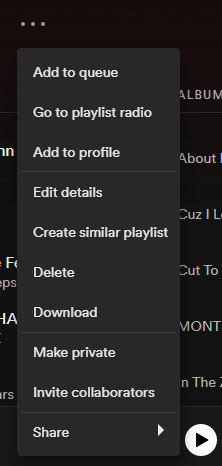
I'm not the original poster, but I'm having a similar issue. I can "invite collaborators," but there's no option to make the playlist fully collaborative. Thanks for your help!

Hey there @SmallishG1raffe,
Thanks for getting in touch about this.
We've made some changes recently to collaborative playlists. In this case, the old option to make a playlist collaborative isn't available anymore as it was replaced with Invite collaborators. This way, only approved Collaborators can make changes to the playlist. For more info, we suggest that you check this article.
If you've followed the steps in the article and you're still having issues, could you let us know what exactly you're trying to do? We'll be happy to help.
Keep us posted.

If you experience the Spotify Collaborative Playlist Not Working issue, then You should clear the cache and cookies. You can do this by opening the App's settings Finding the cache cleaner, and clicking Clear Data
Hey there @frostedflora,
Thanks for reaching out about this in the Community, and welcome 🙂
Would you mind sending over some screenshots where we can take a deeper look at what you are both seeing from your end?
You can attach them to your next response to us by using the Insert Photos option in the post editor.
We'll keep an eye out for your reply.