How to fix "The Playback of Protected content is not enabled" in google chrome.
Hey folks,
Thanks for all your replies.
If you continue seeing this message (or similar), you need to make sure to enable the Widevine plugin or download a media pack. Give it a try and let us know how it goes.
Note: Enabling the plugin requires no download and doesn't compromise your online security.
Also, it's worth disabling your Ad-Blocker extensions from your browser's "Extensions" > "Manage Extensions". After following these steps, make sure to restart your browser.
Keep us in the loop!
Hey @RAVJOSH
You should be able to enable protected content playback by going to chrome/settings/content and checking the box for Play DRM Content.Let me know how you get on 🙂
I have enabled the DRM option but then also same issue
Hi @user-removed,
Thanks for the info. Does the same issue occur across diferent browsers and in an incognito window? Please try that out and let us know how it goes.
Keep us posted.
i use opera gx i cant find the play drm thing can someone help?
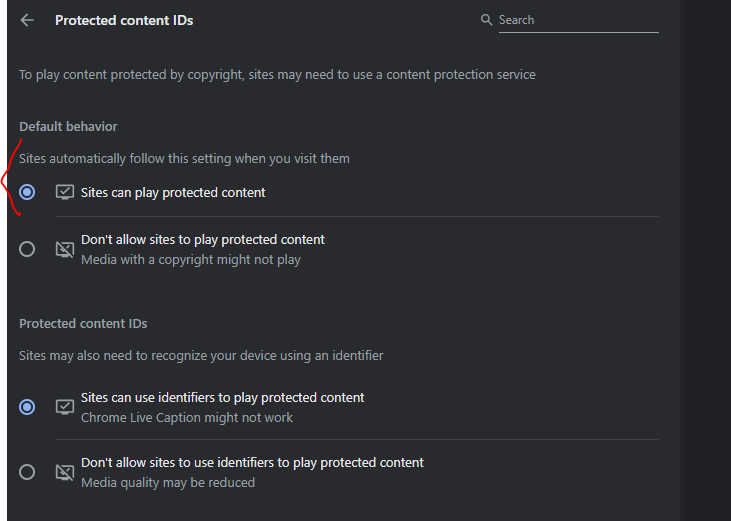
I am receiving "Playback of protected content is not enabled." for the first time ever on Chrome Version 113 today. I have "Sites can play protected content" enabled on my browser. I am not able to download the app on this work laptop but the browser player has worked fine until today. Please advise!
Welcome to the Community and thank you for joining the conversation.
Since this issue could be caused by network restrictions, would you mind using a different Wi-Fi network (and an incognito window) to see if the issue persists?
Also, @jonhackbarth could you check on a different PC (if possible) to see if it makes any difference? Sometimes PC's from work may have some permission restricted and that could affect the proper behavior of the Web Player.
We'll be on the lookout.
Having a similar issue where the web player in Chrome browser was working fine yesterday 5.15 and then on 5.16 receiving the error message "Playback of protected content is not enabled." Tried the change for "Protected Content IDs" within Chrome, as the verbiage under Chrome browser for Spotify help was not the same. Under this section "Sites can play protected content" was already enabled. Still unable to access Spotify in regular Chrome browser or incognito window. It appears to be browser related as access within Microsoft Edge is a non-issue.
I'm having the same issue since updating Chrome (Version 113.0.5672.126)
This has been happening since the middle of last week. I am so sad! Help lol
Thanks for your replies and for the info shared.
Would you mind sharing with us the troubleshooting steps you've tried so far? If you haven't yet, you can start by double-checking Chrome's settings. Then, go to Privacy and Security> Site Settings> Content Section > Protected Content IDs. Open it and turn on "Sites can play protected content" as the default behavior. You can also add Spotify web player to the "Allowed to use identifiers to play protected content" section.
Make sure that the Chrome browser is up-to-date. To check this, open Chrome's settings once more, then go to About Chrome. There, you can check for any pending updates.
What I did was go into my settings, changed the Protected ID content, then changed it back and it still didn't work. Then I went into a incognito tab, everything seemed to work fine until I logged into my account, once I did that, the error message popped up again. Now keep in mind I have the Protected ID Content "Sites can play protected ID content" on. Lastly, I went to my cache and cookies and cleared everything. Now that worked but then it had the same problem as incognito did, as once I Logged into my account, the message popped up again.
I forgot to mention, but for some reason, it works completely fine when I log in on mobile
Hey @12181560050,
Thanks for your reply and for the info shared.
Would you mind checking on a different computer to see if you can replicate this same behavior? It’d be awesome and helpful if you could check. You can ask for the computer of a relative or a friend to open your account and check.
On another note, is this happening if you change the internet connection you're using? Is this happening over WiFi? Ethernet? Both? If possible, you can create a hotspot on your phone and connect your computer to it to see if you notice any difference. Give it a try, and let us know if changing the connection makes any difference.
Lastly, would this happen if you opened a different account on your computer? You can create a free test account to check it out.
I tried the same on an old Dell Laptop I've had but as soon as I went into my account, once again I got the message. Secondly, I tried with the internet connection, same issue, but that time I just got the message right away instead of logging in when using Ethernet. I switched between from Ethernet and WiFi but nothing seemed to change. Lasty, I made a new google account and added it into spotify and it also didn't work. But, I went onto a guest account in google and tried signing in, and for some reason I couldn't at all.
Having some problems since last week, reinstalled and installed chrome again eventually I got to the same spot to this error, the only thing that worked (temporarily) was go into your main disk appdata folder found in your user directory, then search for google > chrome > userdata > delete widevineCdm
Then initiate chrome again and it should work, but when you completely close your chrome and re-open it again you'll find again same problem, so you shall repeat the process and it will work until you close your chrome after doing it. Sorry for my english, in case something it's not clear let me know, but this is the only way it works for me since this problem showed up
Boohoo, same problem here, on 2 different PC desktops, the play-protected setting made no difference. So Chrome fails but I got in by using Edge, hurrah !!
This is still happening after a reboot. Deleting the widevineCdm solves the problem until the browser is closed and opened again
Been encountering this issue all week with Chrome and seems to only be a Google Chrome issue. Latest updated version of Chrome on my PC is Version 115.0.5790.110 (Official Build) (64-bit). This issue seems to be limited to or more prevalent to Chrome as when using Spotify web player in browsers like Microsoft Edge or Firefox, there are no issues. Played music all week in Edge, however it is troubling the need to toggle between applications when Chrome is utilized for the majority of the day. Please let me know your thoughts, rebooted, don't know what the Widevine thing is everyone keeps mentioning and never disabled the playback.
This is happening, and has been for about a week now. Spotify web player works in Microsoft Edge and Firefox. Issue seems to only been with Google Chrome. The Spotify Support fix does not work for the Chrome browser as Default behavior is to allow sites to play protected content. How can this be fixed in Chrome to work again?
I'm experiencing the same issue since a couple of months back.
* Latest Chrome version
* Sites can play protected content: ON* Tried incognito and clearing cache
Works fine on other browsers and other devices.
We have same issue at my work on all the computers when using chrome browser. I was looking if it was something with group policy but couldn't find anything.
Hi,
Has there been any updated on this? I just subscribed to Spotify premium today, but every time I try to login I get the "Playback of protected content is not enabled" error message.
I've tried all the tips that were provided, but Spotify's information is out of date – the Google Chrome UI has changed and Widevine was deprecated a year ago.
Is there a way to fix this?
Makes no sense. I can go to the website not logged in and everything loads. Can browse around limitless. When i login thats when i get the "Playback of protected content is not enabled."
I followed the instructions in the first post and both the settings for enabling playback of protected content are enabled. Can you guys please figure this out so that i can listen to music on my desktop.....
just in case anyone else is still having problems with this, i just spent ages trying to fix it and it turned out it was my adblocker that was causing it. if you use an adblocker or your browser has one built in, turn it off for spotify. i don't know why because i have my adblocker enabled on my desktop and it works fine, but on my laptop the web player only works with it turned off.
Let me tell you what worked for me, spotify worked for me correctly in another browser, so entering the files of both browsers, I replaced the files inside the widewine folder of the browser that failed with the files of the widewine folder of the browser where it worked ** use a translator so I don't know if you understand what I wrote
So I still need help with this issue. I don't even know where the DRM box is located could i get help?
You must enable Google Widevine technology for your browser. See the screenshot below. I use Brave, so it may appear differently in other flavors of Chrome.
We shouldn't have to enable protected content globally; Chrome allows users to enable it by domain. When I enable protected content for [*.]scdn.co | [*.]spotify.com | [*.]spotifycdn.com the web player still says "Playback of protected content is not enabled." What other domains need to be added? (Please get the domains added to the help page - https://support.spotify.com/us/article/web-player-help/ )