Local Files Become Unavailable in Offline Mode

Plan
Premium
Country
Australia
Device
Legion Y540
Operating System
Windows 10
Version
1.1.62.583.gdac868ed-a
My Question or Issue
I am experiencing an issue where, if the client is set to offline mode, tracks that are stored locally on my computer will become faded out and unplayable in any playlists they have been added to.
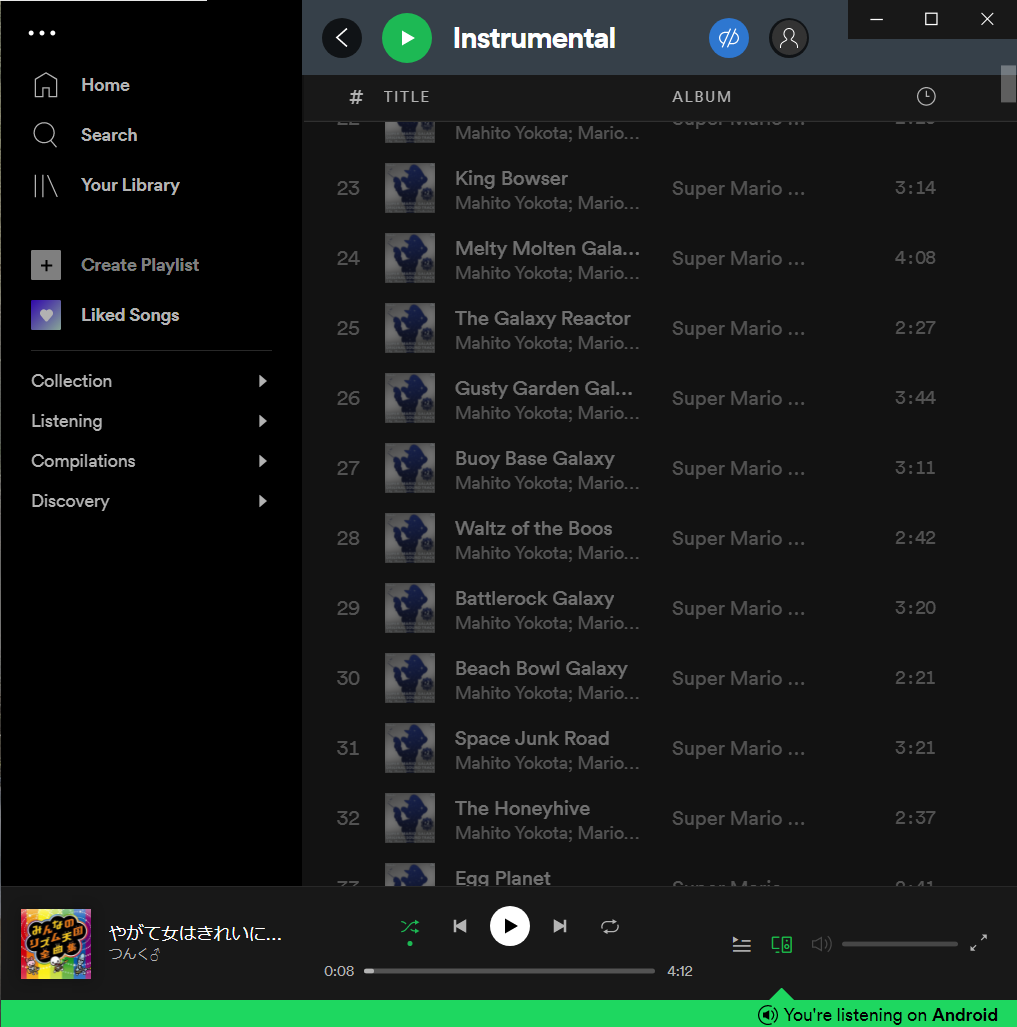 Downloaded Playlist, Local Files, Offline Mode
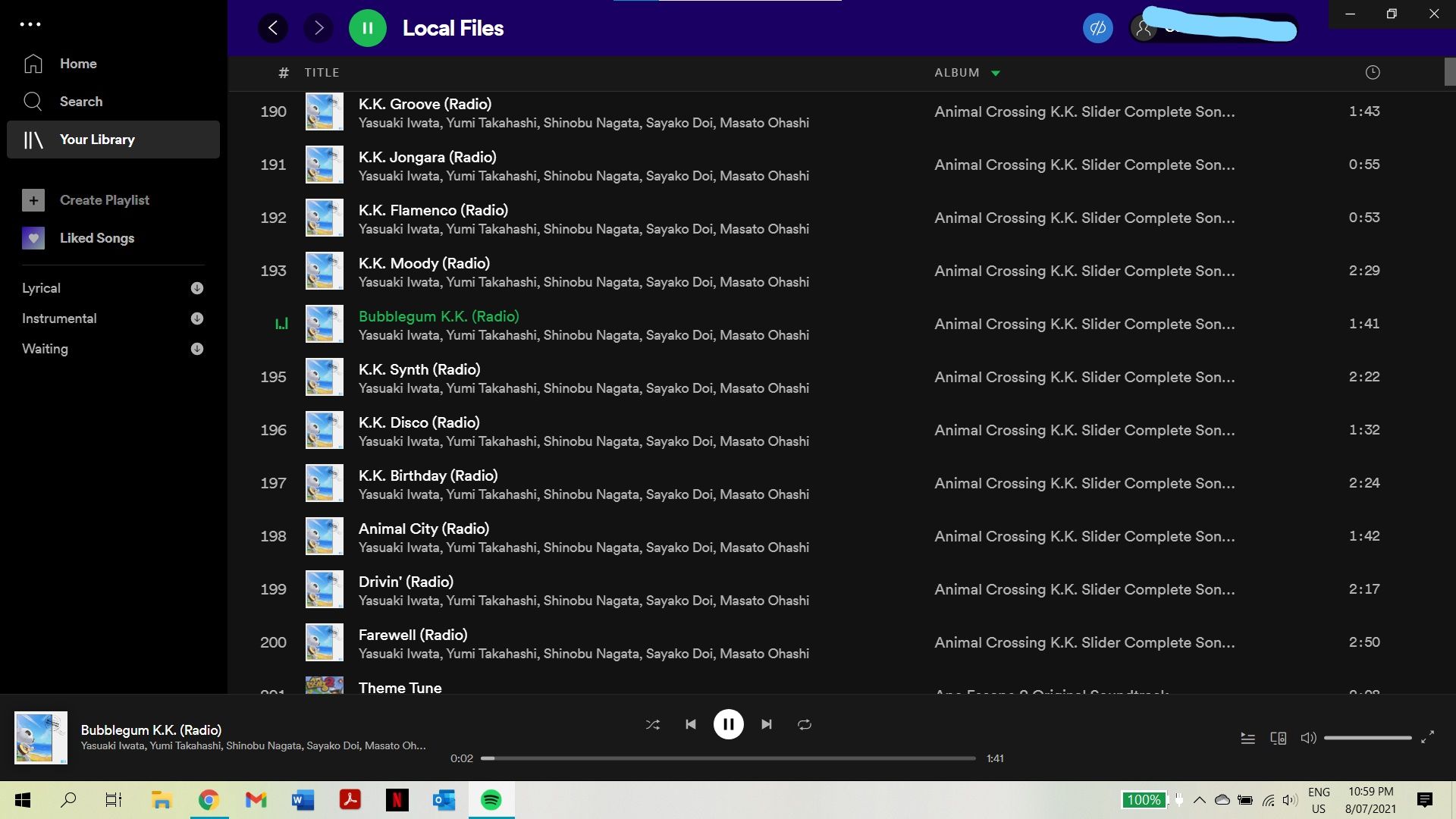
Despite this, the same files are playable from the "Local Files" section of "Your Library"
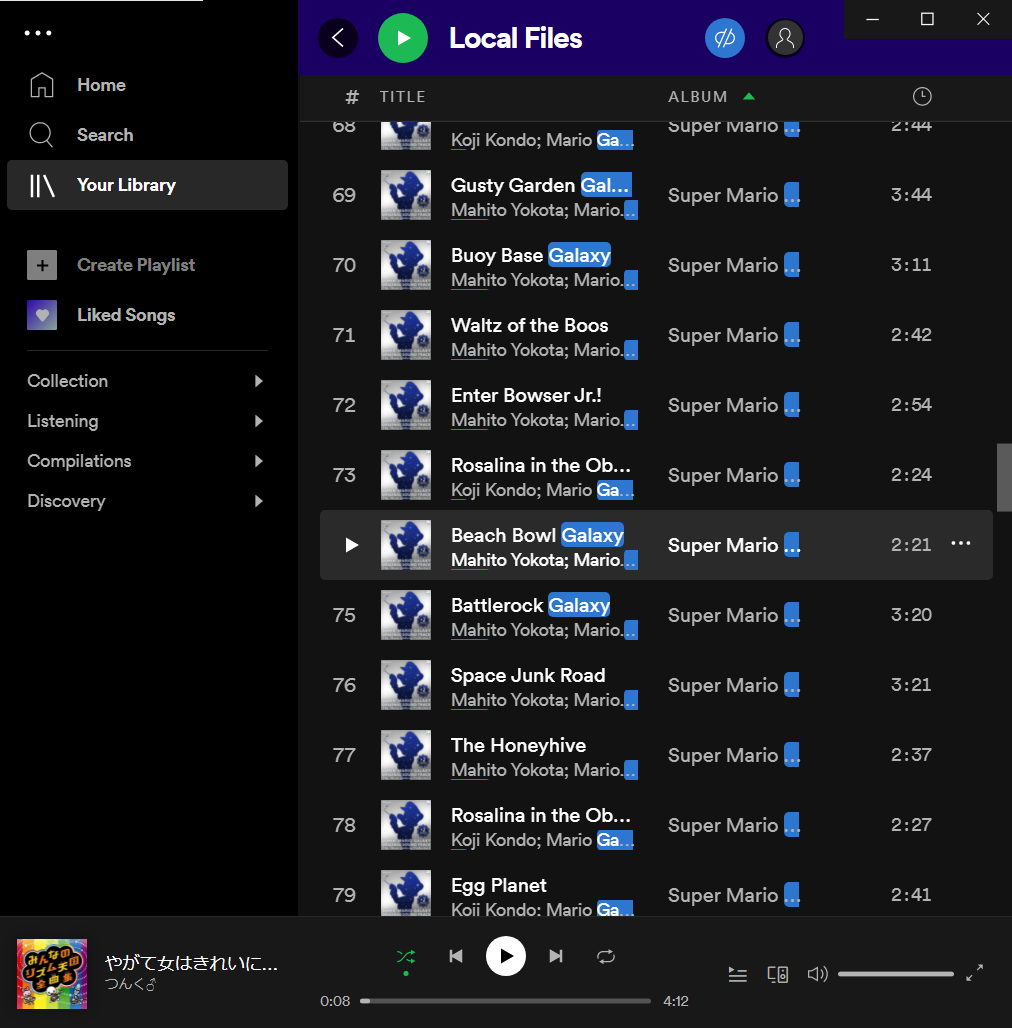 Your Library, Local Files, Offline Mode
It seems to bug caused by the client trying to treat the local files like Spotify tracks, marking them as unavailable due to them not being "Downloaded" and unable to be streamed due to the lack of internet.
I have contacted support, but they did not seem to understand the issue, recommending that I "Download" the tracks by toggling the download switch on the playlists they're in. I feel this is absurd as the files are already stored locally and the playlists are downloaded anyway.
I have done a clean install of Spotify and this has not corrected the issue.
Another person in chat has experienced this issue: https://community.spotify.com/t5/Chat/Local-files-won-t-play-in-offline-mode/m-p/5214870/highlight/true#M227905
More screenshots:
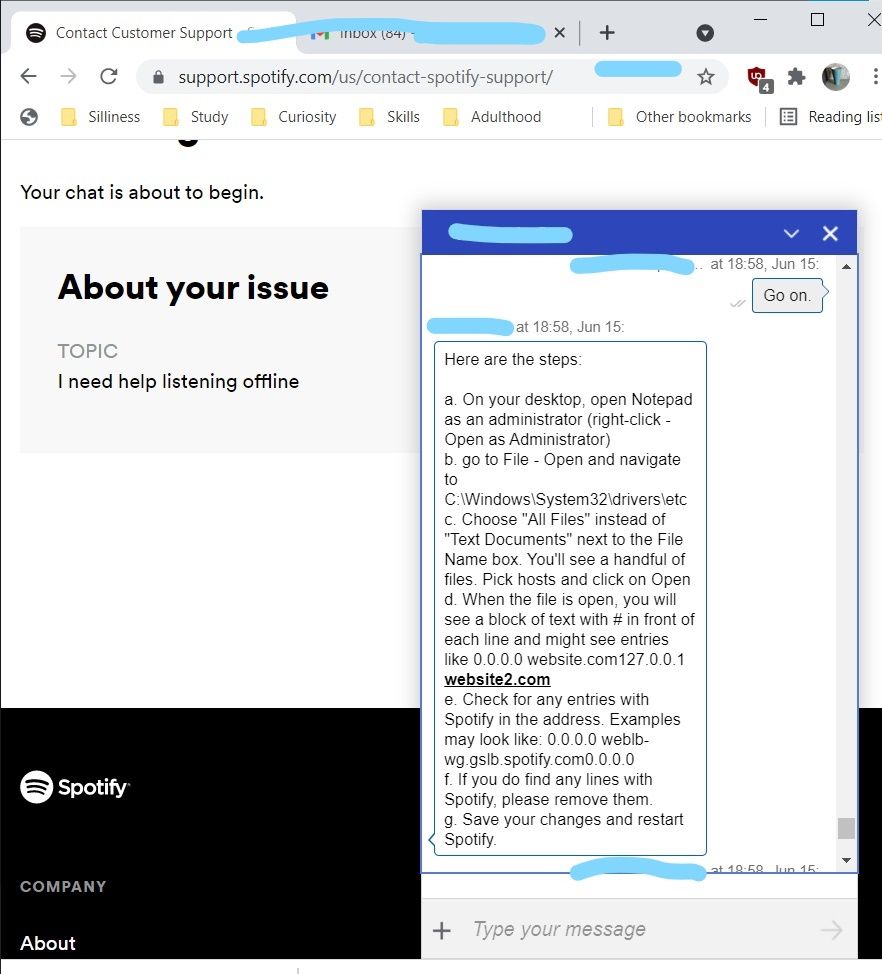 Baffling advice received from Spotify Support
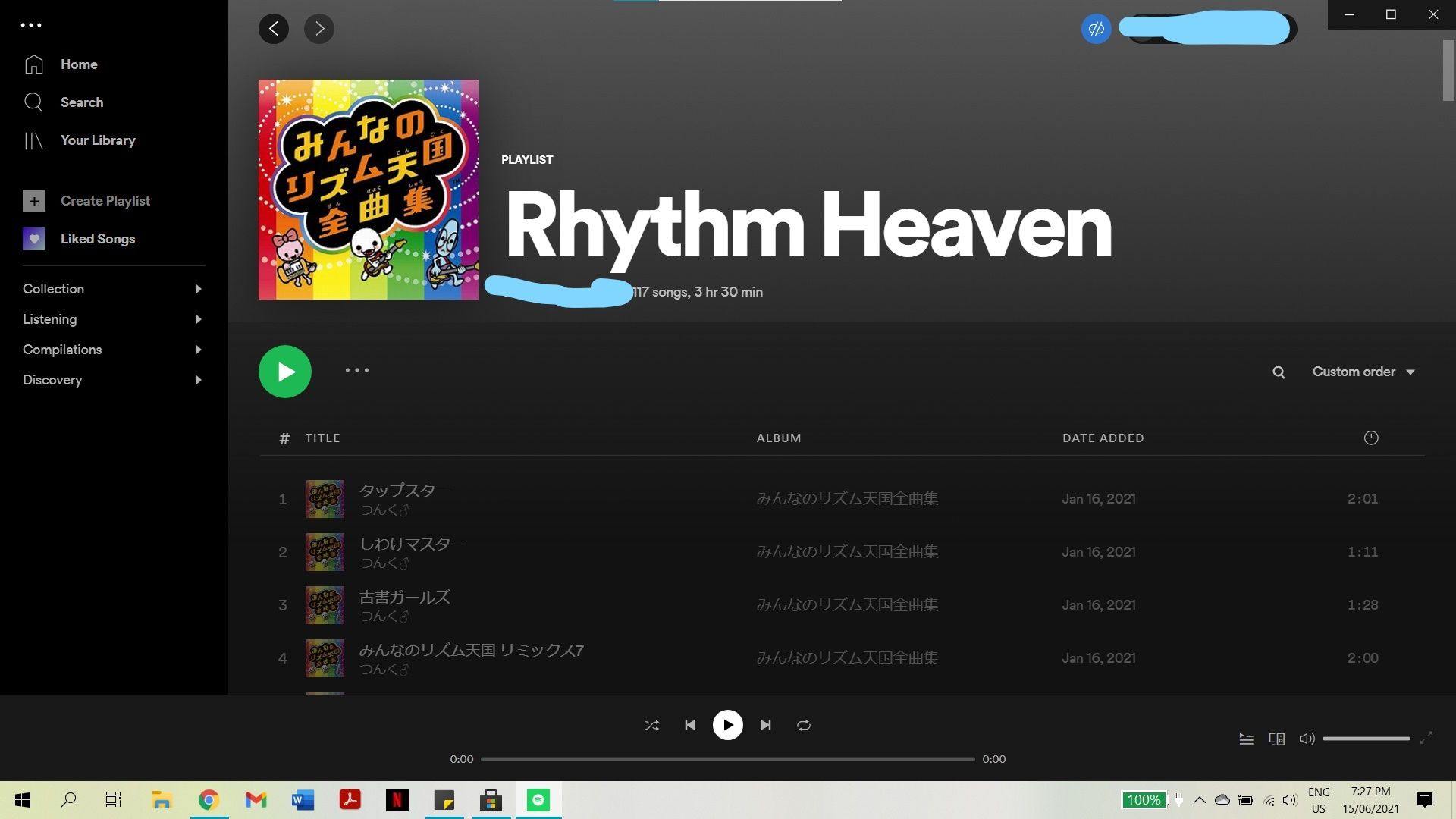 Another Playlist Not Working
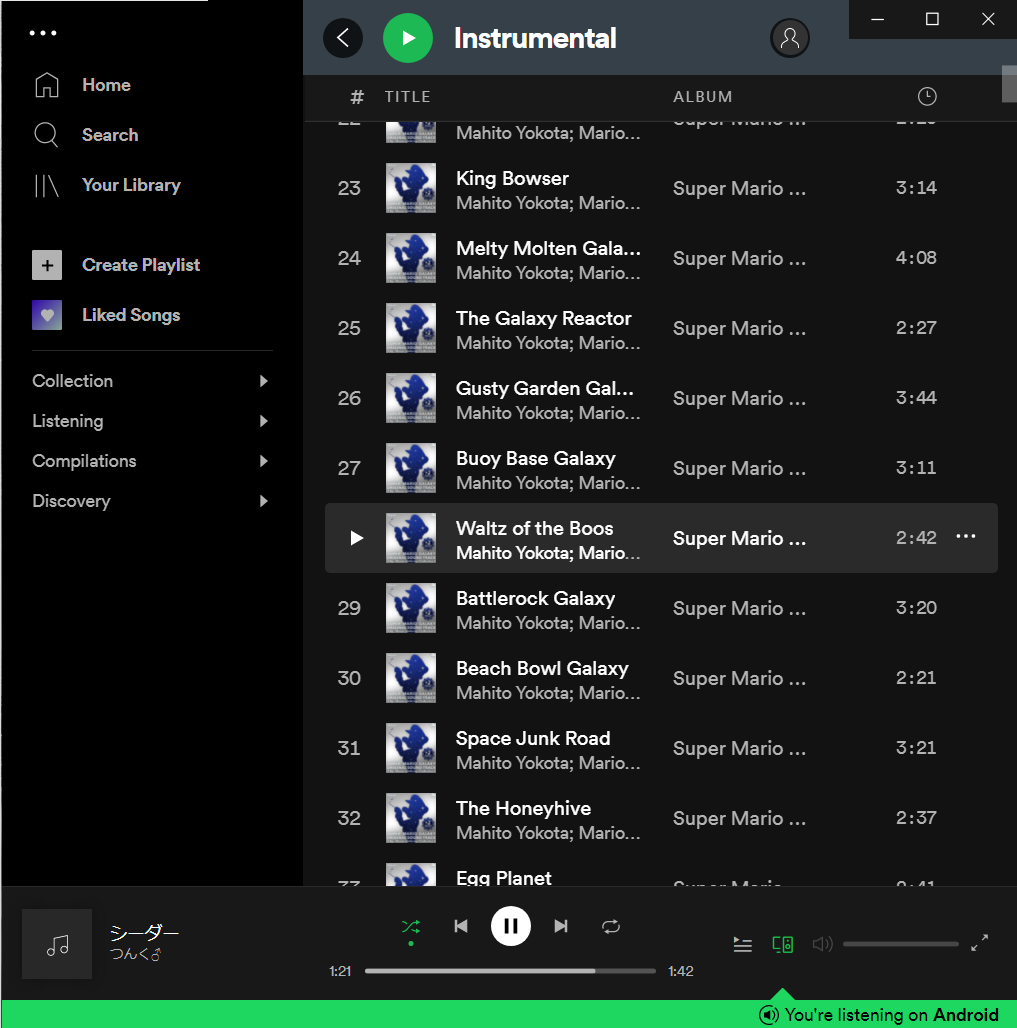 Online Mode Playlist behaviour
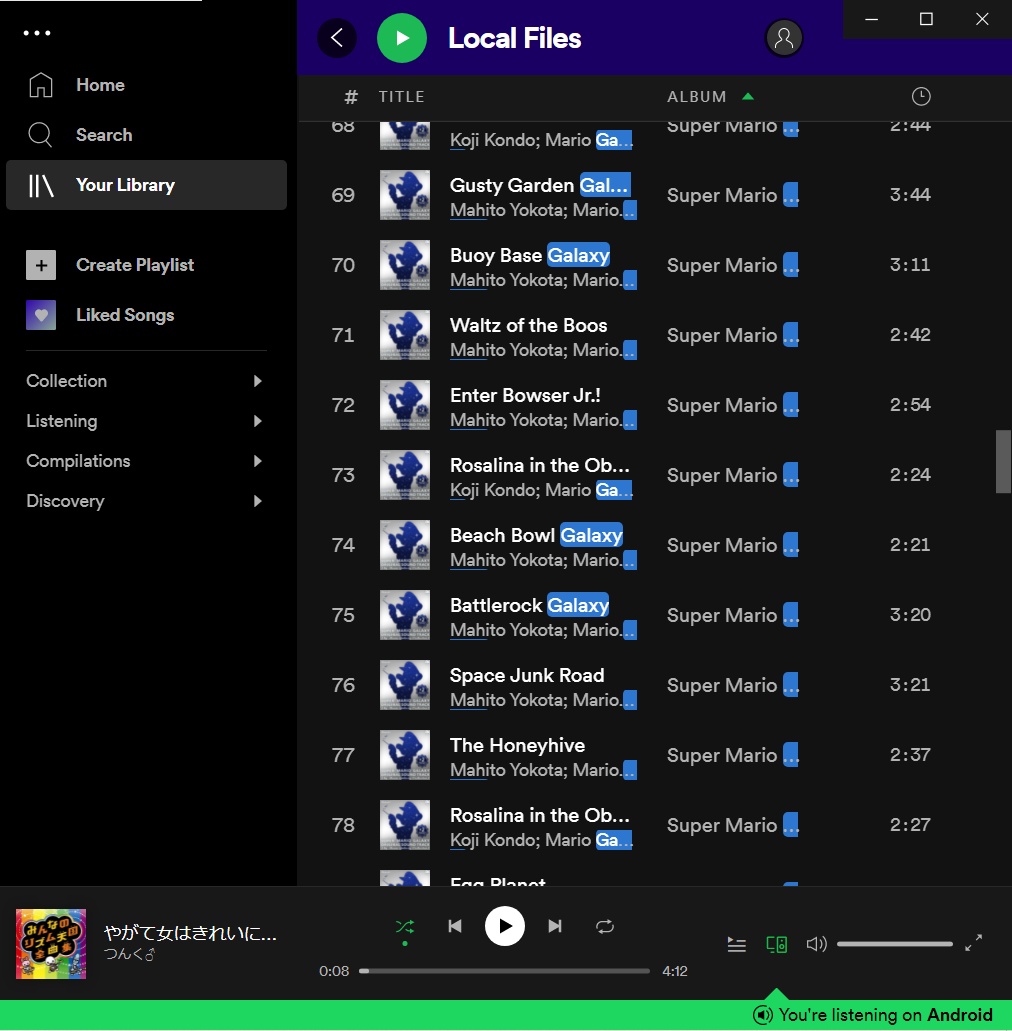 Online Mode Local Files behaviour
Note: Issue was also present on a different computer, with an additional oddity: the local files DID actually "Download" with the streamable tracks, adopting the little downwards pointing arrow, and Spotify deigned to play them.
Also I have used the Live Chat support window three times, communicating for about two hours total, entered my email address when prompted at the end of each session, and I have NOT received transcripts for any of them.
Accepted answers
All comments
Hello!
Thanks for reaching out! I should've noticed that the screenshots indicated I was listening on another device.
Nonetheless from experience the problem does persist.
I'm not planning on doing a clean install of the app again, but if you think deleting all playlists with local files listed would help, I'll give it a try!
Perhaps the client has begun to believe that the source for the local files in the playlists is somewhere outside the computer? or something?
Is there a tool I can use to record the tracks that were in the playlists before I delete them?

Hi there @Cosmo_Kane,
Thank you for your reply.
Another useful step is to change the source folder of the local files on the pc. The steps are: Uninstall Spotify on both devices > create a new folder somewhere else on the pc and move the local files there > install Spotify again > remove any potential source folders and add the new one > download the playlist again.
If that doesn't do the trick - can you try the following:
-
Add some songs from our catalogue to the playlist as well as the local file/s and make sure they have ‘Show unavailable songs in playlists’ turned on in Settings
-
Play some music on the device that has the local files to see if it shows via Connect on the other device
-
Make sure the router supports the Bonjour protocol. If the router is made after 2005, it will likely have this protocol. The best way to handle this is to check the router make/model and Google it
There's currently not any Spotify feature that can make you record tracks, however - you have write them up or screenshot them if you'd like to remember which songs you have in the Local files playlist.
Let us know how it goes.
Take care!
Hello Mihail.
Thank you for trying to help.
As recommended I have:
- Deleted all of my playlists
- Signed out on all devices
- Uninstalled Spotify on all devices
- Performed a clean installation of Spotify
- Changed the source local files folder
- Created a new playlist outside any folders
- Added a local file to it
- Added one from the Spotify catalogue to it
- Toggled to downloaded
- Switched to offline mode
After all of this, the problem persists:
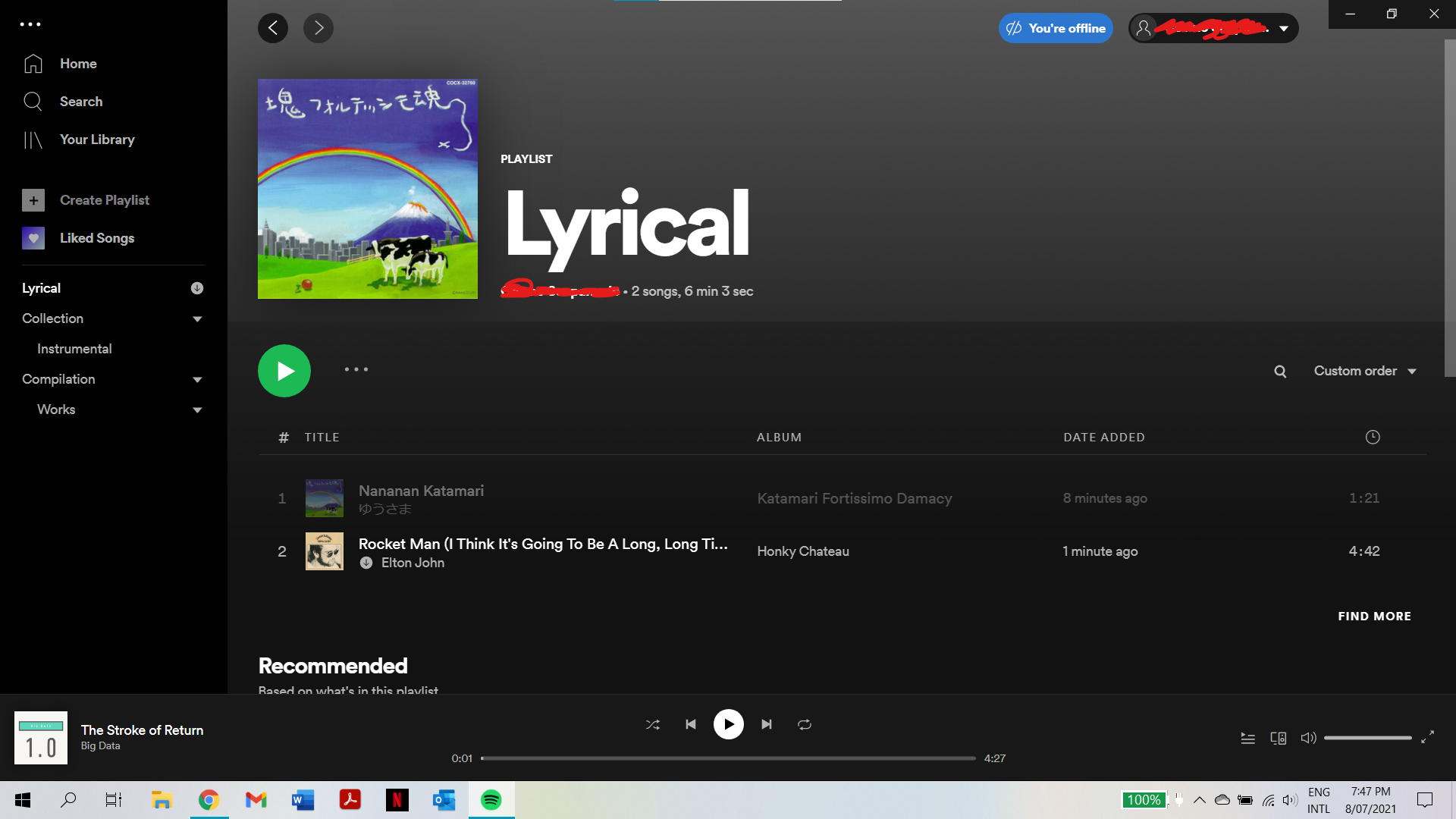 Failure
As with the live chat team I confused by your recommendation of changing protocols or permissions on the network side. The files are stored locally on the same device as the client I'm trying to access them with. They should not need to be downloaded. Unless the app considers locations that aren't its own folder to be outside its domain?
Regardless, I am saddened by the failure of this procedure. What do you recommend now? If anything, could you please report this as a bug to be fixed?
Hi again @Cosmo_Kane,
Thank you for your reply.
Can you start playback and then go offline to see if you can play the local files even if they're greyed out?
We'll keep an eye out for your reply,.
Cheers!
Hello! Thank you for being patient with me!
Huh, how about that, it does keep playing the local files even when its greyed out. I even added a track from local files to the playlist whilst the app was in offline mode, and it got queued and played.
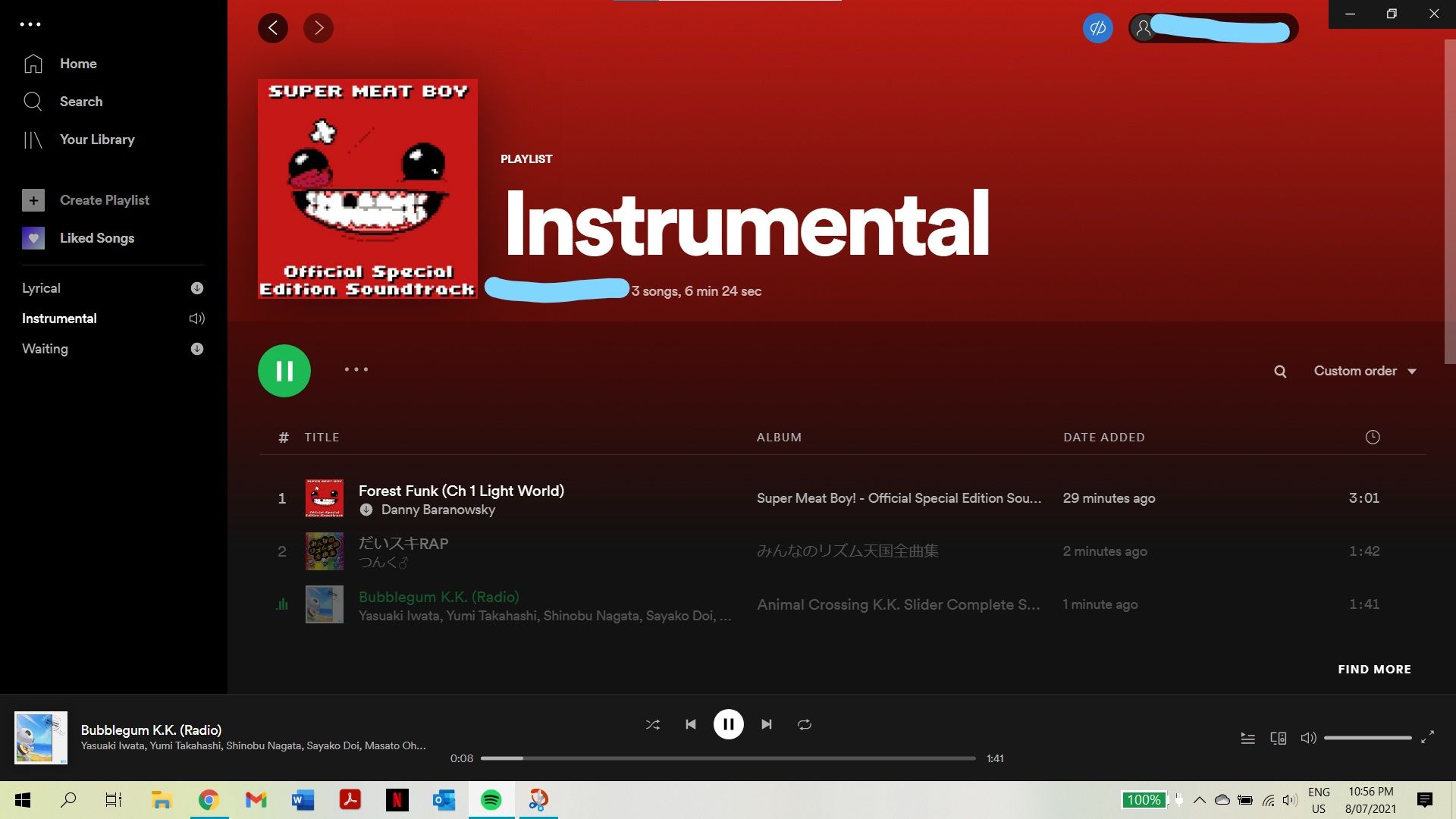
Of course local files can be selected and played individually in offline mode if you pick them from the "Local Files" section of "Your Library", just not from playlists. Weird behaviour.
And it still refuses to play the track if clicked on:
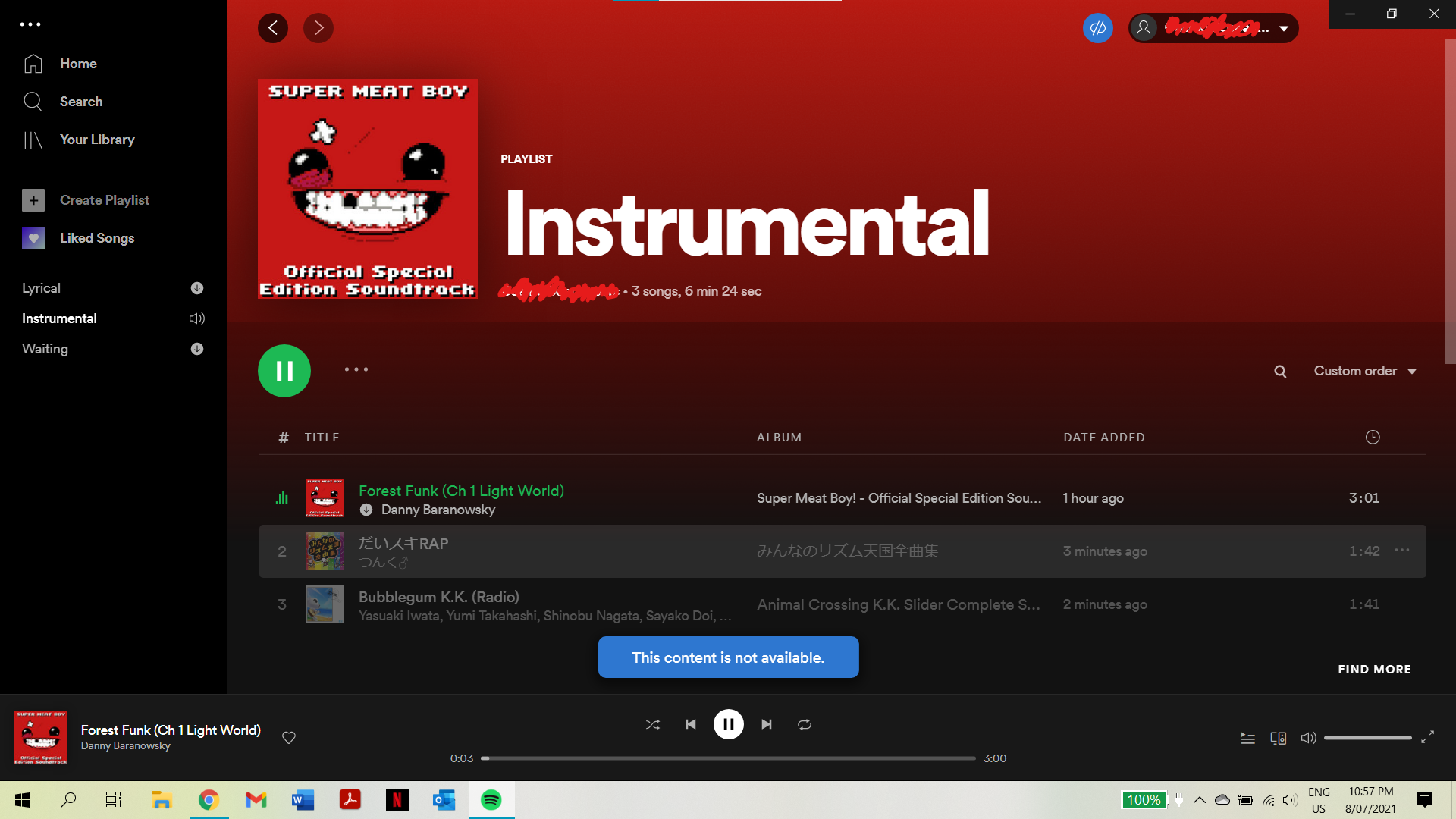
Hope that clears some things up! I've got to bed now but thanks again and hope you can work with the info I've given.
Oh and you can just queue the greyed out ones too... sigh... ah well.
I'm honestly not sure if Spotify considers it to be unexpected behaviour at this point, but I think clients on different machines successfully "downloading" local files to playlists is something to be noted.
Hi! When editing my reply it appears as "Reply to Cosmo_Kane" so I'm not sure if you've been notified. It should be above this message when you check.
Cheers!
Hi @Cosmo_Kane,
Thank you for all of the troubleshooting you've done so far.
We will report this. Can you let us know the following details:
- Device:
- Operating system:
- Spotify version
Cheers!
Of course, thank you so much.
My details are so:
Device
Legion Y540
Operating System
Windows 10
Version
1.1.62.583.gdac868ed-a
Have a good one!

Hey @Cosmo_Kane,
Thanks for getting back to us with the requested info and for the cooperation so far!
We've summed up all info gathered from the thread so far and reported in to the relevant team. They will happily take a closer look into what may be causing this behavior. We'll keep you posted on any updates on the matter here, as soon as there are any.
In the meantime - if anything else pops up, the Community is one post away 🙂

I have this problem too so yeah

Hey @ArkOne,
Can you run a clean reinstall of the app.
If that doesn't help, let us know the following:
- Your device make, model and OS version
- Spotify version
- Can you access local files through your Library?
Cheers.
I have tried reinstalling multiple times but it didn't work anyways
Device: Swift SF114-32
OS: Windows 10
Spotify Version: 1.1.63.568.gda8cb5ac-a
and yes i can access my local files from the library but cannot select to play the songs while offline from my playlist.
Hey @ArkOne,
Thanks for the reply.
We've sent your info over to the team who are looking into this.
We'll keep you updated here as soon as we hear something.
Hello!
This is actually me, @Cosmo_Kane again.
I had my account released and made a new one (since all my playlists are gone now anyway) to test whether it was something about my older account conflicting with a new update.
Alas, the problem persists exactly as before.
I have noticed something though: if the local files are sufficiently short (less than or around 30 seconds) they will successfully "download" along with the Spotify tracks in a playlist.
Hey again folks,
Thank you for your replies and the information you've provided.
We've passed this on to the right team. Rest assured that you'll be updated as soon as we have more information regarding this.
Let us know if we can help you with anything else in the meantime.
Take care!

I have been having the same issue for about three months now, so just after the update. This is a HUGE deal when traveling to places without wifi or when I teach classes at my studio that has no wifi as well. Regardless if you download the playlist that the local files are in, the local files still black out and become unplayable once you enter offline mode in that specific playlist. They are still playable as you said within the local files section on spotify somehow.... picture attached of a mixed downloaded playlist in offline mode. The local files are unplayable but the spotify downloaded tracks are fine. Please help ASAP, for instructors and those who need local offline play this could cause us to leave our favorite music player!

Hi @l3rockstar,
Thanks for your message.
We can forward your report to the right folks for further investigation. In order to do this, we'll just need you to provide the following info:
- Your device's make and model
- The exact OS version
- The Spotify version you're currently running
- Any other troubleshooting steps attempted
Keep us posted.

did this ever get figured out? I have this exact problem currently.
Hey @drewfussmania88,
Thanks for the post.
Can you provide us with the info requested by @Novy?
The right teams at Spotify are investigating why this is happening, however we don't have official info on an exact fix date yet.
Cheers.

I have the same problem on Linux (Ubuntu 20.04.02)

Hey @luna_my,
Thank you for reaching out on the Community!
To be able to report your similar experience with Local files on your Linux, could you also send us the info, that was requested and described in the above-post by @Novy. As soon as we get those details, we'll add them to the report and eventually check for new developments regarding the situation.
We'll be keeping an eye out for your reply, thanks!

Hello I´ve got the same same problem for several months now.
My Device: self built
My OS: Windows 10
Spotify Version: Spotify für Windows
1.1.70.610.g4585142b
Troubleshooting: Basically anything from this thread plus a bit more because my Spotify just wont load up sometimes in offline mode.

Hey @Faxe315,
Thanks for posting here.
Just to double-check-can you play local files from the folder in Your Library in offline mode? Are you able to play the local files that are added to a playlist?
You mentioned that the app sometimes won't load up in offline mode-are you not able to open the app at all after previously setting it to offline?
Once we have this info, we can investigate this further.
Keep us posted.

Hello I´ve got the same same problem for several months now, same as these guys above.
My Device: PC
My OS: Windows 10
Spotify Version: Spotify para Windows
1.1.70.610.g4585142b
Troubleshooting: Basically anything from this thread. It only happens at Spotify's Windows version, it doesn't happen on my Samsung S20FE.

I've started playback and then went offline to see if I can play the local files even if they're greyed out, just as @Jeremy from Spotify suggested in his message on 2021-07-08 01:45 PM. In fact, the song continued playing even when I went into offline mode. As a matter of fact the entire playlist/queue continued playing. However, the app would not allow me to choose a different song from the playlist by double clicking on it as it continued being greyed out.
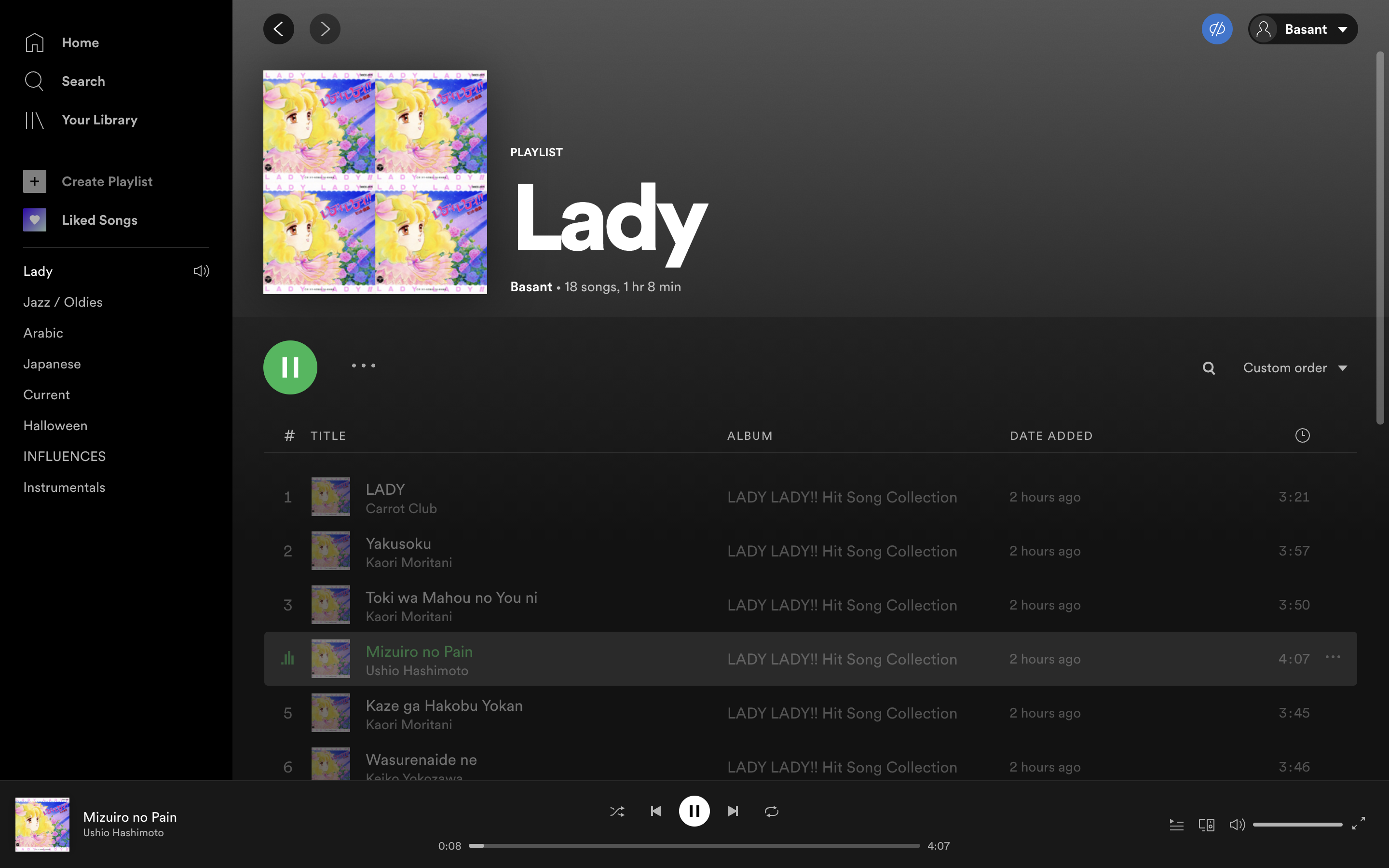
Hi folks,
Thanks for the replies.
Could you try running a clean reinstall of the app, following this Guide and let us know if the issue continues?
Cheers.
Hello @Ver,
Yes I can from the folder they are stroed in.
And I can play them in spotify when Im not offline.
In regards to the other prblem, sometimes if I want to start spotify it just says in the app itself (So yes, the app runs from offline mode) "can not be loaded" or something like that (my spotify runs in german, and I dont recal the exact phrase anymore because I just restart my PC if this happens, which fixes it most of the time)

Having this issue as well.
Device: MacBook air (2015), MacOS Catalina ver 10.15.7
Spotify version: 1.1.71.560.gc21c3367



Hi folks,
Thank you for your replies!
@Faxe315 Just to make sure, if you play local files from the folder in Your Library in offline mode, could you explain to us again what's the behavior you present?
About the second issue, please share with us some screenshots or a video showing how the app looks from your end. This will help us keep investigating.
@Meltan Please let us know if you're able to play your music from the "Local Files" folder on Your Library while being offline, or if you're not able to play them from any section.
Keep us posted.
Hey @Cosmo_Kane,
Thanks for reaching out to the Community.
One one of the screenshots we see that your listening on another device. Please keep in mind that local files cannot be used in combination with Spotify Connect. Offline mode would also sever the Connect link. Can you confirm that this is also happening without using Connect?
If that's the case, could you give the steps here for a clean reinstall of the app once more? this time we'd recommend that you also remove all playlists with imported files and start the whole process from scratch using the instructions in this guide.
Hope this helps. Keep us posted.