Song liked twice. Unlike one, both gone

Plan
Premium
Country
Denmark
Device
PC
Operating System
Windows 10
My Question or Issue
I have several occurences of the same song liked twice. When I unlike one, both are unliked and removed from my library.
Accepted answers
All comments

Hey @Pollert,
Thanks for the post.
Do you see duplicate liked songs on all your devices or just one?
It would be great if you let us know your devices' make, model, OS versions and Spotify versions.
We'll be on the lookout for your reply.
For an example, have a look at my liked Slayer songs. War Ensemble is liked as song 31 and 35. Same album.

These are the songs and albums:
https://open.spotify.com/track/0TvcIlBxvXqfvy8mk36nQk?si=5998522d06dd4c15
https://open.spotify.com/track/1E0yt5XSdjE9NOu897RilW?si=f9ae6bcc6e36434e
https://open.spotify.com/album/49QJ9TAWNqZGbFUvadXPgT?si=c45P80BsTOSOGZ5s4iZSJQ&dl_branch=1
https://open.spotify.com/album/0T7EJcGab7NjykxKZthGTW?si=i6ESSDi0SuaNknPSLbVqyg&dl_branch=1
They are clearly different, but I can still only find one album. I have not yet tested if they both disappear, when unliking one of them - yet.
I found these 2 songs in my liked list. They are the same song, but from 2 different albums/releases:
When I unliked 1, both were gone.
I’ve found out that this indeed is an issue. When a song or album gets re-uploaded and it’s URI changes then you might find that the songs/albums you’ve previously liked are not liked on the artist page. Then you like the songs/albums again on the artist page and then you have duplicates in your library but if you then proceed to remove the old liked songs/albums from your library they both (new and old) are removed/unliked.
It seems like the older versions are not automatically getting liked to the new versions but the new version are somehow linked to the old versions of songs/albums.
AeroZ, I think that is spot on!
I don't think that AeroZ has the solution, that's is just a description of the issue. Can someone please make a note of this issue and fix it, rather than just marking it as fixed?

Hey @Pollert,
Thanks for returning back to this topic.
Could we ask you for some screen recordings, that might be very helpful in the investigation of this behavior? As far a we can see the Slayer songs you provided above appear as two different songs and when I tried liking and unliking them, they behaved as expected - disliking one of them should not affect the status of the other.
As for the Saliva songs, they have the same URL and seem to be noted down as one release. If you spot 2 of the same song in your library again, could you try logging out and in again to see if that'll sync up?
We would like to continue helping, so keep us posted!
I think there are 2 issues at work here:
The slayer songs are a new issue where 2 songs are liked, event though they should be the same song. This is probably a byproduct of publishing the album twice.
The other issue is how I managed to like the song twice (Saliva). There is no suprise if the song is liked twice. Any SQL command deleting the like, will delete any likes of the song.

Hey there @Pollert,
Thanks for getting back to us.
Could you send us a screen recording of the steps you're following so we can take a closer look? You can send a link to it or attach it using the Insert Video option in the post editor.
We'll be on the lookout for your reply.
You want a video of me clicking on the Like heart?
Here you go:

Hey @Pollert,
Thanks for getting back in touch and for the video.
It helped us understand what's happening exactly on your end. We tested it again but couldn't replicate it, so it isn't a general issue with the app or those tracks.
Could you try logging in to a different account, like a friend's or relative's, and test this to see if the same happens there? This would help us narrow down the possible cause of the issue.
We'll be on the lookout.
It is clearly a data issue. The underlying issue is that it was at some point possible to like the same song twice. Now, unliking a song, will delete any and all likes of that song.
The other issue is a data issue as well. For some reason the same album have been published twice, and I have liked the same song twice, each from the duplicates of the album.
The only solution I see, is that someone cleans up the datebase. Duplicate likes of the same song twice must be consolidated into one (no duplicates).
Secondly, duplicated albums must be consolidated and likes consolidated as well.
Hi again @Pollert,
Thanks for your reply.
We've tested this in multiple accounts and with several songs that were just recently Liked and others that were Liked years ago, which have newer versions or releases (making sure to also Like the newer version/release) and the result was always as expected - removing or disliking the previous or old version didn't remove the newer one or vice-versa, so the issue might be related to either some specific tracks/albums, or to some accounts.
You can try creating a new free account here to check if you can replicate this behavior. This would help us determine what the root cause might be.
Keep us posted.
In any case, I can't like the same song twice, so I can't recreate the problem.
However, the same issue still removed too many songs from my library.
The song called Meat by Stephen Lynch is available from 2 releases, of which I had liked both. The first song was from the album "Lion", the second from "Lion (Stephen Lynch)". When I search, all I can ever find is the "Lion (Stephen Lynch)". If you are able to like both songs, you will be able to replicate the problem.
Hi @Pollert,
Thanks for the reply.
Can you send us the links to both tracks so we are sure we're using the same one?
Cheers.
No, I can not, because once I unliked one, I can't find and re-like at least one of them.
As stated, only one release/album is available when searching, and the other one, I can't find.
Also, can you please un-resolve this thread?
Looking at the duplicates in my liked songs list, many of them have the same ID. Maybe the issues is that I was once able like the same song twice.
Hi @Pollert,
Thanks for the reply.
The issue might be coming from the fact that you were able to add the same song to a playlist at one point without getting the duplicate notification. In this case the tracks were most likely one and the same, rather than two different releases of the same song.
It would be great if you can check your playlists for more duplicated songs and send us the exact links/ URIs to the tracks so that we can check if they are the same or different releases.
Cheers.
I have not had time to find duplicates of the exact same track, but I have easily found the following pairs of what should be the same song, but are different tracks.
Brotherhood of the snake - Testament
https://open.spotify.com/track/4VcN84ZdC7doe4yoIarJUA?si=69013d944c434d5c
https://open.spotify.com/album/70oAOzrUemHFWB8VKToEtu?si=afVlrce3QfmgMq7Dh0wR8g&dl_branch=1
https://open.spotify.com/track/5862zgaxKAei2fpZLQe4SN?si=677eb5d8902b4cc1
https://open.spotify.com/album/2MGzG0xHxDQXwR4BeUhw7w?si=zJSqfJZwRDKghqIczOMdgQ&dl_branch=1


https://open.spotify.com/track/61KJQ2oOXuYxJ3g5OFZoRG?si=5efd151811fa4508
https://open.spotify.com/track/6X68GCvteYdV915XOEwY6C?si=4fe65792eac9436e

https://open.spotify.com/track/5Tf3MqMuSJ5NBz9tGDpfSV?si=3a9ae2b5bc6d45fa
https://open.spotify.com/track/4najUZuLr45TTDMzmzJayC?si=4c7fcfba86b942b4

https://open.spotify.com/track/6CggjPUaQWpFKBDMixiNXr?si=f990768f4c6047e3
https://open.spotify.com/track/2YwbSsfdnNy4mHzNqpWrpA?si=964743dd23a94ed4

Hey folks,
Thanks for adding more info 🙂
Make sure that you're running the latest app version, as you should be given a heads-up, preventing duplicates on desktop, if you're trying to add a song which has already been added (from the same album).
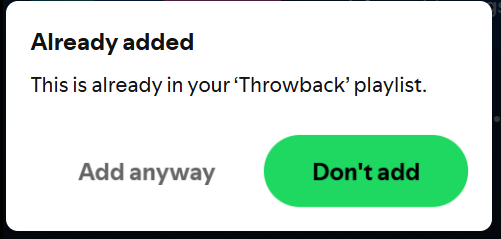
Just keep in mind that if you liked 2 songs, from 2 different albums (different versions, etc.), you'll probably see 2 separate tracks being added to Liked Songs. We've tried to test this out from our end as well, and when removing one of these tracks from Liked Songs, only the selected one gets removed.
Hope this helps. If you need anything else, the Community is here for you.
Updated in 2025
@Ver,
Thank you.
Are you sure you answered in the correct thread? I have this issue on all platforms. It seems to be a data issue, not an app issue.
I tried reinstalling and all firmware is up to date.
Hi @Pollert,
Thank you for your reply!
@Ver's reply is correct, but let me elaborate it a little more.
We've seen this issue in the past. However, there's no pattern as to how it happens and because of this, it always gets fixed by itself.
This is why we suggest you always make sure to keep your app updated so you don't miss any fixes or new features.
Don't hesitate to reach out again if you have questions.

This issue still exists.
I can see it for so many artists, I have it for hundreds of songs, it's really annoying not to be able to see in the artist popular songs page which songs you've already liked in the past.
Only option to see the songs you previously liked is to go to the "liked songs" page for the artist. And you will see the songs duplicated if you then re-liked the song from the "new" duplicated albums.
If you then unlike the old version of the song, it will unlike both versions.
But if you unlike only the new version, the old version will remain in the list of liked songs.
Both the old and current versions are identified with the same ID since they both display the same number of plays, so it shouldn't be very complicated to fix this big issue...

I’m having this same issue.

It's really unsatisfactory this is (still) an issue.
I'm having this problem with loads of songs and it's really annoying. It's never clear if I "liked" a song or not and the heart sometimes is there, sometimes it isn't. The library really shouldn't be this broken.
Just look at this.

This is definitely still a bug. I have just found duplicates in my liked songs list.
Should I do a test removal to see if it removes both?
So I deleted the S4 song from Feb 21, and the other one remained. So I guess the bug of both being deleted is gone, but there must still be a bug that allows you to like a song multiple times. I don't know how, perhaps one was in the app and one on desktop?


They are not technically the same song. They refer to different objects. Tracks can have multiple links to other instances of the same track on different (or reuploaded) albums, and you are able to click like on both (or all; there can be arbitrary many). The request is, or should be, to fix the display so liking any track in a set of linked tracks displays as your having liked any of them, wherever they are linked.
This is super obvious for tracks that are duplicated on singles where an EP or album is released later that contains the same track. You see it a lot for compilations, too. The number same of streams for the track is displayed in all places it appears, but likes do not propagate the same way.
Hey folks,
Thanks for adding more info 🙂
Make sure that you're running the latest app version, as you should be given a heads-up, preventing duplicates on desktop, if you're trying to add a song which has already been added (from the same album).
Just keep in mind that if you liked 2 songs, from 2 different albums (different versions, etc.), you'll probably see 2 separate tracks being added to Liked Songs. We've tried to test this out from our end as well, and when removing one of these tracks from Liked Songs, only the selected one gets removed.
Hope this helps. If you need anything else, the Community is here for you.
Updated in 2025