Spotify can't play this right now. If you have the file on your computer you can import it

Plan
Premium
Country
UK
Device
Desktop
Operating System
Windows 10
My Question or Issue
When I try to play a song I get the following error message "Spotify can't play this right now. If you have the file on your computer you can import it"
I have tried all the fixes I have seen:
Reinstalling app.
Using version from Microsoft store.
Disabled hardware acceleration.
Disabled crossfading.
Changed speaker options.
Deleted local files.
I've had this issue before and it was fixed by using the version from the Microsoft store but this isn't working now.
Spotify works on my phone and my laptop, web player also works only the desktop app doesn't work.
Accepted answers

Hey folks,
Just dropping by to mention that this is an issue that can be caused by a variety of things, so for your convenience, we've compiled all of the most common ones in this article, along with steps on how to get everything fixed of course.
Make sure to try those suggestions and if you have anything you'd like to share, feel free to comment in this thread. If the issue you have is more specific and doesn't get resolved by these steps, feel free to reach out on a separate thread so we can assist you further.
Cheers!
All comments

Plan
Premium
Country
Slovakia
Device
Computer
Operating System
Windows 10
My Question or Issue
I search for everything ..... but it doesnt work ....
I just now rebuild my pc with new mother board cpu an rams
And after i started pc i wanted to listen to spotify but it say this all time : "Spotify can't play this right now. If you have the file on your computer you can import it."
On my phone its working . I tried every solutions what i found on internet rebooted pc reinstall spotify and other stuffs

Hi! Are you trying to play songs located in the Local Files of your device? If so, the connection may have been interrupted between the files on your laptop and the Spotify player.
Try following these steps
- Click
then choose Settings.
- Scroll down to Local Files and switch Show Local Files on.
- Any files in your computer's My Music and Downloads folders are automatically selected. Switch off any sources you don't want Spotify to access.
- Click ADD A SOURCE to select another folder.
- You’ll now find music from that folder in Local Files in the menu on the left.
 then choose Settings.
If the local files aren't downloaded to your laptop, that is likely the reason why you can only access them from your mobile device. Hopefully this helps!!
Did this work for you? If so please mark it as the solution. This helps other users find the solutions to their problems in the future!

That didn't work.

I have the same error but this(solution from eltoch) didn't work for me. my spotify keeps skipping every song. no matter if I ever downloaded the song or not

I resorted to uninstalling spotify and reinstall it, worked like a charm!!

I switched from desktop to appstore version. But still does not work for me.
v1.1.21.
I also tried uninstall/reinstall - did not work
Switched to another Spotify account - did not work
Switched from desktop version to Windows App store version - did not work
(Spotify) Version I have is 1.1.21, Windows 10 1909.
Web player works. Roon works on same device. Amazon Music works on same device.
Spotify app can switch to playing via my HiFi or my Kef speakers, but not through the PC?
Always same error "Spotify cannot play this right now....." see screenshot, with device list showing.
@eltoch. This is NOT a solution. Your solution refers to playing local files which is not the issue. This issue is that Spotify does not stream to "This computer" when trying to play any Spotify track. The error "Spotify can't play this right now...." is displayed.
Fixed! (for me at least).
I reset my default device sound setting back to below 192000 Hz (Control Panel -> Sound -> Playback tab -> Properties -> Advanced tab) and Spotify sprang back into life! Above 192K Spotify Desktop will not play.
Looks like several things affect Spotify playback, so you may have to search through the forums if you are getting this error.
The App was playing to other devices for me, so that pointed to something specific on my PC (although Roon, Amazon and Web Player all worked).

Awesome. You just helped another person. Big thanks.


Hey there folks,
If you've found a post on the Community helpful and it has resolved your issue, you can mark it as a Solution 🙂
This way other people who come across the thread can find it easier.
Don't hesitate to reach out again if you have questions.

Can confirm this is still an issue. Why can't you use over 192KHz? Doesn't Spotify want to bring out a Hifi Service soon? They better fix this then or nobody is gonna listen
Hey there @Malte2411,
Thanks for reaching out in the Community!
Can you give us a bit more info about your situation. Where do you see the error message and on what devices?
Regarding Hi-Fi, you can check out this Idea Thread for more info.
We'll be on the lookout for your reply.
Cheers.

Thank you so much! I dropped to 192 kHZ and Spotify came back to life! I was even able to go back up to 384 kHZ and no problems! Could not figure this out until I read your message! Thank you again!

same issue here...
works on all devices but the pc... also tried everything with no luck

Hi folks,
Thank you for posting on the Community and welcome.
Please follow these steps to clear the Hosts file from your computer and try to play music again. Does it make a difference?
If the issue persists, go to your app's settings and make sure "Hardware Acceleration" is disabled.
Let us know how this goes.
There was no reference to Spotify in the hosts file and disabling hardware acceleration doesn't fix the issue.
Sound settings are already below 192kHz, its set at 24bit 48khz.
Hi @lukaswil,
Thank you for keeping us in the loop.
Please run a clean reinstall once again, but this time download the app from the Microsoft Store.
If this doesn't do the trick, go to this thread and check the solutions, especially the ones that indicate how to tweak your PC's sound settings.
Let us know how this goes!
This solution from LuckasKings fixed my issue finally.
https://community.spotify.com/t5/Desktop-Windows/quot-Spotify-can-t-play-this-right-now-If-you-have-the-file-on/m-p/4960632/highlight/true#M86679

i have the same problem :
i have tried to :
- reinstall apps
- disabled hardware acceleration
- delete local file
- install from windows store
- clean reinstall
the only thing work if change speaker output to HDMI and back to my external DAC which is from NVIDIA High Definition audio to NuPrime uDSD output everytime i open spotify. It is so frustrating to do that everytime, any solution?
Ok, I found solution for my own problem, change the usb port where the usb dac is plugged solved my problem , now i don't need to change output everytime i start spotify, fiuhhhh



This worked for me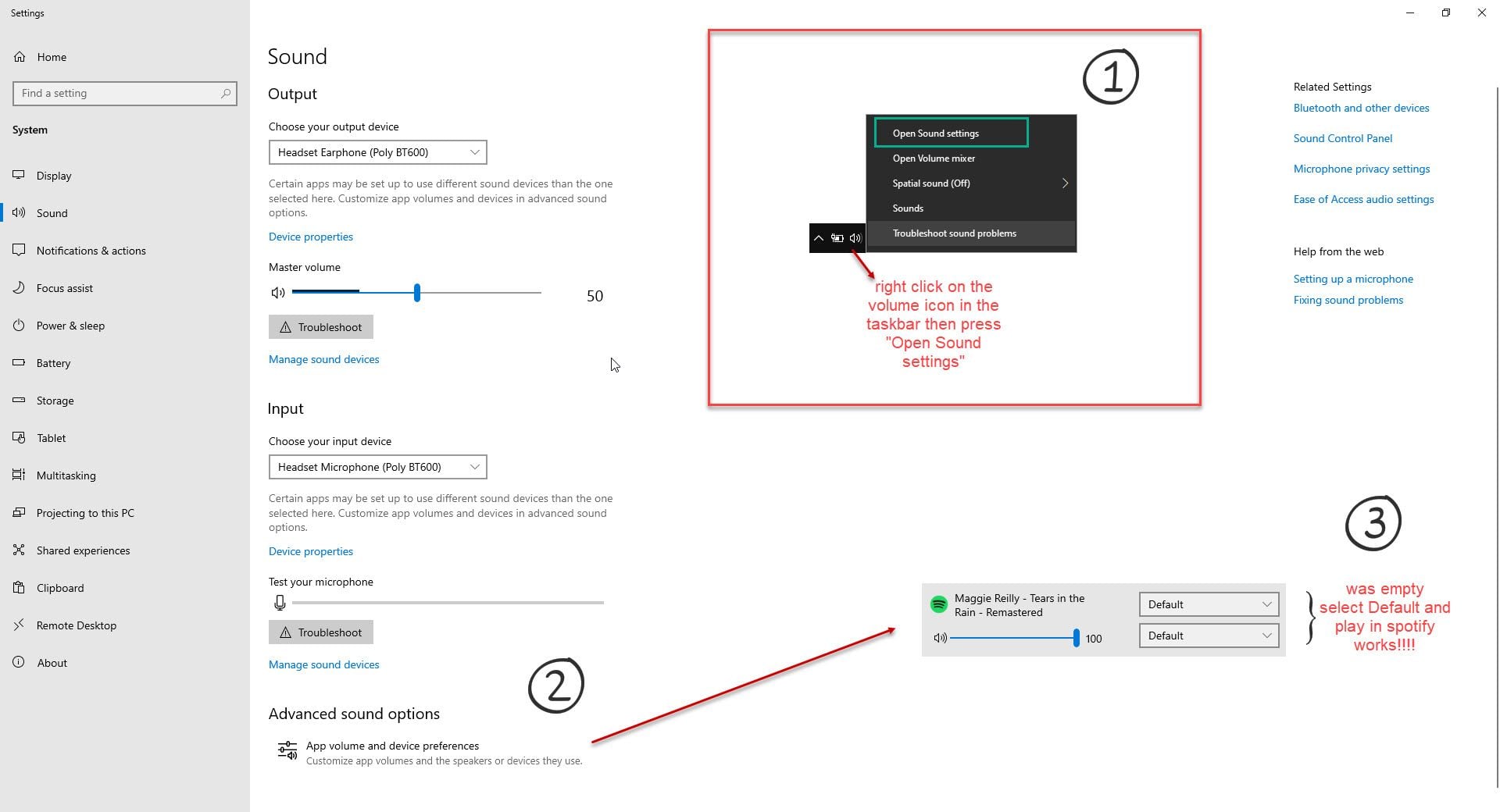

The support for paying users is inadequate.
Probably unpaid mods. Tells you a lot why Spotify are so hated and yet so profitable.
Cannot self serve a solution to this error. Only Spotify having audio issues. Going to cancel family plan instead of rely on this forum for support - not good enough

Solution for me: Disable speakers in [Playback] and enable them again ...


After trying everything on this forum, the issue is still not fixed on my computer
Hey folks,
Could you check if the correct audio output device has been selected for Spotify? Also, make sure that the sample rate of the device is set to anywhere between 44.1 kHz and 192 kHz. You'll find a guide on how to do that + some additional things you can try in this article, check it out 👍
If you're experiencing this in the Web Player, I'd recommend trying the troubleshooting steps from this post.
Cheers 🤘