Some song's don't play.

For some reason, some of the tracks I love won't play. When I click the track it will sit there not playing anything. It will still say the song is selected and playing, but it's not. The bar does not move to indicate time. There is no dot to fast forward anything.
Some of my songs work but then some don't. I am using the U.S version if it matters.
another things I noticed are all songs I bought from iTunes too. However, there from the spotify app, not my local files. I tried making a new playlist with those songs directly linked from my local files and they still don't play. Does that make sense?
Accepted answers

@SnowWhite22 wrote:Thanks! Unlinking my Local Files helped. I just changed the settings so that it didn't pull from my computer files anymore and that solved the problem. Appreciate the suggestion.
Really strange problem. It didn't start until a few days ago when I deleted iTunes (I still had Windows Media and a few other players). For some reason, deleting iTunes created the problem. Or maybe it was the new Spotify update. Either way, seems to be working now so thanks!!
Deleting iTunes might have removed the codecs needed to decode the local files you have in iTunes. If you want to listen to local files again, try installing Apple Quicktime it should do the same job!
Peter
@Cobbyco - I would try a clean reinstallation of the app, but be aware you will need to resync all of your downloaded content. This sometimes happens when Spotify caches a corrupt copy of the track - which is annoying but it somehow happens!
Peter
All comments

ive had a problem with playback on every song no matter what i have to keep hitting the play button several times before it will finally show the song in green and play it and then it s a delayed reaction am i doing something wrong
It seems to be all my local files that don't play

****!! I have the same problem and it's been going on for 3 weeks now!! 😞
Found a solution. It is quicktime. If you google quicktime and download the newest version, it should fix it.

Unfortunately, updating Quicktime did not resolve the problem for me.

If you are still unable to play the file, try converting it into the AAC format. You can do this through iTunes or using a converter (like this: http://download.cnet.com/MP3-to-AAC-Converter/3000-2140_4-75446067.html ) Once you have a converted version, try importing the new file into Spotify.

Got kind of a similar problem. I´ve got Spotify on my PC, my Android phone and finally on my Samsung TV. The problem I got is that on my computer all songs are playable (eg. not a problem), on my phone 1/4 of the songs wont play and on my TV 1/3 of the songs wont play.
I´ve got the same songs locally on my computer as on my phone and no songs stored on my TV at all.
I got the same provider for all three services,Telia. Anyone else got this problem?

For those of you who can't make it work by updating quicktime, I might have the solution! 
It also happened to me; I couldn't play certain songs either...
You know, when you click on a song in spotify, in the same line as the name of the song, it tells you how long the song is, what album it is from, when you added it, and so on.
Maybe you'll notice that in that line of the song that seems to be mute - between "album" and "added" - there is a little icon with a note on a paper.
Here's a photo: 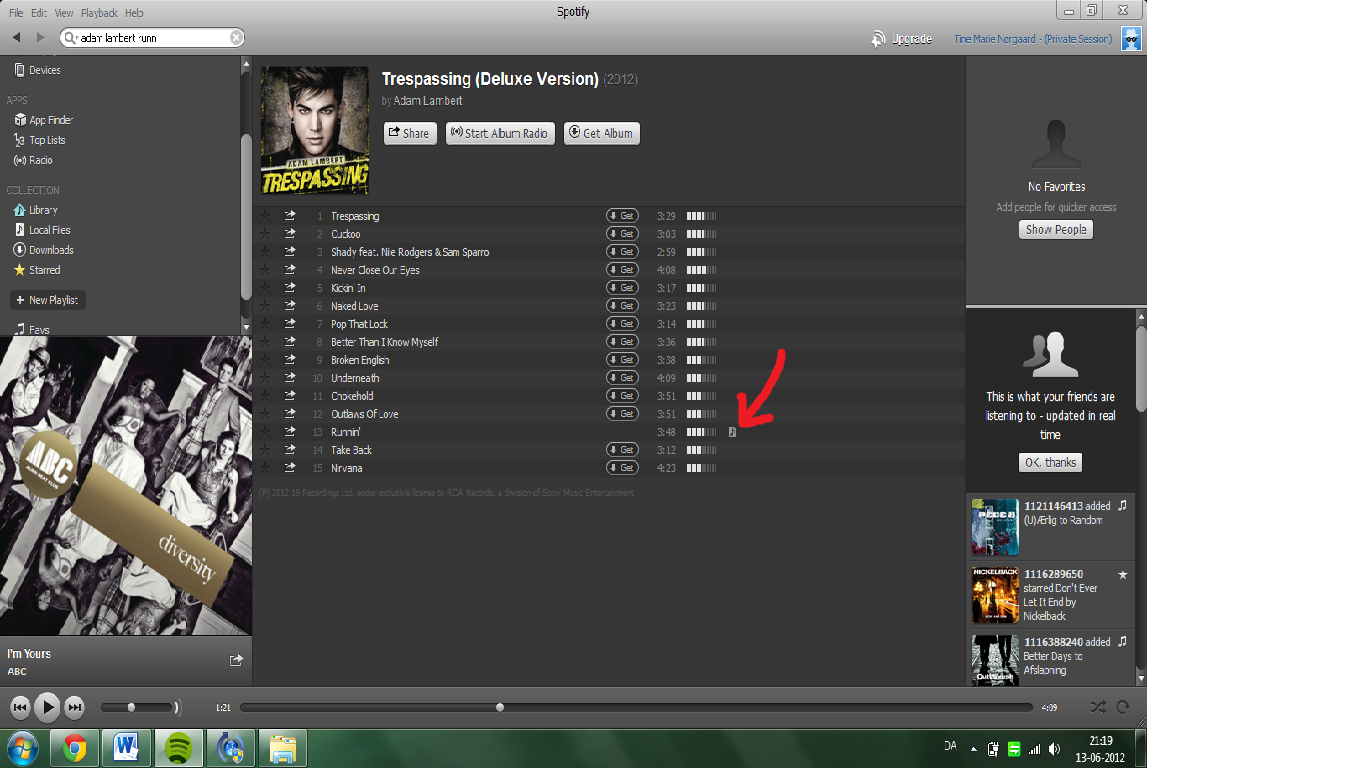
When that icon is there, the song can't seem to be played.
For some reason, it's because the song is already existing on you computer in another music program, like iTunes or something like that.
How to fix it:
Go to the folders on the left side on the window - same place where you can see your playlists, "what's new", "Library" and those sites - and select "local files". Now delete all the songs in that folder, and now you can play them!
I hope i'm not off topic or misunderstanding something in your discussion, but that seems to be the problem, right?... It worked for me 

TineNørgaard - you were ABSOLUTELY correct! This has been happening for months now for me in Spotify, and I never realized that the stopped songs were all ones that I already owned in iTunes. I vote that you have discovered the solution.
It's so annoying when I am just listening to Spotify radio and suddenly the music stops! And it does this because I own that song that is trying to be played.
Thank you for figuring it out! You have made a very annoying issue go away for me.

Thanks so much! Deleting the files from the local files playlist on Spotify fixed the issue for me. 🙂
Glad it worked 🙂
I think it would be nice uf us to go to other sites where people have this issue, and tell them the solution... So if you happen to find someone with this problem, don't hesitate with letting the rest of the internet know how to fix the problem 🙂
Just discovered something else. When Spotify is closed and reopened, the files previously deleted from the local files playlist come back and will no longer play again. So I have it set to only show local files in iTunes and now I have also moved those songs out of my iTunes folder in Finder (I'm on an iMac) and now that finally seems to work.

Hey all,
I've been having the problem that Spotify will play some songs but not others and I have tried updating Quicktime and downloading the codec, but neither of those help.
I may be using Spotify wrong, but I imported my music that was all previously in iTunes and so it is in my Local Files folder. If I delete it, it just takes them off Spotify completely and I would have to go search down all 3000+ songs again to build my library back up. So I don't know if I'm doing something wrong or not, but deleting the files in my Local Files folder doesn't fix the problem and just gets rid of those songs.
I have noticed, however, that the songs that won't play are all songs that my stepdad bought in iTunes. My computer is authorized in iTunes to play music he bought and they're all supported file types, so might it be that I have to authorize Spotify to play his music?

I managed to delete the local files so that all my songs would play on spotify but the problem i have now is that the songs that i previously had on the local files still wont play while offline. Ive tried re sync and download the music again but the songs still dont work offline. Can someone help me to get these songs playing off line please.

I can confirm that the quicktime update worked. However i was aware the problem was rooted in me owning the same songs, had no idea how to go about fixing it tho. Thank you!

Oh my goodness. THANK YOU! This totally worked and I appreciate your help!!

nice work!! i have an easier way tho. just Right Click on the song, and click "Unlink" u shud be good

TineNørgaard wins the internet! This fixed the issue for me, thank you!!

Thanks! "Unlink" worked for me.

Thank you so much TineNørgaard for sending through your solution. Worked without fail - very happy! Thank you!

I have been trying for weeks to figure this out!!! Thanks sooo much for the simple instructions witht he picture:) Everything works now:):):)

TineNørgaard, thanks for the solution! Still don't know why this does this in the first place...

Tinenorgaard, Thank you for your info!!
I had the same problem -some tracks didn't play after importing them- and it was starting to wonder if it was still a good idea to import all my music in Spotify, but thanks to you its fixed!

Thanks! Unlinking my Local Files helped. I just changed the settings so that it didn't pull from my computer files anymore and that solved the problem. Appreciate the suggestion.
Really strange problem. It didn't start until a few days ago when I deleted iTunes (I still had Windows Media and a few other players). For some reason, deleting iTunes created the problem. Or maybe it was the new Spotify update. Either way, seems to be working now so thanks!!
@SnowWhite22 wrote:Thanks! Unlinking my Local Files helped. I just changed the settings so that it didn't pull from my computer files anymore and that solved the problem. Appreciate the suggestion.
Really strange problem. It didn't start until a few days ago when I deleted iTunes (I still had Windows Media and a few other players). For some reason, deleting iTunes created the problem. Or maybe it was the new Spotify update. Either way, seems to be working now so thanks!!
Deleting iTunes might have removed the codecs needed to decode the local files you have in iTunes. If you want to listen to local files again, try installing Apple Quicktime it should do the same job!
Peter

this worked for me thank you man. I believe what the system did for me was try to read an imcomplete files that were downloaded from the same artist. Thanks for the help.

TineNorgaard - You are a genius, this worked! Thanks for your help!


Downloading QuickTime was the solution to my problem of songs not playing.

TineNørgaard You are SO right!!!!!!! THANK YOU SOOOOOOOOOOO MUCH
For those of you who can't make it work by updating quicktime, I might have the solution! ... (forgive me if i can't speak english but i'm not from a english speaking country)...
It also happened to me; I couldn't play certain songs either...
You know, when you click on a song in spotify, in the same line as the name of the song, it tells you how long the song is, what album it is from, when you added it, and so on.
Maybe you'll notice that in that line of the song that seems to be mute - between "album" and "added" - there is a little icon with a note on a paper.
Here's a photo:
When that icon is there, the song can't seem to be played.
For some reason, it's because the song is already existing on you computer in another music program, like iTunes or something like that.
How to fix it:
Go to the folders on the left side on the window - same place where you can see your playlists, "what's new", "Library" and those sites - and select "local files". Now delete all the songs in that folder, and now you can play them!
I hope i'm not off topic or misunderstanding something in your discussion, but that seems to be the problem, right?... It worked for me