Deleted playlist is still visible

Plan
Premium
Country
Netherlands
Device
iPhone XR, PC, Web
Operating System
iOS15, Windows 10, Edge
My Question or Issue
I removed a playlist but it still shows up on my profile in both the mobile app, the web app, and the desktop (windows store) app. How can I get rid of this playlist once and for all?
Accepted answers
All comments
I would expect it to be totally gone. However, I can still open it. That’s not my definition of deleting something

Hey @PleaseFixTheApp,
Thanks for the post.
Can you attach a screenshot or video recording of the issue? Also, let us know if the playlist still has playable songs in it and what happens if you try deleting it again?
Cheers.
Nothing much to show. I can delete it and it still shows up on the homescreen. When I try to delete it again I see an error message "Ooops, something went wrong":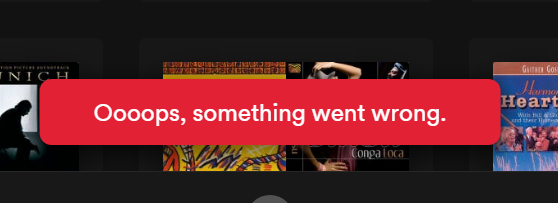
I also restored it and then deleted it again, same result.
When I look in the api for my playlists it isn't included. However, I have completely removed the spotify app from my computer (cleared %appdata%) and after reinstall it still showed up. Not sure what's going on there.
I found this: https://developer.spotify.com/documentation/general/guides/working-with-playlists/
So there's no real way of deleting a playlist in Spotify, you're basically unfollowing it.
I tried unfollowing it via the API and yes, when I looked at the playlists details it didn't show me as a follower. Then I followed it again (via the api) and it immediately showed up in my app. When I unfollowed it again it was removed from my app.
I don't know where the desktop and web app get there data from, but it's sending the wrong data (and it isn't changing when I play a different playlist)
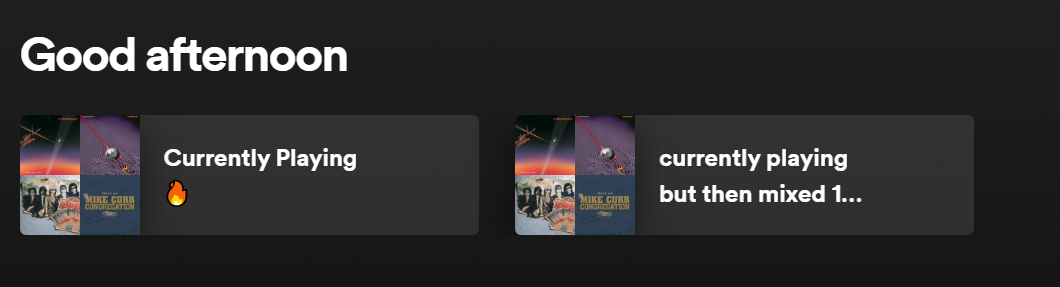
(the playlist on the right is the one I removed unfollowed

Hi @PleaseFixTheApp,
Thank you for your reply!
In order to investigate further, please share with us the URI link of this playlist, this way we can take a better look at it and keep investigating.
We'll be on the lookout.
It's gone in the ios app but still visible in my desktop apps (windows 10 on 2 separate computers)

Hey @PleaseFixTheApp,
Thanks for your swift reply and the link you've sent.
We understand that the unwanted playlist is no longer present on your mobile device, but it still shown on your desktop devices. You can try logging out and logging back (restarting the two separate desktop apps you have) - however, for each of them, do that twice in a row. This may sound odd but it's how the app does a refresh and resynchronizes with your account.
If you still see the list, could you let us know if it only appears on your Home screen or in Your Library as well?
Hope this helps. Let us know how you get on.
I logged in twice, but the playlist is still there. The playlist does not appear in the library.
Hey @PleaseFixTheApp,
Thanks for the post and the clarification.
If it's appearing in the top of your home screen on the Good Morning/ Good Afternoon or Recently played section, you won't be able to remove this. These sections of the Home screen are automatically populated based on your listening activity. It will go away eventually, when the system has gathered more info about recent albums/ shows that you are listening to.
Hope this clears things up.

Hi, I wanted to ask about playlist-related features. I recently visited one of my friend's profiles on the mobile (iOS & Android) and web version of Spotify. My friend's playlist is still visible there, and I can see and play the song inside the playlist. But when I open my Spotify desktop app (windows) and go to my friend's profile, the playlist isn't there, yet I still can view it on the mobile/web version.
Is this a bug? Or is it just my friends change their playlist privacy settings? But if that's the case, why is the playlist still visible on the web and mobile app version?

Hey folks,
Thanks for getting back to us 🙂
@PleaseFixTheApp The playlists will eventually disappear from the Home screen the more you listen to music content.
@rfqif88 Could you restart your PC and then log out and log back in to your account to see if that makes a difference? Let us know how it goes.
The Community is here for you if there's anything else!
Hi @PleaseFixTheApp,
Thank you for your reply.
Since the user interface can change across different devices, the more you listen to other content on all of your devices, the more your recommendations will keep updating.
Also, please make sure that you listen to more of your favorite tracks with the Private session feature off, as it may affect what is shown on your recommendations.
Let us know if you have any questions.
So recommendations are device based? Then again that doesn't make sense because I have completely removed the app and all its data. Or is there some other place where data is stored?
And I see the same stuff on the web player. So it is coming from the Spotify API, but it seems the desktop and web player use another endpoint than the mobile app.
edit:
So i tested a bit more and it definitely is coming from the server. The request URL is https://api.spotify.com/v1/views/recently-played?offset=0&limit=50&types=artist%2Calbum%2Cshow%2Cplaylist%2Cstation%2Ccollection%2Ctrack&market=from_token and it contains the deleted playlist:
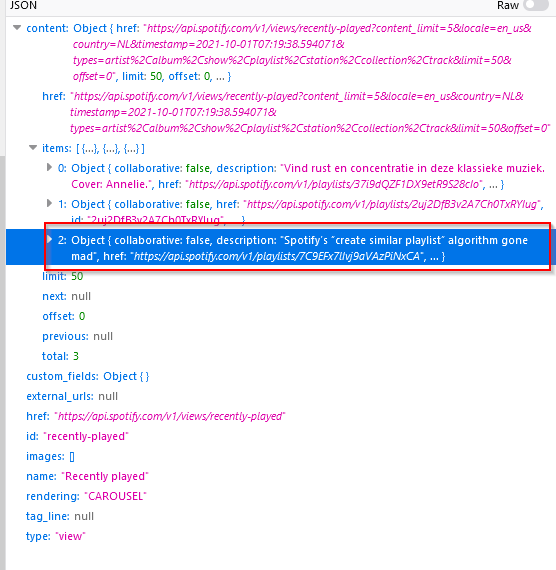
So this is a problem on the Spotify server side. They should not send deleted playlists to the player. Saying things like 'yeah but you should listen more and it will go away' is just not helpful. Given the fact that Spotify don't care about their customers (see all topics about podcasts) I doubt this will get fixed.

I have the same issue on Windows client. One deleted playlist just won't go away.
I listen playlists and podcasts, albums all the time. List is empty and deleted. Opening it you can delete it just to see early mentioned error message about can not delete it, sorry. How can I get rid of this playlist forever? Thank you.
I can't see this deleted list on my Android app, so I assume it is Windows and Web app bug.
Hi folks,
Thanks for your posts and sharing the troubleshooting you've done.
Can you try the following:
- Restore the deleted playlist here.
- Delete all of the tracks, then delete the playlist again.
This way the playlist should be removed from your library, if you still can see it there.
As we've mentioned before, if you see a deleted playlist in the Good Morning/ Afternoon/ Recently Played tab, this will go away eventually as you listen to more content and can't be influenced manually.
Hope this helps.
It seems like on my Android phone it as well not updating recently listened lists, the ones I listen are from time ago. I will try more, like I said now I am in a hurry to leave. Thanks for our reply.
This is under Good morning etc. view.
I still can not get rid of it. Tried deleting list empty or full of tracks when restored. Tried to listening albums or podcasts I never heard of or my other lists. Nothing I listened goes to these boxes. Is this feature update broken? Can it be looked into?
Worth to note situation is the same on Web App and Android, but on Android I do not see the deleted list.
It is 7th on the web/pc and Android shows only 6.
Has anyone else noted this issue that Good evening section is not updating for longer time?

Hi there @vaajy,
Thank you for your reply and for the provided information.
We've double checked this backstage and when it comes to the home sections (like good morning, evening etc.), it's not exactly how and how often the algorithm updates so the only solution for now is to wait for it to update.
We're always testing things by adding or removing features to make Spotify better overall and we’re constantly aiming to improve our features. We’re sorry that this means you’re not able to use Spotify like you wish to do at the moment.
Thanks for the feedback. We appreciate it.
Let us know if we can help you with anything else.
Take care!
Sad to hear if that's how it works.
User needs to see deleted lists for months. Also the fact the Good something view is not updating is problem itself.
I will try to live with it, but it surely feels like a bug not only for me, but for few others too in this thread.
As well the whole Good something section went away. I don't mind, as Good evening section never updated anyway. I think it was broken. Now it shows Recently played instead. I will update if it changes back! The deleted list here all week long was so silly and annoying. Almost on our nerves all time.
Thank you so much for deleting it, I hope it's permanent!
It seems it's now living in this section.
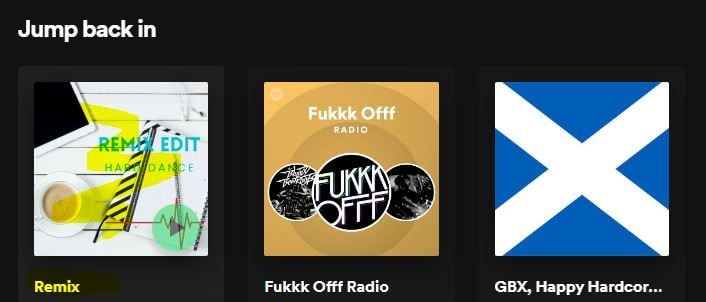
Is there really no way to make it go away?

Hi,
I'm having the same issue where a deleted playlist is still visible.
I deleted a few playlists years ago (literally), and just today, when randomly seeing who followed me and what they listened to, I found that 2 of the playlists I previously deleted, appear in their profiles. Fully visible, playable and my Spotify username appears as the creator of said playlist.
However, when I search for it in the global search bar, or in my own playlists, I find nothing.
I was wondering if there is a fix for this, as I am afraid that anybody else can find it, and it's kind of a personal thing I don't want popping up anymore (thus why I deleted those playlists years ago).
Thanks!
My playlist which I deleted faded away from front page only when it was deleted from Spotify's
Restore playlist page.
It didn't happen with any other playlists I deleted, so I don't know why it happened.
For me it has been long gone.

This issue is driving me nuts. I also have some playlists that just won't go away, so they bring me back bad memories every single time I open Spotify. Maybe that's the solution, stop opening Spotify, cancel my subscription and delete my account and switch to something else. All because of the lazy programming in here.

Hi,
i tried making a playlist private on Spotify however from listening activity i can still see my friend listening to it and idk how to change that.
So then i tried deleting the playlist however she still has access to it so please help.
Why can she see my private and deleted playlists when she hasn't even downloaded them or anything??
Its really starting to annoy me now like literally whatever i do she can always see that playlist and i don't like it.

Pretty major functional problem. Is there a design limitation for doing so? Seems pretty straightforward on the surface as @PleaseFixTheApp pointed out.
Is the server full of hundreds of thousands of dead or unused private playlists in this case?
LOL Honestly the only solution I've thought of. It's driving all of us nuts.
Hi, thanks for asking!
Sometimes when you delete a playlist, it still appears beacuse of the listening history. It automatically goes away as soon as our listening habits changeso do not worry. If the playlist in not in your library and only in recommendations then it will go away soon.
Throw a like my way or choose this as a solution if I helped!