Album Art blurry/low quality

After offloading the app, deleting and then re-downloading it to fix half of my album art not showing up, I have ran into another issue…
Album art is now blurry/low quality under “my Library”.
Even the custom images (that are high rez) I apply to playlist are showing up blurry/low rez.
It seems after I re-download the app the album art looks just fine until I start actually using the app and tapping around, then everything goes south and blurs up.
Accepted answers
All comments

I have the same problem. After my album covers in the library section weren’t showing or they were wrong I tried clean reinstalling. It fixed this problem, but after that now all of my album covers are blurry in my library, please let me know how I can fix it !?
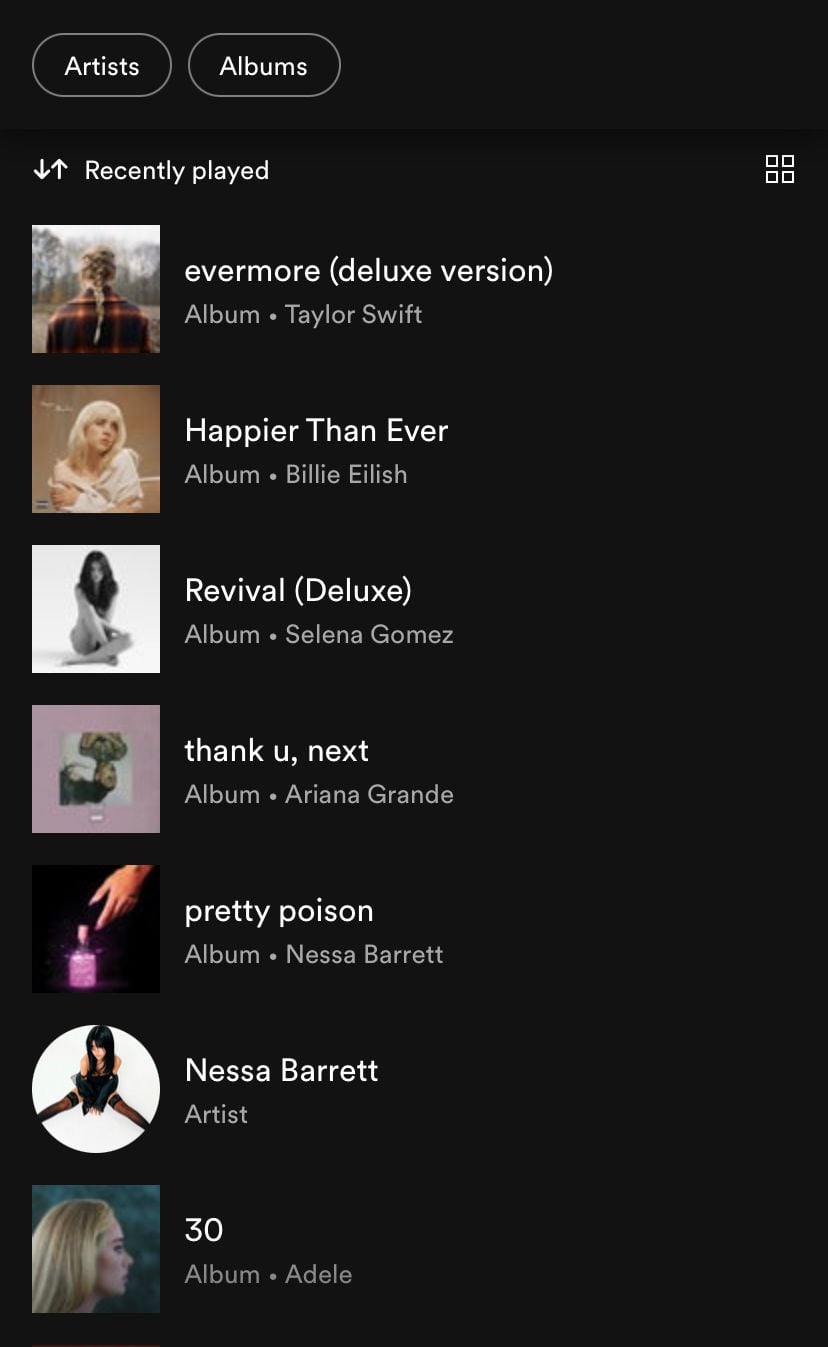


I've been dealing with the same issue since the last update, and it's seriously making me consider switching over to Apple Music.
- Razor Blade Pro - Windows 10.0
- Version: 1.1.74.631.g0b24d9ad
- This isn't an issue on my Macbook Pro or iPhone, only an issue on Windows. And makes no difference whether I'm logged into a different account.
- No changes after running a clean reinstall.

Hi there @stonedapetheory,
Thank you for your reply in this thread.
Can you let us know if you followed the steps of a clean reinstall? This will make sure there's no old cache files causing this.
We'll keep an eye out for your reply.
Take care!
I just followed all those steps and did a clean reinstall, but the same issue persists 😞
Hey @stonedapetheory,
Thanks for the reply.
Can you go into Settings > Hardware acceleration and check how the cover art is displayed when the setting is toggled on or off.
The Windows app might be displaying cover art with lower quality in order to increase performance.
Keep us posted.
Hey @Alex, I just tried toggling the "hardware acceleration" option a few times, but no improvements to the artwork quality whether it was toggled on or off.

Hey @stonedapetheory,
Thanks for keeping us in the loop here.
We're sorry to hear the 'Hardware Acceleration' toggle didn't make any change for your experience. Could you also confirm that you are having a stable internet connection to the device, where you're experiencing this situation?
Also, it would be very helpful for our further investigation, if you could send us a short video of the situation. You can send a link to it or attach it using the Insert Video option in the post editor.
Keep us posted, we'll be on the lookout for your reply.
Sure. @Kiril
Here's a video I recorded showing the blurred art cover quality, you really notice it on the last cover: https://www.dropbox.com/s/12osl3n1087iaus/Spotify%20Premium%202022-01-01%2003-03-41.mp4?dl=0
I should also note that when using Spotify Desktop within a browser, the artwork quality is perfect, it's only blury in the Desktop App.
And to answer your first question, yes, I'm running on a stable internet connection. I travel back n forth between the US and the UK, doesn't matter where I'm at this is still a problem. I've tried using VPN's as well.

Hey @stonedapetheory,
Thanks for getting back to us.
We weren't able to view the video. Could you please try again uploading it to another platform like YouTube or Google Drive and send us the link?
Keep us posted.

I have the same exact issue on the desktop application for Mac OS. The version is the following
Spotify for macOS (Apple Silicon)
1.1.74.631.g0b24d9ad
A small note is that i have had this issue for multiple months now and have seen other support threads with no resolution.

Hey @stonedapetheory and @pedro696,
Thanks for all the info you've sent so far.
Looks like there's a newer version of the app. Could you try reinstalling one more time to make sure you're running the latest version?
Let us know if you notice any difference.
FINALLY!!! It works great since the new update!
Thank you 🙂

Hey @stonedapetheory @pedro696
It looks like the original author of this thread was talking about the iOS app and you both are having this issue in the desktop app.
This issue should now be fixed in desktop app version 1.1.76
The blurry (low quality) issue for the album art in the bottom left corner of the desktop app was fixed in version 1.1.75. There was a delay in this version going out over the holidays, but version 1.1.76 that includes this fix is now rolling out to users.
Finally!! It works! I misread the original post and thought the person was saying the app on the desktop. But either way finally!!!!!
Glad to hear it's working for you both now! @stonedapetheory @pedro696

This is a Great News.


Urgent: Persistent Album Artwork Quality Degradation on Spotify Desktop & Web - Escalation Required
To: Spotify Support Community & Relevant Technical Teams
From: Highly Frustrated User (Account: [User's Spotify Username - to be filled by support])
Date: July 21, 2024
Subject: Critical Issue with Album Cover Image Quality Degradation Across Spotify PC Client, Web Player, and Mobile (Conditional) – Requires Technical Team Intervention.
This report summarizes an arduous, 5-hour long engagement with Spotify Support, involving eight different advisors, concerning a significant and persistent degradation of album cover image quality on the Spotify PC desktop application and web player. Despite extensive user-side troubleshooting and repeated explanations, the issue remains unresolved. This technical problem clearly extends beyond standard user-level fixes and necessitates investigation by Spotify’s dedicated engineering or rendering teams.
1. Issue Overview
Over the past few months, a noticeable decrease in the resolution and clarity of album artwork has been observed, specifically when interacting with albums or playlists. While browsing a list of albums, the artwork may appear fine, but upon clicking into an album or playlist to view its full details, the image quality sharply degrades, appearing "blurry" or "pixelated." This issue affects both older and recently uploaded artwork, including personal creations, and manifests consistently across the Spotify PC desktop client and web browser. A similar degradation is noted on mobile devices, but only when text overlays the artwork; without text, mobile display is clear.
2. Detailed Problem Description
- Primary Affected Platforms: Spotify PC desktop application (Windows 11) and Spotify web player (browser).
- Specific Degraded State: Images become blurry/pixelated when an album or playlist is "clicked into" to view its detailed page. Images appear normal in list views.
- Mobile Behavior (Samsung Galaxy): On mobile, the issue is conditional. Artwork appears clear and high-resolution when viewed without any overlaid text (e.g., in a full-screen view without track names). However, if text is present on the album cover, the image quality degrades, mirroring the issue seen on PC. This suggests a rendering or scaling conflict related to text overlays.
- Affected Artwork: The degradation impacts all album covers, both older ones that previously displayed perfectly and newly uploaded ones. All personal images are confirmed to be in PNG format.
- Historical Context: The user confirms that this issue was NOT present on the PC application as recently as August 29, 2024, indicating a probable change or update within the Spotify client or server-side image delivery since that time. The web player exhibited the issue earlier than the PC application.
- High-Resolution Display Context: The user utilizes a 4K display, which makes resolution discrepancies highly noticeable and easily identifiable.
3. Extensive Troubleshooting Efforts (Repeatedly Performed with Support)
The user has diligently performed numerous troubleshooting steps, often repeating them at the request of different support advisors. These efforts have yielded no resolution, reinforcing the belief that the problem lies on Spotify’s technical backend.
3.1. User-Initiated & Confirmed Steps:
- Operating System (OS) Update: Confirmed Windows 11 is fully up-to-date.
- Clean Reinstallation of Spotify App: Performed multiple times, including thorough deletion of all associated cache and app data files (`%AppData%` and `%LocalAppData%`) and device restarts. This did not resolve the issue.
- Image Format & Resizing: All personal images are PNG. Tested various resolutions, including:
- 600x600 pixels (original, previously fine)
- 640x640 pixels (Spotify's minimum recommended)
- 900x900 pixels
- 300x300 pixels (resulted in pixelation but less blur)
- 1080x1080 pixels (original high-res)
- 2400x2400 pixels (recommended by an agent)
- 3000x3000 pixels (recommended by an agent)
- Re-uploading Images: Album artwork has been re-uploaded multiple times after resolution changes and clean reinstalls, with no positive effect.
- Cross-Device Testing:
- PC App: Consistent degradation when clicked into.
- Web Player: Consistent degradation when clicked into, mirroring the app.
- Mobile App (Samsung Galaxy): Degraded when text is present on the album, but perfectly clear when text is absent.
- Hardware Acceleration Toggle: Toggled the "Hardware acceleration" setting in Spotify app settings (on/off). No change in image quality.
- Spotify Test Account: Logged into a Spotify-provided test account (`cs-test-account-22`) and observed the same blurry quality on the user's personal album, further indicating the issue is not account-specific but platform-wide.
- Data Saver Setting: Searched for and confirmed the "Data Saver" setting (or similar) on both desktop and mobile. On desktop, it was not found, confirming earlier agent advice it might be mobile-only. On mobile, it was located and confirmed OFF. Canvas is ON.
3.2. Evidence Provided to Support:
- Multiple screenshots demonstrating the degraded quality versus the original.
- Direct links to the affected playlist/album for live verification by agents.
- Confirmation by at least one agent (Anita I) that the issue was visible from their end when viewing the provided link.
4. Key Observations and Frustration Summary
The core frustration stems from the repetitive nature of the support interaction, where standard troubleshooting scripts were followed despite the detailed initial report and repeated user confirmations of already completed steps. Each new advisor required a full re-explanation of the issue and previously attempted solutions, leading to significant wasted time (5 hours) and emotional exhaustion for the user.
- Lack of Continuity: Being passed between 8 different advisors, often without them fully reviewing the extensive chat history.
- Repetitive Troubleshooting: Repeatedly asked to perform clean reinstalls, change image resolutions, check OS updates, and toggle settings, all of which had already been exhaustively tried or were irrelevant.
- Misdirection: Transferred from "Customer Support" to the "Artist Team" and back, despite the user explicitly stating the issue was related to a listener's experience with artwork rendering, not artist-specific tools.
- Conflicting Information/Lack of Understanding: Agents at times suggested solutions (e.g., Data Saver on desktop) that did not exist in the reported environment, or proposed image resolutions that worsened the problem. There appeared to be a lack of understanding regarding the user's initial diagnosis of a rendering/scaling issue rather than an image upload problem.
- Confirmed Systemic Issue: The issue persists across different devices (PC, web, conditional on mobile) and a test account, clearly pointing to a systemic problem within Spotify’s platform, not a user or device-specific fault.
5. Escalation Request and Conclusion
Based on the comprehensive troubleshooting performed, the consistent nature of the problem across platforms, and the inability of standard customer support procedures to resolve it, it is unequivocally clear that this issue requires escalation.
The observations strongly suggest a technical fault related to:
- Spotify PC client's rendering engine.
- Album artwork fetching mechanisms.
- Recent application updates.
- Server-side adjustments to image delivery and scaling.
The specific degradation upon clicking into an album implies a fundamental rendering or scaling issue within the detailed view, particularly when coupled with text overlays on mobile. This is not an issue of users uploading low-quality images, but how Spotify processes and displays these images dynamically.
The user has exhausted all available user-level troubleshooting and has provided ample, detailed evidence and observations. It is respectfully requested that this case be forwarded directly to the relevant technical teams responsible for the visual rendering and image delivery components of the Spotify platform for thorough investigation and resolution.
Thank you for your prompt attention to this critical matter.
I'm sorry for sending it twice, this app made me take an hour to verify I was not a robot, and make sure the text reach the maximum limit, and had flood error, and also needed to verify which was a pain, Just keep one of them if you decide to remove it, I just wanted to be heard, it has taken 8 hours for me to get this far, I am tired, just hope someone gets the message of the trouble I have had for five hours, and I do appreciate what the support team has done, taking their time and listening to me, but the problem was not solved and I was in a cycle of repeated issues, where someone kept sending me to another person without any progress.
Hey @søtøpøkø,
Thanks for posting here.
Could you please share with us the following? We'll look into this further.
Keep us posted.