Multiple SD card storage options are shown in app settings

Hey everyone!
We've been receiving reports about the app displaying multiple SD cards in the storage options. 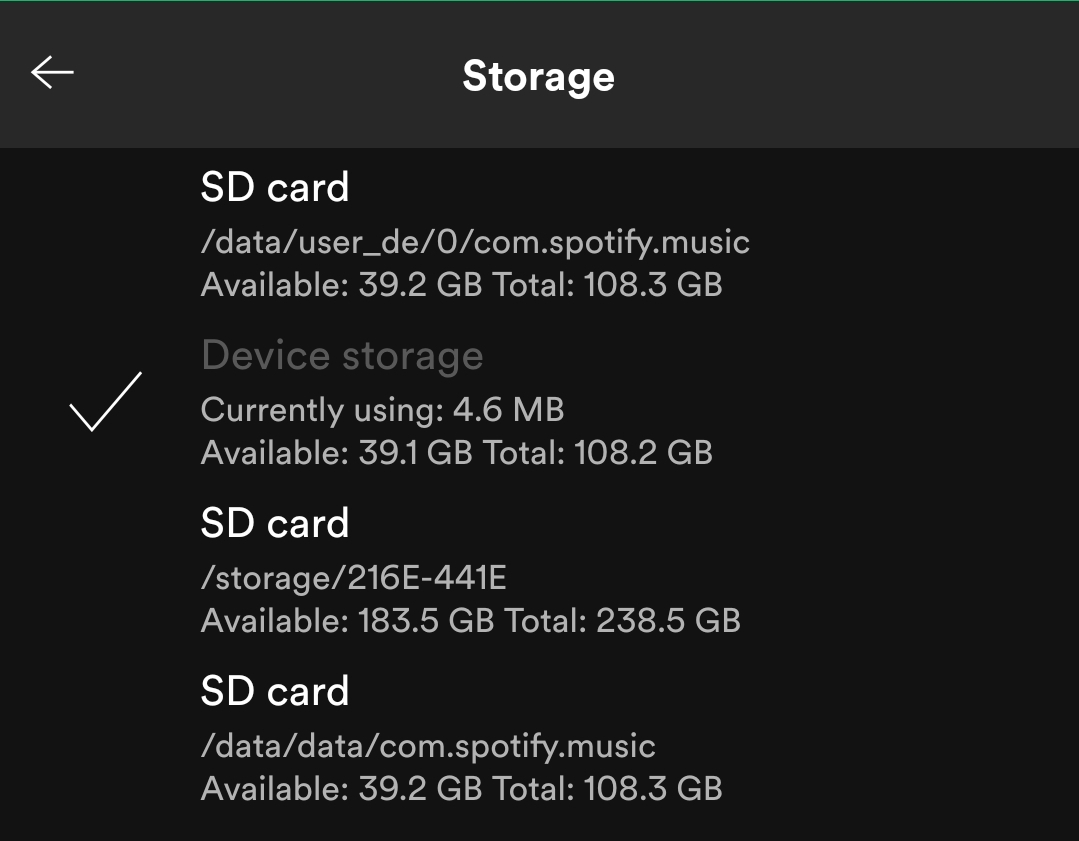
If you're experiencing this, let us know by adding your +VOTE and follow the instructions in the Status Update below.
We'll be keeping everyone up to speed here, so make sure to subscribe to this thread!
Comments

Hey @ABakes,
Thanks for reaching out about this in the Community!
Sorry to hear that you're having such an experience with the app.
We'd recommend running a clean reinstall of the app. Please follow the steps from this Spotify Guide exactly, as this will assure that all app data is cleared completely, before reinstalling.
Also, make sure that Battery optimization is not enabled for Spotify from the system app settings, as well as that the app is granted all permissions. These settings could be hindering the performance of the app.
Spotify shouldn't switch storage back to your internal memory after every update. This may be caused by an app or process on your device, which is clearing spotify cache, in which user settings are saved. Check if your device has automatic performance or battery optimization processes enabled and exclude Spotify from those.
It might also be worth checking if this happens if you use another SD card on your phone.
Keep us posted on how you get on with this.
Cheers.

I have the same problems with my S20+. Also did a clean reinstall. Didn't work out for me 😞

Plan
Premium
Country
United States
Device
Samsung Galaxy A20
Operating System
Android 11
My Question or Issue
Today i had to shut down the phone and after the restart all my downloaded songs went away, the silly app was telling me the downloads just werent there, it was asking if i could download over cellular, after i got home i pulled the SD card and plugged it into my computer and windirstat showed that spotify's folder was using 15GB of music, in other words my downloaded library... oh joy, so i uninstalled the app and deleted the folder from the SD card then re downloaded the app, now im getting three different Sd card locations with two of them being mirrors of the internal storage, ive done the clean install stuff, and i cant erase cache storage and dont have root access, id love some help, but i would also add that every update either adds some feature i hate like the new library, or the new widget that made everything smaller, and ive noticed my spotify updated last night and hey guess what a new glitch, i love paying for a service that forces me to a new system that made my music and my podcasts get all mixed up and when telling the library to show only my downloads, it promptly ignores me when i then go into a folder.

Hi @compzach and @sergiob92,
Thanks for reaching out about this in the Community.
First up, we suggest that you try removing the SD card > restarting your phone > performing a clean reinstall of the app. After these steps, let us know if you're still seeing the multiple SD card locations.
If the issue persists, would you mind trying with a different SD card to check if that makes the difference?
We'll be on the lookout.
locations, but the locations listed are mirrors of my phones internal
storage, the SD Card itself only shows up once, the app just thinks its the
SDCard, the two mirror locations still appear, i have actually performed a
clean install three times and boot the phone into boot interrupt mode to
clean the cache partition, the two folders always remain, i also cannot
remove the folders myself cause they are stored in either the root
directory of the phones storage or in an area that i cannot access without
root permissions i have tried and even tried using ADB through a PC i
cannot delete the folders myself without completely wiping my phone and
doing a factory reset.
Hey @compzach,
Thanks for the reply.
Note that we might not be able to help with this issue, as it seems to be related to the way your phone handles writing cache or due to SD card errors.
Nevertheless, well do our best to try and find a solution. Can you try removing your SD card, and checking whether the close internal storage locations still show up?
Keep us posted.

Already tried factory reset, and also sent to Samsung for system rebuilt. Didn't work, still showing multiple SD cards.

As far as I can remember, never have I had these issues with Spotify. That is until the "Your Library" UI/UX overhaul update, where the different filters ("Playlists", "Artists", etc.) were added. (I want to say this update was around July or August.) This is when I noticed this bug for the first time.
I have been trying to solve this for months, hoping the bug would be patched... Not only have I checked Spotify's permissions in my phone's settings, but I have done a complete factory reset of my phone (wiping all personal data). *For others trying to troubleshoot this issue, I do not recommend this.*
After a long period of reconfiguring my phone and installing Spotify, I checked the "Storage" settings. Nothing changed. In a last effort attempt to solve this bug, I bought a new SD card for my phone. But unfortunately this didn't fix the issue either.
As another loyal and longtime user, I ask that Spotify's dev team looks into patching this bug.
*Thank you, and please keep us posted with any updates.

Hi there @pino12 and @thealiensarecoming,
Thank you for your replies in this thread.
@pino12 - can you confirm if you followed the other step that @Alex mentioned regarding the battery optimization?
@thealiensarecoming - we suggest that you start with following the troubleshooting steps that @Alex provided in his answer above.
Let us know how it goes 🙂
Take care!

Hey folks,
Thanks for your replies.
In this case, we suggest reaching out to our Support team through any of these channels so they can check if everything is ok with your account's cache.
Hope it gets sorted out. If you need anything else, the Community is here for you.
Cheers.

I have a Motorola G fast. I've been dealing with this issue ever since I started storing music on my SD card. I've searched around the internet and found nothing but half baked solutions and "solved" threads that offer no actual help. Every once in awhile Spotify will simply undetect my SD card, it then requires me to reselect it and redownload all my songs. Often in the storage section of settings two more SD cards are listed which are just mirrors of my internal storage. Please Spotify, either fix this error that almost all Android users have, or provide a solution to the issue.

Hi, I have the same problem (3 SD card storage detected).
I have downloaded many songs locally and randomly Spotify changes the default memory and starts downloading all the songs from the beginning.
I've done all of Alex's steps but it doesn't work.
Please help
Hey there @akratorn,
Thanks for reaching out about this here in the Community.
In this case, we suggest that you remove the SD card > restart your phone > reinstall the app following the steps @Alex sent previously and check if that makes the difference.
If this doesn't do the trick, could you let us know if you've already tried using a different SD card?
We'll be on the lookout for your reply.
Hey there @CaseyOverland,
Thanks for reaching out about this here in the Community.
In this case, we suggest that you follow the steps @CarlosE sent previously in order to reach out to our Support team so they can take a closer look at your account and check if its cache is corrupted.
If you need help with anything else, just let us know.
steps but I'll try anyway. Thank you for responding.
Hi Eni,
thanks for your reply.
I tried doing what you said (Alex's method) but it doesn't work.
I also tried to remove the SD card, to deep reset my Samsung Galaxy S20FE (without insert the SD) and install the Spotify app, but the problem still remain (see the attachment, my S20FE shows 2 SD card located in my device internal memory... very strange...).
I don't know how resolve my problem, please help me
Thanks
Regards
The support, at least in Brazil, is terrible. There is no continuity, every message is replied by a different person. Looks a schizophrenic conversation, where i have to repeat the issue over and over and they keep asking to "remove, clean, reboot reinstall" Did it 8 times before giving up. The app keeps downloading the whole library every time i reboot the phone, and still showing two "fake" SD Storage.
Will wait my subscription to end, then migrating my and my whole family accounts to another streaming service. Didnt want to, but the support got on my nerves, its totally disrespectful to treat users/clients as idiots.
Hey @akratorn,
Thanks for trying and keeping in touch.
In this case, we suggest reaching out to our Support team through any of these channels so they can check if everything is ok with your account's cache and further assist you with this.
If you have any questions, the Community is here for you.
Cheers.
Hey folks,
Thanks for reporting this issue to us.
We’ve passed your info on to the relevant team, who are currently looking into it.
Could you also make sure to provide us with the following info, if you haven’t already:
- device + OS version
- exact Spotify version
Thanks! We’ll keep you posted and let you know as soon as we have any updates on this.
Hi Eni,
Device: Samsung Galaxy S20 FE 4G (Snapdragon 865)
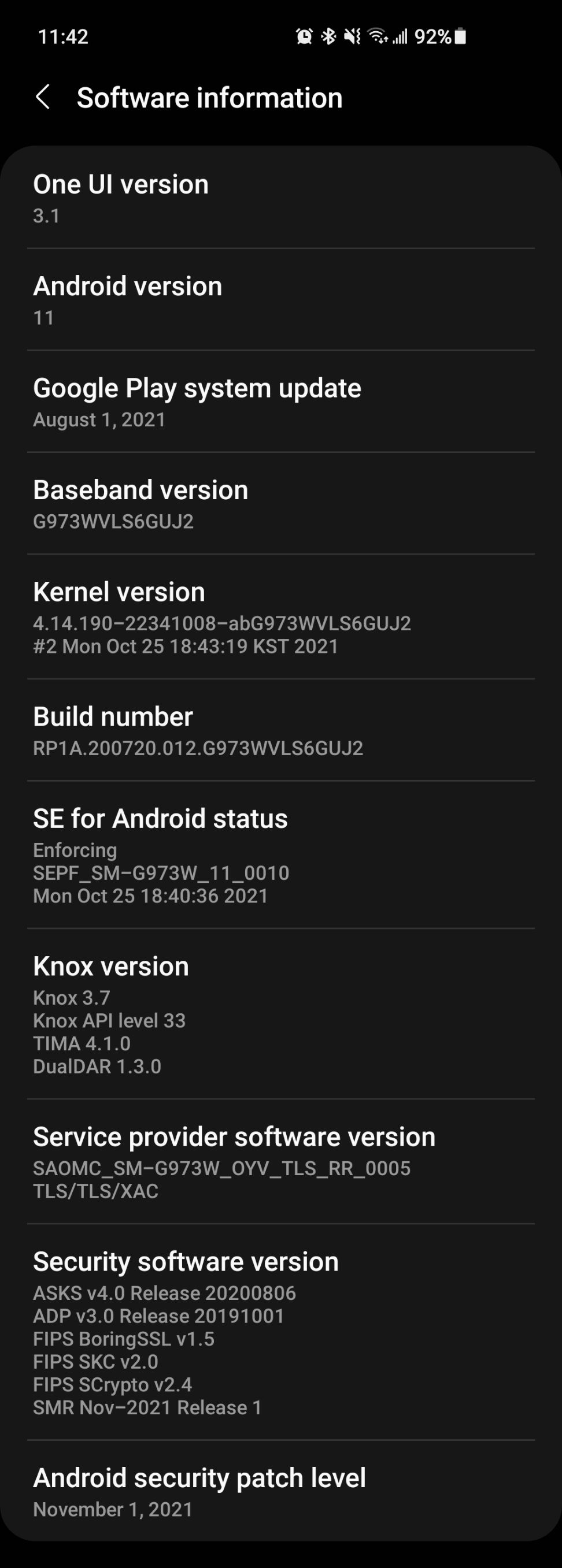
Android version: 11 with One UI 3.1
Spotify version: 8.6.86.1231
Regards

My Device: Galaxy M21, OneUI 3.1, Android 11
Spotify Channel: Alpha (version keeps changing)
I tried moving my storage to Device and it worked but now if I try to move it back to SD Card (not SD Card in real, but the Device storage is named as SD Card) it does not work. Fails to move it. If that helps.

Pianoforte
Premium
nazione
Italia
dispositivo
Samsung Galaxy S10
Sistema Operativo
Android 11
Versione app
8.6.86.1231
purtroppo anch'io devo unirmi a questo problema, ho provato a fare un reset dei dati, ho provato a contattare il team di supporto, il quale mi ha informato della presenza di file corrotti che causavano il problema, ma anche dopo una loro pulizia e un'installazione pulita il problema persiste.
ovviamente quando ho provato a scaricare direttamente i file nella memoria interna i problemi riguardanti la cancellazione dei download non si sono presentati, ma continuavano ad apparire più schede sd specchio della memoria interna.
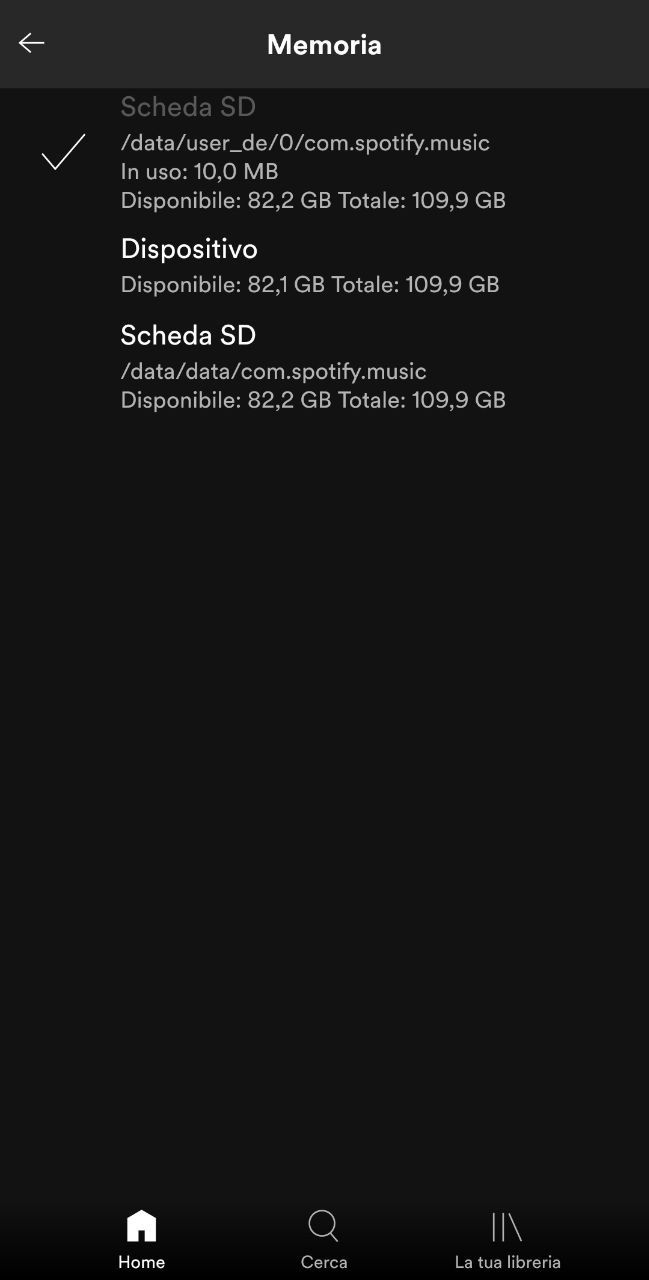

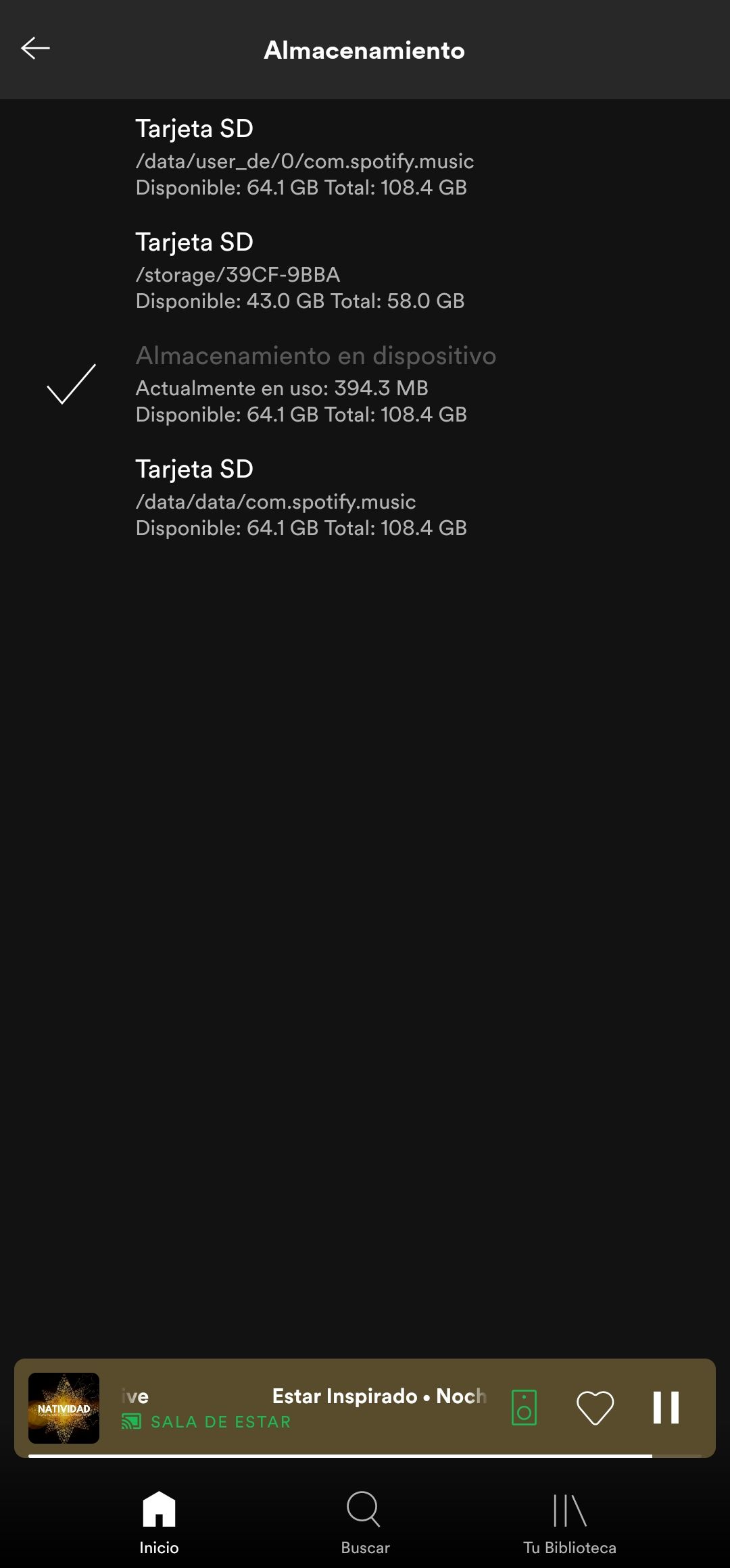 I was saving all my downloads into the SD and I was happy I could do that. But then I saw I didn't have my downloads anymore, and look at this page and I saw all this directories and tried to change them but the problem persist. Now I'm trying with device storage.
- Model: Samsung Galaxy A31 (SM-A315G/DSL)
- Android Version: 11 (One UI 3.1)
- Spotify Version: 8.6.86.1231

Okay. So an update from my end. Still having the same problem. Things I have done.
-turned phone off then on.
-changed permissions.
-changed battery optimization settings
-un-installed spotify, deleted any folders with in Android I could find relating to spotify. Even tried to get with in the Android registry, but that was taking to long for what it's worth.
-reinstalled OS(biggest waste of time). Installed spotify before any other apps incase it was another app creating the bug.
-installed Android 12 beta.
-reformated the memory card.
-reinstalled spotify with out the memory card.
-also tried all the steps in the threads where people are having just the problem with their downloads constantly being thrown from their SD card to internal storage.(almost feel like I would have to clog up my internalstorage, just to force stop that from happening.)
Once this bug happens, the only thing that seems to clear it on an install is to completely reinstall the OS. Reinstalling with out the SD card still shows multiple instances of internal storage as an sd card.
Also this hasn't always been a problem on this phone. I would also agree that this seemed to start happening after the library section was updated to the new UI or organization.
It kinda sucks. Cause I relied on my downloads for dead zones where I typically listen to music. Now I either have to deal with lower audio quality or just no audio at all. And don't get me started on how I have to get around doing seemless audio. I have my crossfade on 4s, that way the next song has more then enough time to buffer.
Kinda want to pass the torch on. Cause I spent 4 days trying to problem solve on my own. But with memory card issues it seems like every one gets stuck in a world with no solutions.
Hi @Jeremy
Yes, i followed the steps from Alex (a couple of times) and also the steps from the users with the same problems. Nothing works. It is a bug from Spotify. Before the update (don't know which one), the problems has started.
- Model: Samsung Galaxy S20+ (SM-G986B/DS)
- Android Version: 11 (One UI 3.1)
- Spotify Version: 8.6.88.1104
I hope the dev team of Spotify can help us out. Premium member for years...

Hello,
Same issue here
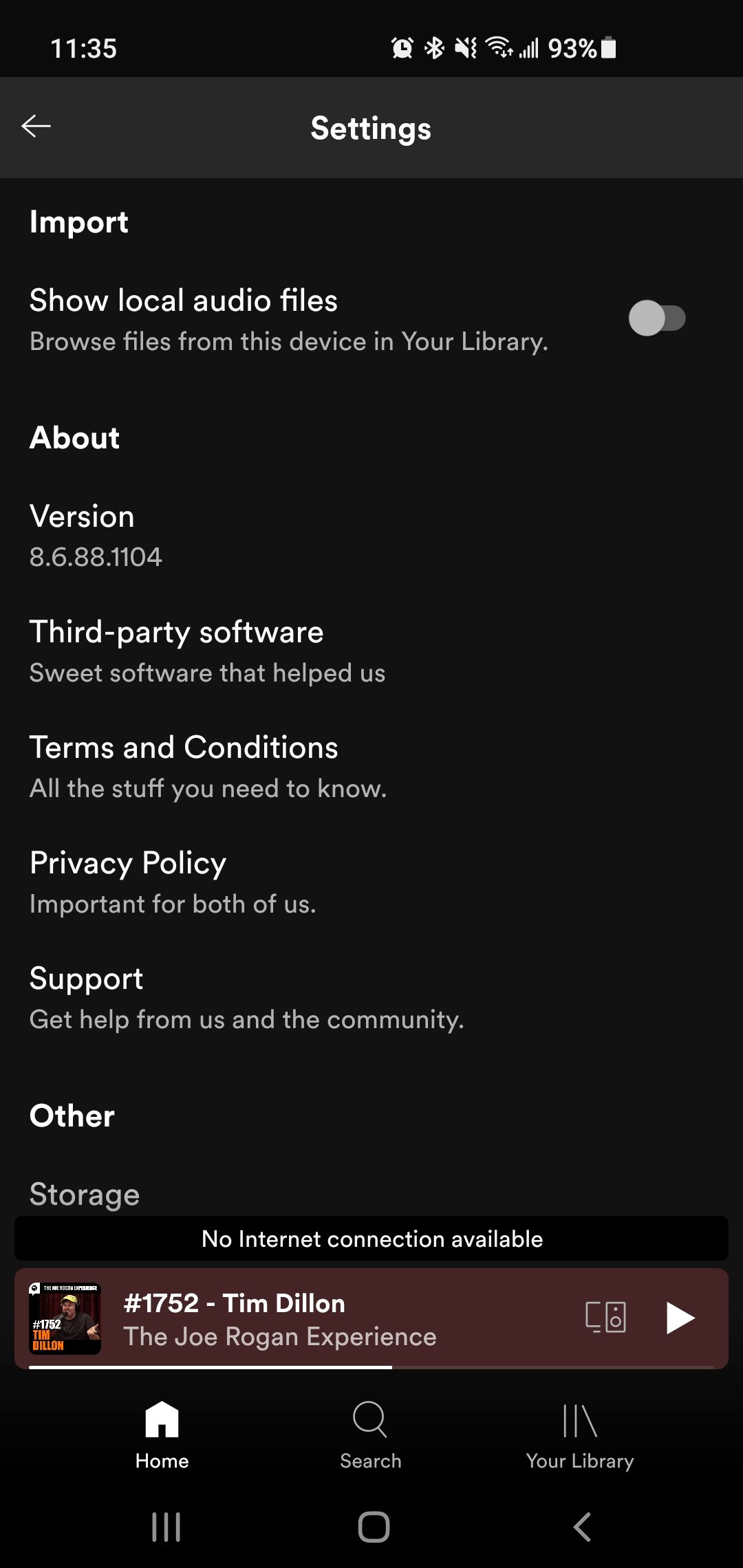
I also run into the issue where Spotify won't download all my songs even though I have plenty of room (over 50GB).


Been having SD card issues with Spotify for YEARS now. It is a problem with the app, not everyone's phone or card.
I see multiple SD card options as mentioned above, and I also suffer from having to redownload my music back onto my SD card after every single time my phone restarts. No amount of clearing the cache, formatting the card, reinstalling the app or anything fixes the issue. It's always the same with every phone and card.
-Galaxy s20 Ultra 5G
-SanDisk 512GB Extreme microSDXC UHS-I Memory Card
-Spotify 8.6.88.1104
So the problem that has been going on for years with saving playlists to an SD card to only have them moved to internal storage. Tried every thing nothing works. And I mean everything. Once Spotify updates it seems like that's what reverts all settings. And seeing that Spotify updated almost weekly with no change log in Google play how is any one suppose to know if its a worth wile update or some un noticeable "stability" update...
Now. Spotify is showing that I have 3 SD cards. Yeah you heard me 3 Sd cards. Two of them are are reflection of the internal storage space. Tried deleting files and went as far as trying to find the root files in Android but nothing..
Getting really annoyed paying for something called premium that really doesn't feel premium, with a problem like this that has been so wide spread for years... And it's not getting any better.
This problem needs to be fixed. It's beyond annoying for those who pay for premium so they can save playlists offline.
Plan
Premium
Country
Us
Device
Samsung Galaxy S20
Operating System
Android 11