Browse liked songs by artist

Provide the possibility to browse and play liked songs by artist. I have a long list of liked songs and it's inconvenient to browse them to play only the ones related to some particular artist.
When browsing the liked songs I would like to have the possibility to see the list of all the liked artists and then drill further down into some particular artist to see the list of the liked songs of that artist.
Accepted answers

Hi @HoboFett,
Thanks for specifying!
You're right - unlike the desktop app, the Web Player does not currently support sorting within playlists. All tracks are displayed in Custom Order by default instead. Looks like someone has already submitted an idea about implementing this feature on the Web Player as well, so feel free to check it out and add your +VOTE to show your support.
In the meantime, if you'd like to play all of your liked songs by a specific artist, you can do so by heading to the Liked Songs section on their artist page. It's located underneath their popular songs:
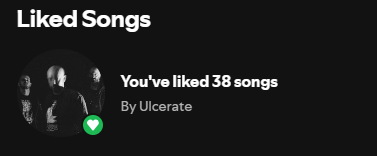
Note: on desktop, the Liked Songs section on the artist page also includes saved albums.
 Since I have saved the album, both songs are added to the Liked Songs section of the artist page, while only the first one appears in my Liked Songs playlist.
Hope this info was helpful! In case you meant something else, feel free to elaborate further by including as many details as possible.
Cheers!
All comments

Hi @DmytroSly,
Thank you for reaching out to the Community.
We've moved your post to this help board because this is something you can already do.
When you open your Liked Songs, you can sort them by artist. On the desktop app, you'll find these options on the top right side of the screen.
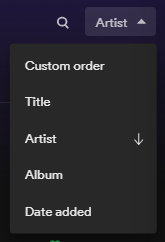
On the mobile app, open your Liked Songs, drag down the playlist > click on the Sort button in the top right corner > Sort by Artist.
Let us know if you have any questions.

So... I'm with DmytroSly on this one. I open the web player, go to liked songs, and I see the attached screen. No option to sort anything.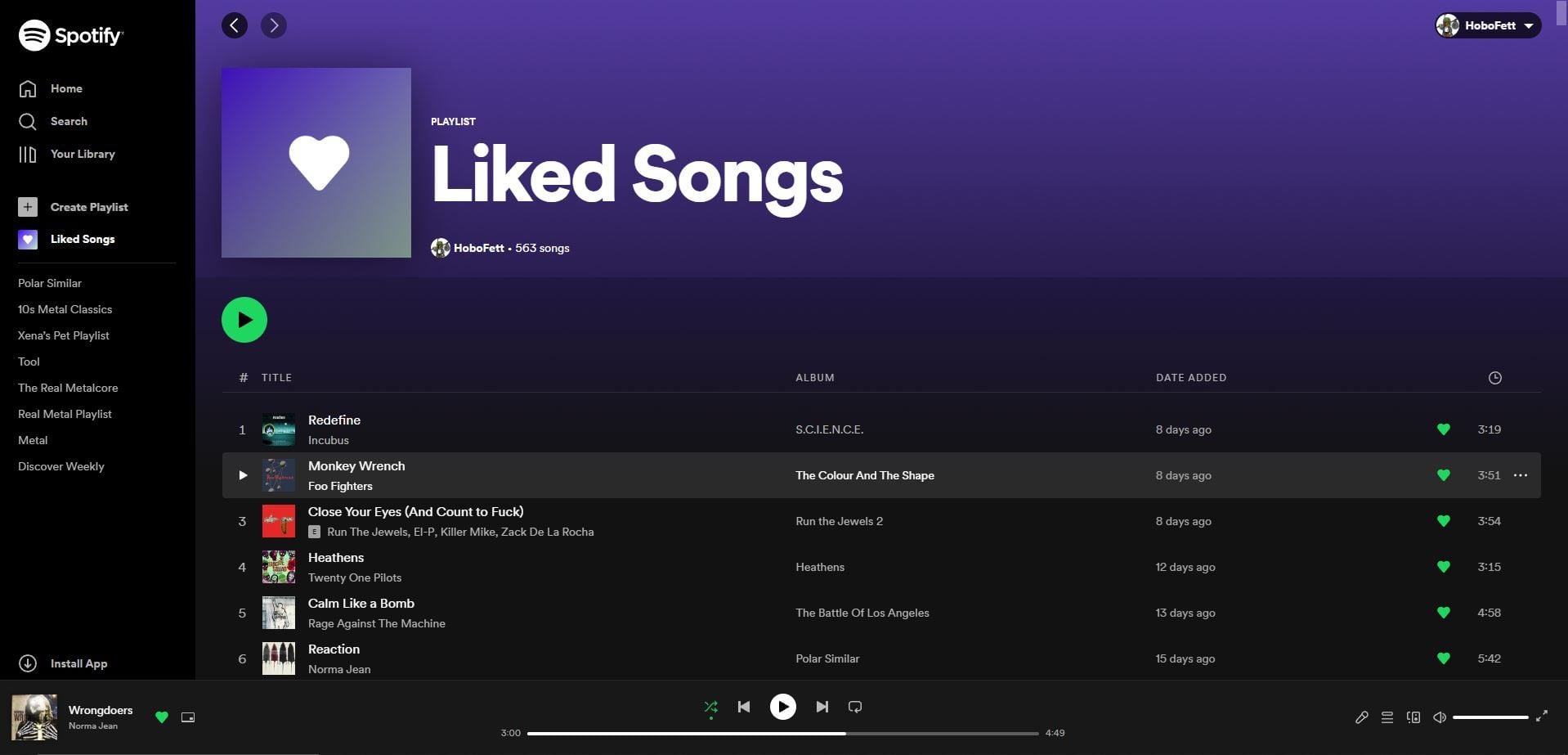
Hi @HoboFett,
Thanks for specifying!
You're right - unlike the desktop app, the Web Player does not currently support sorting within playlists. All tracks are displayed in Custom Order by default instead. Looks like someone has already submitted an idea about implementing this feature on the Web Player as well, so feel free to check it out and add your +VOTE to show your support.
In the meantime, if you'd like to play all of your liked songs by a specific artist, you can do so by heading to the Liked Songs section on their artist page. It's located underneath their popular songs:
Note: on desktop, the Liked Songs section on the artist page also includes saved albums.
Since I have saved the album, both songs are added to the Liked Songs section of the artist page, while only the first one appears in my Liked Songs playlist.
Hope this info was helpful! In case you meant something else, feel free to elaborate further by including as many details as possible.
Cheers!

Hello!
I'd like to support this question/requirement. The proposed solution is not quite useful, because even if sorted by artist, the songs are not grouped, and you still see the long list of songs.
Please see the screenshot from YTMusic, it shows how should it look like.
It would be great to implement such feature, this was the only flaw I found out when moved from YTMusic to Spotify.
Best regards,
Pavel

Nvm, feel free to delete. Found it.

Finding this thread while looking for a solution to this specific question (seeing all liked songs from one artist), I find it interesting how Spotify now has removed even this last possibility to view liked songs from one artist in the web player. Was there any communication as to why this option was removed? As far as I can tell, it is now impossible to view all the songs you have liked from one artist in the web player. It just seems like a malevolent move to bring users away from the web player.


The data are there... lets try to vibecode some nice addon to browsers, which will just add this 😄 #KeepTheWebPlayerAlive (and user friendly)
Hi @DmytroSly,
Thank you for reaching out to the Community.
We've moved your post to this help board because this is something you can already do.
When you open your Liked Songs, you can sort them by artist. On the desktop app, you'll find these options on the top right side of the screen.
On the mobile app, open your Liked Songs, drag down the playlist > click on the Sort button in the top right corner > Sort by Artist.
Let us know if you have any questions.