Spotify Premium no streaming my music

So I just got Spotify Premium because I heard you can import your iTunes playlists into it. This excited me because my phone is literally out of space (I have about 15 pending app updates that I don't have space for lol). So the plan was to use Spotify to stream my music and free up all that space.
Well I imported the playlists, but when I got to them on my iPhone 5 Spotify app, literally every single song is grayed out. It tells me I need to sync them.
Well that defeats the entire purpose. Because then I would have to put them on my phone, and then there's literally no point to even having Spotify.
Did I miss a step or did I have the wrong idea about Spotify in general. What do I do?
Thanks,
Scott
Accepted answers
All comments
Nope, I have no problem playing them through the desktop application.

That could be because you imported the itunes library as well as the playlists. I should be able to check this if you would post the link to one of the playlists. Righ click on the playlist name > copy spotify URI then paste it here. Please also make sure the playlist is public.
iPod Music: Epic Pure
There's the link. Thanks for your help!
Hi. It's as I thought - most of the tracks haven't matched up with music in the spotify database. There is a way to fix this but you'll need to do a little work I'm afraid.
In itunes, export your playlist to a CSV formatted playlist then head over to Ivy and feed it your exported playlist. With luck and a following wind, it should generate a spotify playlist for you.
Please shout if you have any problems and I'll try to help.
How do I export to CSV? In iTunes it isn't one of the export output options (just text, XML, and M3U) Thanks.
Duh, shows how long it is since I used itunes 😞 Export as a .txt file should work.
Thanks. I really thought that was going to work. I got all the way to this screen: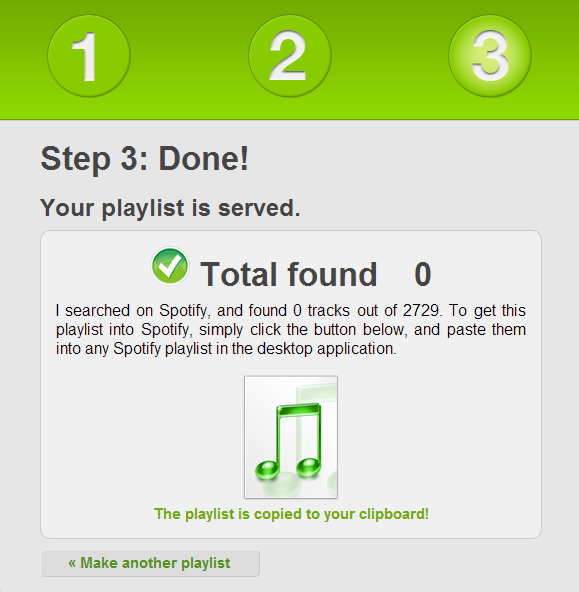
But when I actually go to do so (I assume I have to create a new playlist), and paste it in, I get the error shown in the top yellow bar in the next screenshot. What am I doing wrong??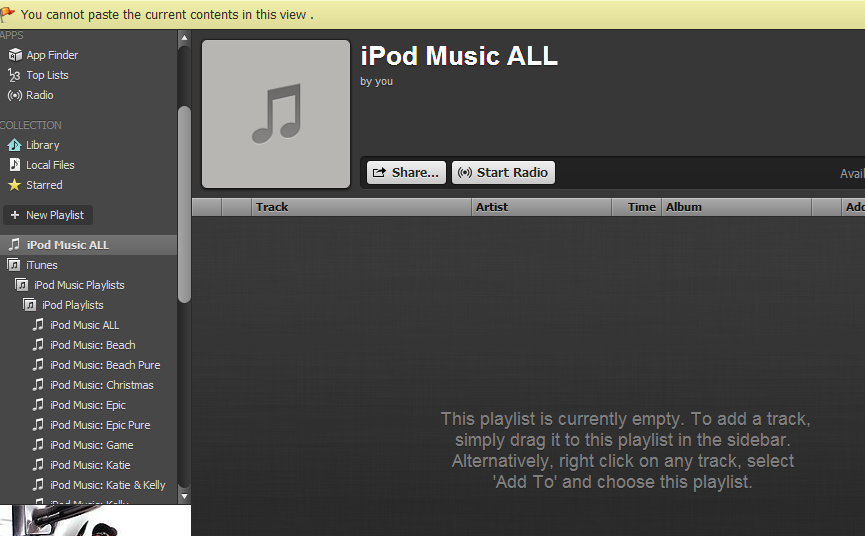
Ivy didn't find any tracks. Sorry, I just checked the Ivy tutorial and I got it wrong - it likes xml files from itunes.
That didn't change what happened at all. 😞
Strange. Maybe Ivy can't handle large playlists. Have you tried creating a smaller playlist in itunes then exporting that as an xml and importing it into Ivy?
Yes, I tried a smaller playlist with <200 tracks. I got the same error. It's like it can't find any matches in Spotify, which is ridiculous, as a LOT of my music is very mainstream and should have the correct ID3 tags.
bump...?
I just tried two methids on Ivy and both worked for me. First I imported a 1500 track itunes .xml playlist and it found 1478 of the tracks. Next I exported the itunes playlist as a text file and copy/pasted it into Ivy and that worked too.
Check out the video tutorial to make sure you're not missing something and retry both methods. If neither works for you, I can have a try if you would attach the .txt playlist here.
I've attached a playlist here. I just can't get it to work. It always tells me 0 tracks were matched.
I don't see an attachment.
Huh...? Well that's weird. Let me try the attachment again.
Okay, I guess this site's attachment system just doesn't work? I've definitely attached an xml file to the past three posts, including this one.
Actually, this time I got an error saying you're only allowed to attach jpgs, gifs, pdfs, and pngs. Well that's silly, I could just insert any of those as pictures. Umm not sure how to proceed?

Good idea, Peter! Thanks
Here's the link: http://pastebin.com/xujBe65a
bump?
Please, somebody help me! Just Spotify just not work? I don't want to cancel my subscription but that's where it looks like things are headed.
Sorry, @hickmanc - I've been busy lately but I did take a look at that xml. Ivy didn't return any tracks for me either so I hacked it about with a text editor and some regexp and here is the result in which Ivy matched about 100 tracks out of the original 196. If you follow the playlist, you can then select all the tracks and copy them into your own playlist.
Thank you so much!! It kind of sucks that it only matched about half of the songs, but I guess that's Spotify for you. Can you please tell me how you did it so I can convert my other playlists as well? Thank you @jwylot!
You're welcome. I just used a decent text editor with regexp to hack the xml into a list of "artist - track". I did notice that some of the unmatched songs exist in the spotify database but are tagged slightly differently so you can probably add these by hand.
I'm afraid I don't really know what regxp is. How do you access it? I have Word and Notepad++ on my machine. Do you think you could send me the file that you finally got to work so I can see what you're talking about? Thank you!!
- Export your playlist as a .txt file - this is easier to work with
- In notepad++ you'll notice that each line starts with track name<tab>artist
- So, all you need to do, is swap those first two fields and you may as well delete the remainder of each line.
- Open the search/replace dialogue and make sure that "Wrap around" and "Regular Expression" are checked
- Copy and paste this into the search box
([^\t]+)\t([^\t]+).*
- And this into the replace with box
\2\t\1
- Make sure your cursor is at the start of a line and hit the "replace all" button.
You now have a artist/track title list you can copy and paste into Ivy and you're well on the way to becoming a regular expressions expert 🙂
When I did that, it came back with something like this:
Artist NameThe Jackson Five
ABCNice Peter
Abe Lincoln vs. Chuck NorrisNine Days
Absolutely (Story of a Girl)Counting Crows
Accidentally in LoveOrianthi
According to YouSimple Plan
AddictedDaft Punk
Aerodynamic (Daft Punk Remix)Mayuko Aoki
After TearsManami Kiyota
After the Rain, a StrollYUI
againHajime Wakai
The Jackson Five sings ABC, so shouldn't it be on the same line as that song?? I could just fix it, but that would take a considerable amount of time when you consider how many songs I have. Thanks!
Sorry about that - I guess it was time I updated my notepad++ anyway 🙂
Slightly amended search term: ([^\t]+)\t([^\t]+).*
Replace is now: \2\t\1
Let me know how that works for you.
Hiya. Some folk are having issues when they import their iTunes playlists. It seems that Spotify fails to match the playlist tracks to the spotify database for some reason. If you check these playlists in the spotify desktop client, are they greyed-out there too?