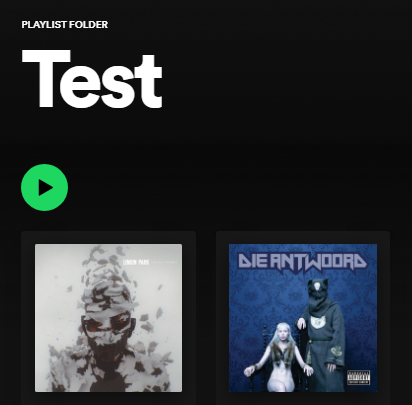
is there anyway to shuffle two or more playlists?
I thought Queue was a workaround but I guess not.
Hey @airtas,
Thanks for reaching out about this in the Community!
The Queue in Spotify works a bit differently than other music apps, so you can only queue tracks to be played in certain order.
You can shuffle two or more playlists like this:
For now this is possible only on Desktop. If you'd like to shuffle multiple playlists on mobile, you'd have to use the Add to Playlist function and create a new mixed playlist, which you can shuffle.Hope you find this info useful. Don't hesitate to reach out again if you have questions.
When will this additional 'play' option be coming to mobile?
Hi @ledwards86!
There's an idea about shuffling multiple playlists here, however, this isn't something we have any immediate plans to implement. Still, feel free to check it out and share your feedback there.
In the meantime, you can use the following workaround:
The Community is always here if something else comes up.
Cheers!
That doesn't work. i cannot drag playlists into another playlist
Hey @Pascal1972,Thanks for reaching out.For this to work, you can either drag the playlists into a folder or add them to a new playlist via the playlist context menu as explained by @Alex and @Yordan above.We hope this helps. Let us know if you have other questions.
It looks like this function was removed with the latest Windows app update. There's a new playlist view that looks more like the iPhone app. There's no play button when I select a folder. Is there a different way to shuffle multiple playlists in a folder? If not, will the old function be restored?
Right click on the folder seems to do the trick.
There should be a way to see which playlist the song you're listening to is from. Also, why did the shuffle button get taken away from the folders? I know you can right-click the folder to shuffle the playlists but it just seems like a step backwards.Finally, I can't see why we are not allowed to shuffle folders on IOS. I can access my folders now but there is no way to shuffle them which is frustrating.
Hi! Here’s an idea to spotify!
In the same way that you have “blend” to create a mixed playlist between two users, can you activate a blend where you can pick two of your own playlists?
I’d love to get in the car with my wife and 8 year old daughter for a road trip, select two existing playlists (no! I don’t want to create a new one every time!): so we pick one from the adults and from my kid, it shuffles both, and Everybody is happy! Can’t be so hard?
Or, you have an “add playlist” option to the queue and it brings it already shuffled.
Hey @danielmesat,
Thank you for joining the conversation.
If you think that the feature you want is different from the options mentioned above and other users would like it too, we'd recommend posting it on our Ideas exchange board so it can be voted on and reach the relevant teams to be taken into account. We'd also recommend checking our guidelines before posting it to avoid any early rejection.
More info on how your feedback reaches Spotify via the Idea Exchange can be found here.
Hope this helps. If anything else comes up, the Community will be here for you.
Sounds like the Spotify developers / produces need a kick in the ###, this feature would be awesome 😞
The solutions in this thread may have worked at one point, but they no longer work as of 2024. I really would like to be able to do this. Here is a "live idea" that you can vote for to bring more attention to the fact that this feature is something we all want.
What about playing a playlist, then opening another playlist, then selecting the three dots, and then selecting "add to queue"?
Would that work?
This is not even on desktop anymore. Why does pandora have this as a main feature, but spotify can't seem to figure it out???
Hey @Joshorndorff,
Welcome to the Spotify Community!
You can still use folders to shuffle-play as many playlists as you like on the desktop app, here's how:
Hope this info was useful. Cheers 🤘
Hey @treadyroc,
Welcome to the Community and thank you for joining the conversation.
At the moment, the option to shuffle all playlists inside a folder is only available on the Desktop app. If you want to show your support for this functionality, you can add your vote (by hitting the thumbs-up button) to the idea previously mentioned by @treadyroc here.
Also, another similar idea to shuffle your whole library has been posted here as well, in case you want to add your vote to it too.
Hope this helps. If you have any additional questions, don't hesitate to ask.
Hi Yordan, I tried all of these steps and it doesn't work like you suggest. I have three playlists within a folder. They are all set to shuffle. When I click on the Play button for the folder, it plays the first song from one of the playlists and just plays that playlist in order, despite the shuffle button being activated.
Hey @AlanWick4,
Just to confirm, after you start the playback from the folder, and it starts playing the first song of the first playlist, if you turn off the Shuffle button of the Now playing view and turn it on again, does the issue persist? You can confirm this by checking the songs that will play next on your Play queue.
If the folder is not shuffling after this, since it could be related to an outdated version of the app, we'd also recommend performing a clean reinstall to see if the issue persists.
Lastly, include in your next response the OS version of your device, along with the Spotify version you're currently running to continue investigating the case.
We'll be waiting for your response.
Hi Oscar,
I think that may have done the trick. Basically, what I'm trying to do here is listen to three playlists in a folder, but one of my folder's has Christmas music in it and I have a lot of those songs on my liked songs playlist, but my liked songs is 18,579 songs, so the chances that those Christmas songs would come up are very minute. This gives me a little better chance of having some Christmas songs played. By the way, count me among the many who want that cap lifted on playlists. I have a playlist of 10,000 and another one of 8,579 and I think I am dissimilar to these other users who have many repeats. Mine are all unique songs. None are the same.
Currently, Spotify only allows users to play one playlist at a time, requiring manual intervention to start a new playlist after the current one ends or to switch between playlists.
I propose a feature that would allow users to:Select multiple playlists to be played in sequenceAdd next playlistThis feature would enhance the listening experience by:Providing more variety in music selectionReducing the need for manual playlist management during extended listening sessionsAllowing users to create longer, more diverse listening experiences without creating new playlistsImplementation could include:A "Combine Playlists" option in the playlist menuA drag-and-drop interface for selecting and ordering multiple playlistsThis feature would greatly improve playlist functionality and user experience on Spotify, making it easier for listeners to enjoy their music collections more flexibly
A Super Playlist would be a playlist that incorporated two or more regular playlists. For example, if you had two playlists, one named "80's Road Trip" and one named "90's Road Trip" you could make a Super Playlist maybe called "Road Trips" and then add both the "80's Road Trip" and "90's Road Trip" into that Super Playlist. You would then be able to shuffle both playlists together. It really wouldn't take much to implement.
this doesn't work. There's no "play" button on the folder
4 years later and still no solution for mobile? Disappointed