My friends can't add to my collaborative playlist and we don't know why.

Accepted answers
All comments

Hey ljrapier,
A few others were having the same problem on some other threads. Still no fix for it yet, but there's also a lot of us upset that the traditional option of making a playlist collaborative has been removed. If you're interested, click here to vote to make them both an option! Hopefully this way we can make an open collaborative playlist as many like, and they can fix this feature for those that want the link to work.

Hey folks,
Thank you for posting in the Community!
@ljrapier, would you check if the app is up to date and then try sending the link again :?
Go to the three dot menu at the top of a playlist and select 'Invite Collaborators'.
That should do the trick, but please note that the links are only valid for 24h.
Let us know if the issue persists afterwards.
Much appreciated!

I still have this issue both on my desktop and mobile app. The correct playlist opens with the generated link, but other cannot add songs to the playlist.

Hey @Listener1992,
Thanks for posting in the Community.
Could you check this thread for extensive description on how to invite someone to the new version of a collaborative playlist?
It is important to note, that a link can be used only once per person and is valid only for 24 hours. For every new collaborator a new link needs to be generated.
Keep us posted,
Cheers!

Having the same issue here. When I click on the link it only takes me into my spotify app.

Hey @Archway77,
Thanks for your post in the Community!
Please check the thread given by @Dian earlier, where you'll find detailed information on the changes on playlist's privacy and how to invite collaborators. Aslo, you can check out this article here on the same subject which was updated and published on our Support page.
Hope you find this useful. Keep us posted if you have any questions.

This happened to me as well. I was trying to send the link via messenger, it didn't work I sent 4 invites non worked. Then I sent it via sms, bang that worked. Maybe try that out

Also having this issue sadly!

Hey there @Penguinexpert1,
Thanks for the post.
I'd suggest you check out the articles posted by @Dian and @Kiril for more info on how collaborative playlists work.
Cheers.

Hi Alex,
It doesn't seem that thread is very useful in resolving the issues currently occurring when inviting collaborators to a playlist. I was sent a link by a friend (it should still be active as it hasn't been 24 hours), but when I click on it, it takes me to the Spotify homepage. I also found the playlist manually and liked it (no option that says "follow"), but I still cannot edit it. When I click to see who the collaborators are for the playlist, I am not listed. Is there a coming solution for this?

This is still not working. Followed all the links above and carefully followed directions and retried. Sent invite that was opened with 5 mins, it does NOT work. Tried it again tonight with a friend, he got the invite, clicked the link, tried it on desktop Spotify as well as phone. He gets to the playlist and sees my one song, but cannot add.
This really needs some attention.
Hi folks,
Thank you for your clarification on the issue. In order to investigate this further it would be great if you could upload a short video of what happen when you receive an invitation to join and add songs to a collaborative playlist.
Please also include the following info in your reply:
- Device model and OS version
- Spotify app version
Looking forward to your replies.

I'm sorry but what the heck? A short video? I don't know about the others but I don't really have the time for making a short video of what was just clearly described by like seven people on here. Links generated by the 'invite collaborators' simply don't work, I'm thinking that it might be some kind of interference from the browsers (some kind of 'pop up window business' perhaps?) since someone mentioned that it worked for them via sms. I might try that later but for now I can say I have two other people in a messenger group chat and we're repeatedly sending links to our respective 'collaborative playlists' to each other, generated by the button, and none of us succeeded. It's not a matter of 24 hours, we click on them literally after five minutes. As someone said, this needs attention; it's a pretty damn cool functionality hypothetically but why even add it if it doesn't work

Hi there @kyo_fu_,
Thank you for your reply and feedback. We're sorry to hear that this has been a bad experience for you so far. Let's continue to look into this together.
Just to confirm, did you follow the troubleshooting steps that's been provided?
We also suggest that you try to create a new collaborative playlist to see if the issue persists.
Let us know how it goes so that we can continue to assist you if you need us to.
Take care!

This is an issue that has begun ever since Spotify updated how collaborative playlists “work,” which is ironic, because they don’t really work anymore. As a way to curb spam, there’s now an option to simply use a link that is supposed to be valid for 24 hours. The issue is that the link doesn’t work consistently and when it does, it’s only applies to users who click on it from a mobile device to open the mobile version of the app. Copying the link to a desktop application (like Slack) opens either the web or app version of Spotify on desktop where the link DOES NOT allow users to contribute to a playlist.
Instead of referring to older threads or replies for help, it would be really great if Spotify would look into the issue of how collaborative playlists are broken on those who click on a link from a desktop setup to actually contribute to these playlists.
I like that Spotify is trying to avoid spammed content, but Spotify’s devs should really look into how this is broken and find a path to better enrich the user experience and integrate collaborative playlists for both mobile and desktop users.
Hi there @user-removed,
Thank you for your reply and feedback.
We understand that things can feel frustrating when things don't work as you'd like them to. Rest assured that we're always trying to improve as we always strive to improve our features. However, we haven't been able to recreate this issue which is the reason we're providing troubleshooting. If you're having issue we're only one post away we'll be happy to take a closer look into this together with you.
Have a great continued weekend 🙂

According to https://support.spotify.com/us/article/collaborative-playlists/
Step 2 (for Desktop and Mobile) states: Select Invite collaborators. This generates a link that’s valid for 7 days.
So, one, where is the 24-hour limit coming from? And two, whenever someone does click on the link - on desktop or mobile - it just takes them to my profile page. A 7-day link would be great, if not an indefinite link that the playlist creator can control.
Please fix this. 😞

The duration of the link was recently extended to 7 days, so it's now valid for longer, as previously it was common for the link to expire before the users clicked on it.
As for your collaborative playlist, you can try creating a new one and copying the contents of your old one to it, then sending an invite link to the new playlist your friends.
In case the issue persists, please let us know which alternative you're using for sharing the Invite Collaborators link.
A couple of videos which show the app's behavior would also be greatly appreciated, as we're unable to recreate the issue. One, where you send the Invite Collaborators link, and another one of your friend opening the invite link - this would help us get a clear understanding of how things look on your end.
We'll be on the lookout for your reply. Cheers!

just to be clear, you guys cant add songs if you're a collaborator right? and also, your friends cant add songs to your playlist even tho theyre following the user, and are added as a collaborator on the playlist, right? because same. a straight answer would be good, or just make that a feature again if its been removed.

Same issue here.
Followed the instructions to add a friend. No matter what they cannot add songs to the playlist.
I'm on mobile, they're on the browser client.
Based on Google results, I find it odd that no Dev/admin/support staff on the spotify side are able to replicate this issue.
It would be quite easy to test with a user who has the issue, let one of us provide you collaboration on a playlist and you can try and add songs :shrug:
Hi Yordan!
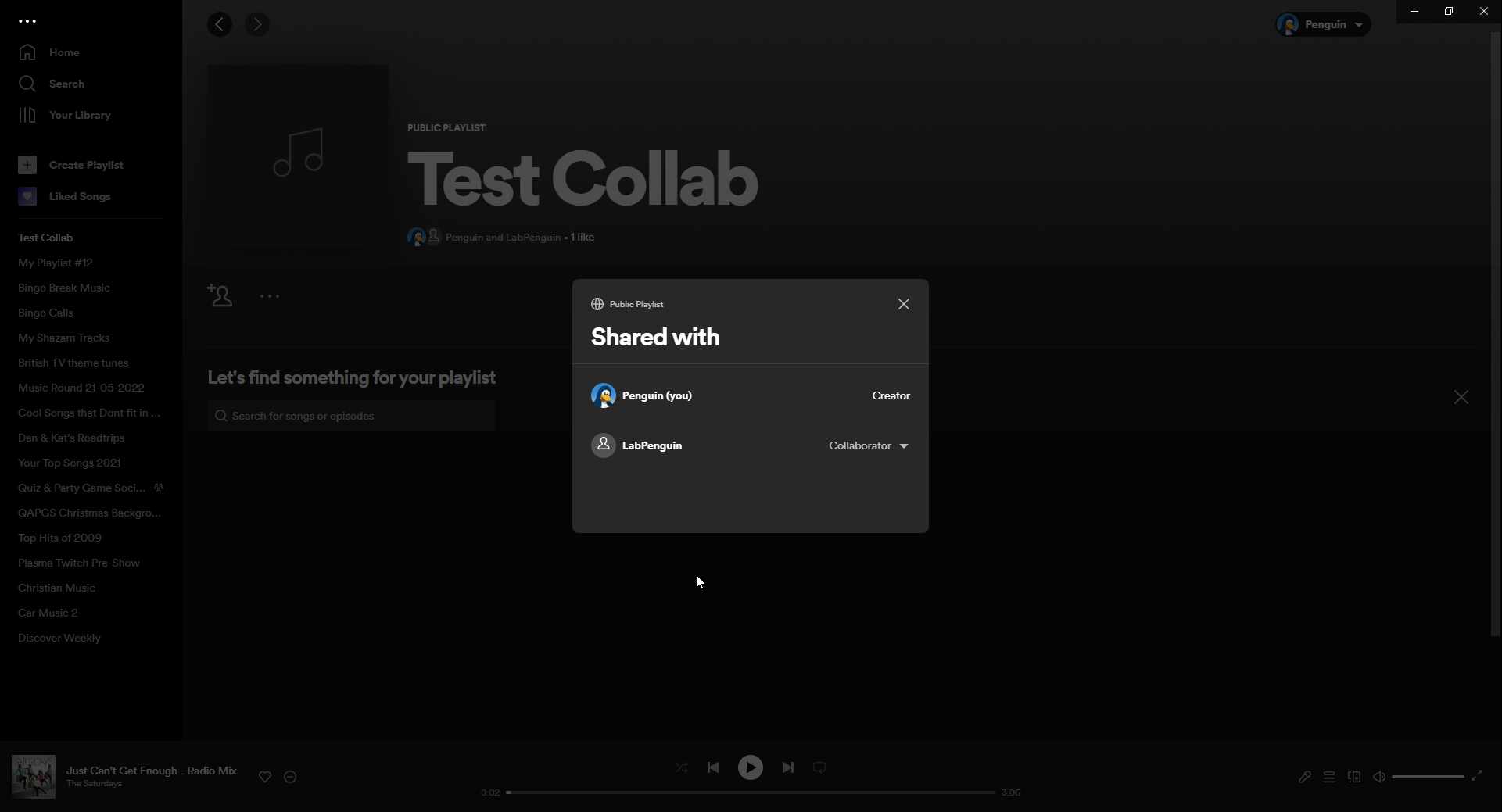
I have made a video showcasing the issue.
My left window is my main account using the Desktop version of Spotify, and the second window is my alternative account which I want to add as a collaborator using Firefox.
Steps to reproduce:
- Main account on Spotify desktop app (left window), alt account on browser (However, this doesn't work with any configuration of browser/browser, app/app or desktop/mobile that I can find) (Right window)
- Create new playlist on main account (left window)
- Use the Add Collaborator or the Invite Collaborators button in the menu
- Paste link onto right window / alt account
- Playlist can now be viewed, but songs cannot be added to the playlist. The playlist does not appear on the user's list of playlists (Not shown in the video, but the collab feature still doesn't work even if the heart icon is pressed to add the playlist to the list)
- Attempt to add a song to the playlist, and it doesn't show in the list of available playlists when attempting to add the song.
- Not shown in the video, but when going back to the playlist on my main account (Desktop app), my alt account will show in the list of collaborators.
Hey @Penguinexpert1,
Thanks for the reply and the screen recording.
It is currently not possible to add songs to a playlist you don't own through the web player, even if you are a collaborator.
Could you try the other way around? Send the link from the web player and open it in the desktop app. A video of this not working will be very helpful.
Keep us posted,
Cheers!
Hi Dian,
Unfortunately this is not possible as it is not possible to generate a collaboration link from the Spotify web player.
I have found that when on the same PC, using Bluestacks Android Emulator, the collaboration links work fine. However, when using my mobile (Samsung A52s 5G, Spotify fully updated V8.7.44.968) the playlist doesn't show and I am unable to add songs.
I have made another video showing the link sent from Spotify Desktop, via Facebook Messenger, to Android Mobile. The playlist is called "Test" and should be from Penguin - Its not the one called "Test" on the video, as that was from the alt account and not my main.
As you can see when the link is clicked on, Spotify just goes to the home screen, and doesn't actually interact with the playlist
Hey @Penguinexpert1,
It seems your alt account has been successfully added as a Collaborator.
Despite this, you will not be able to make edits to the playlist, while you're logged into your alt account from the Web Player because of functionality restrictions.
In this case, we'd suggest logging into your alt account from the desktop app, while you're already added as a Collaborator and trying to make any changes from there.
Let us know how it goes!
Thanks.

Simply does not work at all, Android phone latest Spotify update.
I generate the Invite Collab link and share it through Messenger, Whatsapp, text,... Nothing works. When someone clicks that link they just get the Spotify app homepage.
EDIT: Why do you guys keep asking for videos, it literally does everything as expected but when someone clicks the link it opens their Spotify app and that's it. Literally just the Spotify home screen when you would start the app by clicking it open on Android. My device is a Huawei P30, the invitees have Motorola Edge, Samsung A53, Xiaomi 11 lite, Samsung Galaxy A51 and a Samsung Galaxy A40.
Honestly it's a bit pathetic that the devs cannot recreate the issue. I'm wondering if they actually tested anything at all.

I had problems to add songs to collaborative playlists as well. Above someone mentioned that each link is unique and can be used by a single person only. This is not clear from the UI though.
What happens most of the time is: someone creates a playlist, copies the share link and paste it in a group chat in Whatsapp or Slack or something like that.
One person clicks the link and is now a collaborator and can add songs. Others can use the same link to find the playlist, but can't add songs.
I clicked such a "second hand" link today and added the playlist to my account. I was unable to add songs. Then I asked the creator of the playlist to create a unique link for me. I then clicked that link, but nothing changed - I was taken to the playlist but couldn't add songs.
Then I left the playlist, removed the playlist from my account and used that same unique link again to go to the playlist. Now I was able to collaborate and add songs. So something is really wrong in the UX flow here, Spotify should redesign this.
For example the share link should clearly mention something like "Create a unique share link for one person" and when a second person clicks the link a message should appear that the link already has been used and you need a unique link from the playlist creator. Also, when you added the playlist to your account and then receive a unique link that link should still work, or should mention that you need to remove the playlist from your account before using that link.
TL;DR:
Until Spotify fixes the UX flow the solution is simple:
Create a unique share link for each person you want to make a collaborator. So do not share a share link in a group chat.
If y ou are the person who just received a new link made for you personally, make sure you first unfollow the playlist and completely remove it from your account before using the link.

What helped me was having the invitee open the collaborator link through the web app, hearting the playlist and then right clicking on a song in the playlist through the web app and pressing "Open in Desktop app". Crazy poo poo UX
also the playlist was public, you can make it public on the desktop app. if this doesnt work try also sending the link from the phone.
also you need to restart the desktop app after doing everything
I had problems to add songs to collaborative playlists as well. Above someone mentioned that each link is unique and can be used by a single person only. This is not clear from the UI though.
What happens most of the time is: someone creates a playlist, copies the share link and paste it in a group chat in Whatsapp or Slack or something like that.
One person clicks the link and is now a collaborator and can add songs. Others can use the same link to find the playlist, but can't add songs.
I clicked such a "second hand" link today and added the playlist to my account. I was unable to add songs. Then I asked the creator of the playlist to create a unique link for me. I then clicked that link, but nothing changed - I was taken to the playlist but couldn't add songs.
Then I left the playlist, removed the playlist from my account and used that same unique link again to go to the playlist. Now I was able to collaborate and add songs. So something is really wrong in the UX flow here, Spotify should redesign this.
For example the share link should clearly mention something like "Create a unique share link for one person" and when a second person clicks the link a message should appear that the link already has been used and you need a unique link from the playlist creator. Also, when you added the playlist to your account and then receive a unique link that link should still work, or should mention that you need to remove the playlist from your account before using that link.
TL;DR:
Until Spotify fixes the UX flow the solution is simple:
Create a unique share link for each person you want to make a collaborator. So do not share a share link in a group chat.
If y ou are the person who just received a new link made for you personally, make sure you first unfollow the playlist and completely remove it from your account before using the link.