Cannot drag songs to top of the queue

Plan
Premium
Country
Uruguay
Device
PC
Operating System
Windows 10
My Question or Issue
I've been unable to drag a song to the top of the queue ever since the Spotify revamp. If I drag the song to the top of the screen, it does not auto scroll. Dragging songs down the queue works, just not up the queue.
This thread includes a GIF clearly illustrating the issue.
As per this thread the issue should've been fixed around December 2021, but it's not. I've tried versions 1.1.74.631, 1.1.78.765, 1.1.84.716 and 1.1.85.895 (the current one at time of writing) and it's still broken in all of them.
Note that I'm talking about THE QUEUE LIST. Dragging upwards does scroll all right in every other playlist.
Accepted answers
All comments

Hey there @slug_camargo,
Thanks for reaching out about this here in the Community.
Could you let us know which troubleshooting steps you've already tried? That way we can avoid any repeating steps.
On another note, could you let us know the exact make/model and Spotify version of your device?
Keep us posted.
I did a clean install of the latest version (1.1.85.895) and I tried the web player in Firefox and Chrome, and the bug is present in all of those places, across two different PCs.
I also spoke to a handful of people in these very forums and they're all getting the same bug. I'm guessing you can confirm it by giving the Windows desktop version (or the web player) a try yourself.
I assume not enough people care about this enough to make much of a fuss, but it seems to be a universal issue.
Hi @slug_camargo,
Thanks for your reply.
We've passed this info to the right team to be looked into. We'll keep you posted on any updates on the matter here, as soon as there are any.
If you have any questions, the Community is always here for you.

Plan
Premium
Country
US
Device
PC
Operating System
Windows 10
My Question or Issues
When I drag a song to the top of the screen, the screen does not scroll up. Because of this, I cannot move my songs up more than one page at a time. I tried both reinstalling and updating Spotify but the issues persist.

My Issue:
Trying to drag the song or multiple songs up the play list and it will not scroll up for manually orginising playlists. This has been fustrating as when I try and drag a song up the playlists will not scroll.
Version:
Spotify for Windows
1.1.89.862.g94554d2
Plan:
Free
Country:
UK
Device:
PC
Operating System:
Windows

I am having this same issue in the Windows Desktop app today. Please fix.

Plan
Free/Premium
Country
Device
Windows 11 Desktop
My Question or Issue
Using Spotify for Windows 1.1.89.862.g94554d24, Spotify is no longer scrolling up when you drag and drop track(s) to the upper portion/limit of the playlist display to be able to move songs to the top/middle/other non-visible portion of the playlist. For some reason the bottom edge is still working and gets you scrolling down wards when you drag selected songs to the bottom edge. Just the top edge is malfunctioning.
Sorry duplicate of:
The Desktop app doesn't scroll up when dragging so... - The Spotify Community
You may delete
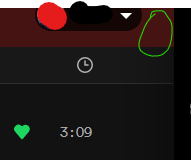
Occurring for me too. I found a spot (circled in green, next to the profile menu) where you can drag and drop and get it to scroll..but the scroll rate is very very slow lol
Using Spotify for Windows 1.1.89.862.g94554d24, Spotify is no longer scrolling up when you drag and drop track(s) to the upper portion/limit of the playlist display to be able to move songs to the top/middle/other non-visible portion of the playlist. For some reason the bottom edge is still working and gets you scrolling down wards when you drag selected songs to the bottom edge. Just the top edge is malfunctioning.

Hi folks,
Thanks for sharing this extensive description with us.
Sorry to hear that you're having such an experience with the app.
We'd recommend running a clean reinstall of the app. Please follow the steps from this Spotify Guide exactly, as this will assure that all app data is cleared completely, before reinstalling. If that doesn't help, let us know if this is happening only with specific playlists or any playlist at all.
Keep us posted on how you get on with this.
Cheers.
I'm sorry, you're making a mess of things. This topic was about A BUG IN THE QUEUE LIST. Now you're merging a bunch of other threads (because I guess now it's also happening in other playlists), and you're rolling back to giving generic housekeeping advice.
It's a bug.
We've already been through this.
There is no clean reinstall, no cache flushing, no trying different versions.
It's a bug in the program.
I happens in the desktop and web versions.
This matter is not only not moving forward, it's actively going backwards.

Hey everyone,
Our tech folks have made some changes backstage, so this should now be fixed - just make sure you're running the latest version of Spotify.
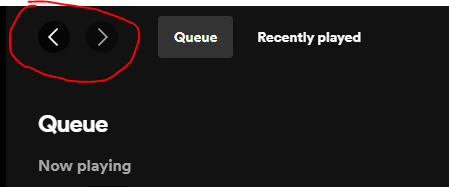
You can move the track's position up both in the queue and in playlists by dragging it and hovering over the arrow keys < > in the top left corner.
Alternatively, you can cut the track by pressing Ctrl + X (Cmd + X for Mac users), then navigate to track above the desired position using the Up and Down arrow keys and paste it there. This, however, is only possible playlists - cutting a track from the queue would cause it to be removed directly.
Cheers!

im still having this issue.
slug_camargo is right you're making a mess...I couldn't even find this thread because everything that existed yesterday is now gone.
Yordan it is NOT fixed for playlists!
Today I noticed it can only scroll up when hovering within the user profile button/drop down, but no where else on the screen...

I am having this same problem which makes it impossible to manually arrange large playlists. For me this first appeared July 11, 2022.
I just tested the web version and dragging upwards works for playslists and queue, which is great.
You can't drag downwards, however; so I guess we're halfway there. I'm pretty sure dragging downwards used to work just a few days ago, so I don't even know what's going on here.
As much as I was expecting this fix, I'm frankly gonna hold off on updating the desktop version for now. If this thread is anything to go by, the thing looks undercooked to say the least.
You guys really need to get better at testing fixes and features. We're paying customers, you can't possibly expect us to be your QA department.

While this problem was addressed for a time, it is now back.
The thread referencing this problem has been locked so it is not possible to reply there.
Version info:
Spotify for Windows
1.1.89.862.g94554d24

Plan
Free
Country
USA
Device
PC
Operating System
Windows 10
My Question or Issue
When I take a song and try to move it up my playlist, it does not scroll. It does scroll, however, for moving songs down. I saw someone ask this question already, but it said that this problem was fixed (around a year ago).
Still not working for me. Using the Windows app I can only drag and get the page to start scrolling if I move my mouse to the top edge of the profile menu only... Scrolling down still works fine for me.
Using
Spotify for Windows
1.1.89.862.g94554d24
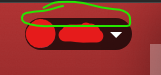
The up is only working in Limited Areas on desktop, but the down is now broken altogether. This bug has happened serveral times in the last two years and every time its been fixed. It breaks next version after. Can we just have some sort of trigger that happens when you drag a song it has a areas hightlighted both above and below and depedning which one it goes over it either goes up or down?
Version:
Spotify for Windows
1.1.89.862.g94554d24
I have not tried anything yet except for closing the app and reopening it (did not fix).
How would I check the model of my Spotify?
This works! When it starts to scroll there, I move my cursor up a little, and it goes faster. Thank you!!

Same here... it started happening to me today (7/14/2022). It has never happened before. When i try to move songs down, the scroll does work, however it does not scroll upwards...

I echoe all the complaints above! How can Spotify label the tread "Solved"?? The glitch blatantly persists. An yes, we are paying users! I can`t believe this is a unsurmountable challenge for Spotify techies. It seems Spotify is just not giving a damn. Very disappointing. That`s why I never ceased to use my iTunes, where I own what I paid for, and now Apple Music, much better in delivering the goods.
No it`s not!!!
@edamferr wrote:I echoe all the complaints above! How can Spotify label the tread "Solved"?? The glitch blatantly persists. An yes, we are paying users! I can`t believe this is a unsurmountable challenge for Spotify techies. It seems Spotify is just not giving a damn. Very disappointing. That`s why I never ceased to use my iTunes, where I own what I paid for, and now Apple Music, much better in delivering the goods.
I believe that this is a temperory fix till they can fiind a long term solution.
Hi folks,
Good news. Our tech wizards have done their magic backstage and this should now be fixed.
Please make sure you're running the latest app version available. You can download it from here.
Cheers!
Latest version downloaded and installed, logged out and in again, Windows restarted: glitch persists!
Why you guys keep on claiming it has?

I am also having the same issue even after uninstalling and reinstalling "the latest version" as suggested above so clearly that is not the solution. Sort of appalling such a basic feature is not working. Any help would be greatly appreciated.

This is still broken. I've done fresh installs of the latest version of Spotify for Windows (1.1.89.862.g94554d24) and the problem still exists. This is unacceptable. It makes building or modifying playlists impossibly difficult.
Can we go back to an earlier version of Spotify until this is fixed?
Hey everyone,
Our tech folks have made some changes backstage, so this should now be fixed - just make sure you're running the latest version of Spotify.
You can move the track's position up both in the queue and in playlists by dragging it and hovering over the arrow keys < > in the top left corner.
Alternatively, you can cut the track by pressing Ctrl + X (Cmd + X for Mac users), then navigate to track above the desired position using the Up and Down arrow keys and paste it there. This, however, is only possible playlists - cutting a track from the queue would cause it to be removed directly.
Cheers!