Spotfy Connect not picking up all Sonos Devices

Plan
Free/Premium
Country
Device
iPhone, Android adn Windows devices
Operating System
(iOS 10, Android Oreo, Windows 10,etc.)
My Question or Issue
I am unable to connect to one of my Sonos rooms with any devices in Spotify but I can play through the Sonos app. I have tried all of the following:
- Restart the Spotify app + updating it
- Closing other apps you’re not using
- Restart your devices
- Restart your WiFi
Accepted answers
All comments
Hi there, I have tried all the suggested fixes except a different wifi network as I donlt have availablity for that. This is a shot of what I can see:
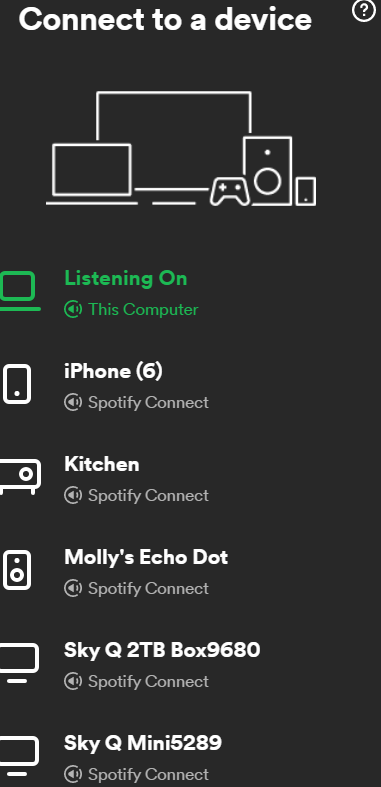

Hi @silverfano!
Could you try linking another account to Sonos temporarily (a friend's or a relative's would do) to see if they'd experience the same behavior? It's worth checking if your Sonos devices would appear in the Connect picker on the Web Player, if you haven't already.
Make sure also that your Sonos' software and firmware are up to date. If you use any VPN services, try disabling them temporarily as well to see if that does the trick.
Keep us posted on this. Cheers!
Hi there,
So the Sonos devices don't appear in the Connect picker on the Web Player, the Sonos' software and firmware are up to date and we don't use VPN services. I can't currently use another account. As i think I said before, I can stream Spotify through the missing devices through the Sonos app, so the issue doesn't appear to be with Sonos.
A

Same here,
IT was working Last week smoothly

Hey @silverfano,
Welcome to the Community and thanks for reaching out to us.
Great troubleshooting so far!
Can you confirm that you followed the steps that's provided thein this article when trying to connect Sonos & Spotify?
We'd also recommend to try reinstalling Spotify with the steps here. This is more thorough than a regular reinstall and can be helpful to get rid of any cache that might be causing issues. Also, it tends to solve issues with the app's performance.
If the above mentioned doesn't do the trick, can you send us a screenshot(or quick video) of what you see, so we can get a better understanding?
We'll be on the lookout for your reply.