"Now my friends can connect..." message keeps showing up; how to get rid of it?

Plan
Premium
Country
United States
Device
Samsung Galaxy S23Ultra
Operating System
Android
My Question or Issue
I've got a new phone and installed Spotify on it. Every time I physically leave my home wi-fi network (go somewhere and listen to Spotify in the car) then return home, the Spotify app shows me a full page notice that "My friends can connect to my speaker". There is an option "Got It" at the bottom, and no other action can be taken. I select "Got It" to clear it out. But if I leave the house again and come back, the notice returns.
So, I "Get It". Now I want this message to stop reminding me, but I can't see how to control this. Any assistance would be greatly appreciated.
Just for reference, on my previous phone (Samsung Galaxy S21 Ultra) this never happened. I'm not sure why this install on this phone has different behavior?
Accepted answers
All comments

Hey @NotDJK,
Thanks for reaching out.
In order to disable this feature, simply connect to the external speaker via the Connect menu and toggle off "Multiple people can join and control this speaker" as shown in the screenshot below.
We hope this helps.
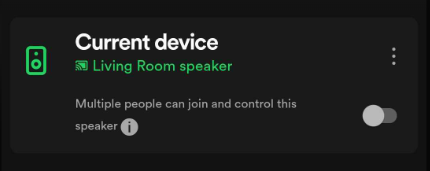
Thank you for the suggestion. I've followed these instructions and will watch to see the next time(s) I leave and return to my wifi coverage if I get the reminders again.
I still think this is a poor app design and that a notification of any kind, once confirmed by the user, shouldn't keep reappearing. Assuming I WANTED to use this feature (and leave the multiple people option enabled) I certainly wouldn't need the app keep reminding me everytime I connect to my wifi. I hope this gets addressed soon.

Hi @NotDJK,
Thanks for getting back to us.
Take your time to test this and let us know how it goes.
On another note, we appreciate you taking the time to share your feedback with us and will make sure to pass it onto the right team, as we always strive to improve your experience.
Cheers 🙂