Release Radar playlist not listed in saved/liked playlists on Web player

I liked my Release Radar for easy access every week, but I noticed on the Web player, this playlist does not show up in my list of liked/saved playlists. It shows up in My Library on mobile (Android), so it definitely is added. But on Firefox v110.0.1, it isn't listed at all.
It's weird because Discover Weekly is another Spotify curated playlist I've saved that is updated weekly, but unlike Release Radar, it shows up in My Library just fine.
EDIT: The solution I marked is the last thing I tried before my issue was resolved, but I'm not sure if it was the exact fix. If anyone else is having the same problem, see this reply for more details.
Accepted answers
All comments

Plan
Premium
Country
Device
(Samsung Android, Asus Windows)
Operating System
(Android 10, Windows 10)
My Question or Issue
Hi,
After the most recent update the Release Radar playlist seems to have disappeared in my library. It doesn't show up on either my phone, or desktop.
Is the playlist discontinued? is this a known issue? re-installing / logout/login didn't change anything. And it seems a back-end issue as it is on both my devices?
would like to see a response!
Kind Regards,

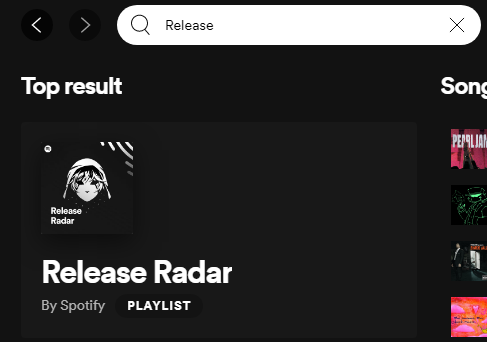
You can still find it by using the search feature. Spotify has removed the "Made for you" as a permanent area in both the desktop and mobile apps.
Desktop app:
I was looking for it in my library, as discover weekly was also there, couldn't find it.
now I see I liked the playlist discover weekly, but not release radar..
thanks!

Hey there! I'm just wondering why Spotify would remove the 'Made For You' section and make Release Radar so difficult to find? It's super important for artists releasing new music and part of what makes Spotify great for listeners who relish that fresh new discovery feeling. Is there some other feature that does this better?

Hey there folks,
Just umping in here to shed some light on the situation.
You can still find the Made for You hub with all your personalized Mixes as well as the Discover Weekly and Release Radar under Search on desktop and mobile:
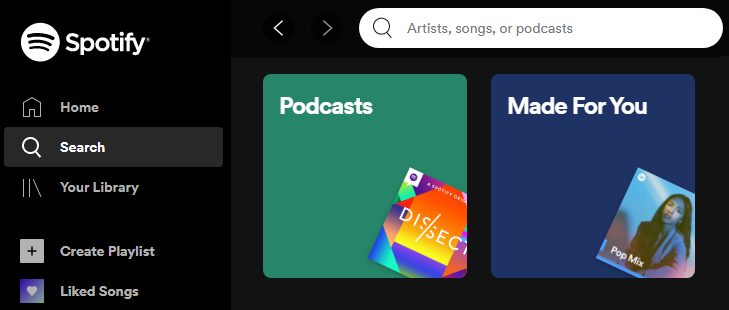
If you're following the playlist it will also show up in Your Library.
In case you'd like to see the Made for You category added to the side menu or an option to customize your Home screen and pin favorite categories for easy access, you can check out some of the related ideas we think you might be interested in and add your vote to them to show your support:
- [Desktop][Browse] Add bookmark for "Made for you" section
- [All Platforms] Customize Start Screen
- [All Platforms][Search] Allow users to customize the “Your Top Genres” list in the search tab
Hope you'll find this info useful.

Looks like Release Radar is gone for good now? I add it saved in a folder and now Spotify is saying the playlist was deleted. This was the last feature that made me keep a subscribtion.

Hey @rndbblnn,
Thanks for reaching out.
The Release Radar playlist should be available in the Search section under Discover new music. If you don't see it there, try searching for it through the search bar and let us know if you find it.
Keep us posted!
Yeah it is back now, thanks

Hi mangopit, so it sounds like there may be a technical issue with the way Spotify is syncing your Release Radar playlist across different platforms. Here are a few things you can try to troubleshoot the issue:
Refresh Your Library: In the Spotify web player, click on "Your Library" and then click the "Refresh" icon next to the "Liked Songs" playlist. This may trigger Spotify to re-sync your library and display the Release Radar playlist.
Clear Your Browser Cache: Sometimes, cached data in your browser can interfere with how Spotify displays your library. Try clearing your browser cache and then re-loading Spotify to see if the Release Radar playlist shows up.
Log Out and Log Back In: Another way to refresh your library is to log out of Spotify and then log back in. This may trigger a new sync of your library and display the Release Radar playlist.
Hope to of helped,
-Prague the Dog
Thanks for the reply. Unfortunately, none of these things worked for me. Also, I don't think I have a "Refresh" icon as you've described, unless I've missed it.
I just checked: Release Radar does show up for me as a liked playlist on the Windows desktop app. Also, it continues to not show up on the Web player on another computer with the Firefox browser, nor does it show up on Google Chrome. This seems to be a web player-exclusive issue.

Hey @mangopit,
Thank you for your post and for trying the troubleshooting methods that @Prague suggested 🙂
We've tried reproducing this but we were not able to, so we'd suggest checking for a pending update on your browsers.
1. Steps for Google Chrome - > Go to the three dot menu > Settings > About Chrome. Chrome will check for updates
automatically. If an update is available, it will be downloaded.
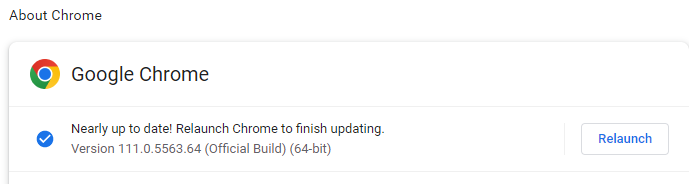
2. Steps for Mozilla Firefox - > Click on the menu button > select Help > About Firefox. Firefox will check for updates automatically. If an update is available, it will be downloaded.
It's important to relaunch your browsers if the update is installed, even better - try restarting your computer.
On another note, if a friend or a family member has a Spotify account - it'll be great to ask them to like their Release radar playlist, then log in on your computer and test if they'll be able to see it in the Web Player.
Hope this helps. Let us know how it goes.
Thanks for the reply. I'm afraid the issue is still there.
Firefox was updated on both of the computers I'm using.
I'm unable to let someone log in directly on either computer, but my friends haven't been able to reproduce the issue on their own computers. Seeing as though the two computers I've been using are two different models from different manufacturers, I doubt that it's computer-specific and maybe instead has something to do with my account alone.
As an aside, I've noticed with my Release Radar playlist that instead of saying "Made for mangopit", it says "Made for" + a string of letters and numbers that links to my mangopit profile. I haven't included it screenshots because I wasn't sure if that was sensitive information. Release Radar isn't the only playlist of mine that shows that, so I'm unsure how relevant that is in this case, but I thought it might be good to mention.
For now, I've un-liked Release Radar and I will see next Friday after the playlist has regenerated if I can successfully like it and see it listed in my saved playlists. Thanks all for your help so far 🙂
Hey @mangopit,
Thanks for your reply.
The "Made for" section does indeed show the Spotify-generated username instead of the Profile name for us as well but considering that we can see Release Radar in the list of saved playlists on the web player, we doubt that the two issues are related.
In the meantime, please also ask someone to save your Release Radar playlist (you can share a link to it) in their account, so we can further narrow down the possible cause of this behavior.
Looking forward to your response.
My friends were successfully able to access my Release Radar playlist, like it, and see it in their respective libraries, on both mobile and the Web Player.
https://open.spotify.com/playlist/37i9dQZEVXbi0AlrZ2T0e6?si=25603131945c406a
Interesting addition -- I had a friend send me their Release Radar playlist and I tried saving it. Again, it would not show up in My Library on the Web Player; on mobile, it showed up as expected.
Hey @mangopit,
Thanks for getting back to us.
In this case, we'd recommend logging out and then logging back but this time - two times in a row. As @Prague mentioned - this forces a sync between the account and your device.
If the issue still persists, we'd suggest that you try with a different connection to see if it pops up.
Hope this does the trick for you. Keep us posted!
Happy Friday~ Not-so-happy to report that waiting for the Release Radar playlist to regenerate before saving it did not solve my problem. Logging out and in twice also didn't work for me. I have yet to try logging in and out twice on a different connection, so I'll report back once I try that.
Sad to report logging out and in twice didn't work for me on two different connections 😞

Hey @mangopit,
Thanks for keeping us in the loop.
Based on what you mentioned, it's sounds like the issue is account-related. In this case, would you mind creating a new account to check if you can replicate this? Keep in mind that you need to use it for some time so the algorithm can create the Made for you playlists.
We'll be on the lookout.
I have an old account that I haven't touched in 3 years. Is it okay if I use that for replicating the issue and generating the Made for you playlists, or is a brand new account needed? I'd have to make a completely new email for the latter.

I have the same issue, I cannot find my "Release Radar" playlist, I also tried search bar and nothing, it disappeared completely from my Spotify. Can you help please?

Hey there,
Thanks for posting in the Community.
We'll need the following info from anyone, who can't find the Release Radar:
- Where are you looking for the Release Radar, the web player, the mobile or desktop app?
- If you can't find it on the mobile/desktop app, the version of the app.
- Are user in your vicinity able to find the release radar?
- Are you able to find it with an old account on the same device?
Keep us posted,
Cheers!
To clarify to anyone new in the chain, the original issue isn't that I can't find the Release Radar, but that it's not shown in My Library on the Web Player when I like/save it. On that note...
I'm still listening on my old account (woohoojazelyn) and waiting for Release Radar to be generated, but just to experiment, I tried saving my current mangopit Release Radar on that old account, and strangely, it would also not show up in my woohoojazelyn library when I liked it. But on woohoojazelyn, I am able to save and see other playlists from my mangopit account. So that makes me wonder if this truly is an account-specific issue.
My computer setup is the same as when I first had this issue. The friends who I asked to save and see my Release Radar live quite far from me (different states). I can probably ask someone who lives 10 minutes away to try to replicate the issue for me, if it's somehow a regional issue?
Any thoughts or ideas with that?
Hey @mangopit,
Thanks for this info.
The behavior you're describing is indeed strange and points to an issue with this specific playlist and not your account. Can you please unlike it and then save it again from Search - Made for you - Discover new music?
Cheers,
Hello, I did this on my mangopit account on Web Player and I did not see the saved playlist in My Library. Just to cover all bases, I'll see if this issue is something a friend in the area can replicate.
My friend who lives close by was able to save and see my Release Radar on Web Player—probably not a regional thing. Didn't think it was, but it was worth a shot :')



Thanks for double-checking @mangopit,
one more question, in your screenshots it seems like the list doesn't appear in a folder you've created for your recommendations.
Just to be sure, when you open your whole Library does it pop up anywhere in the list of liked playlists?
Do you also have any other issues with syncing any content between platforms like for example using our Connect feature?
We appreciate the time you're putting into investing this, keep us posted.
New development this Friday morning: I can finally see my Release Radar listed in My Library on Web Player!
I'm unsure what exactly fixed it. The playlist was already liked when I logged in to Web Player this morning, but I followed @MihailY 's advice of accessing Release Radar through Search -> Made For You, and I noticed that the playlist was visible in my list of saved playlists. The fix was probably a combination of those steps, plus waiting for the playlist to regenerate on Friday.
To answer @Elena 's questions, I was checking the entire library list before, and I was not having problems with Connect.
As an aside, I notice the playlist no longer says "Made for [string of letters and numbers]", but instead says "Made for mangopit", as expected.
If anyone knows what exactly fixed the issue from my descriptions, let me know 🙂


Hey @mangopit,
Thanks for this info.
The behavior you're describing is indeed strange and points to an issue with this specific playlist and not your account. Can you please unlike it and then save it again from Search - Made for you - Discover new music?
Cheers,