Let the user fully decide the order of the playlists (on PC)

I have 100+ playlists. I do not know the name of them all but I had them sorted so I knew how to find what I was to listen to.
Now I cannot have my own sorting any longer, as only the ones in the picture are possible to chose.
There should be an "own order" or "[Username] order" alternative for the persons like me that are dependent on such. I have been a user for many year but as it is now it makes the app almost unusable.
Thanks for many years of enjoyment and a (usually) fantastic app and user experience. 🙂
Comments

It's 2023, why doesn't Spotify have this feature already?!

100+ is a lot

I think your problem might be slightly better if you permanently turn on the filter of "Playlists" because that let's you sort by "Custom order" - at least that's the only way I'm surviving right now lol
I also have an UNGODLY amount of playlists so this new update is doing me all sorts of bad :'))) ♥

I absolutely hate this new desktop update for the same reasons, I have everything custom organised and now it's so messy

AND KEEP IT CONSISTENT!!! When you back out of a page and come back into it, it should keep YOUR SETTING instead of making you change it every single time.

Updated on 2023-06-12
Hey! It looks like your suggestion is growing up fast and it's amazing! We are going to change its status to 'Good Suggestion' now and we hope it continues being supported by more and more users.
Thanks again for your suggestion. We really appreciate it 🙂
More information about how the Spotify Idea Exchange works can be found here.



Updated on 2023-06-16
Hi folks,
We're closing this Idea, as this is something you can already do. In Your Library you need to select the Playlists button and choose the "Custom Order" sorting order from the drop down menu. This will allow you to re-arrange your playlist and folders.
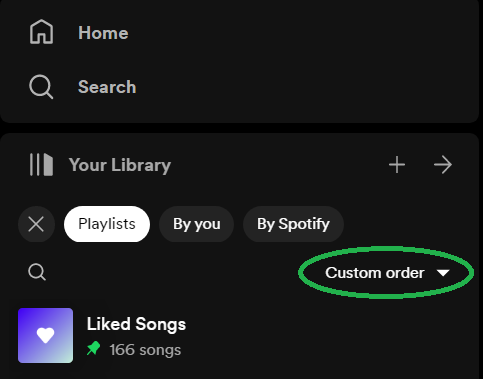
You're welcome to leave your feedback on the new Your Library design - here.
Hope this helps.
Updated on 2023-05-14
Hello and thanks for submitting your idea to the Idea Exchange!
We've gone ahead and marked this as a new suggestion. Spotify Staff will look into this idea once it reaches the necessary amount of votes.
More info on how your feedback reaches Spotify via the Idea Exchange can be found here.
Cheers!