Play random songs during Liked playlist listening

Plan
Premium
Country
Poland
Device
OnePlus 11
Operating System
Android 13
My Question or Issue
During Liked songs playlist listening recently can even see on the phone the non-liked songs time to time being played. It seems to be a songs from top proposals (non-liked) but very random. Recently it happens much much often which is very annoying 😕
Accepted answers
All comments

Hey @lszramuk,
Sounds like you've toggled on the Enhance / Smart Shuffle feature for your Liked Songs. Both features add song recommendations to the current playlist. Follow the steps below to disable them:
- Enhance: tap the Enhanced button.
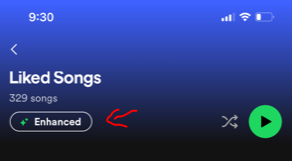
- Smart Shuffle: tap the Shuffle button and switch to regular play/shuffle.
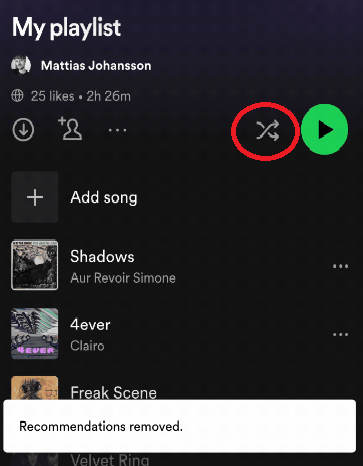
Hope this clears things up. Cheers!
Hmm, what if cannot see any Enhanced button? 🙂 Have the download icon only under the Liked Songs title.

Hey @lszramuk,
Thanks for your reply and for the info shared.
Then, it's possible you have the smart shuffle feature enabled on your Liked Songs playlist. It looks like this when activated:

Keep in mind that Smart Shuffle replaced the Enhance feature recently. You can check this out and tell us how it goes.
On another note, it's possible you have some other playlist or songs in the queue ready to start playing. So, we'd recommend you check if there's something in the queue to play next. If yes, you can clear the queue, you first have to locate it by following the steps in this article. Then you can hit the Clear queue button to see if you notice any difference.
If none of the above does the trick, can you share with us a video recording of what you're seeing on your side? er. You can attach the video recording in your next reply in mp4 format, or you can also upload it to YouTube or Google drive and make it public, so we can visualize it.
Keep us in the loop!

Plan
Premium
Country
Australia
Device
ASUS Zenfone 10
Operating System
Android 14
My Question or Issue
Hey @lszramuk,
Thanks for your reply and for the info shared.
Then, it's possible you have the smart shuffle feature enabled on your Liked Songs playlist. It looks like this when activated:
Keep in mind that Smart Shuffle replaced the Enhance feature recently. You can check this out and tell us how it goes.
On another note, it's possible you have some other playlist or songs in the queue ready to start playing. So, we'd recommend you check if there's something in the queue to play next. If yes, you can clear the queue, you first have to locate it by following the steps in this article. Then you can hit the Clear queue button to see if you notice any difference.
If none of the above does the trick, can you share with us a video recording of what you're seeing on your side? er. You can attach the video recording in your next reply in mp4 format, or you can also upload it to YouTube or Google drive and make it public, so we can visualize it.
Keep us in the loop!