Numan one Internetradio Crashes (maybe when Loading Spotify Connect Cover)

Hey guys! First im German, sorry for my English!
Im Using a Numan One 2.1 Internetradio. When i try Spotify Connect, the Radio works for about 15-20Seconds. Than it Restarts. It wont Dislplay the Cover of the Song. When im in the Menu and Scrolling around, the Radio works normaly. When i go back to the Spotify Connect Display, it Crashes again about 15 Seconds..
Any Ideas? The Brand is no more very actually..
Accepted answers
All comments
Very Interesting..
I Hope that there will be a fix or Something...its pretty anoying..

Good to hear I'm not alone!
Spotify has continually crashed my Numan Unison player, after 30 seconds or so. Last week was fine - now has happened dozens of times over different days this week.
Other functions, such as internet radio are completely fine. Streaming Spotify to a laptop (on the same network) is fine.
Certainly sounds like a problem with Spotify, which began in a possible upgrade to their systems several days ago.

Hello,
since two days I'm experiencing the same Problem when using Spotify-Connect on several Internetradios and Smart-Devices with a frontier-silicon chipset (Undok App). My Devices are a Grundig DTR6000 and a Block MHF 900.
Spotify Streaming works for about 20 to 40 Seconds before the Device reboots. When accessing a Menu Option (e.g. system settings) the Streaming keeps working. As soon as I leave the Menu the issue persists. Maybe frontier needs to check a lot of Devices...
This is the specific Spotify Version on my DTR 6000. You can check yours in the System Settings -> Info

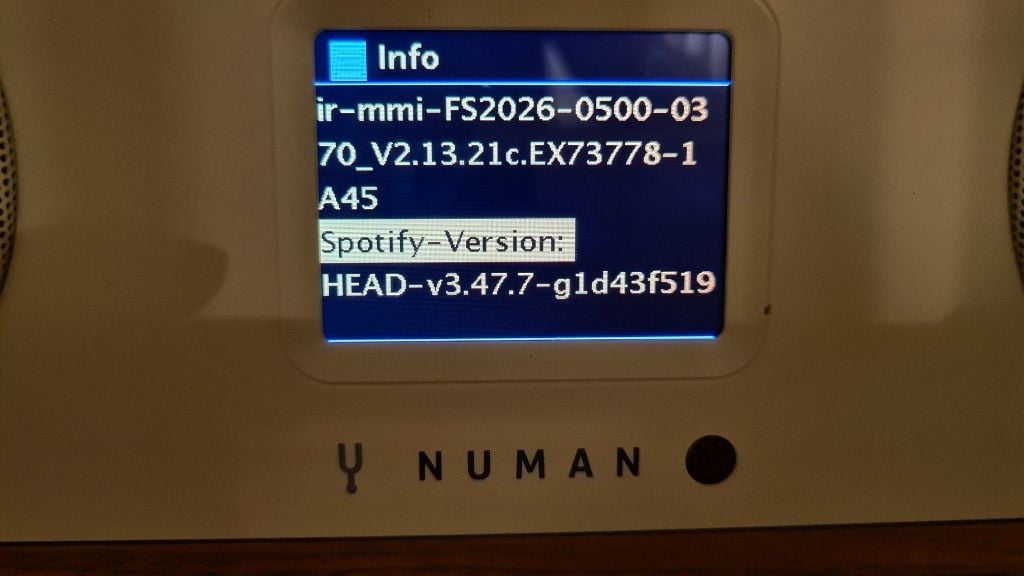
Same problem with a Numan Two

Plan: Premium
Country: France
Device: Argon Stream 3 MK2
My Question or Issue
Since a few days my Argon Stream 3 MK2 reboots after 20 seconds when playing songs via Spotify Connect. It has been working flawlessly for multiple years, no updates of software or firmware were performed.
I was told by the seller of the Argon it's a Spotify issue.
Is anybody having the same issue?
Regards, Jérôme

I have the same issue with my Numan Two
Spotify crashes after 20-40 secs
Bluetooth streaming and Internet Radio work just fine.
Highly appreciate a fix for this from @Spotify
Please take a look at this from Spotify Forum. 4 people have reported the same problem with Numan devices today, and 2 with Grundig music players. The devices have not changed, something has changed with Spotify...?
Today 4 people have reported the same problem with Numan devices, 2 with Grundig music players and one Argon Stream music player. The devices have not changed, something has changed with Spotify - possibly the way it delivers album art. I'm discussing this issue with @SpotifyCares on X - you might wish to do the same. https://twitter.com/mobailey247/status/1705228019898499499
Yes the issue is already discussed in the Thread mobailey provided above, on Twitter and on Reddit. Block Audio Devices have the same Problem. It has definetly Something to do with frontier silicon Chipsets and the way Spotify is providing the Album Cover.
Seems like all devices with Spotify version "release-esdk-3.32a-v3.32.26-gbba0b20d" are experiencing this issue...
At the request of Spotify on X, I created two videos of the problem. Both devices use the same Spotify version (release-esdk-3.32a-v3.32.26-gbba0b20d) but different Frontier firmwares. I asked relatives who also use Numan, Technisat and Medion devices. The devices with an older Spotify version (release-esdk-2.8d-v2.8.71-g9919e10f) had no problems, but with the Numan Unison it is also present. However mrhennes Numan two uses an even newer Spotify-Version with the same problem.
I was also able to reproduce the problem when using Multiroom. However, only the Multiroom master, which loads the album cover, crashes. If a SmartSpeaker with a Frontier chipset but without a display is used as the Multiroom master, there are also no problems. So it must be related to the album cover and the Spotify version.
Video 1 Grundig DTR: https://nx11402.your-storageshare.de/s/N6Q85PTascatXtB
Video 2 BLOCK MHF: https://nx11402.your-storageshare.de/s/5LPJbRasCjiY9me

Just wanted to /metoo on this. Numan Two, with latest firmware.
It would be nice to know what exactly has changed in Spotify, in case it can be reverted.
They fixed another Bug regarding Spotify-Connect some days ago. Maybe it is related: https://community.spotify.com/t5/Ongoing-Issues/Spotify-Connect-not-working-on-multiple-3rd-party-devices/idi-p/5427085/page/80#comments
As a test I have blocked i.scdn.co (supposedly used to server the cover images) on my DNS server, only for the Numan. I will check now whether that helps.
I am on This Version on my Numan:
HEAD-v3.47.7-g1d43f519 so the same as mrhennes.
I Hope they will fix this...
OK!
blocking i.scdn.co (return NXDOMAIN) solves the issue!! 🙂
(it my case that domain is queried 2x per second (!!!!), which appears wholly unnecessary, but I confirm that after 5 minutes Spotify Connect is working just fine with my Numan Two).
Can you explain how to block it?
What do you mean?
Edit: ah i see.
my speedport doesnt support that i think...
I have my own DNS server for my network, and use unbound. Pi-hole is also a very popular alternative.
The goal is to configure the Radio to use a specific DNS server, which will block queries to "i.scdn.co" (which is the server Spotify uses to provide the album covers, as far as I can tell).
This may require some knowledge (linux, DNS, etc.). If your router allows blocking of DNS queries, you could probably use that. I think the fritzbox (popular in Germany, I also have one) has the option of filtering URLs ("Gesperrte Internetseiten"), so maybe adding "i.scdn.co" there might do the job.
Another alternative is to use a cloud DNS server like nextdns.io. You can set-up filters (and adblocking, etc.) and then just make sure your device (or your whole network) uses that DNS server. This may be too long to explain here, but it should be easy enough (hopefully  .
If there are any specific questions I (hope I) may be able to help. Otherwise good luck!
Yepp I can confirm this! Just blacklisted "i.scdn.co" on my FritzBox and it works. Still no album covers ofc but finally no crashes anmyore! Kudos @reinob
Thank you for your explanation!!
Glad that this works. I have just a Telekom Speedport which dont allows to block websites...so i just have to wait i think..
Maybe you can manually setup a Wifi Connection on your Numan and set another DNS-Server manually. So no Wifi autodiscover but a complete manual wifi setup. Then use nextdns.io and block it there...
Thats an Idea...
I gonna read about nextdns and try it when im Home!
Thanks!
Unfortunately the Speedport doesn't support blocking addresses.
Try to see if you can set-up some DNS server (nextdns.io should be easy enough) and configure your Numan manually (no DHCP) so that you give it an IP address and a specific DNS server.
I can't promise anything, but I could set-up a cloud DNS server somewhere, which would just block i.scdn.co and otherwise resolve as a normal DNS server (w/o logging, to avoid wasting space), and anyone could point their radios to this DNS server. But as I said, I can't promise. Maybe later today or tomorrow if I get around to doing it.


Same issue with Argon Stream3 (not sure if MK1 or MK2). Plays the songs from Spotify for a minute or two then the device restarts. Tried with both wired and wireless with same result. Good to know that it is likely not a hardware issue but something that should be fixable by Spotify or device vendor.
OK. Just for you (and hopefully for anyone who needs it and reads this), you could configure your radio to use 128 [dot] 140 [dot] 52 [dot] 148 as DNS server.
Note that this is a private server (small VPS at Hetzner), and as soon as I spot any form of abusive behaviour (which I get to define as I want and when I want) I will stop it.
It will forward any DNS request to Cloudflare (1.1.1.1), but requests for i.scdn.co will return an error ("NXDOMAIN").
Nothing will be logged at all (again, to save space, but also for privacy reasons).
Let me know if it works!
Two things:
1. I too have taken a video of my Numan Unison crashing after 30 seconds, and sent it to @SpotifyCares on Twitter. They're being helpful, and I receommend we all get in touch with them.
2. I tried blocking IP address range 2.19.117.1 to 2.19.117.255 (used by i.scdn.co) on by broadband hub. I could no longer ping i.scdn.co from this PC. BUT: it didn't work - Numan Unison still crashes. Good idea though (as a temporary workaround).
Thanks for contacting Spotify on Twitter. I have no Twitter so I can't help there, but obviously this is a good recommendation.
The domain "i.scdn.co" is a content delivery network (hosted by akamai, I think), so it wil resolve to, probably, thousands of different IP addresses (depending on your location, etc.), so even if you block a few of the associated IP addresses, the next time the address is resolved it will (very likely) respond with a new one.
So blocking at the DNS level seems to do the trick, as the device keeps on trying to get a response (i.e. a valid IP address, instead of an error code), which is wasteful, but as long as it doesn't receive an answer it doesn't seem to crash.
If you want you can try setting your radio to use the address I posted above as DNS server, which hopefully will workaround the issue effectively (my radio is playing Spotify, without a hiccup, since I tested this for the first time a few hours ago)
I did try that (thanks) but there's no way to amend DNS on the device.
I'm currently experiencing the same behavior with a different device. My Grundig DTR6000 plays for a while and then restarts. The album cover isn't loaded during that time.
On a slightly newer Grundig DTR6000X I don't run into the problem. The album cover is correctly displayed here.