Background: The recent UI redesign on Spotify has led to the "Add to queue" and "Remove from this playlist" (or "Remove from your Liked Songs") actions being closely positioned within the context menu, as evidenced by the provided screenshot.
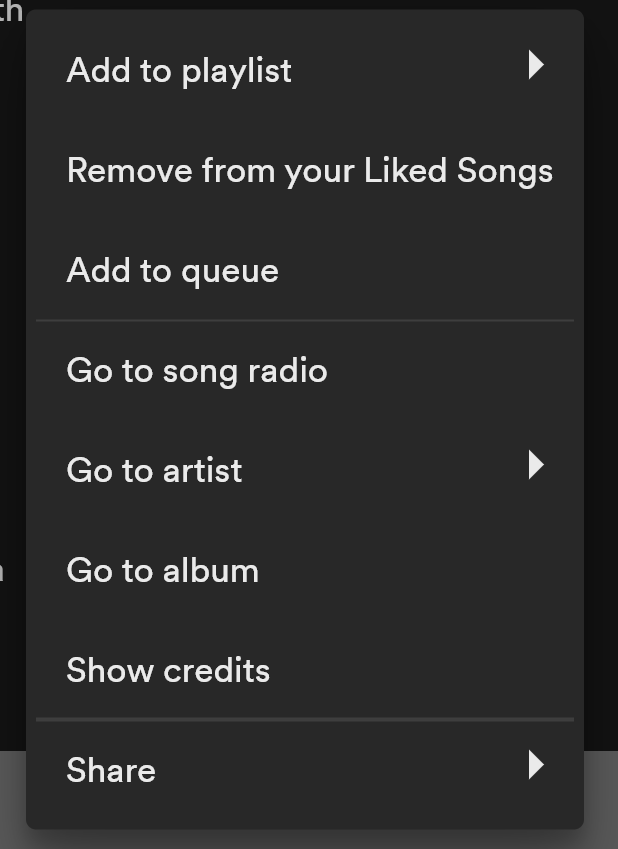
Problem Statement: This proximity has resulted in inadvertent song deletions when users aim to add tracks to their queue. Mistakenly removing tracks can result in data loss, especially if users can't recall the deleted songs.
Personal Experience: I've unintentionally removed tracks multiple times when my intention was to add them to my queue. Attempts to restore my playlist through Spotify's support weren't entirely fruitful, compelling me to devise alternative means to retrieve the lost songs—a process both cumbersome and exasperating.
Proposed Solutions:
- Spatial Separation: Increase the gap between the "Remove" action and other actions, like "Add to queue", to mitigate accidental clicks.
- Visual Distinction: Introduce unique icons or color codes for different actions. A red hue for "Remove" can act as a cautionary signal.
- Confirmation Prompt (Preferred Solution): Introduce a confirmation dialog when selecting the "Remove" action. This dialog should have an option that allows users to disable future prompts if they find it unnecessary.
- Undo Option: Offer an "Undo" feature immediately after a song is removed, giving users a brief window to revert accidental deletions.
Conclusion: By implementing one or more of these solutions, Spotify can significantly enhance user experience, reduce unintentional deletions, and ensure users can confidently interact with their music libraries. The preferred solution of a confirmation dialog, with an option to disable, strikes a balance between caution and user autonomy.


