Local song is added to playlist then auto-removed

Plan
Premium
Country
Mexico
Device
Redmi K40 Gaming
Operating System
Android 13
Spotify version
8.8.80.599
My Question or Issue
Whenever I add a local song to a playlist, song is added, but when I open the playlist, I can see the song is automatically removed. There is no issue with local songs already in my playlists, nor adding spotify songs to playlist, issue happens with every local song which is playable directly from "Local files" folder in spotify.
Please see attachment.
Regards,
Ivan Ojeda
Accepted answers
All comments

Hi @IvanOjeda!
Based on the video you've attached it looks like you have Smart Shuffle toggled on for that playlist. As long as it's activated, the feature will temporarily hide the local files found in the playlist. You can turn it off by tapping the Shuffle button and switching to regular play/shuffle:
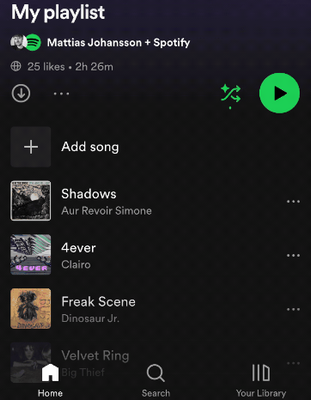
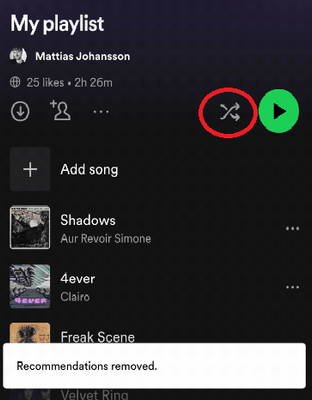
In case Smart Shuffle was already toggled off, please share a short screen recording which captures the described behavior so we can take a closer look.
Cheers!
Yes! That's it! Thank you Yordan!


Plan
Premium
Country
Romania
Device
Predator laptop
Operating System
Windows
My Question or Issue
I am sometimes adding some songs with the local files feature. After x amount of time, those songs disappear from the playlist i've added, and when I am trying to add them back, it shows as if they are being added (the plus icon changed into a tick for a split second) but then the tick changes back to the plus sign. The only way I found a fix to this is to completely reinstall the application, which I find annoying as this issue sometimes reoccurs in either 2-3 days or a few hours from a fresh install. Any fix?
Hi @IvanOjeda!
Based on the video you've attached it looks like you have Smart Shuffle toggled on for that playlist. As long as it's activated, the feature will temporarily hide the local files found in the playlist. You can turn it off by tapping the Shuffle button and switching to regular play/shuffle:
In case Smart Shuffle was already toggled off, please share a short screen recording which captures the described behavior so we can take a closer look.
Cheers!