Unable to play video on desktop at all

Plan
Free/Premium
Country
United States
Device
HP All-in-one Desktop
Operating System
Windows 10
My Question or Issue
I want to be able to watch the Distractible podcast videos on my PC, but no matter what I do, I'm unable to access video at all. There's no settings, no option for watching video, nothing. Videos work fine on my Android (including settings), which is frustrating, because that's not where I want to watch the videos. I've even tried to uninstall and reinstall the app on my computer at least twice and no changes. I'm honestly at a loss at what to try to do.
Here's my Spotify version for desktop:
Spotify for Windows (64 bit)
1.2.25.1011.g0348b2ea
Accepted answers
All comments

Hey @Bethylee
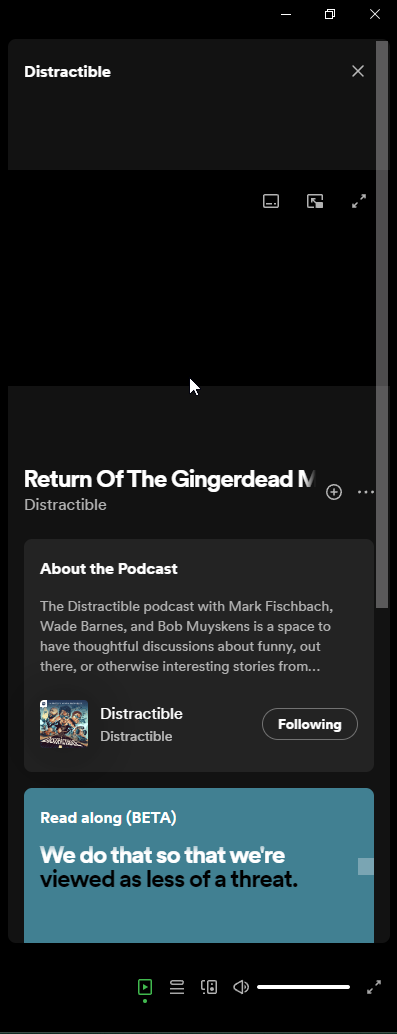
In recent Spotify updates, video podcasts appear in the Now Playing sidebar. Please make sure you have the sidebar open.
Here's a screenshot. Spotify hides the video from my screenshot.
If my answer was useful, don't forget to give it a 'Like!' If my answer was the solution, don't forget to mark it as the solution! Thanks! 😇 | If you need anything else, please reply and ask! Disclaimer: I am not affiliated with Spotify. |
Okay I see the video today, but it wasn't there last night, so I'm not sure what kinda trickery my computer's playing on me, but at least I can access the videos now thank you. Apparently my computer just needed a good night's rest?
Hey @Bethylee
In recent Spotify updates, video podcasts appear in the Now Playing sidebar. Please make sure you have the sidebar open.
Here's a screenshot. Spotify hides the video from my screenshot.
If my answer was useful, don't forget to give it a 'Like!'
If my answer was the solution, don't forget to mark it as the solution!
Thanks! 😇
If you need anything else, please reply and ask!
Disclaimer: I am not affiliated with Spotify.