Add whole playlists to “Liked Songs” at once

Example: Spotify makes a playlist full of songs that I enjoy, but I don’t have them in my Liked Songs. Instead of having to like every single song individually (which bugs my app out sometimes), I should be able to add an entire playlist to my Liked Songs at once. Its very annoying.
Accepted answers
All comments

Hey @SLNTMNK,
Thanks for posting in the Community and welcome.
We hope you don't mind us moving your post out of the ideas section to one of our Help boards as it fits better here.
That being said, we can confirm this is possible on the Android mobile app version. To do it, you just need to go to the three-dot menu of the playlist you'd like to add the tracks to your Liked Songs. From there, select the Add to other playlist option:
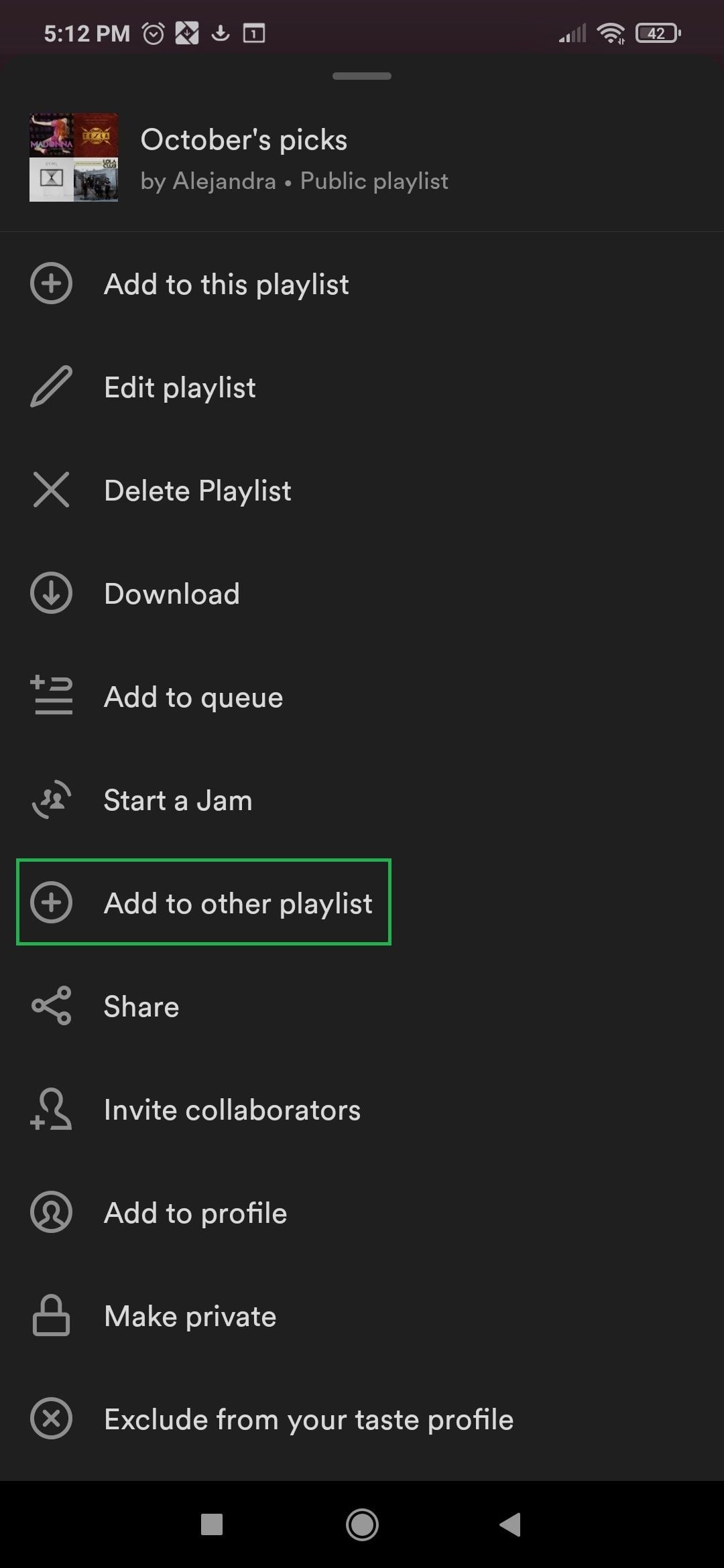
From there, you'll see the option to add the tracks to your Liked Songs:
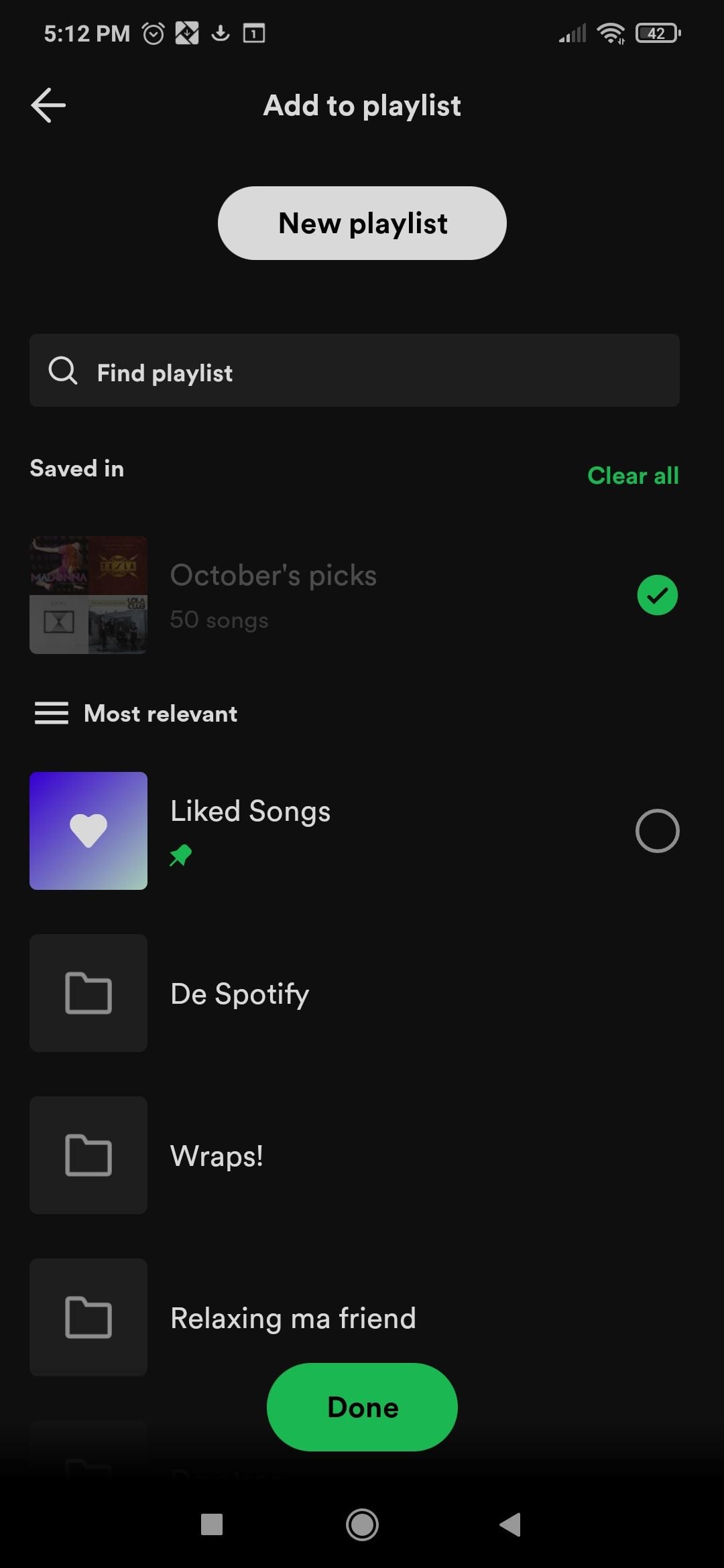
If perhaps the idea you have in mind is different from this, feel free to post your suggestion again. Take into account, you must follow the guidelines for submitting ideas, so your suggestion will be approved more quickly and smoothly.
We hope you found this helpful. We're always here to help.
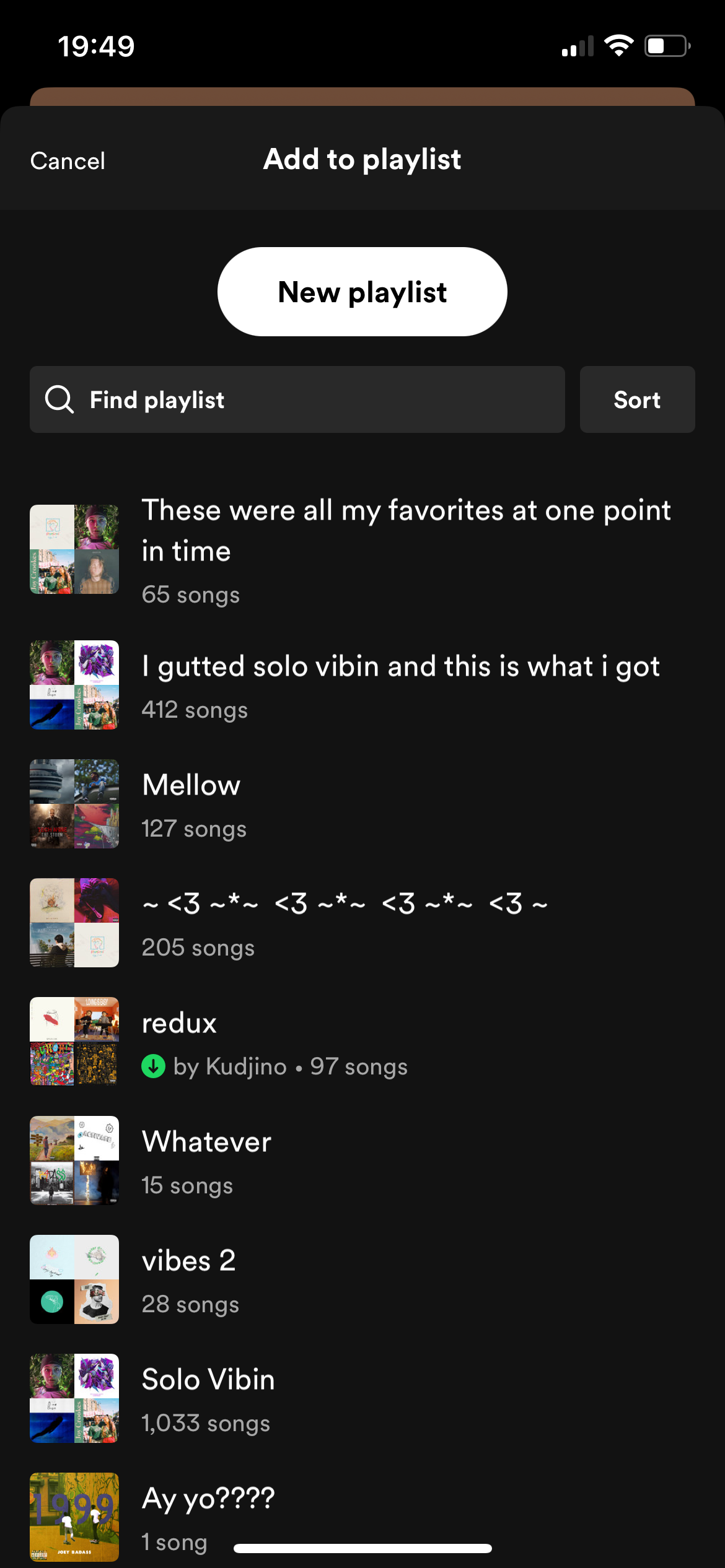
Mine doesn’t give me the option to add to my Liked Songs, just other created playlists. My app is up to date.

Hey @SLNTMNK,
This is odd. We would advise to perform a clean reinstall of the app - this will get rid of any potentially corrupted cache. You can follow the steps from this article.
Keep us posted on how it goes.
Just did that. Still no option to add to my Liked Songs. The screenshot used by the other support individual is of an Android and I’m on an iPhone, if that makes a difference.

Hey @SLNTMNK,
Thanks for clarifying and for providing us with some more info.
We did some further investigation from our end and we experienced similar behaviors within the app for iPhone. We've passed this info onto our teams, so that they can have a closer look as well.
We'll keep you posted and let you know when we have any news to share about this.
If anything else appears in the meantime, we're just a post away.
Cheers!

I have a possible solution!
I had the same problem on android, as well as on pc. For me the issue was that there are a few "podcasts" in my playlists. So I used the windows app in order to move all songs in the playlist (that aren't a podcast) to my liked songs. I did this in the following way:
1. go to the playlist on the windows app
2. sort on "Album or podcast", all podcasts will be at the top
3. use [ctrl + A] to select all songs and podcasts in the playlist
4. manually unselect the podcasts by holding [ctrl] while clicking on them
5. use right mouse button and select "save to liked songs"
For me this worked, I hope it does to for you!
some notes:
- I had some songs in my playlist that were only available as a "podcast" because they are live recordings or very obscure. So it is worth checking if there are any "podcasts" in your playlist even if everything sound like a song.
- There is apparently no way to like podcasts, so those can't be added to liked song in any way I assume.
It seems like the method mentioned by SLNTMNK showed.
However, my method will then still work, except there is no need to unselect the podcasts, so step 2, 3 and 4 can be skipped.
You do need the pc app for this though, so it would still be better if it also worked as intended.
I don’t have any podcasts on Spotify. The issue is that the option doesn’t exist for Apple products; you can’t even do it on a Macbook. I appreciate your input though and hopefully it helps someone else out. I figured the solution would’ve been a patch or update and this thread would be closed but I’ve noticed companies have trouble updating/maintaining their products on Apple. Frustrating.

Six months after moderator Maria said “We've passed this info onto our teams, so that they can have a closer look as well””, the method still doesn’t work on the iPhone app because the Liked playlist isn’t offered as a target.

nor does it work for my Chromebook, or my Samsung phone. 😒

Does not work on my iphone or my windows pc. I only get "something went wrong" on pc and the option just does not exist on iphone.

"We've passed this info onto our teams, so that they can have a closer look as well"
They didn't take a very close look I guess

I wish this could be rectified for iPhone users since I have over 5k songs in one playlist and I can’t take the time to move them all over individually and have been waiting for this update. Thank you in advance for your attention to this matter Spotify team.

Press Cmd+A on your keyboard to select all songs in the playlist, Right-click the highlighted songs and select either add to/ Remove from your Liked Songs. Desktop only

Simply put I have been using the same account for years, I have multiple different playlists for different genres and I like all the songs in my carefully curated playlist.
I want them all in my liked songs instead of having to individually put them into the playlist.
That would take a good year haha
I could make a playlist but then I miss out on the "liked songs".

Liked songs doesn’t appear as an option for me.

this is not possible on the mobile app or on pc.

Having the same Problem even years later, My liked songs doesn’t pop up as an option either when i try to add stuff from my playlist to my Liked songs. Any updates ?? Apple sounds pretty good rn

I'm here bc I have an iPhone and a Chromebook and I can't add a playlist to my liked songs... I guess still no solution

i’ve tried to do this but my liked songs doesn’t pop up as another playlist when i go to add it? what now?

Dear Random Internet Stranger -
You are an angel. May your pillow always be cool.
- Sincerely,
Someone saved from way too many clicks

I have 2880 songs on a playlist and I don’t have the mental capacity to select all of them, any other ideas?

SOLUTION FOR APPLE USERS: Open Spotify on your desktop, select the first song on the playlist, press Ctrl+Shift, and continue holding Ctrl+Shift as you scroll to the bottom and select the last song. This will select from point A to point B of what you want to add. Once everything is selected, right-click or ctrl and click the mouse pad. A menu will pop up allowing you to add everything to your liked. If the menu says "remove from liked", you have something selected that is already in your liked. Select "remove from liked" and repeat the process. It will then say "add to liked" because you removed the possible double 🙂

hi i'm on a MacBook and selected all the songs in my playlist (command + a), and then dragged then into my liked songs which has copied them all there. this should work for anyone experiencing this issue!

Moderator said, "We've passed this info onto our teams, so that they can have a closer look as well." on 02/2024.
As of 06/2025, we haven't seen an update and are still experiencing the problem.
On windows desktop, I was able to:
1. Go to each playlist
2. Press Shift and select the first song
3. Scroll to the bottom of the play list - still holding shift
4. Still holding shift, select the last song in the playlist
5. Right click and select 'Add to Saved Songs'
I had to do this for all playlists, but I found this to be the fastest way!
Hope this helps!

Hey! So I'm on a MacBook Air, and its way simpler then you think. If you're trying to save a whole playlist scroll all the way down to the last song, or scroll as far as you want. All songs listed above will also be selected. Right click on the song while holding shift, then release shift and right click again. It will give you the option to "Save to your liked songs.". ❤️

Ya this would work a lot.

Adding entire existing playlists you have to your liked songs

Bro there's no point.

I have had this same issue for literal years now. Have uninstalled and reinstalled many times. Frustrating
Hey @SLNTMNK,
Thanks for posting in the Community and welcome.
We hope you don't mind us moving your post out of the ideas section to one of our Help boards as it fits better here.
That being said, we can confirm this is possible on the Android mobile app version. To do it, you just need to go to the three-dot menu of the playlist you'd like to add the tracks to your Liked Songs. From there, select the Add to other playlist option:
From there, you'll see the option to add the tracks to your Liked Songs:
If perhaps the idea you have in mind is different from this, feel free to post your suggestion again. Take into account, you must follow the guidelines for submitting ideas, so your suggestion will be approved more quickly and smoothly.
We hope you found this helpful. We're always here to help.