Post of the Week - Windows Media Keys Fix

 |
|
Hello everyone,
It's that time of the week again. The post of the week this week was spotted by @Rorey in the Desktop Board. It's a solution to a problem that has troubled a fair few users since the Community started.
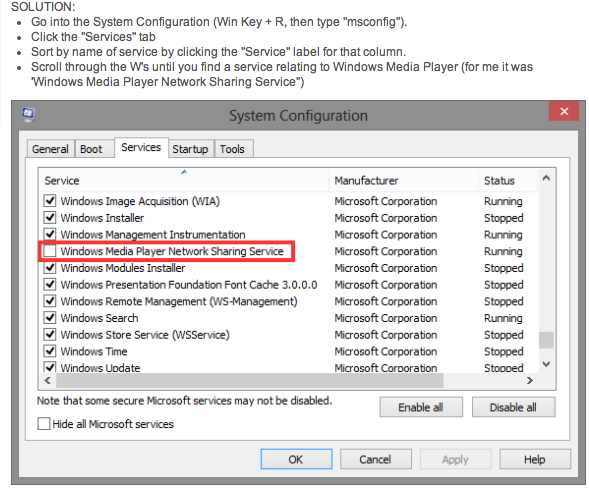
So, in the future, should the media keys be misbehaving on your Windows keyboard, please try the steps @aaroncouch suggests here.
The solution was inventive, clearly presented, and easy to follow. Thank you, @aaroncouch. You have a little present heading towards your inbox now.
Until next time!
|
Comments


Coucou

Just to clear it up since it's not explicitly stated in the article, you want to UNCHECK this service. Unchecking it should fix you media keys 🙂

Unchecked and still doesen't work. When i have active windows window like that "msconfig" or "windows explorer" as activated, then media button works. But when i unactive window, media buttons doesent work anymore on spotify. Only when windows window/programme is activated media buttons works.
I have disapled windows media player from control panel and "windows media player network sharing service" from "msconfig"

I found the answer. I was searching through blogs and found this:
Solution:
- Press Winkey + R to open up run and type "services.msc" (without the quotes) then press enter. This opens up Services.
There are other ways in which you can open the services dialog but I always use this method as it works with almost every version of Windows (if not all). - Navigate to "Human Interface Device Access" and double-click it to open up the configuration dialog.
- Change the "Statup type" drop-down from "manual" to automatic.
- Click start
- Click ok
You should be good to go. You don't need to restart your computer, just open the media player (if not already open) and use the media controls as normal. Because you changed it from "Manual" to "Automatic" the service will run even after restarting the PC.
http://www.hardwareheaven.com/community/threads/windows-8-media-keys-do-not-work.220562/
Hope it helps! I struggled for a while with this
Thanks a lot! Nice that internet have you kinf of dudes who helps people

Solved my problem with this. Was having this issue in Windows 8 and thought it was my keyboard driver(steelseries). Updated to Windows 10 and updated keyboard drivers and still didn't work until I found this post

Just installed Microsoft IntelliType, that solved the problem for me. Neither setting HID to Automatic or uncheching Windows Media Player worked for me. Hope this will help others.

Turns out a restart of the "Human Interface Device Service" via services.msc can resolve this too.

iTunes may also interfere with media keys.

- Thank you

If you restart " "Human Interface Device Service" and it works and then stops working, disable the Google Music plugin in chrome.

****, Psycoder. I've been trying to solve this issue with my Logitech G710+ for months, my media keys not working, and it turns out removing Play Music from Chrome did indeed fix it instantly. Thank you!


Did not work for me really, only a few secs. Here is the solution that worked for me, basically uninstall/disable Google Music on Chrome browser since it hijacks media keys. Source: https://www.reddit.com/r/Corsair/comments/3qmovs/question_k70_rgb_multimedia_keys_for_spotify/

The msconfig didn't work for me unfortunately 😕 I tried fiddling with the Human Interface Device Access in services as well and that didn't change anything. Lastely, I checked my extensions through Chrome and Google Play Music isn't installed and never has been.
I have a wireless keyboard: HP K3500. The volume buttons work fine but none of the other media controls work for Spotify. Only a few of the other buttons work for anything else at all, as a matter of fact.. Not sure what to do about it.
Spotify used to let you right click on the icon in the system tray and have access to pause/play and whatnot, which I was content with using instead, but I see that is no longer an option.
Any advice would be great!

In my case, I found stopping the itype.exe application in task manager also works. It's part of the Microsoft Mouse and Keyboard Center suite. Just remember to turn it back on if your keyboard requires it to run with all features!

Psycoder, I thank you. That did it for me on my wireless keepboard. Thanks much!
JK

If you have Itunes running in background it will take over the media keys over Spotify too. 🙂
add-on. I think it was Google play. Once that was gone it all worked again.
Never expected that.

Thank you!!!!

Thanks for all the tips, but they did not seem to work on my Windows 10. Just to summarize what has been told so far:
- ITunes on back- or foreground
- Chrome extensions overriding the media keys (also check "Shortkeys" at the bottom of extensions in case you don't have "Google Music", perhaps something else overrides the keys)
- The "Human touch devices" service running
- Disable the "Windows media player network sharing" keys
For me it was a another yet-so-easy fix:
- Spotify was running multiple processes in the background. Killed them all and restarted spotify. Only my "stop"-button does not work, but play/pause/for- and backward does.
PS. I don't restart my computer often.

None of the previously listed solutions worked for me. Except I found this one:
https://superuser.com/questions/1075929/enable-the-volume-osd-in-windows-10
Quote from Tsaukpaetra:
So the answer was a whole lot further off base than I would ever have thought.
So I was using a somewhat trusty program called SRS Audio Sandbox (more recently SRS HD Lab or something) to adjust for the fact that my speakers kinda suck. Well, it doesn't work on audio cards that aren't connected to PCI (for some reason), so I uninstalled it.
Unfortunately, the installer did not remove the "Audio Filter" pseudo sound card that's used to capture your sound for processing (I guess it was in an error state?), so Device Manager listed it as working fine, but in the Sound control panel it was basically non-functional.
Apparently, having a sound card that refuses to fully initialize (or gets stuck, whatever) doesn't completely stop Windows from playing sounds, or using your functioning sound hardware, but it will screw up the UI for some reason.
Once I removed the broken sound card using Device Manager, all is well in the world, media keys work and the sound slider pops up when appropriate.
Who'da thunk it?
Whoa, I've had this problem for months, and this finally solved it for me.
Turns out a restart of the "Human Interface Device Service" via services.msc can resolve this too.
This. This worked for me, after unchecking Windows Media, setting HID to Automatic, and restarting it...
You are bae for fixing this for me.

Yeah, uninstalling SRS audio sandbox immediatley fixed it for me.

With Chrome hijacking Media Keys - while it's commonly the Google Play Music extension, it can be other extensions too. An easier (and less extreme way) to fix the issue for any plugin causing it (even if you don't know which plugin it is) is to go to the Extensions page (Chrome Menu --> More Tools --> Extensions), scroll to the bottom and click on the "Keyboard Shortcuts" link on the bottom-right of the page, and then find any extension hooking the Media keys and changing them from "Global" to "In Chrome" - this'll remove the global hook on the keys and should get Spotify working again!

Beautiful! This worked for me, not having any Google Play Music services in chrome, it took me several minutes of googling until I found this. Thank you.

I just upgraded to Windows 10 - This worked perfectly! Thank you so much!

For me, I had to disable the Plex extenstion within Chrome to get my media keys working again.
This has solved an ongoing mystery which has been on the community since I joined!