Volume buttons on device don't work when casting

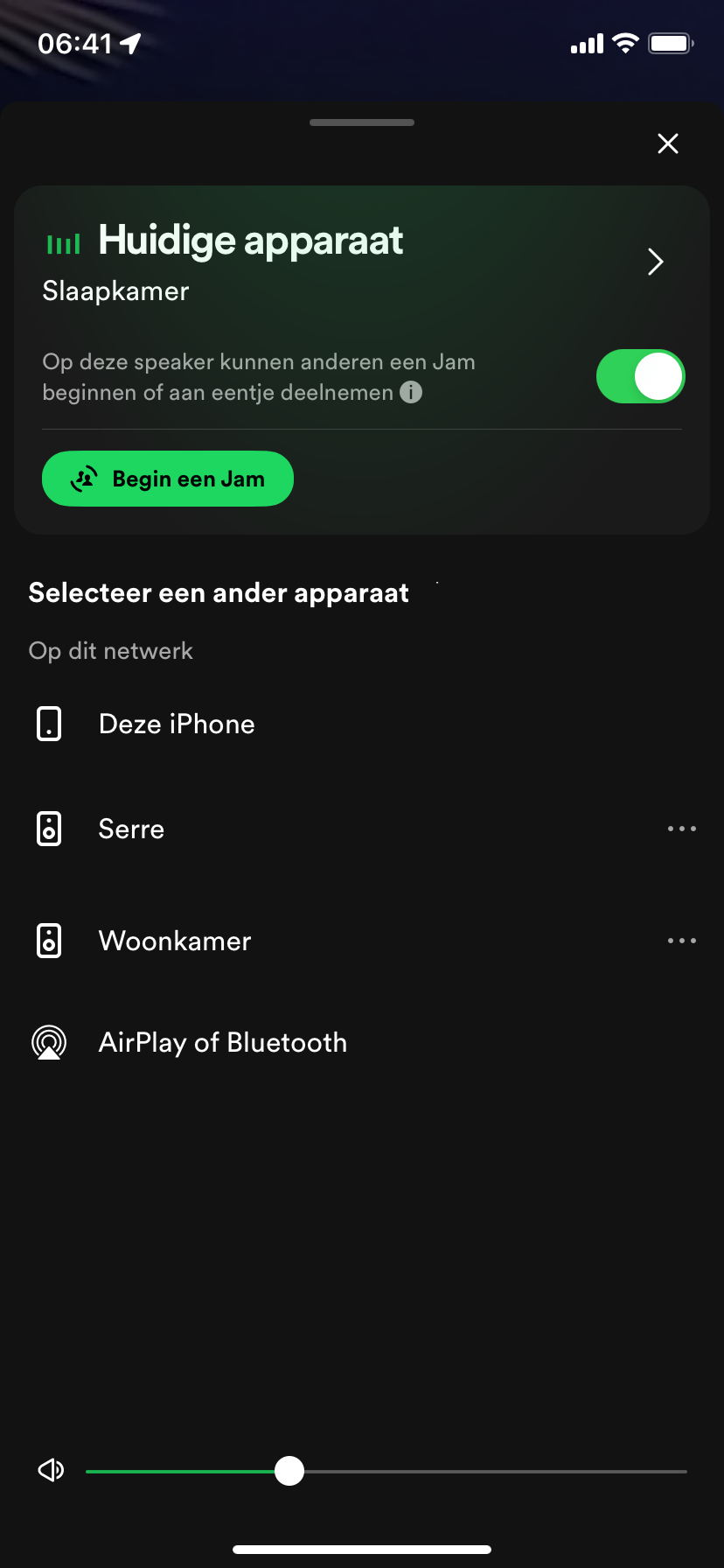
As of Spotify 8.9.xx and newer I can't control the volume on my iPhone when casting to a Chromecast device. I need to go into the slider inside the Spotify app to change the volume.
This is not an iOS or apple issue:
My non working version of Spotify is 8.9.16.556 and just today updated to 8.9.18.xx which has the same bug.
On another iPhone a WORKING version of Spotify is 8.9.14.526
The latter works perfectly fine. It is not a iOS problem but a Spotify bug!
Both iPhones run iOS 17.3.1
If this is not being actively solved by Spotify I'm sorry to say I will cancel my subscription and change to Tidal. This is a CORE functionality.
Accepted answers
All comments
 Camp19

I'm totally fine adjusting volume by TV remote or voice command, I just need to know how to turn this off.

Every time I use the Spotify app on my iPhone 13 it turns the volume way up on my Sonos speakers, frequently all the way to max volume, which is quite problematic. I talked to Sonos support about this and sent them my speaker logs. They said the volume increase command is clearly coming from Spotify. Which makes sense, this is what I see in my tests. In fact if I only use the Sonos app I have no volume problems at all. But I pay for Spotify and want to use that app to control my music. I saw another similar thread on this and tried the troubleshooting steps offered there but it did not work for me. Have tried deleting/reinstalling Spotify and Sonos apps, deleting caches, logging in and out, restarting phone, removing then re-adding Spotify connection to Sonos app, and probably a few more things. I am an active user and this only started recently so it could be the latest Spotify build causing the problem. Possibly the latest iOS public beta that I have but this seems like a long shot. Anyone else seeing this? Any thoughts on a remedy?
Plan
Premium
Country
USA
Device
(iPhone 13)
Operating System
(iOS 17.4)
Posting what resolved this for me after spending two hours with Spotify chat support. Hopefully this will help someone else and save them two hours. Note that a regular uninstall/reinstall of the app did not fix this for me, I had to do the following steps:
Let's do a thorough troubleshooting which usually fixes the issue. I understand that you already reinstalled the app. This time, can you perform a clean reinstall? It's more thorough than regular reinstallation. Just follow these steps:
1. Open Spotify. In the app's settings (you can access them by going to your profile picture in the top left corner and then tapping the Settings and privacy gear icon), tap Storage then Delete Cache.
2. Head to your device's Settings, then tap General.
Tap iPhone Storage.
3. Select Spotify from the list of apps.
4. Tap Offload the app and confirm. This will delete the app but its documents data will be kept.
5. Then tap Delete App and confirm. This action should delete any leftover documents and data.
6. Once the app is deleted, press and hold the Side/Top button and either volume button until the power off slider appears.
7. Drag the slider to turn your device completely off.
8. After your device turns off, wait a couple of minutes.
9. Press and hold the Top (or Side) button again until the display turns on.
10. Switch your device back on and install Spotify from the App Store.

This sadly did not work for me. I don’t understand how Spotify can keep messing up. How did this get passed QA?

I’ve noticed that and its quite annoying, is it a temporary thing? Connect got quite a bit slower recently also.

This didn't work for me sadly, I think the latest iOS update broke it completely

I'm having the same issues as of the last week or a little less. My guess is it is Spotify and the latest iOS aren't talking, it will get figured out while the software maker blames the hardware maker, and vice-versa. As my device and other streaming still works with bluetooth or wifi (except Spotify, lately), that isolates the problem's source as Spotify.
Thanks for that info, though given the responses here including my own experience show there are no solutions, it sounds like Spotify needs to update it's dialogue with iOS, etc. so it works as it used to. Otherwise, the functionality you once had is lost. There is no solution here so far, so it should not be "marked as solution"!
Thanks, but just now your steps did not work at my end. For now. I'll plan to use my receiver or PC volume controls to work Spotify on my stereo speakers, until Spotify fixes and restores this feature at their end. Or I eventually cancel my service with them.
To clarify, at least on my iPhone with the latest OS, the steps are more like:
1. Open Spotify. In the app's "Settings and Privacy" icon with the gear icon (you can access them by going to your profile picture in the top left corner), tap the arrow on "Storage", then tap "Clear cache".
2. After deleting the cache in Spotify, close Spotify and open your device's Settings (on an iPhone, it's in the lower right of the screen with a gears graphic). Scroll downand tap "General" which has a wheel and gear. Scroll down and tap "iPhone Storage".
3. Scroll down and select "Spotify" from the list of apps, tap arrow.
The rest is similar to your steps. Hopefully that works for someone.

I have noticed some changes on how iPhone volume buttons interact with the Spotify app. Originally, changing volume on apps would both change volume on my iPhone speakers AND the volume on the casted-to speakers. A few days later, I observed multiple Spotify app crashes when I currently have a Spotify connect session going and try to open the Spotify app. It seemed like the crash would happen when Spotify tried to sync the volume of the Connect session with the iPhone volume.
Now, pressing the volume buttons does nothing when the Spotify app is open while casting to speakers.

Same here. Was able to use the buttons on the side of my iPhone, but not anymore. This is very cumbersome to go in this screen to do it. Also I want volume changed immediately, not after five screens
Forgot to add: I’m connected to a Bose Soundtouch speaker

Same here. Since 5 days impossible to use the side buttons of my phone for adjusting my device volume when using Spotify connect.
My Spotify app has been updated also 5 days ago.
What did you do/change Spotify team ?

Same issue
How is this a solve?

Is this a JOKE? This is one of the main areas of functionality of using Spotify connect. Every other music app allows you to change the volume on your speaker by using the volume buttons on your phone. Are you saying that there's nothing Spotify plans to do to have this function work again?
Is this a JOKE? This is one of the main areas of functionality of using Spotify connect. Every other music app allows you to change the volume on your speaker by using the volume buttons on your phone. Are you saying that there's nothing Spotify plans to do to have this function work again?

Loss of volume control from the buttons really spoils the playback experience . If you’re doing the amateur dj thing at a home party it’s a nightmare trying to browse and select tracks and then having to jump to the playback view to adjust volume and then back to track list again. This is a serious loss of functionality !

This isn’t resolved - saying tough luck it now doesn’t work isn’t a solution. Please fix ASAP

It doesn’t wooork. On my ipad it works, old iphone 6s works, but not my main iphone 11 pro. Annoying af

Same here - last few days using Spotify app on iPhone, connecting to Sonos speakers through app. Volume buttons have worked perfectly for years. Now can’t find any way of getting them to work. Still working on iPad (though very jerky - can’t say working well). I’ve tried settings in both Spotify app and iPhone Spotify settings, and can’t see anywhere to switch on physical volume controls.

I have also experiencing this issue for the past 5 days or so. I hope it gets fixed.

I think calling this a "solution" is being pretty generous.
This probably explains why the Digital Crown on the Apple Watch has stopped working for volume control too.
Which is weird because that implies the watch app sends volume change events to the cloud and then back down the phone.

I also don't understand why this feature would be removed. It's like their goal is to make the app functionality bad as possible. Somebody needs to tell the CEO he has bad UI/UX skills.
Spotify are claiming this is "solved" now and the solution is to use the volume slider in app.
They're blaming iOS for changing which is a bit of a stretch, IMO.

This is not a practical solution - please fix asap!!!

I just spoke with Spotify Support about this. I was going INSANE. Thought I was crazy and realized it’s not just me. So listen to this I pretty much go to them explaining what you just said. This was their response: “Thank you for letting us know. Due to updates on iOS, Spotify users no longer can use their iPhone's volume controls to change the volume on connected speakers. Instead, please use the volume slider in the device menu. in the meantime, we recommend keeping up-to-date with future updates. If there's anything else we can help you. Let us know! We'll be here in the meantime.“
After calling bull&@$# cuz my roommate can use it with the same make and model they reply with this:
” At the moment, this is what we can disclose. This feature is currently unavailable for iPhone users. We hear you and have submitted this to the corresponding team. In the meantime, if there's anything else we can help you with, let us know!“

The solution outlined is not acceptable
Spotify Connect volume control using the volume buttons on iPhones is essential
Is the reason you are not fixing this issue becasuse the department that looked after these issue part of the resent redundancies