Next / Previous media keys don't work on 3rd Party Keyboard, Play/Pause does work. [MAC]

Hello!
So I am using a Logitech G710+ keyboard with my Mac (running 10.9) , and the media keys (Play/Pause, Stop, Next and Previous) work perfectly fine with iTunes, even in background.
Now, when I use Spotify, I usually quit iTunes (to stop conflicts), but only the Play/Pause key seems to work.
It does work in the background, which is good, but crucially the Next / Previous keys don't work at all.
Any ideas?
Accepted answers

All comments

Hi,
Its kinda strange, i just cleaned my PC and the media keys are not working anymore, they did before xD
Ill get back to you if i find a solution.
Regards,
Ikniz

Hi,
I'm having the same issue but with a CoolerMaster QuickFire TK.
Running Mavericks:
iTunes all media keys work.
Spotify only play/pause works.
Any fix yet?

I'm having this same issue. G710+ keyboard on OSX 10.9 and only the Pause and Play button works for Spotify. Itunes everything works great.
I found that if you assign the media fuctions to the G keys they work throughout all programs.

I have the same problem on my daskeyboard 4.
Play/pause work fine but prev/next dont work at all. They work fine with itunes though.

Same issue, i use daskeyboard 4 ultimate on Mac 10.9, However, Command + left and right arrow work but limited when you are on spotify app (it wont work if you are browsing on safari) any solutions please!!!

exactly the same issue, das keyboard for mac, play/pause works, fwd/back not.
Any fix yet?

This happens to me as well on the Corsair K70 Vengence Keyboard. All media keys except next, previous and stop.
Any news?


So I have the exact same issue as everyone else here. I have a Logitech K750 wireless keyboard running Yosemite on my MBP.
I don't necissarily think this issue resides with Spotify, but instead with Logitech. If I use the media keys on my MBP I am capable of using Next/Previous even when Spotify is in the background. On the wireless keyboard only Play/Pause and the Volume buttons work. I think the issue is with the key mapping with the Logitech.
Then again, I don't know how the code is written. Maybe Spotify missed an alternative key map for the media buttons. I didn't write the code....
The logitech forum is a ghost town for this issue though. Only post I found was 5 years old.
EDIT: With further reasearch I DO believe the problem lies with Spotify. A tech for Logitech explained to me that Spotify wrote some "interesting" code for the keymap functionality for its Mac client. A quick Google search shows that it is not only Logitechs experiencing this issue. It would be great if we could get someone to look into this. It isn't critical, but it sure would be nice to get fixed.


I am running OSX 10.10.2 with Logitech K520 keyboard at latest version of OSX Spotify. Media keys are fully functional with itunes. For spotify Play/Pause is functionl, while previous track and next track do not work.
Spotify please fix this bug ASAP. This has been an oingoing problem for a long time now.

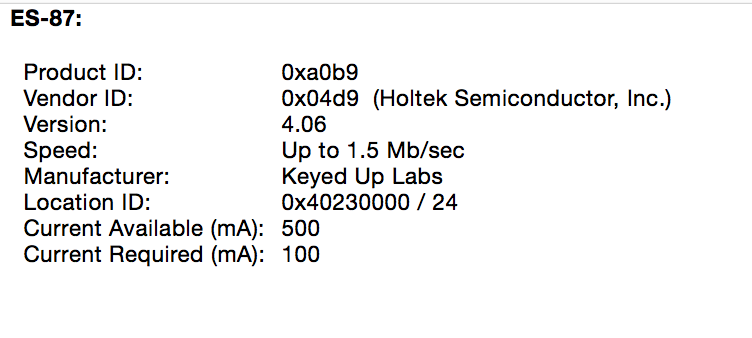
I think that Spotify is looking for the Vender ID (VID) to be Apple, otherwise it ignores the media buttons.
I have a KUL ES-87 Keyboard. I can put it into "OS X mode" or "Windows mode". In Windows mode, the Previous and Next buttons don't work. But if i put the device into OS X mode, the keys do work.
When I set the keyboard in Windows mode, a system report shows:
But if I place it into OS X mode (the prev/next keys work):
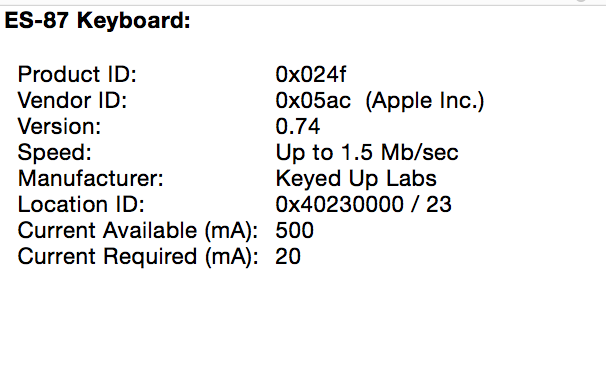

I have programmed a custom keyboard so that it does this, fakes out the computer to be an Apple. This is not the solution. The keyboard, in normal mode or in fake Apple mode, doesn't work for next or previous. They both do in fact work for iTures.
Screenshot of the working KB (ES-87) and the non working (ps2avr), but both show to be the same vender and hardware ID numbers.


having the same issue on my brand new DasKeyboard.
super disappointing.
I've got a temporary fix for this which is a useful program in its own right.
This program takes control of media keys and sends the output to the select media player (iTunes, Spotify, Soundcloud (on chrome)) etc...
BeardedSpice understands all the keys and now I can go next/prev easily on spotify.
Hope this helps,
Cheers
I have played with the USB codes that my keyboards sends OS X, and I have found the Spotify works flawlessly with Rewind (0xB4) and Fast-foward (0xB3) instead of Previous (0xB6) and Next (0xB5).
You can also use the software Karabiner to remap what the keys do. This was not an option for me cause I am using on my work computer and it is not a verified software.

I just got my Das Keyboard 4 today, I got Spotify Premium last week.
I am extremely disappointed that I can't skip tracks with the media keys.

Same issue for me!
OS: 10.10.5
Keyboard: daskeyboard
Would be nice with a fix for this.

This fix from WASD keyboards support does the trick on my Cooler Master CM Storm Quickfire XT: http://support.wasdkeyboards.com/customer/portal/articles/1925899-fixing-spotify-media-keys-issue-in-mac
Edit: my keyboard is the nordic ISO variant if that makes a difference.
This worked for me on my logitech keyboard. Thank You! Hopefully Spotify can use this information to create their own fix or perhaps Enable Media keys option for 3rd party keyboards.
Daniel

This is only a workaround, still waiting for a official fix.

I've been waiting for a fix for nearly a year and a half, my Logitech keyboard designed for OS X works great with spotify on Windows 10, but not El Capitan.


@Swanny: I love how you say « if » instead of « when »…
I also have that problem, by the way. And for some reason, the Karabiner workaround isn’t working for me..Logitech K380. If anyone has an idea, do please tell me 🙂
€: I just realised.. this thread was created before a new Mac subforum was created, so maybe a mod could move it?
This fix from WASD keyboards support does the trick on my Cooler Master CM Storm Quickfire XT: http://support.wasdkeyboards.com/customer/portal/articles/1925899-fixing-spotify-media-keys-issue-in-mac
Edit: my keyboard is the nordic ISO variant if that makes a difference.