Why do some of my public playlists disappear on different screens?

Accepted answers
All comments

Hey there @KiLumiin_,
Thanks for reaching out here in the Community.
We'd first recommend checking if these specific playlists are set to public. If the playlists are private, this could be the reason why you can't see them from a different account. We'd suggest taking a look at this article in which you'll find the steps to make them public.
In case you've already made sure the playlists are public and added to your profile but you still can't see them from a different account, could you send the link of the affected playlists so we can try to check them from our end?
We'll be on the lookout for your reply.
I cannot view the article, I believe it is blocked on my current device. I searched on how to make playlists public, but the feature doesn't show up...
For example, this playlist https://open.spotify.com/playlist/0qlr32LWUDpeqzgr42rjXp?si=2376bb82ac024f3d has nothing wrong with it, I don't believe there's anything bad? I am now wondering if it's just my school restriction policies, but it is highly unlikely.

Hey @KiLumiin_,
Thanks for replying!
We can't be sure what network restrictions you might have at your school grounds but I'm also more inclined to believe that what @Novy has shared with you is the more likely reason for the described behaviour.
Try opening the shared link via a different network and verify if the Privacy & Access options are correctly set for your playlists.
When right-clicking on a playlist, make sure 'Make Public' is selected. When the setting is enabled it will shift its text to 'Make Private'.

Hope this helps! Keep us posted 🙂
I can't do that right now, it doesn't show all the options for me, but I will try it at home and update when I can...
This is all I see
Hey again @KiLumiin_,
It seems something has gone wrong with the upload of the screenshot you've been trying to share.
Could you upload it one more time please? Thanks!
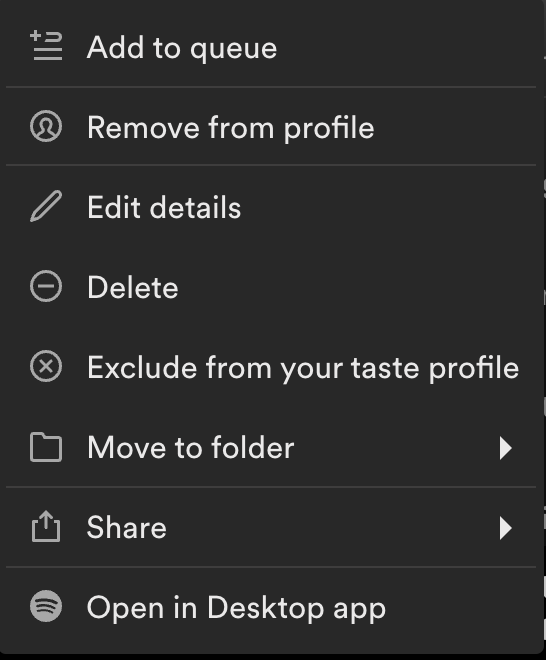

Thanks for sending over the screenshot @KiLumiin_!
Would you mind opening the app on your computer instead? It seems that you're trying via the Web Player. You can directly download it from our website.
Keep us posted on how it goes 🙂
Thanks for sending over the screenshot @KiLumiin_!
Would you mind opening the app on your computer instead? It seems that you're trying via the Web Player. You can directly download it from our website.
Keep us posted on how it goes 🙂