Downloaded icon is not being displayed for all songs

It is not fixed as they said.
Plan
Premium
Country
SWE
Device
Samsung Galaxy A12 and Windows 11
Operating System
Windows 11
My Question or Issue
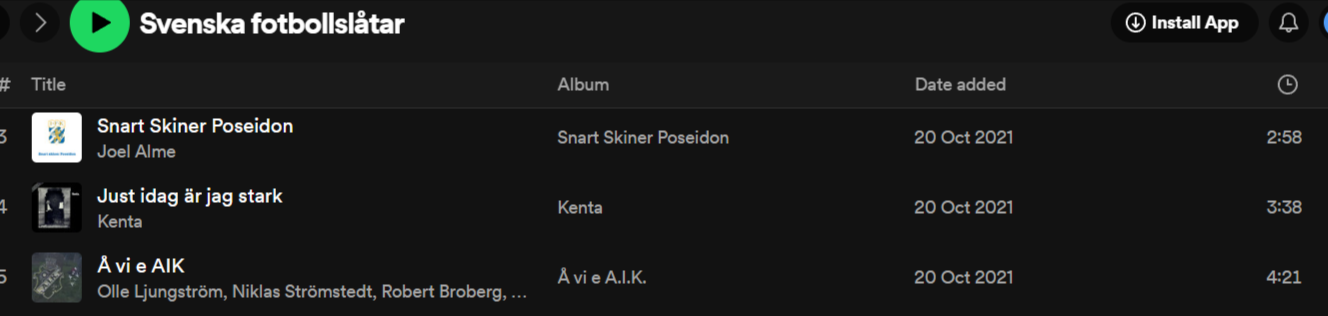
All songs are not displayed that is in playlists. Here is one example:

Accepted answers
All comments
No, the thing is in the desktop app as well for me. Can you confirm it's just a visual bug and that it will be fixed though I can't screenshot it?
Cheers/
Melvin
Here are other examples on the desktop app:
(The playlist is downloaded)

Hey there @melvinwahlen,
Thanks for your reply and for the info shared.
Just to confirm, are you referring to the checkmark (plus button) or to the downloaded visual indicator? It'd be awesome if you could clarify.
Checkmark (plus button):


If you're referring to the checkmark (plus button), it'll just display on the playlists that are not created by you, so you can have a visual indicator of the songs that make part of your playlists/library. Within your own playlists (those created by you and your Liked Songs), it'll display just when you hover over a song. It's expected that it's not going to be visible at first.
Now, if you're referring to the downloaded visual indicator, and if this is affecting the playback when you're listening offline, we'd recommend:
- Clearing the cache within the app.
- Soft restarting the app (closing it and then open it).
- Performing a clean reinstall of the app. By doing that, the app can be up-to-date, and you can make sure the cache is not leading to this inconvenience. A clean reinstall removes all the content you've downloaded, so afterwards you'll need to download your playlists again.
If this persists after those, we'd suggest keeping your app up to date, so you don't miss out on any developments.
Hope this clears things up. If you have any questions or need a hand with anything else, we're always a post away.
The problem still persists on the app as seen here:
Here I searched for "Stockholm i mitt hjärta" and it shows it being downloaded with the green symbol on the downloaded playlist but not on the search bar which is confusing and has led to me using third party software to prevent duplicates (due to it not showing up):

Hey @melvinwahlen,
As @AlejaR has mentioned above, if you're referring to the checkmark/ plus button, it'll just display on the playlists that are not created by you, so you can have a visual indicator of the songs that make part of your playlists/library. Within your own playlists (those created by you and your Liked Songs), it'll display just when you hover over a song. It's expected that it's not going to be visible at first. This is not the indicator for downloaded playlists.
Downloaded content will display the download indicator instead:


In case this indicator is not visible for you, go over the abovementioned troubleshooting steps in @AlejaR's post and let us know how things go 🙂 We'll be on the lookout!
P.S. We do not recommend using any third-party software as we don't have control over what it might do or how your information is handled. The best practice is to avoid such software whenever possible.
Hey @melvinwahlen,
Thank you for reaching out to the Community.
Checking the screenshots you attached in your post, we can see that you're using the Web Player instead of the desktop app on your PC. Since this version doesn't support the Offline feature, you'll not be able to see the downloaded icon under the song's name. So in this case, we'd recommend using the Desktop version of the app to see the icon. You can download it from the official website or the Microsoft store.
Hope this helps. If anything else comes up, don't hesitate to ask.