Spotify Crashes on Open (Mac) - Have tried reinstall/deleting cache

Spotify is crashing on open. Have tried multiple re-installs. During re-install, i delete the cache and application support folders, in addition to moving the application from apps folder to trash bin. On reinstall, it cues me to login on browser, which i succesfully authenticate, and then spotify desktop app goes black. Have also tried restarting computer.
Plan
Free
Country
usa
Device
Macbook pro 16 inch 2019
Operating System
sonoma 14.5
Accepted answers
All comments
Hi maria, this problem is still happening. I can open spotify desktop app on wifi when tethered to my iphone cellular service, but when i try and open desktop app using my apartment buildings wifi the app doesnt open and crashes (app not responding, need to force quit).
While im connecting to the apartment building wifi, i can access spotify in my browser and listen to music fine, but the desktop app does not work and i don't think my iphone app works either (iphone app launches but when i search a song i just get grey three dots and it never loads- if i restart app on iphone without wifi connected using cell phone service it works fine).
Again when connected to this same wifi network, i can listen in spotify browser but not in mac desktop app (crashes) or iphone app (app opens, but songs don't load when searched). When i switch to another network, desktop works fine.
Have tried reinstalling application many times.
also tried searching the host file in text edit and didnt see anyting referencing spotify.

Hey @asoifer,
Thanks for following up and for including more details on this!
It is interesting that this only seems happen on the building's WiFi, both on the computer and on the phone app. With this in mind, it's possible that this is related to some of the current router/network settings, as public connections can sometimes block certain apps from running.
If possible, you can double-check with the administrator of the network (as we understand it, it's not your personal router/WiFi) if Spotify is set as an exception and if any limitations has been made for the app.
Should it be your personal network, however, it's also worth checking if you're running any VPN. If so, we recommend switching it off, as it may interfere with the app performance.
We hope this helps!
i am not using a VPN, and other people using the network are not experiencing this issue as far as i am aware.

Thanks for confirming, @asoifer!
Could you make sure Spotify is allowed through your Firewall? You can also try turning it off temporarily to see if the app would load then.
- Choose Apple menu > System Preferences.
- Select Security & Privacy.
- Click the padlock icon to unlock it to make changes. Enter the password to confirm.
- When Firewall is on, click the Firewall Options.
- To allow Spotify app and service to connect, click the Add button, then select the Spotify app in the dialog that appears > Add > OK.
- To check whether Spotify is listed and enabled in the Security & Privacy settings, select Apple menu > System Preferences > Security & Privacy > Privacy > Files and Folders, then check if Spotify is listed and enabled.
- Reopen the Spotify app.
- Choose Apple menu > System Preferences.
- Select Security & Privacy.
- Click the padlock icon to unlock it for further changes. Enter the password to confirm.
- Select Firewall > Turn On Firewall.
I'd also recommend flushing your DNS cache to make sure there aren't any discrepancies:
- Open the Terminal by navigating to Go > Utilities > Terminal.
- Enter this flush DNS command: sudo dscacheutil -flushcache; sudo killall -HUP mDNSResponder
- Enter your password to confirm.
Something else that's worth trying is deleting the prefs file located in the Spotify installation folder + changing the Proxy type on login.
- Open Finder on your Mac and click Go > Library (if you don't have hidden folders enabled, press the option key first and it should appear).
- Go to Application Support > Spotify.
- There you'll find a file called prefs, which holds info about the currently logged in account. Simply delete it.
- While in the Spotify folder, you'll also find a Users folder. Open it and delete its contents as well.
- Restart the Spotify app.
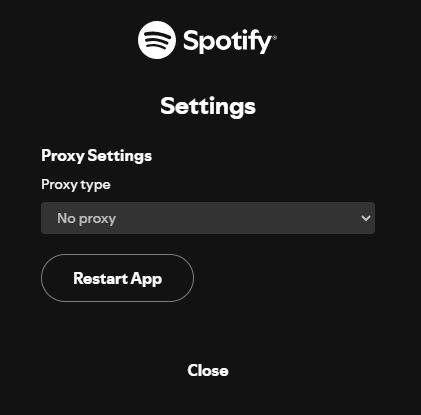
- After deleting the prefs file and restarting the app, select Settings on the login menu.
- In the new window that shows up, set the Proxy type to No proxy.
- Restart the app once again.

Hope this helps! Let us know how it goes 👍

Where is the solution?
Hey there @asoifer,
Thanks for reaching out on the Community!
Just to check, is this still happening if you change the internet connection you're using? For example, if you're currently using WiFi, you can create a hotspot from your phone and connect your Mac to it.
It's also worth deleting any entries which contain Spotify from the host files on your Mac, if you haven't already. You can do so by following the steps here. Keep in mind that the steps mentions Web Player, but they may help with app related issues as well.
Should the issue persist, it would be great if you could let us know what Spotify version you're currently running.
Keep us posted on how it goes.