Suddenly NO AUDIO using PC app!

Plan
Free/Premium
Operating System
Windows 10
My Question or Issue
Yesterday I was listening via the PC app on my Windows 10 machine, when all of a sudden the songs looked like they were playing, but there was no audio. I decided to wait and see if it fixed itself next time I used the program.
This afternoon I launched the program and I STILL have NO AUDIO, even though the song is playing. My speakers are working fine, I haven't made any changes to any settings, my firewall is not blocking Spotify, I did everything suggested on the Spotify website... STILL NO AUDIO!
I think this happened once before but I can't think of anything else that could possibly be the problem! HELP!
Accepted answers
All comments
OK, I don't know how this worked, but I found on another site a simple suggestion:
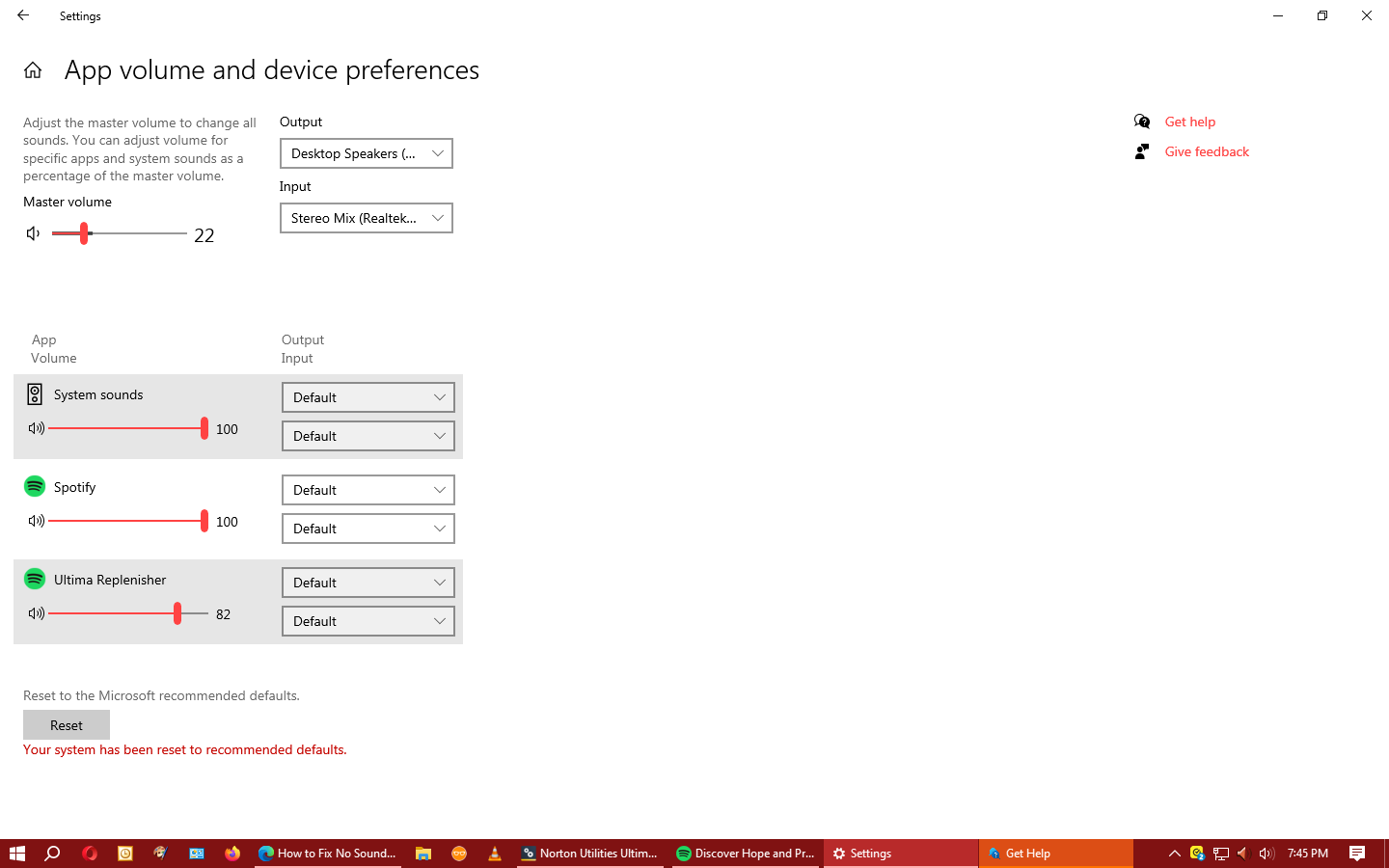
RESET WINDOWS AUDIO!!
Below is a screen shot of the button I clicked (Windows 10), RESET TO THE MICROSOFT RECOMMENED DEFAULTS
All of a sudden the program's audio came through the speakers.
OK, I don't know how this worked, but I found on another site a simple suggestion:
RESET WINDOWS AUDIO!!
Below is a screen shot of the button I clicked (Windows 10), RESET TO THE MICROSOFT RECOMMENED DEFAULTS
All of a sudden the program's audio came through the speakers.