
Accepted answers
All comments

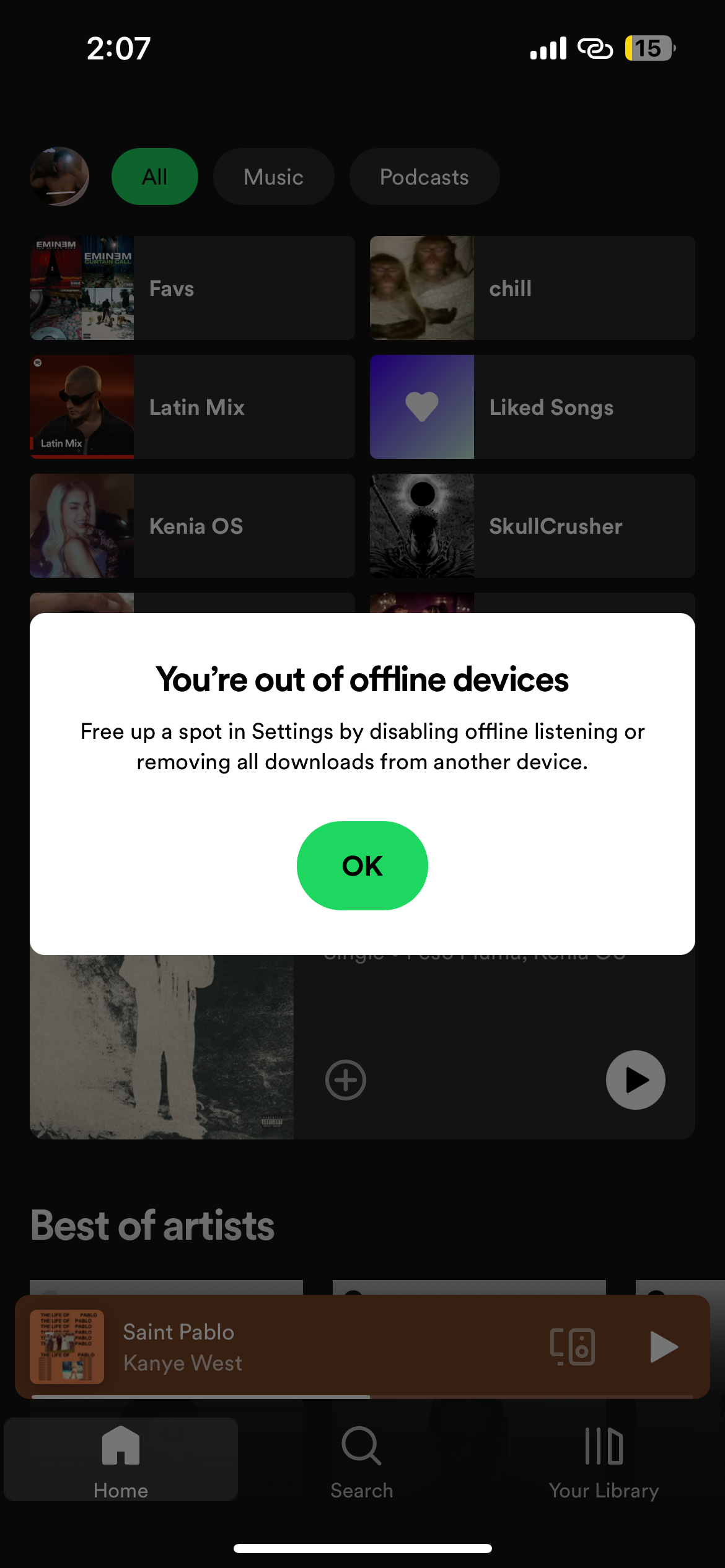
me too

Hey folks,
Thank you for reaching out to the Community and welcome.
This type of error message appears when you reach the limit of offline devices you can have. Keep in mind that at the moment, you can download Spotify tracks for offline listening on up to 5 devices at a time. If you still have those devices, you can remove the downloaded content by following the steps mentioned in this article under the section "Remove all downloads from your mobile device".
Once you remove all downloads from non-used devices, you should be able to download content on a new one 🙂
Hope this helps. If anything else comes up, don't hesitate to ask.

I am also having this issue but I can not clear the downloads as I no longer have that phone is there anything I can do?

Hey @Fraser15!
Thanks for the question.
You can download content for offline listening on up to 5 different devices. To remove the downloads on a device you no longer need simply go to Settings > Data-saving and offline > Remove all downloads.
A device can stay offline for a maximum of 30 days, then all offline content will be disabled and the license will be revoked. Once license has been revoked, you can download offline music on another device.
If you're trying to delete the downloads sooner you can reach out to our support team here. They should be able to help you remove the device.
Hope this info helps! Cheers!


Hey there, welcome to the Spotify Community! 🎵
It looks like you need to remove downloads from your older devices. To do this you can either manually open the app on those devices and delete all downloads from the settings or you can use the sign out everywhere option on the accounts overview page.
Note that if you use the latter it will log you out from all devices and clear the downloads. If that does not work, you can get in touch with the Spotify support here. Let them know about the problem and they can clear the devices for you.
To know more about the offline feature, you can check out this article.
I hope that helps. For anything else, don't hesitate to reach out. 🙂


Hey there,
Thanks for coming to the Community.
I recommend maling sure that you've removed all Spotify offline music from the devices that you don't use, otherwise, they'll still count towards your offline device limit. 🙂
To remove offline music from a device, open the Spotify app > Settings > Storage > Remove all downloads.
Let me know how it goes 🙂

I have the same problem, but some of the devices that I used before, don’t work anymore and I don’t have them. And I tried the option of logging out from all devices, but I still can’t download music

Hey @Marleth-,
Thanks for reaching out and welcome to the Spotify Community!
In this case it'd be best to reach out to the folks over at Customer Support, so that they can remove the offline devices for you.
Take care.

Hello Oscar I have a problem with my new phone. I can't download the playlists. It says you're out of offline devices. How can I make it work?

Plan
Premium Family
Country
canada
Device
Asus vivo laptop pc
Operating System
windows 11 home
My Question or Issue
spotify says i have reached my download limit but i deleted the app from my phone, and tablet. and i have nothing downloaded on the laptop.

Hi Elena,
My iPhone was stolen and I now have a new iPhone which I'm trying to access my own songs from my Local Files so I can play offline. When I try to download them on my new iPhone, it says: "You're out of offline devices. Free up a spot in Settings by disabling offline listening or removing all downloads from another device." How do I clear and remove downloads from my stolen device?
Many thanks,
Kim

so what are we supposed to do. i cant walk with my laptop around if i have to listen to spotify offline.

What if I no longer have access to the device, would just choosing the option to log-out of all devices help?

i am downloading playlists on my new phone and it is saying i have reached my limit of offline devices. I have downloaded playlists on 3 other devices so this one will be my fourth. I have the regular premium plan which i think gives a limit to 5 offline devices (which i haven't reached) i have deleted the playlists on my previous devices, cleared the cache and logged out of all but for some reason i still cant download anything and it gives the same error. How do i fix this

It sounds like your music streaming app is still recognizing older devices as active for offline downloads, even though you've deleted playlists and logged out. Try these steps to fix the issue:
1. Remove Offline Devices from Your Account
Most streaming services have a device management feature.
2. Reinstall the App on Your New Phone
- Uninstall and reinstall the app to refresh device authentication.
- Log back in and try downloading again.
3. Wait 30 Days (If Needed)
Some streaming services don’t immediately remove old devices even after clearing downloads. If the problem persists, you might need to wait for the system to reset device limits (usually within 30 days).
4. Contact Support
If none of the above works, reach out to customer support and ask them to manually reset your offline devices.

I’m seriously having same issues. I’ve already logged out everywhere and is giving me same issues. I can’t download

I am having the same issue and I’m the only one connected to my account, i didn’t reach the limite it’s more of a technical issue

Hello! I have a premium plan but I can’t download my playlist in my IOS but I can using my android phone. It’s saying You’re out of offline devices even though I deleted everything in my devices. Help!
Plan
Free/Premium
Country
Device
(iPhone 8, Samsung Galaxy 9, Macbook Pro late 2016)
Operating System
(iOS 10, Android Oreo, Windows 10,etc.)
My Question or Issue

How did you fix it?

From what I've read there is a 5 device limit for downloads, i don't even own 5 devices, and the only other one i recall having downloads on was my old phone i just replaced and wiped so i can't go into it to delete the downloads since i factory reset it. why can't we view/manage devices logged into from the website or one of the apps?

What am I supposed to do if it's like this

i am going to download songs for offline but its shows you are out of offline devices but settings there is nothing option for offline devices

Hey there @PrivateUsername13,
Thanks for your reply here.
As mentioned above, keep in mind that you can download as many as 10,000 tracks on up to 5 different devices. If you go over that, you'll need to remove the downloads from old/not regularly used devices. On mobile, you can follow these steps:
- Tap your profile picture at the top-left.
- Tap Settings and privacy.
- Tap Data-saving and offline.
- Under Storage, select Remove all downloads.
On the desktop app, you can follow the steps here. If perhaps you're having issues locating these settings, send us the make/model and OS of affected the device(s) along with the Spotify version you're running.
You can also send us a message via the links here if you lost the access to devices in which you previously downloaded content.
We hope you found this helpful. Let us know if you need anything else.

I need you to help me to log out from my other devices
Hey @Fraser15!
Thanks for the question.
You can download content for offline listening on up to 5 different devices. To remove the downloads on a device you no longer need simply go to Settings > Data-saving and offline > Remove all downloads.
A device can stay offline for a maximum of 30 days, then all offline content will be disabled and the license will be revoked. Once license has been revoked, you can download offline music on another device.
If you're trying to delete the downloads sooner you can reach out to our support team here. They should be able to help you remove the device.
Hope this info helps! Cheers!