Smart Shuffle keeps turning itself on

Hey folks!
Some of you have reported that Smart Shuffle is automatically turning itself on again after being switched off. This is now being looked into.
Note: The Smart Shuffle feature works on a playlist-by-playlist basis. If you turn it off on one playlist, it doesn't mean that it is turned off for all playlists.
We'll keep you posted 🙂
Comments

This is happening to me! And I feel the same way. I have used the smart shuffle feature at times... then soon started to realize it is always suggesting the SAME songs! "Paid promotions and getting certain music in my face" makes so much sense now. So, I prefer to keep my playlist on regular shuffle, but EVERYTIME spotify turns smart shuffle right back on. But even when left on regular shuffle, when I have a 35+ hour playlist, the same songs are always playing... "Paid promotions and getting certain music in my face"... my end of the year recaps don't ever reflect the things I actually like. My number 1 song last year was a song I would always skip. UGH!

Plan
Premium
Country
US
Device
Macbook Pro
Operating System
14.4.1
My Question or Issue
When I turn off Smart Shuffle the existing Smart Shuffle songs are removed from the queue, but new ones are added, even when the icon shows regular shuffle, not Smart Shuffle. I would prefer to turn off Smart Shuffle on a global level, but I can't even do it on the playlist level.

Hey there @px77,
Thanks for posting this thread and for the screenshot!
Even after you've disabled Smart Shuffle and just with regular Shuffle on you see songs being added to your playlist(s) and the queue, correct? Do they still have the Smart Shuffle symbol next to them as shown in the screenshot?
If that's the case then this can be caused by some corrupted cache on your Mac so if you haven't already, I recommend giving Spotify a clean reinstall with the steps here. A detailed reinstall can help resolve different performance issues.
Let us know if it makes any difference and we're here if anything else comes up in the meantime.
Cheers 🙂
I did all of this, no change. It's still putting Smart Shuffle songs into my regular shuffle.

Thanks for trying @px77!
Does this occur with a specific playlist or with all of your playlists? Note that the Shuffle button located next to the big green Play button is playlist-specific, meaning it's state will affect only that playlist. To change the shuffle state of what's currently playing, use the one in the Now Playing Bar instead.
 Now Playing Bar
It's also worth checking if disabling Smart Shuffle via another device (your phone, for example) or the Web Player would do the trick.
Hope this helps!


Hey there @FenrirWolff,
Thanks for getting in touch about this here in the Community.
Just to confirm, is this happening across devices or only on a specific one? Also, after you turned off the Smart Shuffle feature it kept happening?
If so, we suggest that you try logging out and then logging back in to your account twice in a row. It's also worth trying with a different internet connection to see if the same happens.
If the aforementioned steps don't do the trick, it's well worth running a clean reinstall of the app to get rid of any cached files that might be causing trouble.
Let us know how it goes.

I'm having the same issue
Hey @mjmaurer7,
Could you share the info requested in my previous reply so we can investigate further? A short screen recording which showcases the described behavior in action would also be greatly appreciated. That way, we can get a clear view of what's happening in the queue.
Cheers 🤘
Here you can see a screenshot with the smart shuffle off, but a song inserted from smart shuffle


Plan
Premium
Country
USA
Device
OnePlus N20
Operating System
Android 12
My Question or Issue
Smart Shuffle keeps turning itself on while I am listening to music. I turn it off, then the next time I come back to the app, the song will finish and something I've never heard before starts playing. I look and Smart Shuffle is on again. I am not using, nor have I ever used, the Smart Shuffle button. Why does it keep doing this?
Hey @mjmaurer7,
Based on the screenshot you've provided, it doesn't look like you're running the latest version of Spotify. Could you share the exact version you're running? I also recommend reinstalling the app by downloading it from our website.
Could you also let us know if this occurs while using Spotify Connect or does it also occur if you're just listening on your Mac?
In general, a screen recording is preferred, as it allows us to observe the issue in real time as well as study the conditions in which it occurs.
We'll be on the lookout for your reply.

Under investigation.
In order for us to have a better look into this, please provide us with the following details:
- Your device + its OS version;
- Your Spotify app version;
- A screen recording of the issue;
- Does this happen across devices or on a single device? E.g. if turned off on one device, does it re-appear on the same device, a different one or across all of them?
- Does this happen when using the Connect feature or when playing normally?
- What are the steps to reproduce the issue on your end?
Many thanks! We'll keep you posted 🙂

- Same Problem here but I use the App on an Android Phone. It's a Problem since the smart shuffle exists and I hate it 😞

That it is issue, I believe.
It's been driving me mad, but yes. It seems if you switch off shuffle in the main play menu bar, but leave shuffle on in the playlist menu bar, the playlist menu bar overrides the main play menu bar not matter how many times you change it back.
Very frustrating and unintuitive.

Hi, ever since smart shuffle was introduced, shuffle has been totally broken on the Spotify app. It will randomly toggle between smart shuffle, shuffle, and no shuffle on its own. This is horrible, and if it continues, I will have to switch to Deezer. I pay good money for Spotify Premium. Please add a way to disable the terrible Smart Shuffle feature entirely, and fix this bug, which has existed for nearly a year now! You can clearly see in this video, disabling smart shuffle is totally ignored.
Plan
Premium
Country
USA
Device
Pixel 7a
Operating System
Android 14
Spotify v8.9.60.560

I have the same issue. Smart shuffle opens itself right after I change my screen, and smart shuffle songs don't disappear from upcoming songs list ever. So far I cleared cache and reinstalled Spotify but they didn't solve the problem.
Plan
Premium
Country
Turkey
Device
Macbook Pro 2020 M1
Operating System
Sonoma 14.5
macOS (Apple Silicon) için Spotify
1.2.42.290.g242057a2

- Your device + its OS version: MacBook Pro (Mc OS Sonoma 14.5)
- Your Spotify app version: Spotify for macOS (Apple Silicon)
1.2.42.290.g242057a2 - Does this happen across devices or on a single device? Only on my Macbook
- Does this happen when using the Connect feature or when playing normally? Playing normally
- What are the steps to reproduce the issue on your end? Open the app, start a playlist, and select the REGULAR shuffle mode. Go to another app or minimize the Spotify app and the shuffle option changes to the (very annoying I must add) smart shuffle over and over. Doesn't matter how many times you change it back, as soon as the app goes to the background, it changes back
This needs to be fixed, very frustrating. It seems like Spotify prioritizes pushing out shoddy features, and not keeping existing app functionality working properly. If this continues, I will have to cancel Spotify, so please remediate this. This has been going on for months.

Even when I turn off smart shuffle it keeps playing songs "from smart shuffle".

Here is a video of the issue.

I get only 1 choice when it comes to shuffle and that is smart shuffle. I click on the shuffle icon and it is either gray or green. I do not have a choice to shuffle without smart shuffle.

I have the opposite problem. I turn on Smart-Shuffle on my Desktop to discover some new Songs, but it disables itself completely after downvoting a newly suggested song via the minus button.
Your device + its OS version:
Fedora Silverblue 40
Your Spotify app version:
currently 1.2.42.290.g242057a2, but older versions did the same
A screen recording of the issue:
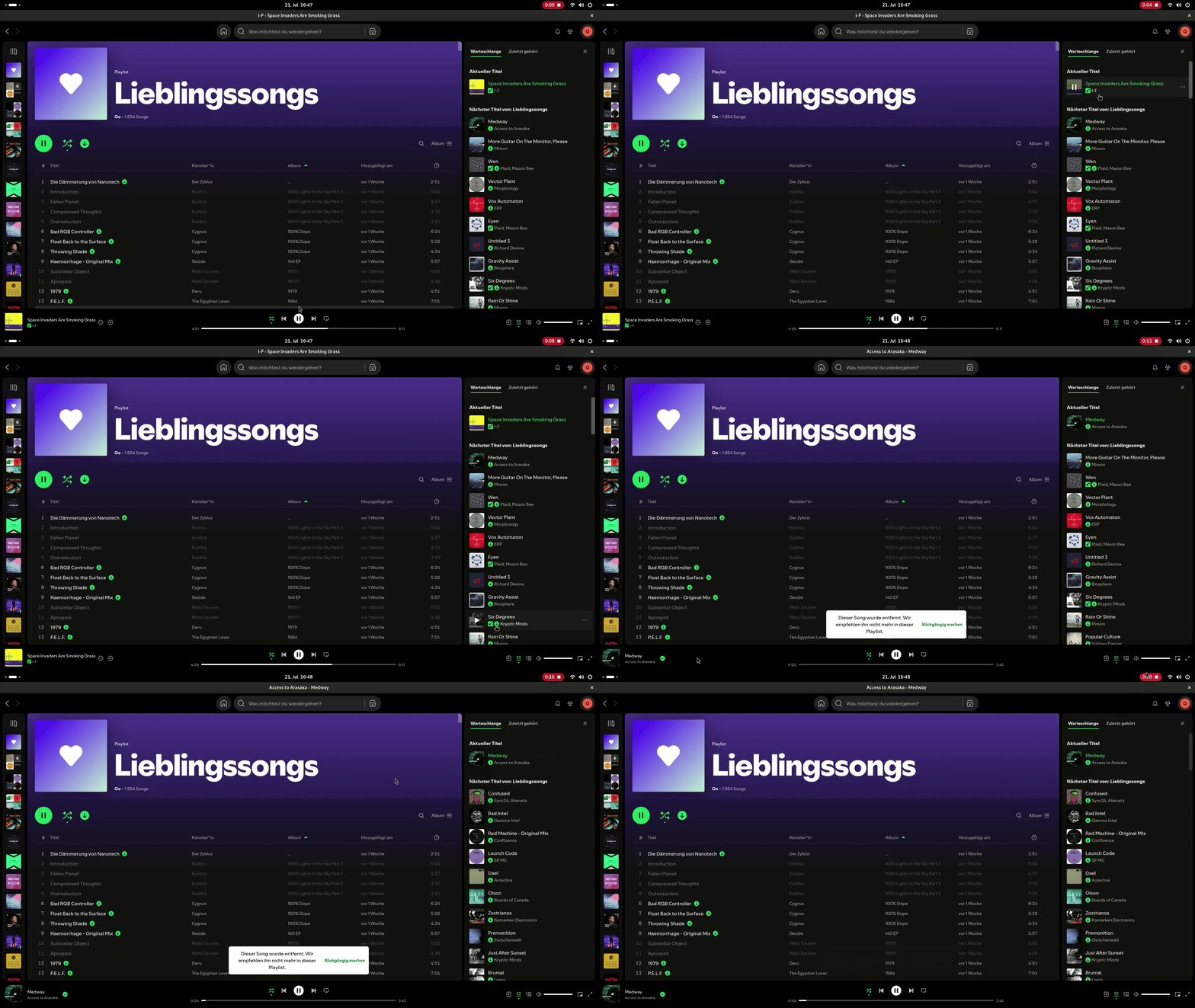
In this video, you see the whole playlist changes to a new list without Smart Shuffle content after the downvote. Also note that the Smart Shuffle button stays the same - it doesn't switch over to Normal Shuffle mode.
Does this happen across devices or on a single device?
Only on Desktop. When I listen on my Desktop, but downvote the Song on my Phone via Spotify Connect, Smart Shuffle usually stays on.
When listening and downvoting on Android, Smart Shuffle seems fine.
Does this happen when using the Connect feature or when playing normally?
See above.
What are the steps to reproduce the issue on your end?
- Start Playlist
- Activate Smart Shuffle
- Downvote a new Track suggested by Smart Shuffle
I usually need to downvote 1-3 tracks for the Smart Shuffle to deactivate.
That's not surprising at all. The Smart Shuffle feature was very poorly implemented, and then forced down everyone's throats. And it's clear Spotify has no intention of fixing this. Shameful!

I am having the same issue both on my IOS and on my computer.
My IOS only gives the option of Smart Shuffle or no Shuffle.
The computer keeps turning Smart Shuffle on when I turn it off and keeps the Smart Shuffle songs in the queue even when turned off. Very very annoying and needs fixing before moving to a different music provider.

I’m having an issue since Tuesday, my playlists won’t stop shuffling even though shuffle is turned off. So frustrating.


While listening to a podcast I had to pause for a moment. I came back to the podcast and after a few minutes, the podcast switched to another podcast before the one I was listening to was finished. This has happened before and it is annoying.
Why was there a recent price hike?
@Joan
Hi there, I seem to be having the exact same problem as most people on my laptop, and it happens when I switch windows or when my computer goes into rest mode. Here is a video link to give you a visual of what is happening. https://youtu.be/LzrrttclOsk