Search function in playlist not working as it should

Why doesn’t search function in normal playlists work like it does in Liked Songs playlist. What I mean is, if you search in Liked Songs for example an artist and click on one of searched songs, the other songs of that artist will automatically be added to queue.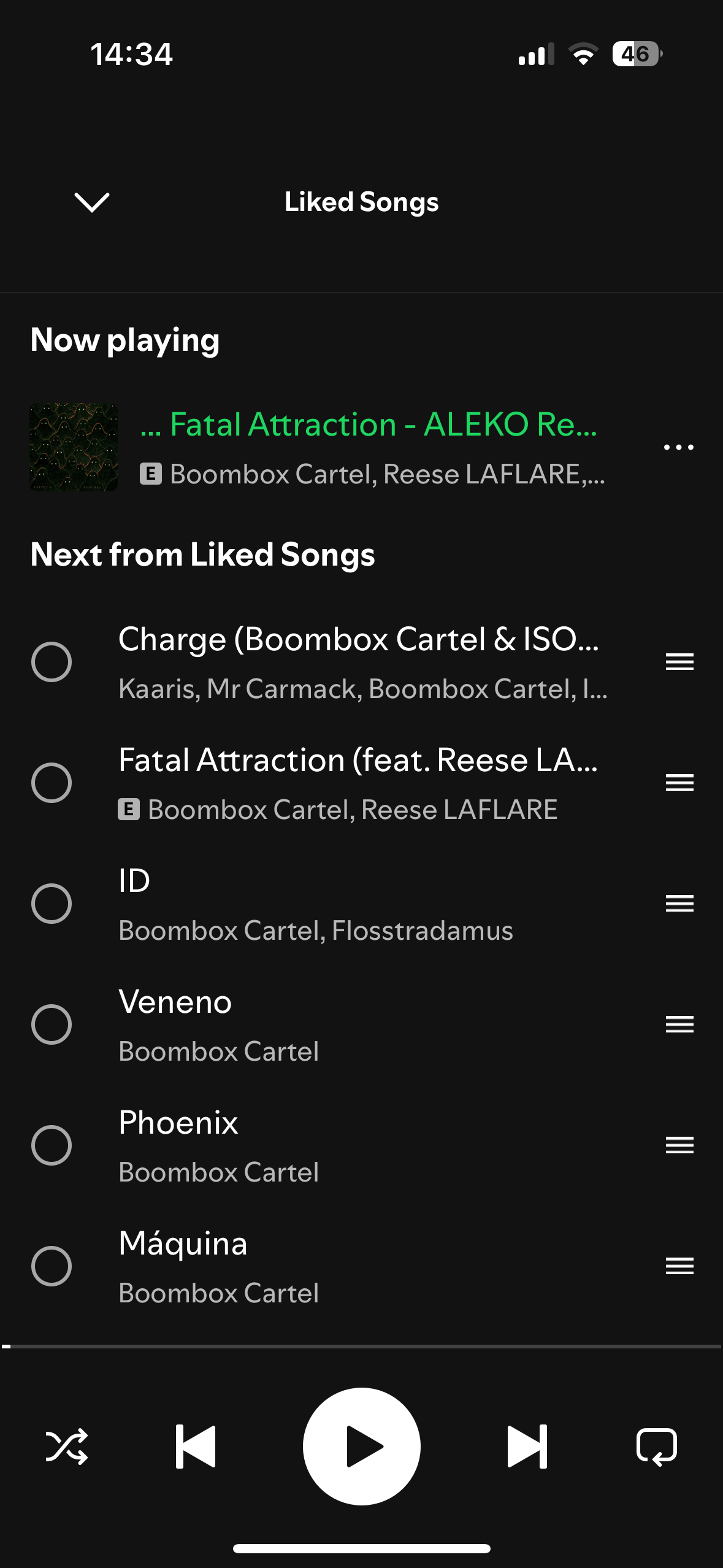
This is how it looks when I search for artist "Boombox Cartel" in Liked Songs playlist and play a song.
But when you do it in normal playlist, when you click searched song then next song will be random and not the song of artist you searched.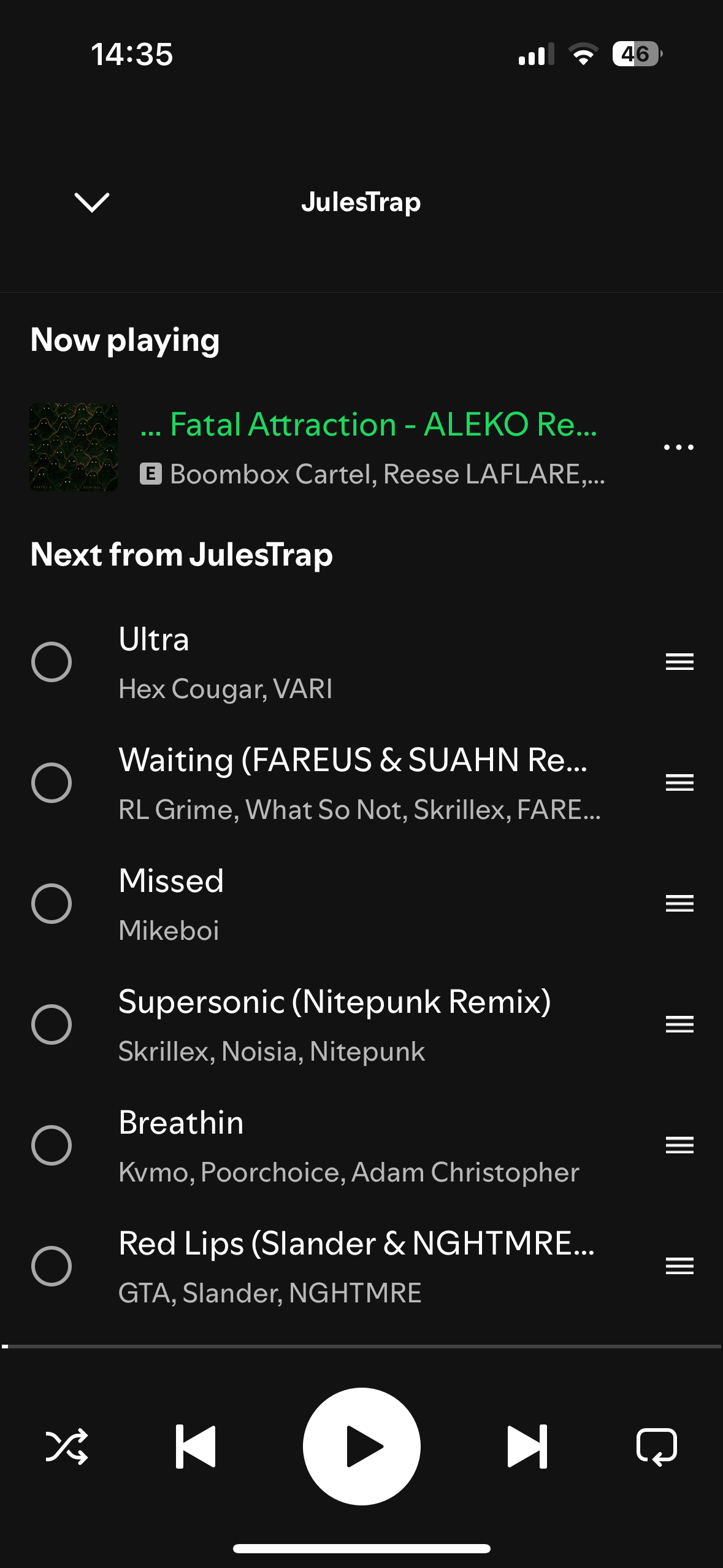
This is how it looks when I search for artist "Boombox Cartel" in normal playlist and play a song.
This problem is only on android and iOS, but on windows it works perfectly.
Am I doing something wrong or you have the same problem?
Accepted answers
All comments
I don’t think it is caused because of operating system update because it was not working for so long. I did like you said log out and log in twice, and reinstalled my app. It’s still not working. My phone is iPhone 14 Pro with iOS 17.6.1 and Spotify version is 8.9.82.628

Hi @xaamus,
Thanks for the reply. If possible, could you test this out on another device, iPhone or otherwise, and let us know if the behaviour is the same. That will help us narrow down the possible root cause.
Let us know how it goes.
Yes it still doesn't work, I think the problem is with the app itself more than my device or account

Thanks for trying @xaamus!
We've forwarded the information to our tech folks who'll investigate further. We'll keep you posted as soon as we have any updates, stay tuned!
Cheers 🤘

I don't know if it was a bug or a feature that got updated, but on my spotify there was an option to search in liked songs for an artist and it would show you those songs. My problem is that when you would play the song it would continue playing next songs that were on the list making a "new playlist in a playlist". It was useful because out of hundrets liked songs there was an option to create a playlist with only one artist/ similar titles that normally are scattered throughout the playlist. Now if i search for an artist it plays the first song and then playes the next songs that are in the unfiltered list. Please chnge it back or add an option that would allow you.

Plan
Premium
Country
France
Device
Poco F6 pro
Operating System
(iOS 10, Android Oreo, Windows 10,etc.)
My Question or Issue
The search feature used to restrict the songs played when used inside a playlist, not anymore (only on my phone, pc works like usual)
Exemple : you type the name of an artist inside your "liked titles" playlist. You click on the first song found and you expect the next ones to follow the ordre that is displayed after the search. But what my Spotify after the update does is that it starts the first song, and the next ones will follow the order of the playlist, weither or not they even fit the search.

Plan
Premium
Country
United States
Device
Samsung Galaxy S20 FE
Operating System
Android
My Question or Issue
For the past week, whenever I search for a specific artist under my Liked Songs playlist, it will not stick to the order of the search list. I'm attaching a screen recording below to show what exactly is going on. If you can't see the screen recording, this is what's happening:
1. I search "Kesha" under "find in liked songs", and every Kesha song I have in my Liked Songs pops up
2. I hit play on the first song, "Bastards", but when I click the next button, "I Love It" by Charli xcx starts playing instead of "JOYRIDE".
3. The same thing happens for any song I select under those search results.
Shuffle has never been on, I've cleared my data and cache TWICE, even uninstalling the app, restarting my phone, and re-installing it- And it still does this! It works just fine on my iPad and my laptop, it really is just Spotify on my phone being weird. I also got in contact with Spotify Support, but the solution the agent suggested involved me plugging up my phone to my PC and manually going into my Android files to delete a specific file under the Spotify folder (my phone is also refusing to recognize that it's being charged through a USB, which is a whole other technical issue I'm working on my own)
I come to the Community in a desperate time to see if there's literally any other way to get Spotify to stop being silly and goofy on my phone... I'm to the point where I'm deleting photos and videos to see if it's just an issue of I **bleep** ton of storage which is causing Spotify to act up.

Plan
Premium
Country
US
Device
Samsung Galaxy 22
Operating System
Android
My Question or Issue
Just a few weeks ago, if I searched in my Liked Songs Playlist for a specific artist, it would allow me to view and listen to all the songs by just that artist, without any other artist's songs playing next. Now when I try to do that, it just plays one song from my searched artist and then starts playing the next song in that songs place in my Playlist. Was this a recent change? If so, how can I change it back? I would like to be able to search for one artists songs in my Liked Playlist without other artists songs playing after.


Hi,
I've noticed a change in what the queue looks like when searching in Liked Songs. Before, when selecting a song from the search-filtered options, the queue would consist only of songs that match the search. For example, searching an artist's name, then clicking the first result, would then automatically play only the songs also returned in the search next, all songs by that artist. Now, when I search, then select from the filtered songs, the queue is just the next songs in the Liked Songs list, disregarding the filter. How can I return the function that I had before? I find it inconvenient to search an artist, then have to queue all the returned songs, just for when that queue ends to play the song that is saved next in the Liked Songs list.
Thanks in advance

Plan
Premium
Country
Brazil
Device
Samsung Galaxy S23+
Operating System
Android
My Question or Issue
When you were in a playlist, say for example, your liked songs, and you searched for something, like a word or artist name, and played one of the songs, all the next songs, would be of the songs found within your search. This behaviour was normal and confirmed to be intended, as seen in previous threads.
But all of sudden, this is not happening anymore. When I play a song within the results of a search on a playlist, the next songs will be not from the search but from the actual playlist

Hello @fefacio!
Thanks for coming to the Spotify Community. I'll try to help you clear things up.
I checked on my devices and I'm still experiencing the behaviour you're describing first (the songs from my search results will shuffle). Can you let me know which version of Spotify you're using? You can learn how to find it here. Also, does this happen in all of your devices or just one?
If it's only happening in one of your devices, it might be worth having a clean reinstall of the app to make sure this is not a bug.
Keep me posted!

Facing the same problem


Having the same issue. No idea what's causing it. Did you ever figure it out?

Experiencing the same thing, I use Spotify daily so I was taken aback when this happened. The update which took place on 13/01/25 clearly removed the feature.

Plan
Premium
Country
Device
Operating System
Android 13
My Question or Issue
With the recent update, the app is no longer only playing the songs that are searched within a playlist, playing the whole thing instead. For example, a playlist contains songs A-E, A-C consisting of songs from the same artist. Before this update, searching the artist and playing any song would create a queue with songs A-C. Now the queue has A-E instead. Was wondering if this was intended? I think it would be better to add both options as a setting, since I can see people preferring it working this way.

For example, if I searched for Taylor Swift, Spotify would only play songs with "Taylor Swift" from my library. It was nice to play by artists, and it would also include songs where they're featured. Now after playing one song, Spotify will shuffle my entire Liked library.
How do I change this back?
Hi there,
Thanks for reaching out. We'll be glad to look into this for you.
Could you elaborate a bit on what exactly you mean when you say it "plays from your Liked songs"? Do you mean that even if you search normally, it plays your Liked Songs? Or is it only when you search within the Liked Songs?
In general, this behaviour depends on a number of factors. If you're on free, then the algorithm will automatically shuffle in suggestions usually. If you have Autoplay enabled, it will add suggestions after a playlist or queue has finished. If you have Smart Shuffle enabled, then recommendations will be mixed in with whatever is in the playlist being shuffled.
Let us know how it goes. We'll be happy to assist you further.

This is a problem for Spotify Premium and is occurring on EVERY playlist, not just Liked Songs. This is the issue they're talking about.
Filtering Liked Songs, or any playlist, with a search, should ideally play only the songs from the search results when shuffled. However, when attempting this now, Spotify is shuffling as if there was no search filter, instead playing the entire playlist (or Liked Songs) on shuffle. This is nulifying the search filter feature of playlists and needs to be investigated immediately if possible, as it's an issue across ALL playlists. Thank you.

Hey @thinglass,
Thank you for joining the conversation.
If you're using the desktop version of the app, you should be able to listen to your filtered selection. If you've already checked the info mentioned by @Joan, we'd recommend performing a clean reinstall of the app by following the steps mentioned in this article. This is often an overlooked step, but it’s more thorough than a quick one and can be helpful in getting rid of any cache that might be causing trouble.
If the issue persists, include in your next response the OS version of your device, along with the Spotify version you're currently running to continue investigating the case.
We'll be waiting for your response.
Hey Oscar,
I'm on a Samsung device with One UI 6.1, Spotify version 9.0.10.415. Thank you.
When I go to "Liked Songs" I see all the songs I've liked. I can search this list of songs by typing in "Find In Liked Songs". If I type an artist (i.e., Taylor Swift) I see all the songs I've liked with Taylor Swift in the credits (artist, song title, featured artist, etc.).
Ideally I want to be able to search for Taylor Swift, play songs, and have Spotify only play Taylor Swift songs. This is how it used to work.
Now it will only play Taylor Swift songs if I don't use Shuffle. If I put on Shuffle, it plays all the songs that I've liked (in a random order).
I have Premium. Autoplay is on, however, even when I turn it off the same issue persists. I do not use Smart Shuffle.
Hi Oscar,
I've tried a clean reset and it's still not working.
I'm on a Google Pixel 9 Pro, Android 15 (November 1, 2024 update), and my Spotify Version is 9.0.10.415
Note on desktop app everything appears to be working as is. I'm using an Apple computer for my desktop app.

The same thing is happening for me- I've searched for GOT7 and my phone keeps skipping and giving me songs of other artists, whom I love too, but obviously don't want to listen to when I search for something else.
It works on my laptop app, but my Android has been having problems.
Sorry been a while and couldn't find where to respond however I have tried on two different phones
Galaxy A32 5G and REVVL4+ and my friend also tried on his iPhone 12 with the same result
Spotify version: 9.0.10.409
The last time the search function worked as intended was back on version 8.9.86.551
I know it's the app update and not phone because of a old version of Spotify on my previous phone having the search and queue function working as intended

Hello, I've been having the same problem as everybodyon this thread regarding the queue for a searched artist in playlists, and was wondering if anyone has found a fix. I'm on samsung and have done the double sign-out thing but it did not work. Is there any way we could contact someone to look into this?

Plan
Premium
Country
usa
Device
(moto g power)
Operating System
(Android 11)
My Question or Issue
i am so unreasonably frustrated with the newest up date. i have been talking to the wonderful support folks, to try and understand why, the way the search bar in liked songs, has changed how it works. it used to be, that you could go to my liked songs, then scroll up, type a band in the search bar, play a song, and it would ONLY play songs from that band. now it just plays any song within my liked songs. which as first world of a problem as it may seem, is so ever loving frustrating. i have been told to clear my queue (all while providing screen shots that show i have nothing queued), uninstall my app, delete the files from my internal storage, and sd card, reinstall the app, have chatted with advisors for 2 days. and still have no resolution. it is so so so frustrating that this has changed. and for what reason? was given a work around, where i can use the magnifying glass search bar on the bottom middle of the home page, search for a band, open their profile, and click the liked songs from this artist button. which is extra steps, and for what reason? who said, "hey how can we make this wonderful feature that has always worked just fine for atleast 10 years, and make it inconvenient" ? please i beg of you, fix it or revert the update. i can not be the only one who is absolutely annoyed and upset about this...
i just wanna cry kinda.. because my choice is to stay with a frustrating service that doesn't work the way it "should" or atleast used to, or start over and support a friggen nazi. like ahhhhhhhhh


Yes, I am having the same issue as everyone else in this thread. The search function was working just fine until the last update. Please revert this. It is so frustrating to not be able to listen to one singular artist in my liked playlist.
Hey there @xaamus,
Thanks for getting in touch about this and welcome to the Community.
Could you let us know if this started happening after a specific event such as an update either of Spotify or the OS of your devices?
First up, we'd recommend logging out and then logging back in to your account twice in a row. We know this sounds odd, but it'll trigger a sync between your account and device.
If this doesn't do the trick, it's well worth running a clean reinstall of the app to get rid of any cached files that might be causing trouble.
Should the issue persists, sending us the exact make/model, operating system and Spotify version of your device would come in handy.
We'll be on the lookout.