Created a playlist and cant rearrange songs....

Seems like a simple action but i am unable to move a song from a playlist, i created, from bottom to top?
Thanks.
Accepted answers


Total disapointment, looks like it is time to try apple music
Finally solved.
You can only sort stuff if none of the columns selected for ordering AND you have Queue play mode selected!
Spofity, you need to fire all you dumb UI/UX experts it is just nonesense.

OK, I think we have a solution!
I have downloaded the program (app?) to my laptop and in that interface I am able to rearrange tracks and sort the columns.
I could not find any link to the download from the webplayer, so I googled it. www.spotify.com should get anyone to the right download for Mac vs. PC.
Sheesh what a process!

Thanks, Unclicking one of the sorting options did it!

It's mind boggling to me that after YEARS of users complaining about sorting, Spotify has done NOTHING to fix it. The official answer just doesn't work.
I've attached an animated GIF screencast that shows dragging tracks just doesn't do anything. I don't have any sort order activated because there's no option to sort any more. And yes, it's my own playlist I'm trying to reorder.
**bleep** Spotify.

I figured it out!! You have to be using DESKTOP version of Spotify, not the online/app version. It has to be downloaded to your computer. Then you can reorder your songs in your playlists!!

Interesting that Spotify still haven't fixed it. The official sollution does not work, it is not even possible to click on the "Artists" and rearrenge them like that.

>You can only rearrange on the computer. Not in mobile
You can't in Android mobile, only on IOS, thats the whole point of all this. Spotify refuses to fix it on Android.
All comments

Hey there!
It seems that one of the organisation settings at the top of your playlist may have been selected. Check the top of your playlist and see of any of the column headings looks like the Artist one below.
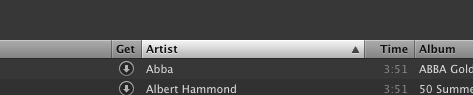
If it does, click on it a couple of times, and it should go back to normal.
Got it...thanks for the quick response!!!

Ever since I downloaded the new update I am not able to rearrange songs in a playlist. I have tried everything.

Hey 🙂
What do you mean rearrange?
Playlists are only sortable by clicking the headings at the top to reorder the list. You can't manually set the order of a playlist when any of the headings are selected.
Peter
no not the playlist but the songs within the playlist. I was always able to move around songs within my playlist and now i can not.

Have you sorted the playlist by clicking on one of the column headings? If the playlist is sorted that way, you can't manually rearrange. You have to unsort. I had that problem, unsorting fixed it.
See the earlier reply in this thread, it explains this, too.

My husband too. the support said that i must double click on the playlist so i can manually move the songs but this is not working. tried deleting and reinstalling..everything still nothing
Hey guys 🙂
You need to see the post earlier in this topic.
You can still reorder playlists providing none of the column headings are highlighted in a different color to the rest. You can deselect the column ordering by clicking on the heading until it is no longer selected.
Peter
They are not even highlighted. so i can not unselect them
Can you provide a screenshot?
Peter
I have tried to hold down the playlist to select it or unselect it and nothing.
Are you trying to reorder playlists or songs inside playlists?
Peter
I can when i get home i can take a picture of my phone in spotify.
as a right now the top says
Edit playlist nowplaying
*starred
INbox
Local files
___________
music key the name of the playlist then a >
when i click into the playlist it comes up like this
playlist name of the playlist nowplaying
Avaliable offline
*** --> shuffle play ((.))
then the songs that are on the playlist
I have tried everything
songs within the playlist. i didn't have a problem before then i updated and now i can't fix it
jenvauter: In this laptop screenshot, my playlist is sorted by "Artist". The column heading is highlighted and there's an arrow on the right. I can't rearrange the playlist while it's like this.
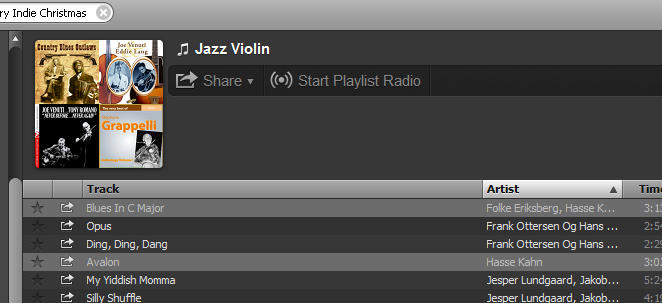
Here is what it looks like after unsorting. I clicked on the "Artist" column heading twice to remove the arrow and highlighting:
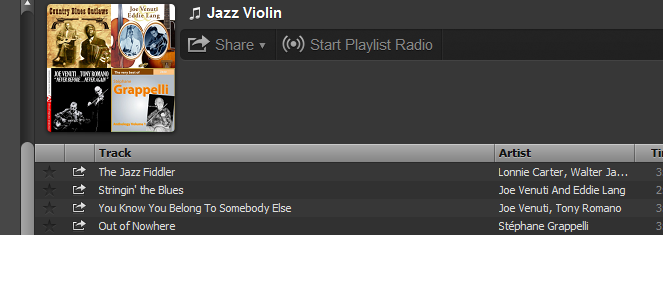
Now I can rearrange the playlist. Does this help?
No its on my iphone 4s
these problems are on an iphone not a computer


I am having the same issue. I cannot rearrange songs within a playlist on my iPhone 5 since the update. When I choose edit it doesn't have the three dots beside the song to move it up or down. How can I get that back? The fixed you provided must be for computers, but those do not work for the iPhone. Please HELP!!!!
@angelavinas wrote:I am having the same issue. I cannot rearrange songs within a playlist on my iPhone 5 since the update. When I choose edit it doesn't have the three dots beside the song to move it up or down. How can I get that back? The fixed you provided must be for computers, but those do not work for the iPhone. Please HELP!!!!
Hey! Welcome to the community 🙂
To my knowledge, that functionality was removed from the iOS application due to stability issues, although it will hopefully make a return at some point in the future. New sorting features just arrived on android, so hopefully iOS won't be far behind.
Peter
That's a total pain!!! That's one of the features I require when making playlists. The order of the songs are super important. How will I know if it becomes available? This needs to be fixed ASAP!!!
@angelavinas wrote:That's a total pain!!! That's one of the features I require when making playlists. The order of the songs are super important. How will I know if it becomes available? This needs to be fixed ASAP!!!
Subscribe to this topic (Topic Options > Subscribe) and then you will get an email when any new iOS releases come out.
As a temporary work around, if you reorganise tracks in the desktop, and then copy them into a new playlist in the correct order they should appear in the correct order on your phone.
Peter
problem is i don't have spotify on my desktop. i have a work laptop, not a personal one, and they won't allow spotify to be downloaded. any other work around you can offer on the phone itself? Besides writing songs down on paper and then saving them in that particular order in a playlist?
You could try installing the "Spotify for iOS 4" legacy app, to my knowledge it still has the functionality but as you can imagine lacks the modern Spotify features.
Peter
okay, i'll try that. i'd rather have the option to move songs around in a playlist than the modern features. they look nice but that option is more important than things looking nice 🙂 the older version won't mess anything up will it? I had the older version until today and it wouldn't connect unless i updated to the newer version. thanks so much for all of your help. i love spotify, but need it to work!!
@angelavinas wrote:okay, i'll try that. i'd rather have the option to move songs around in a playlist than the modern features. they look nice but that option is more important than things looking nice 🙂 the older version won't mess anything up will it? I had the older version until today and it wouldn't connect unless i updated to the newer version. thanks so much for all of your help. i love spotify, but need it to work!!
The only thing that will change is you will need to redownload any offline content/playlists you have. However, it might let you install them alongside each other (the current app and the iOS 4, I don't have an iOS device so I don't know haha!)
Peter
oh boy! i have like 30 offline playlists, prob about 1500 songs. if it messes up can i reinstall the newer version? i dont want to lose my existing playlists. i'd rather write it down and arrange that way then lose all my songs i've already downloaded and arranged. know what i mean?
Yeah, if you don't want to risk a resync, I wouldn't go for the iOS 4 solutuon 😛
Peter
okay. fingers crossed that you'll get the rearrange option for ios VERY soon! how will i know when it does become avail? will i have to update again?
Hello: @croozn33
I take you are running an android spotify apo. If you load up a playlist and then swipe down from just under the big shuffle button, just an FYI here you do need to be a permium subscriber in order to play in the order that you wish to. But if you are permium keep swiping down from underneath the big shuffle button until you see then a filter screen. On the far right is a kind of odd looking three line icon, tap it, you should get filter options. If this does not work you must be stuck in shuffle mode, and either need to be a permium user to turn it off or need to go back to the playlist view and tap on the current playing song at the botton to show the Now Playing Window, to turn shuffle mode off here look to the lower left for a double crossed arrow turned green, keep tapping until it turns back to grey. Does this help any?