How do I rearrange my songs in my playlist?

Accepted answers

Thanks for joining the thread, @mtfish42!
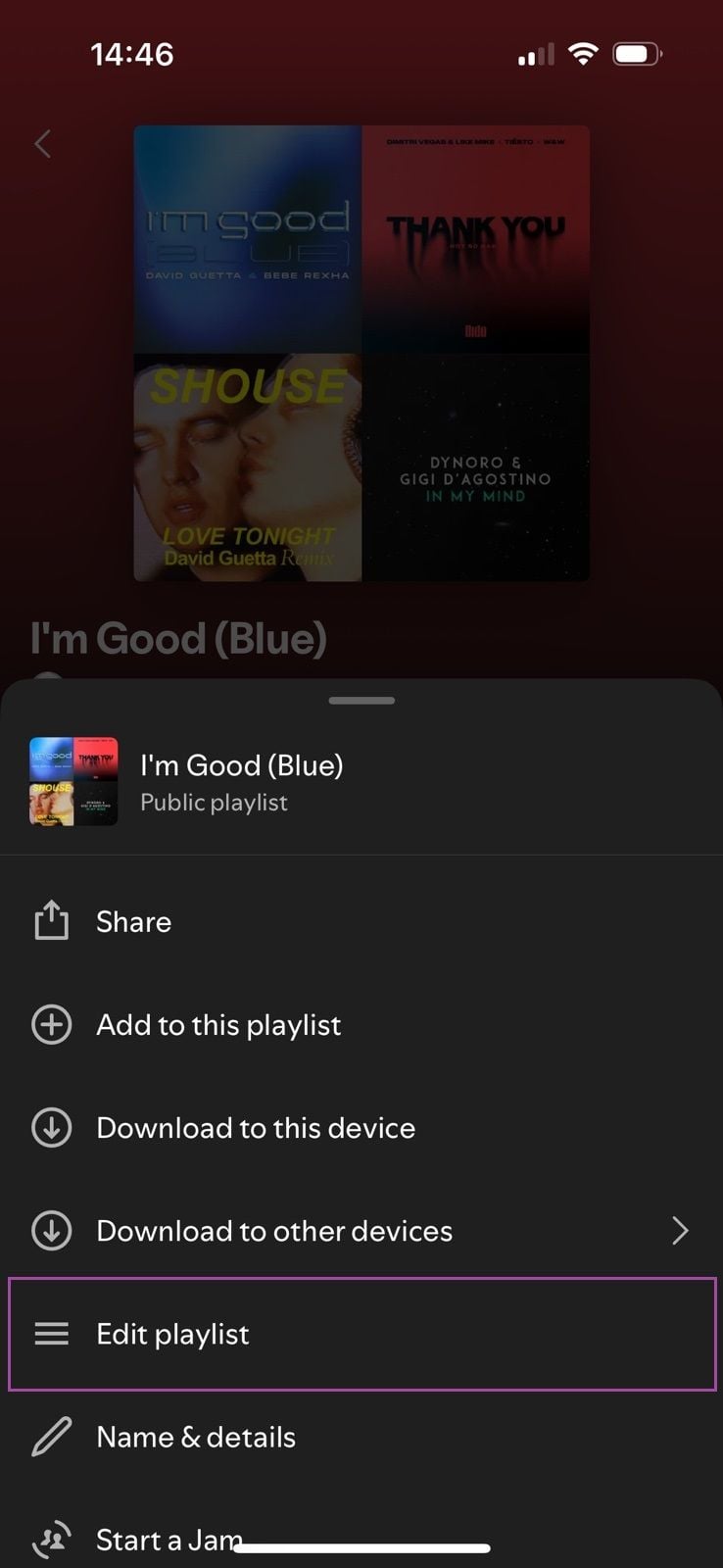
Hmm, on mobile, the 'Edit' button should be located somewhere at the topside of the playlist, but in any case, you can also find it in the three dots menu as well:
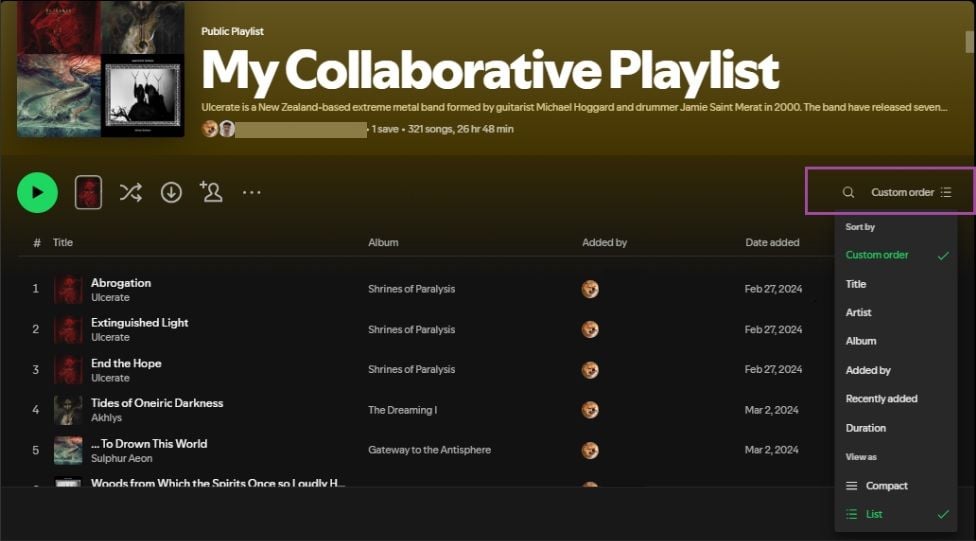
On desktop, there isn't an 'Edit' button since you can easily drag & drop items to rearrange the playlist - just make sure you've set the sort order to Custom first:
@vizanje, apologies for the late reply, I just stumbled upon your post. In your case it might be easier if you just set the sort order to Artist - that will instantly reorder the songs in the playlist.
For an in-depth look of these features I'd recommend checking out the aforementioned article.
Take care, folks!
All comments

Hi,
Thank you for reaching out to the Spotify Community
In order to re-arrange songs,
Simply open the playlist from My Library > Playlists. Once you are on the playlist page > tap the three dots in the top right hand corner of the screen > click on Edit to make changes. Then long press the 3 bars on the right, and drag each track where you'd like to reorder it.
Hope this helps

There are no dots in the upper right to click on! Am using Android btw
Hi there, @Mstjamesca,
Thanks for joining the thread!
We're currently testing some UI changes for some users, so things might look a little different on your end. Could you give the following steps a try instead:
- Open the playlist in question.
- Tap Edit, located in the playlist header, next to the big green Play button.
- Select & hold the button on the right on a song, then drag & drop it to the desired location.
- Tap Save at the top right corner to save your changes.
Once edited, make sure to set the playlist sort order to Custom order to view your changes.
Check out the screenshots below for more info:
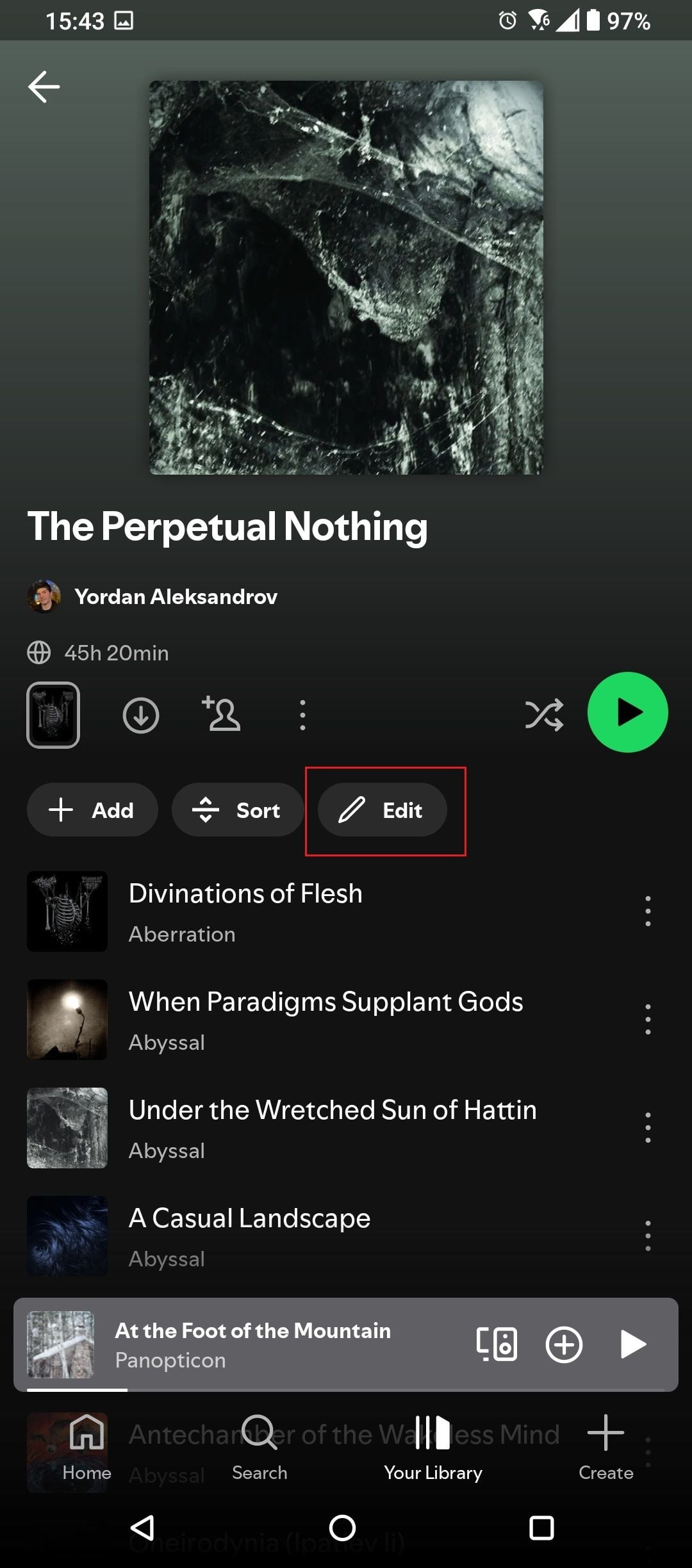 1. Tap "Edit" to reorder the songs.
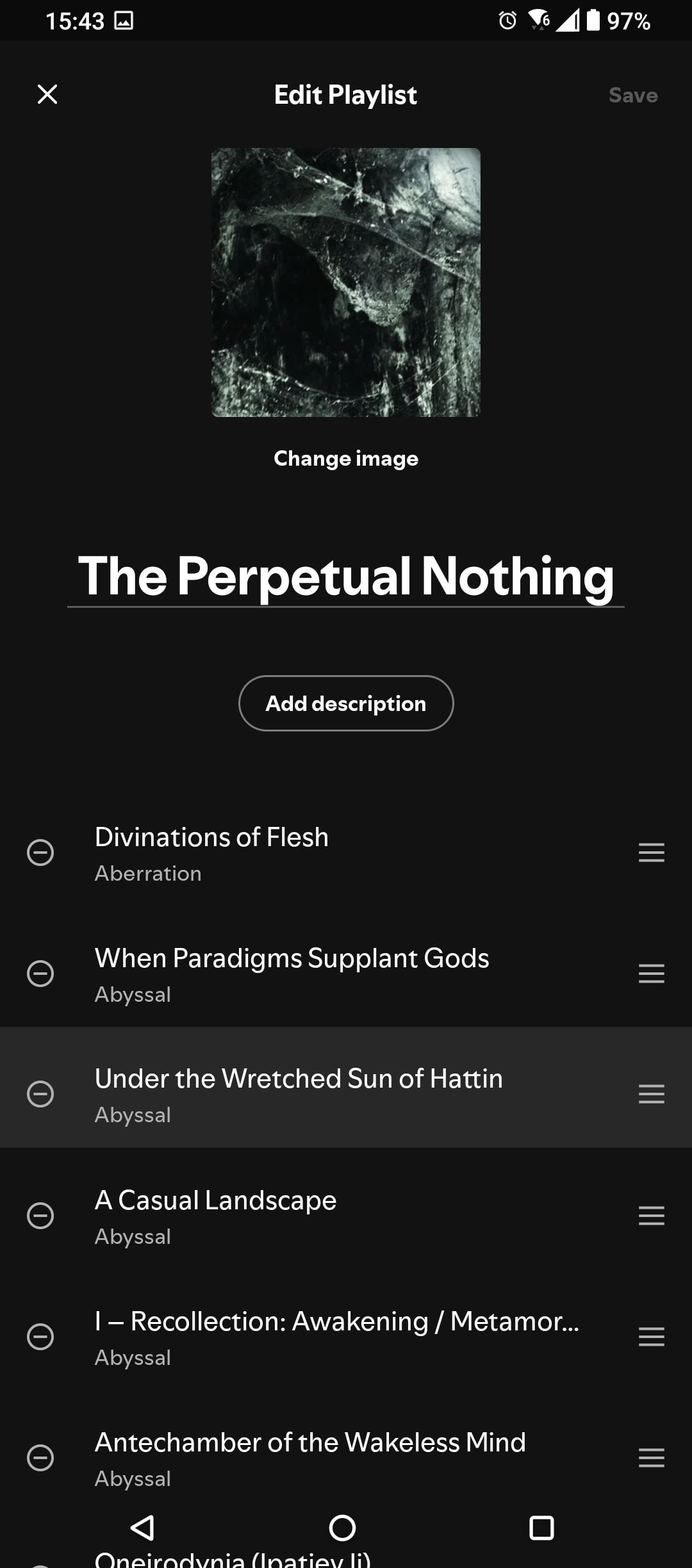 2. Use the button on the right to move songs around and press Save at the top right corner to save your changes.
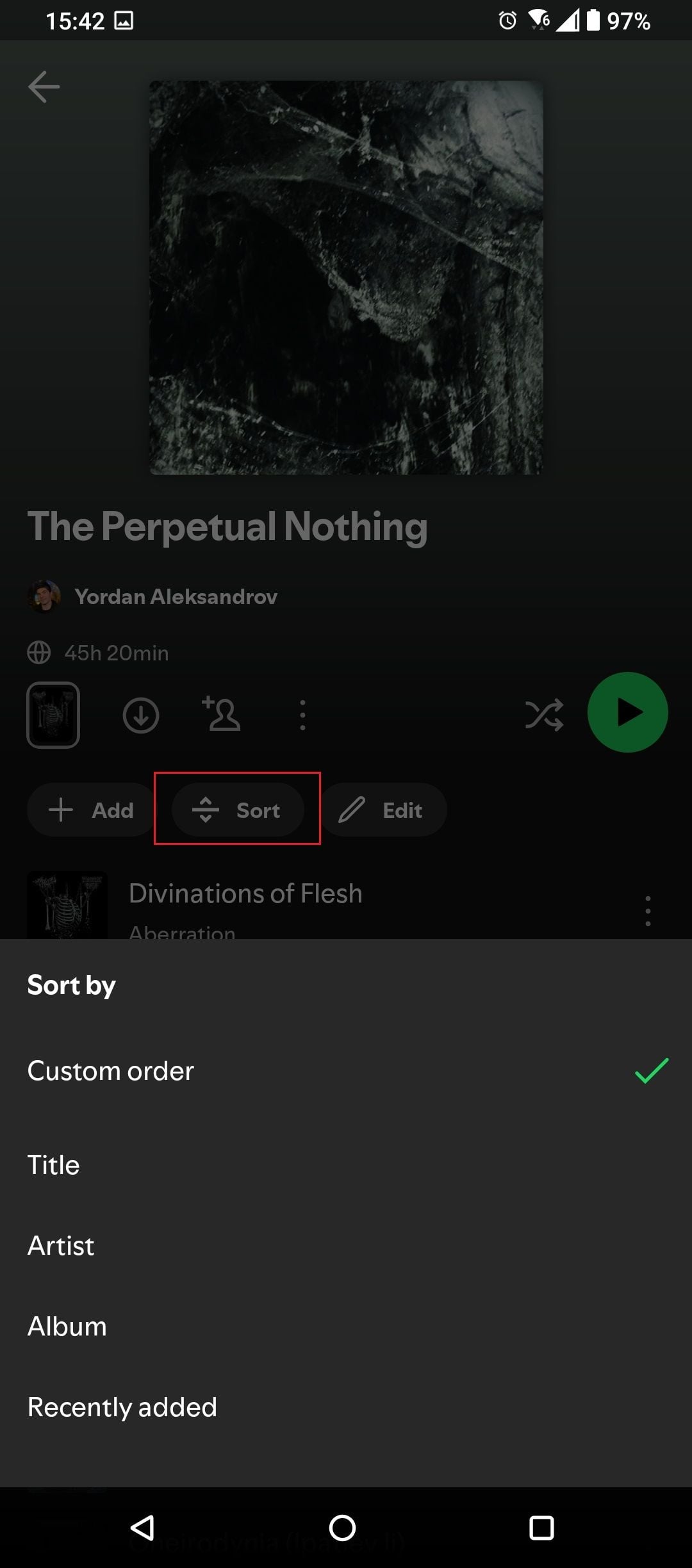 3. Change the sort order to "Custom" to display the songs in the specific arrangement you just set.
If you need further assistance, feel free to share a screenshot which shows how the playlist page appears on your end so we can take a closer look.
More info on how to search, sort & filter in Spotify can be found in this article.
Cheers 🤘

so I want to list songs in my playlist by artist, I have to manually go through a 100+ song playlist to do this?????
Used to be able to, now I can do much less.

Hey Yordan, there's no edit button. This is pretty annoying. I've updated my app on my phone and there's no clear way to do it on desktop either. C'mon Spotify. This is**bleep**
Thanks for joining the thread, @mtfish42!
Hmm, on mobile, the 'Edit' button should be located somewhere at the topside of the playlist, but in any case, you can also find it in the three dots menu as well:
On desktop, there isn't an 'Edit' button since you can easily drag & drop items to rearrange the playlist - just make sure you've set the sort order to Custom first:
@vizanje, apologies for the late reply, I just stumbled upon your post. In your case it might be easier if you just set the sort order to Artist - that will instantly reorder the songs in the playlist.
For an in-depth look of these features I'd recommend checking out the aforementioned article.
Take care, folks!

All the ways Spotify says we can change the order inside a playlist are wrong. No three dots. No edit button beside the play symbol. No edit option inside the sort tab. iPhone and iMac. No way to change the order. Very lame. Maybe time to switch.

Hey @2old2wait,
Thank you for joining the conversation.
We've tested the methods mentioned in the previous response and they're working properly to edit the order of the playlists. Keep in mind that the options to manually change the order of the songs are only available in playlists created by you, but it doesn't apply for playlists you follow.
If you want to change the order of the tracks in a playlist you follow, you can Sort them in a different order by following the steps mentioned in this article.
In case you want to manually change the order of a playlist you follow, we'd recommend copying all the songs of the playlists you follow and creating your own one. You can check the process in this article under the section: Save a version of a playlist. This way you'll keep the same content, but including the ability to rearrange the songs as you prefer.
Hope this helps. If you have any additional questions, don't hesitate to ask.

Why not just add an option to set the playlist order the same as the sort order?

I need it for laptop pls
@yordon can u help
Hey folks,
@YosemiteSamurai, if I understood you correctly, you'd like the songs in "Custom order" to match the order of sorting by "Artist", for example. The easiest way to achieve this is via the mobile app by making a duplicate of the original playlist:
- Open the playlist on the mobile app and set the desired sort order (let's say by "Artist").
- Tap the three dots menu and select Add to other playlist > New Playlist. This will create an exact copy of the original one.
- The sort order you had selected will now become the new "Custom order". You can delete the original playlist & keep the copy you just created to avoid confusion.
@jack-jack1, are you using the Web Player by any chance? The default sort option there is always 'Custom order', so you can rearrange the songs in your personal playlists via drag & drop, but you can't sort all tracks by "Artist", "Album", "Date added", etc. - at the moment, this is only available in the app, which you can download here.
Hope this clears things up. In case you meant something else, feel free to elaborate further 👍.
Thx I will try this. If it does not work I will get more details
LOL just tired it works. I was just being dum. thank u again @Yordon. ❤️
again thx u so so so so so so much @Yordon

hello yordzan , in the app i don't see any three dots or filter to sort my own playlist for example by artist; Can you help me?

Hey there @Marc100,
Thanks for getting in touch about this and welcome to the Community!
If you'd like to sort your playlists by Artist, you just need to follow these steps.
If this is not how it looks like on your end, could you send us a screenshot of what you're seeing so we can take a closer look? You can attach it to your next response by using the Insert image option in the post editor. Make sure not to send any private info.
We'll be waiting for your reply.

I have no three for option. It only says sort. When I click on it it allows by artist and album and so on. No custom. No three dots. Am I challenged? Ugh…

Hi there @Weirdcatlady1969,
Thanks for joining the thread and welcome to the Spotify Community!
Sounds like you're using the mobile app on your phone. Is the playlist you're trying to sort your Liked Songs by any chance? If so, note that custom order is not available there at the moment. This article goes in-depth on how to sort, filter and search in Spotify, so we'd recommend checking it out if you're interested.
Hope this helps.

Plan
Premium
Country
Device
PC
Operating System
Windows 11
My Question or Issue
Why can't I order the songs on my personal playlist in the web browser version? The option is missing and only offers to change the appearance of the playlist from list to compact. Now my songs are back in the default order and I can't alphabetize me. Why is this not an option on the web browser?

I can't re-order my playlist anymore. I could do this before, so why can't I do this now?
Plan
Premium
Country
USA
Device
any
Operating System
macOS or iOS
My Question or Issue

I have no Edit command on my mobile, and try as I may, on my laptop, nothing is budging.

Hey @Albie693,
Thanks for letting us know 🙂
See if there aren't any pending app updates and then try logging out of the app and back in twice in a row. This will trigger a manual sync of your settings and data.
In case the issue persists after this, clear your app's cached data as shown here. It's also a good idea to check if the same error would appear when using a different internet connection.
If nothing helps, we'd like to ask you for a screenshot of how things look like on your end on all affected devices.
Many thanks! We'll be on the lookout for your reply.
Hi Vasil
1. No updates were found
2. Logged out several times
3. Try as I may, could not find Clear cache either via Storage or Data & --- (another option)
4. Tried another browser to Edge (Chrome) but outcome was exactly the same
5. Please see my screenshots
Thank you, Albie

Hey @Albie693,
Thanks for your reply and the screenshots.
We’ve removed the first one as it included some sensitive information, just to keep your account safe.
Just to clarify, the Clear cache option can be found within the settings of the Spotify app on your mobile device, rather than on the account overview page in your browser.
Before you give that a try, could you confirm if you're attempting to edit a playlist that you created yourself? Keep in mind that the Edit option isn’t available for playlists made by other users or for personalized playlists created by Spotify.
Cheers,

Hi MihailY
Thank you - I had no idea sensitive info was included in my screenshot.
I've finally found the Clear cache option and have now cleared data.
However, this appears to have had no impact on my ability to rearrange my created playlists.
I can confirm I am trying to apply the rearrange function on my playlists.
There is no Edit option on either my mobile or my laptop (and btw, when I try to drag and drop a temporary stop icon appears).
So, no luck.
Thanks, Albie693
Hey @Albie6931,
Thanks for the reply and for testing this out!
Are you trying this with your Liked Songs playlist? If yes, then keep in mind that it's not possible to drag and drop the songs in it on desktop and it's expected to see a "stop" icon as you mentioned when attempting to do so. You also won't see an Edit option on mobile or desktop as custom order isn't available for Liked Songs at this time.
If that's happening with any other playlists that you created, then it'd be great if you can either share a screenshot of what you see when you try to edit/rearrange the songs within it, or if you can send us a link to the playlist in question, so we can take a closer look.
We'll be on the lookout for your response.
Hi Dessi
Yes, I am. So, I wonder why one cannot drag and drop tracks in the Liked Songs playlist either on the desktop or mobile. Is there a plan to make that option available. I tried to other playlists and while I can move tracks on the desktop, there is no Edit option when I click the three dots on the side of track titles. Should there be? Can one drag and drop tracks on the mobile?
Thank you for letting me know
Albie

Thanks for the response @Albie6931.
We understand that it'd mean a lot to you if you could drag and drop tracks in the Liked Songs playlist. While this isn't possible at the moment, we're always looking for ways to improve and there's actually other users that share your opinion. There's an existing Live Idea here on the topic that you can vote for in order to show your support.
It is possible to edit playlists on mobile and drag and drop songs (you should see an 'Edit' button on top), but as mentioned, keep in mind the edit option isn't available for playlists made by other users or for personalized playlists created by Spotify. You can check out this article for more info.
If you're unable to edit other playlists that you created, it'd be helpful if you could share a screenshot of how things look like from your end, or if you could send us a link to the playlist in question, so we can take a closer look.
We're here in the meantime if anything else comes up.


I want to be able to move songs around in my playlist on mobile by just holding down the song and panning it up
Hi there, @Mstjamesca,
Thanks for joining the thread!
We're currently testing some UI changes for some users, so things might look a little different on your end. Could you give the following steps a try instead:
Once edited, make sure to set the playlist sort order to Custom order to view your changes.
Check out the screenshots below for more info:
If you need further assistance, feel free to share a screenshot which shows how the playlist page appears on your end so we can take a closer look.
More info on how to search, sort & filter in Spotify can be found in this article.
Cheers 🤘