Spotify liked songs readded all songs and shuffled the order

Plan
Premium
Country
Netherlands
Device
Pixel 7 pro
Operating System
Android 15
My Question or Issue
My liked songs thought it was funny to readd EVERY SINGLE SONG, so now the whole order is ruined. I always put it on recently added first, and I just don't remember what I added recently, so not only are these songs basically gone, because I basically don't remember there names. Besides, the whole order is now even worse, with really old songs being at the top. I need a fix, I did nothing weird, changed nothing, and suddenly my order is f'ed.
Accepted answers
All comments

I have the same problem, logging in and out twice didn’t fix it

Hey @Nikki5818,
Thanks for joining the thread and welcome to the Spotify Community!
We're not really sure we understand the initial issue reported in this thread and we weren't able to reproduce it, so it'd be great if you can share a bit more info about what you're experiencing on your end, so we can take a closer look. Can you also let us know if this affects the mobile app, the desktop one or both? Is it only with Liked Songs and did you make any changes to the list prior to this? If you can think of anything else that wasn't covered and can be useful for the investigation, feel free to share it, it'd help a lot!
We'll be on the lookout for your reply.
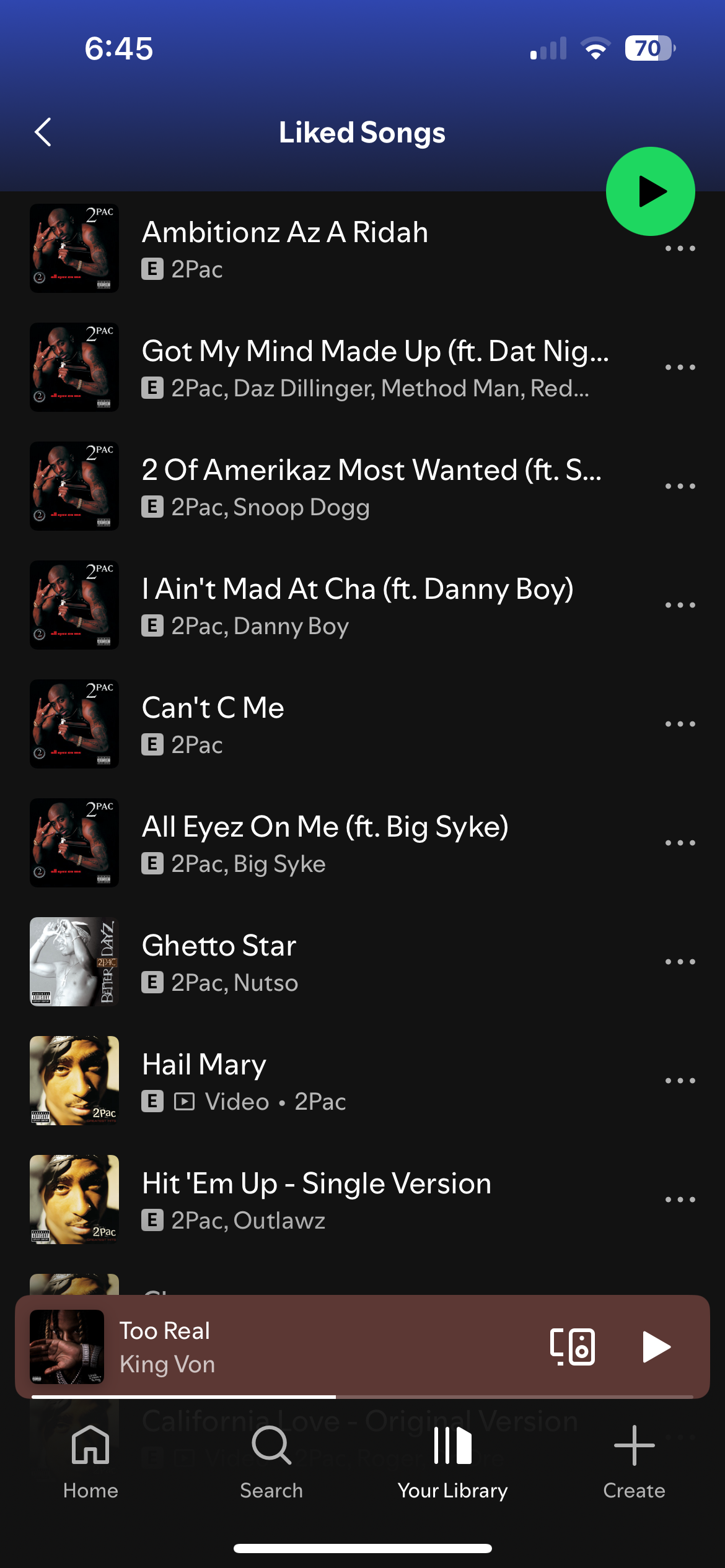
this photo is from my phone in my liked songs
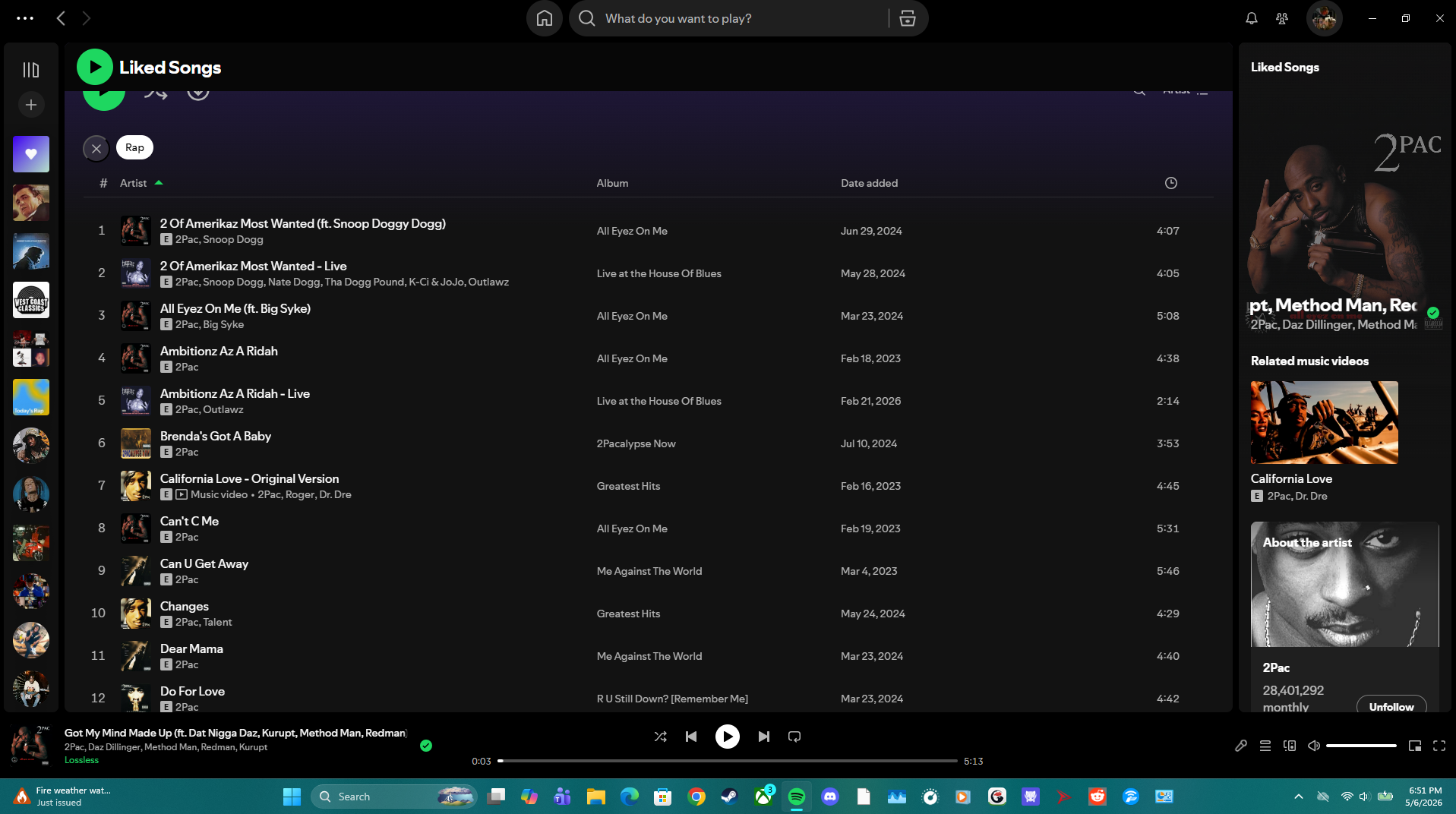
this photo is from my laptop
id like to have my songs in order like they are on the laptop instead of how they are on mobile

Thanks for the additional info, @Nikki5818!
Based on the screenshots you've sent you're sorting by Artist and have applied the "Rap" filter for your Liked Songs on desktop. To change the sort order on mobile, pull downwards while at the top of the playlist - a Sort button should appear in the top right corner and you can switch to "Artists" there.
More info on how to sort and filter in Spotify can be found in this article.
Cheers 🤘
I’ve already tried changing the filter it never works
Hey again, @Nikki5818,
In addition to changing the filter, make sure you've selected the appropriate sort order ('Artist' in your case, if you want to match the one on desktop):
- Open your Liked Songs.
- Pull down and release - a search bar and a "Sort" button will show up at the top.
- Tap Sort and change the order to 'Artist'.
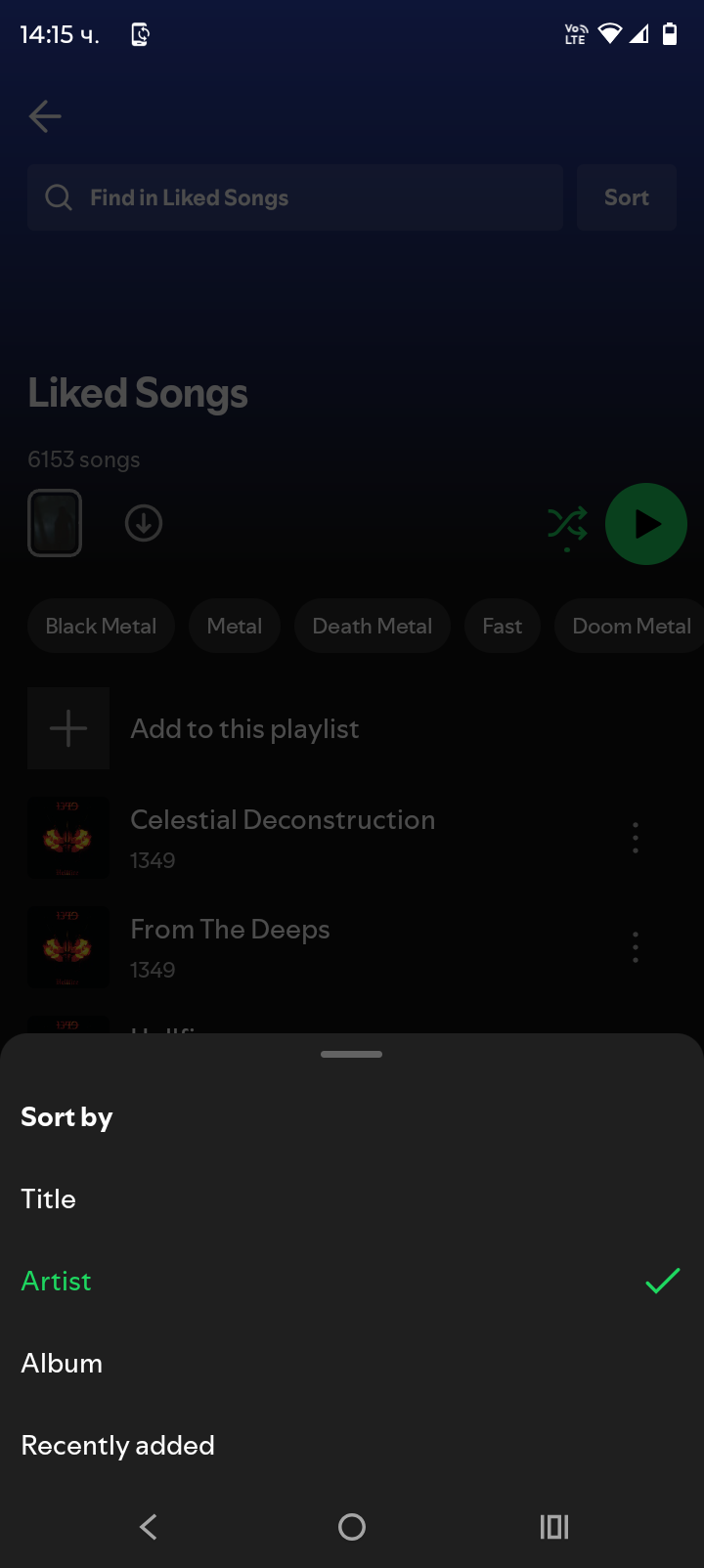
Take care.
I’ve tried that as well, neither worked
Thanks for confirming, @Nikki5818.
In that case I'd recommend performing a clean reinstall of the app on both devices. This will get rid of any potentially corrupted cache and ensure you're running the latest version of Spotify available. After that, you can set the sort order to match across your devices.
Should the issue persist, could you check if it only occurs when you have a genre filter selected, i.e. "Rap"? If there aren't any filters applied, does the song order remain the same on both your phone and PC?
Let us know how it goes 👍
I tried a clean install, it didn’t work. The order on pc is fine, it’s only mobile. But no, it dosent change regardless of filter or sort.

Hey @Nikki5818,
Thank you for keeping in contact.
We appreciate the clarification that the sorting order on the PC is fine. So in that case, we'd recommend making sure you've the same "Rap" tag selected at the top of your playlist and the same sorting option on your mobile device. In fact, I was able to replicate the same behavior at first, but after selecting the tag at the top (Electronic) and applying the same sorting options (in my case "Date added"), both devices are now showing the same order as shown below:


Hopefully this will work for you as well. Let us know how it goes.
I keep the same tag ‘rap’ and sort ‘Artist’ on mobile and pc. But mobile is the only having the problem. And like I’ve said I’ve tried the clean install and logging in/out twice, but nothing’s worked.

Thanks for the response, @Nikki5818.
To continue investigating, it'd be very helpful if you could send us:
- A screenshot or two, showing the current order in your Liked Songs playlist (make sure that both the Sorting option 'Artist', as well as the 'Rap' tag are shown on the screenshot(s).
- Make and model of your phone, OS-version and the exact Spotify-version this is happening with.
In the meantime, we're here if anything else comes up.
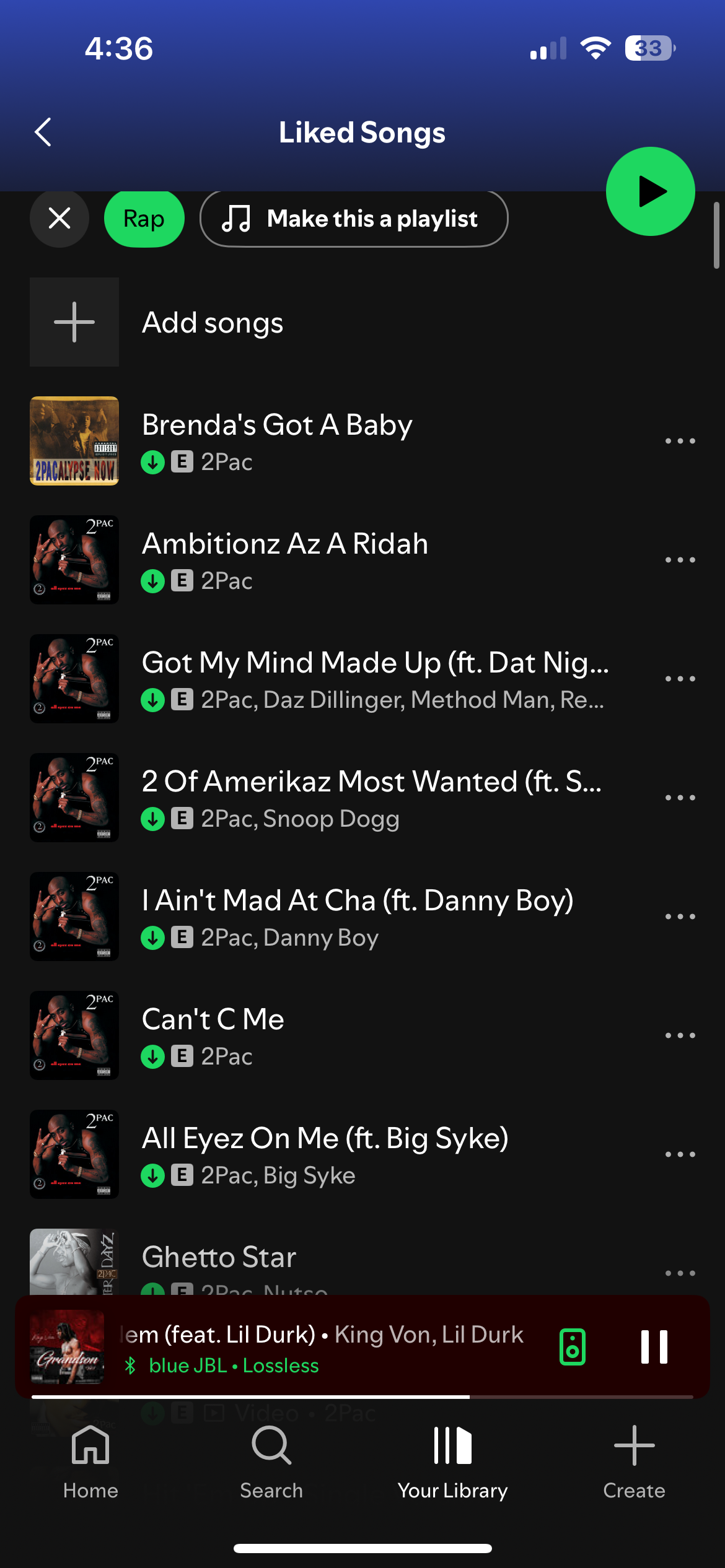
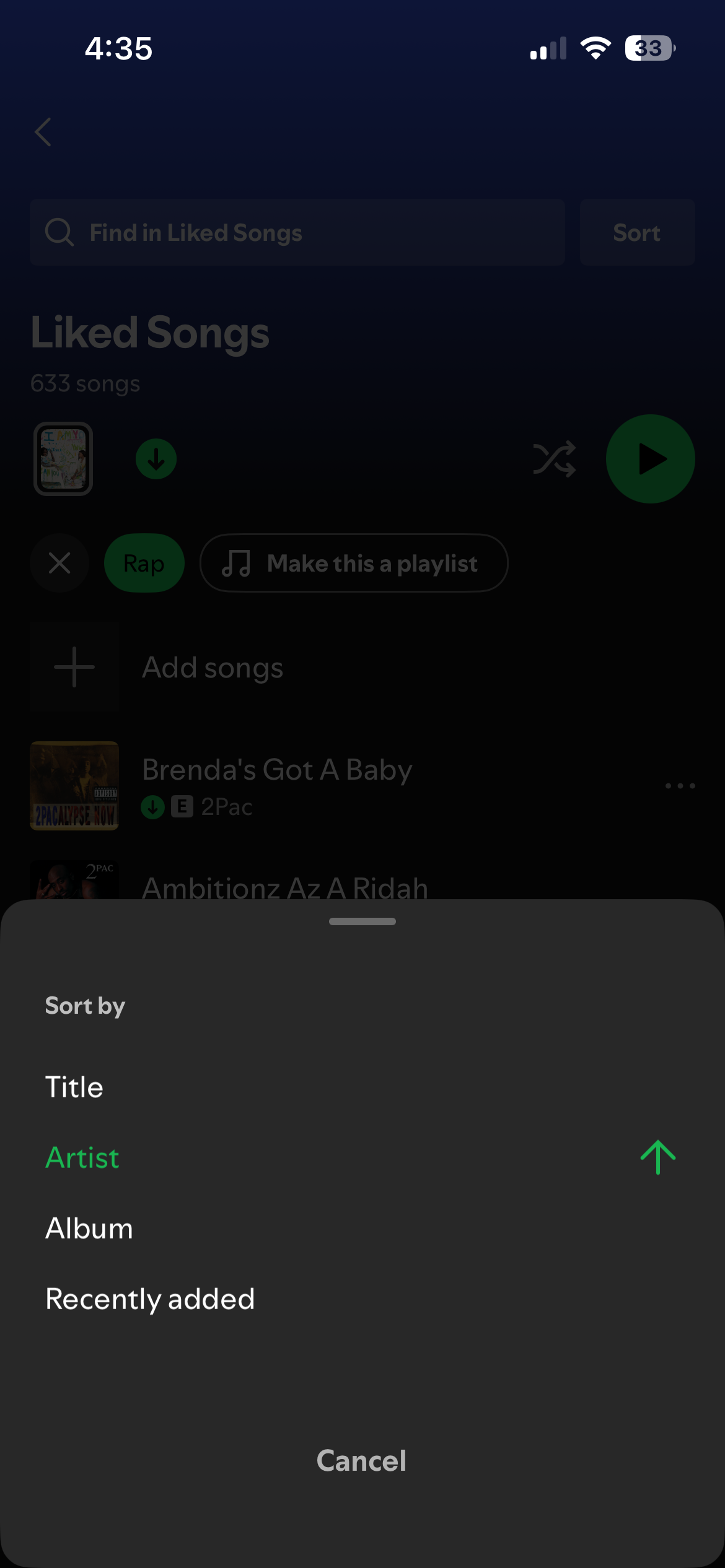
I’m on an IPhone 14, iOS 26.4.2, Spotify version 9.1.44.2119
Appreciate the quick response @Nikki5818 and your input!
Do you mind double-checking something else to see if it will make a difference? Notice how the green arrow next to 'Artist' is pointing up? Could you click it again so that it points down and let us know how things look like?
Additionally, whilst having the Spotify app open both on your iPhone and desktop at the same time, toggle all of the options for a refresh then set the exact same settings in Liked Songs again.
Keep us posted!

I am facing the same issue - I selected all liked songs and accidentally dropped them in the same place instead of a playlist I was trying to create. It messed up all the "Date Addded"... I used to sort them on date added... but now everything is having the same date. PLEASE HELP SPOTIFY!!!
Hey @Trocx,
Thanks for posting this thread in the Community!
The order of your Liked Songs shouldn't just change on its own and it'd be helpful if you could think in case you noticed if this happened after something specific such as an update for example.
Could you also take a look at how things look like on another device?
If this happens only on your phone then you can log out > back in twice in a row. As odd as it sounds, this resyncs your account and device.
Additionally you can give Spotify a clean reinstall with the steps here as this helps resolve different performance issues.
Appreciate the cooperation and let us know how it goes.