Your Library cannot be expanded via mouse/keybinds beyond a certain point

Plan: Premium
Country: US
Device: Dell Desktop
Operating System: Windows 10
My Question or Issue:
When I use Spotify on desktop, I like to keep my view split between the album/playlist on the right, and my library on the left. Now currently, the library view takes up a three-wide grid showing less of my library and making the playlist/album section too large. Wondering if this is a bug or a change that's here to stay.
Accepted answers
All comments

Also experiencing the exact same issue. I made the mistake of making the library portion smaller and now I cannot make it larger than shown in the screenshot.

Same issue here on a Mac. Adding a comment here in the hope that enough people join in with their dislike. Spotify seems to be doing a lot of tinkering with the UI at the moment, not much of it seems to be for the better. Please revert back to how it was before!
Plan
Premium
Country
UK
Device
Macbook Pro
Operating System
MacOS Sequoia
My Question or Issue
The UI has been changed recently so that the maximum width of the library side bar is reduced significantly with home / playlist / album etc now taking up more of the screen. Previously you could have a 4 wide grid with the playlist icons being up to double the size they have now become.
Is this an error, I have seen that other users in the Desktop (Windows) section have the same issue?
If it is a deliberate UI choice please revert back to the previous design, as it makes it much easier to use when you have a lot of playlists and folders.

Hey folks,
Thanks for getting in touch about this here in the Community.
We can confirm that the behavior was changed recently. You can still expand Your Library by clicking on the arrows next to the "Create" button at the top right:

We’re always testing possible improvements and new features, so you might see something on the app that other users don't, or get a brand-new feature for only a temporary period.
We appreciate you taking the time to share your feedback with us and will make sure to pass it onto the right team, as we always strive to improve your experience.
Hope this clears things up. If you need a hand with anything else, the Community is here for you.
@Eni this is hardly a solution. This is just poor UX/UI. I want to view my library split 50/50 with the player/search section. I can't see how this is possibly an improvement.

Agree... I like to be able to see when was the last time I listened to a playlist. The list (in 'standard' format) can't be made wide enough anymore to display that data.

Are you completely nuts now? This new thing is for the ass! I want to decide for myself what width the library has!!!
I'm assuming that it's a bug! Anything else is totally unacceptable!
Hi Eni, no, that's not a solution! We don't want to maximize the library! We want to split the library / current playlist view!
As we like it!
Who came up with that stupid idea???
Have you guys ever heard of widescreen monitors? Yes, on a PC...
Or do you only use Spotify with your smartphones?
I hope that enough people will complain here!
Otherwise Spotify might get the idea that this change is a great idea!
But it's not! Why would it be?

Hello I wanted to ask why the ability to rescale the library was removed?? You used to be able to just freely rescale the whole library sidebar but for me its locked now.
You used to be able to just pull the library window to make it take up a larger space but now it wont let me move it further than in the screenshot. I can maximize it with the arrows at the top but thats NOT what I want since it hides the tracklist. Is my client just bugged or did you really take away the ability to resize the window???? Why???? Why not allow for a manual resizing. Why make the UI/UX worse??? The tracklist takes up so much space and i liked having it smaller and being able to browse my playlists and albums more effectively. This REALLY takes away from the usability of the client and really makes me upset given the fact the functionality was there before.....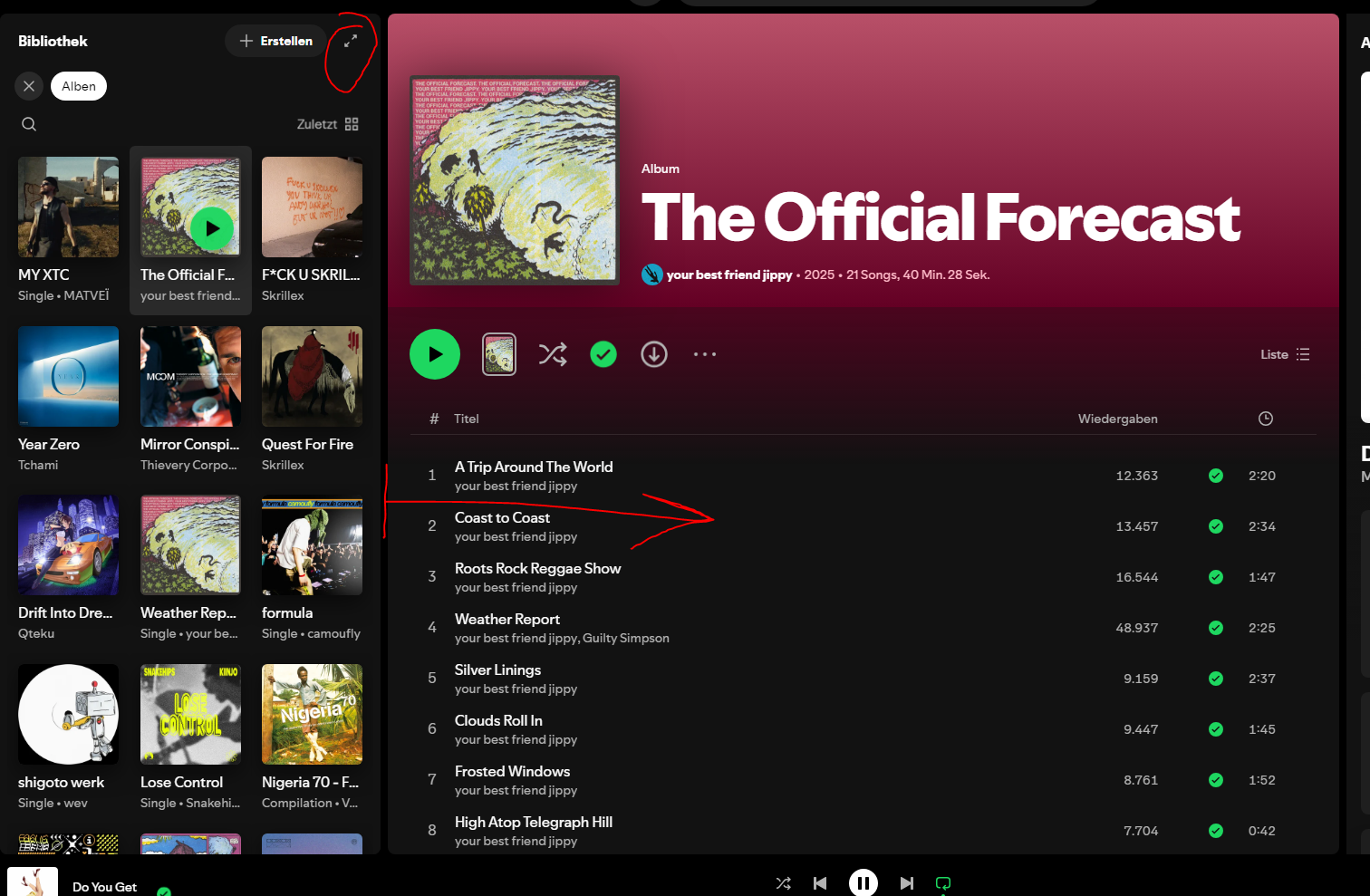

Hey there, @Ulim,
Looks like you got one of the changes our tech folks are working on currently.
At Spotify, we're often testing and launching improvements to the app. This means you might occasionally see something your friend doesn’t, or get a new feature to try temporarily.
Your feedback on this is important, as it may ultimately end up paving the way for our broader user experience. Thanks for sharing it here - we appreciate it 💚
The Community is just a post away if something else comes up.
Cheers 🤘

So they changed the desktop ui to be horrible over a year ago at this point, but AT LEAST i could resize the library to be a bigger part of my screen so it was still usable.
Guess what i opened spotify today and i can not anymore drag the library to be bigger than 3 columns like thanks now 70% of my screen is reserved to the song info and huge voids of nothing in between the title, plays and length.
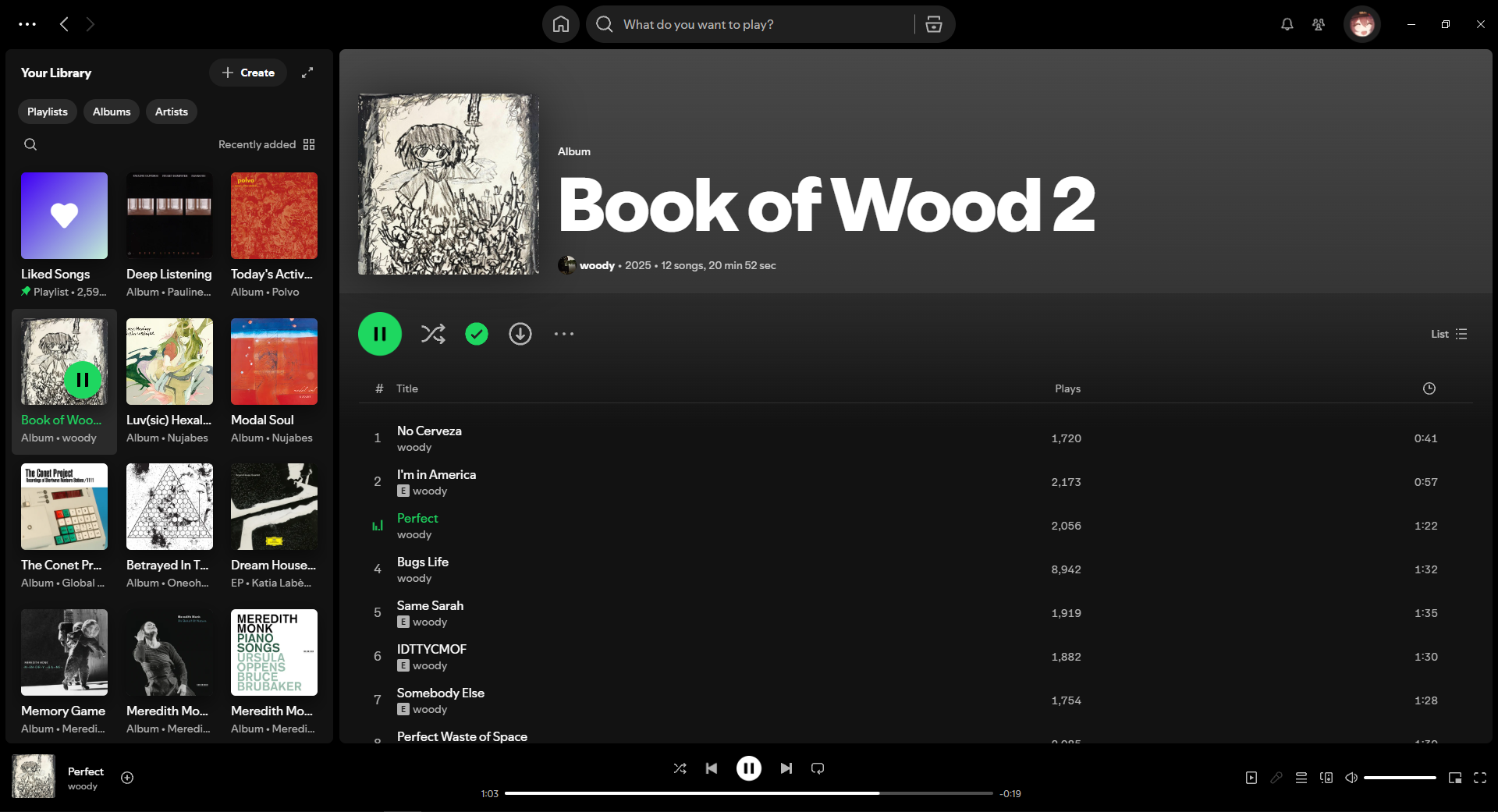
Like they didnt even add anything they just restricted the ability to resize the library what is the point of that there is absolutely 0 reason it makes the app less convenient and more annoying to use without a single possible pro
If theres a way to change the ui somehow PLS let me know i cant use this garbage

Please fix this, it's insanely irritating when something becomes worse for no reason.
Is there any way to revert this change? It makes it much more difficult to use when I have so many albums in my library.
Nobody likes this

I would like to express my thanks to the Spotify team for being transparent about the changes and the manner in which said changes were implemented.
That said, I struggle to see this as being anything but a downgrade. It could maybe have niche use cases for PCs with very small displays (ultrabooks and the like) and it could potentially offer some accessibility for users who struggle with precise window resizing. However, even considering niche cases or just user preference, it would make more sense to add this snap-resize mode for the library window as a toggle in the settings menu, rather than implement it as the one and only option to the detriment of most PC users.

Please correct this, this is a horrible change, and it appears to impact the ability to add new albums to the library.

Fix this. Why are you so determined to reduce the usability of the desktop app all the time?
It's fine if people want a smaller library sidebar, but why would you take away the option for people who don't? I have to agree that this is just bad design.

I've just received this update and would like to also say that I dislike this change. It makes no sense to me to limit the album view on the left to a maximum width of 3 albums, considering that limit wasn't there before, and removing the option to change the size of the album artwork is also another strange choice. It feels like the change was made just for the sake of changing something.

Please revert this change.

Dear Spotify Team,
Thank you for your response and for clarifying that the current Library View limitations are part of an ongoing test. However, I would like to express my concerns regarding this change.
1. Extra Clicks Reduce Usability
The need to click an arrow each time I wish to expand the library is an unnecessary additional step. Previously, being able to resize the panel freely with just a drag offered a much smoother and quicker workflow.
2. Loss of Custom Flexibility
Customizable width allowed users to set the library panel exactly to their preference, accommodating different screen sizes and personal habits. This level of control is now lost, which is frustrating, especially for those who multitask or have large collections.
3. User Experience Decline
For many users, especially those who rely heavily on playlists and folders, having immediate access to a wider library panel is essential. The new limitation hinders productivity, reduces comfort, and may negatively affect the impression of the desktop app.
I sincerely hope that Spotify reconsiders this approach and brings back the option for custom resizing of the library sidebar. Allowing users to tailor their workspace is a significant advantage of the desktop version and helps make Spotify stand out among other platforms.
Thank you for your attention and for considering user feedback in further updates.
Hm, only 24 replies / complaints so far...
spotify could easily get the idea that users like this stupid idea!
please don't!
But why is removing the option to resize even a thing you do?? That doesnt improve anything it just removes something that was aviable for no reason???
PLEASE REVERT THIS CHANGE. ITS HARDER TO USE, UNINTIUITIVE AND A STRICT DOWNGRADE FROM PREVIOUS VERSIONS. I HATE THE RESTRICTIONS ON RESIZING EVEN THO I LOVE THE LAYOUT


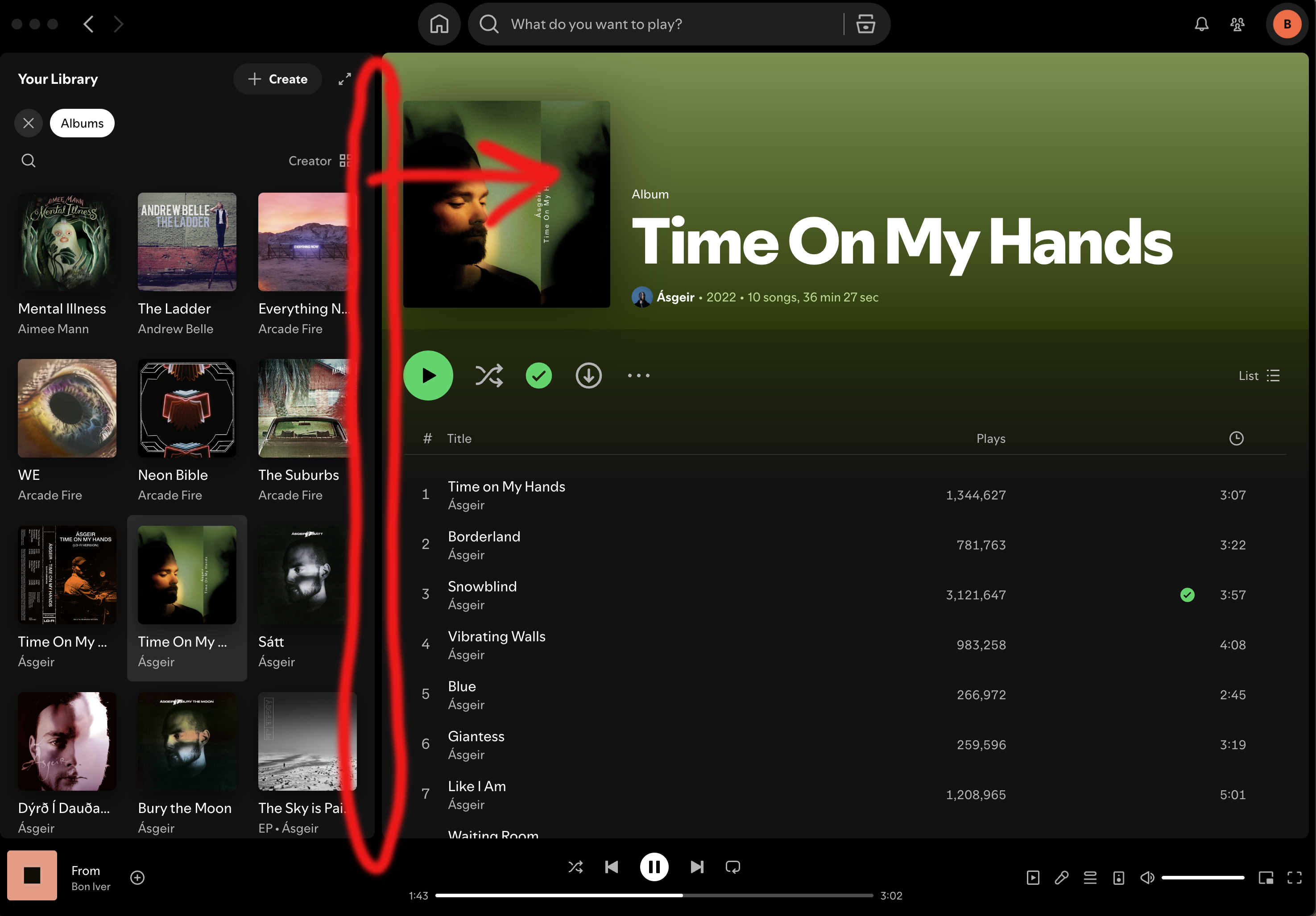
On the Mac desktop app I can no longer click on the area to the right of the Your Libaray sidebar and drag the sidebar wider like I can still do on the web app. I've done a clean install but still no luck.
YES, YES, YES!
@Ronef wrote:Dear Spotify Team,
Thank you for your response and for clarifying that the current Library View limitations are part of an ongoing test. However, I would like to express my concerns regarding this change.
1. Extra Clicks Reduce Usability
The need to click an arrow each time I wish to expand the library is an unnecessary additional step. Previously, being able to resize the panel freely with just a drag offered a much smoother and quicker workflow.
2. Loss of Custom Flexibility
Customizable width allowed users to set the library panel exactly to their preference, accommodating different screen sizes and personal habits. This level of control is now lost, which is frustrating, especially for those who multitask or have large collections.
3. User Experience Decline
For many users, especially those who rely heavily on playlists and folders, having immediate access to a wider library panel is essential. The new limitation hinders productivity, reduces comfort, and may negatively affect the impression of the desktop app.
I sincerely hope that Spotify reconsiders this approach and brings back the option for custom resizing of the library sidebar. Allowing users to tailor their workspace is a significant advantage of the desktop version and helps make Spotify stand out among other platforms.
Thank you for your attention and for considering user feedback in further updates.
YES, YES, YES!
I have the same problem. Yesterday i could still click and drag the separator to any position, but now it expands to a maximum width that seems to be around one sixth of the total UI width