Unable to add songs/ save new playlists/ create playlists, or albums to my library

For at least the past couple weeks or so, whenever I've added a new already curated playlist to my library, or an album, or when creating new playlists of my own, they've disappeared as soon as they appear (appear to have been saved that is) ... I'm not sure why this is happening, but it's been the case on my phone and laptop. It will appear as if it has been saved and successfully added, but it will vanish in a split second, and not be saved anywhere in my library. I can see it pop up and then POOF goes away like it was never there and ceases to exist.
Is anyone else having this issue?? Is there a way to fix it?
Plan
Premium
Country
Australia
Device
Android mobile, and Dell laptop
Operating System
Android, Windows 11
Accepted answers
All comments
On Tue, 27 May 2025, 1:41 pm Katherine Michailides,
wrote:
>
>

Hey @KatMichail13! Thank you for sharing the video!
Can you try a clean reinstall on both devices to see if it makes a difference? You can also try logging out and back in twice in a row to make sure your account is synced.
After doing the clean reinstall, the filters in Your Library should be cleared out. So, can you check if your playlists show up when there aren’t any filters set?
Let me know how it goes!
/Mateus
still not working 😞 tried both of these suggestions
Hey @KatMichail13! Thanks for getting back!
Just so you know, this kind of thing can happen if you have a really big library. If you’ve saved a ton of playlists or have a lot of songs in each one, the app’s performance might be affected.
Remember, there’s a 10.000 song limit per playlist; if you go over that, the app might not work as expected. So in this case, I’d recommend splitting up bigger playlists into smaller ones, or maybe deleting any playlists you don’t use or that are empty.
Hope this helps clear things up! Let me know if you have any questions.
/Mateus

I am also having this issue - there is no “Done” button. I have tried all the suggested fixes, to no avail, and while I do have a lot of saved playlists, it is nowhere near 10,000 songs.
Please see the screenshot - after selecting the playlist to add to, there is no button that says “Done”, as there previously was. Can someone please help?

Hey there @goldenfish7,
Thanks for getting in touch about this and welcome to the Community.
You mentioned you've tried all the aforementioned troubleshooting steps, just to confirm, have you performed a clean reinstall of the app too by following the exact steps @MateusM sent previously? If so and it didn't make any difference, could you let us know if the "Done" button won't show up on any of your playlists when you're trying to add songs?
Also, we'd like to know if this happens across devices or only on your phone. If it only occurs on your phone, make sure to send us its exact make/model, operating system and Spotify version of it.
Lastly, did this start happening after a specific event such as an update either of Spotify or the OS of your device?
We'll be waiting for you reply.
This happens on both my iPhone and on my iPad.
Today I found that if I simply attempt to add the song to the playlist,
then simply swipe down, the song is added.
This is not at all intuitive, but I’m glad I was able to find a solution.
Hey @goldenfish7,
Thanks for the clarification!
We can confirm that you're seeing a recent change in the app. We’re always testing possible improvements and new features, so you might see something on the app that other users don't, or get a brand-new feature for only a temporary period.
We appreciate you taking the time to share your feedback with us and will make sure to pass it onto the right team, as we always strive to improve your experience.
If you need a hand with anything else, the Community is here for you.

Hi,
I have the same issue
No "DONE" button is available following playlist selection
I have reinstalled the app but the issue remains the same
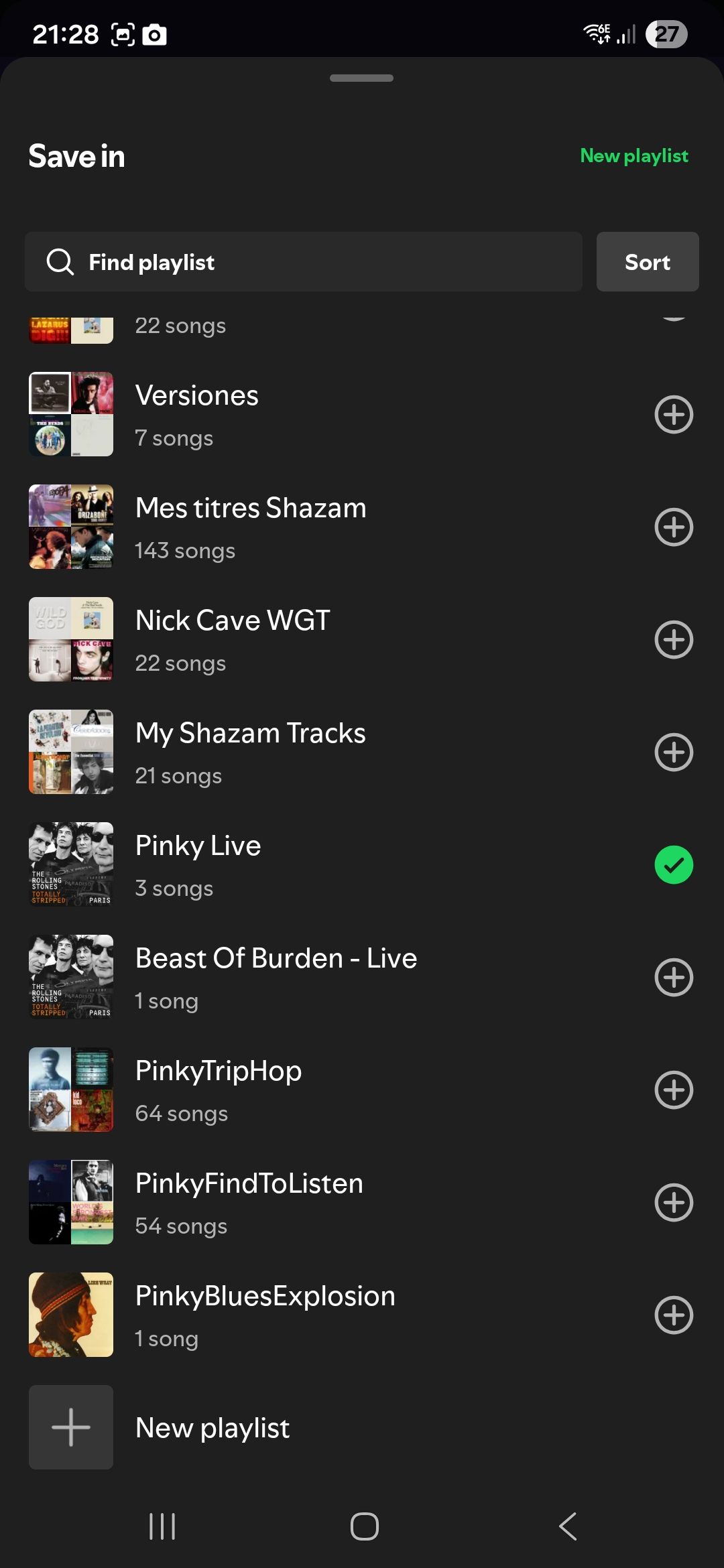

Hey @PinkySquatter,
Welcome to the Community and thank you for joining the thread.
Currently, this is an expected behavior since the "Done" button is no longer available at the top of the section as @Eni mentioned since the process changed in recent versions of the app.
Now, if you want to save the changes you made to a playlists, instead of tapping the "Done" button, you can drag the section down from the top as suggested by @goldenfish7, or use the "back" button of your mobile device to save the changes as seen below:


Hope this clarifies things a bit. If anything else comes up, don't hesitate to ask.
Hey @PinkySquatter,
Thank you for keeping in contact.
We're glad to know that everything is working fine with the new process. We appreciate the time you took following the recommendations and sharing your resolution.
In case you need anything else, remember that we're just a post away.
Cheers!
Hey @KatMichail13!
Thanks for reaching out.
Can you share with us a quick video or a screen recording about this behavior? This way, we can take a better look at what's going on, and see what to suggest.
We'll go from there!
/Mateus