Smart Shuffle only playing recommended songs

We've received reports that the Smart Shuffle feature only plays recommended tracks. No liked songs or songs from the user's playlists are playing/visible in the queue.
Comments

"Smart shuffle"
but keeps playing the same song out of all my songs.
Garbage.

same here, in moved to smart shuffle cause the regular one keeps generating the same queues no matter the song you want to play and now smart shuffle wont recognize any song you have liked or in the playlist youre listening

This is happening to me today and I’ve been on Webchat with Spotify for over an hour and nothing is fixing it

It was working fine yesterday.
I tried toggling through the shuffle options, but the problem persisted, except that sometimes smart shuffle would play only liked songs and no recommended songs. But most of the time, it will only show recommended songs and no liked songs.
I've reset my phone, cleared the app cache, turned off autoplay and turned smart shuffle off and back on in settings, but the problem persists.
running a student premium account on android. Version 9.0.50.416

I have the same problem, but on every playlist I’ve created.
i have iPhone
version 9.0.50.511

So annoying!!! Hope they sort it quick. Was definitely working properly yesterday

I have the same problem when using Smart Shuffle with my Liked Songs - everything in the queue is a Smart Shuffle Recommendation, and none of my Liked Songs actually play. I also feel like this worked fine yesterday.
Spotify for macOS (Apple Silicon)
1.2.65.255.g85e641b4
Also reported by other users here: https://community.spotify.com/t5/Other-Podcasts-Partners-etc/Smart-shuffle-plays-only-recommended-songs-and-no-liked-songs/m-p/6997866

Same here. Only happened today, wasn't the case yesterday. So annoying

I'm having the same issue, it started yesterday. When smart shuffle is on, it only plays recommendations.

Hey there folks,
Thanks for all your replies here and for the info shared.
If you haven't yet, we'd suggest you perform a clean reinstall of the app on the affected device. That way, you can make sure you're running the latest version of Spotify available and that the stored cache is not leading to Smart shuffle just playing the recommendations.
If the above doesn't or didn't do the trick, we'd like to gather some additional info. Please send us:
- The make/model and OS of the affected devices.
- The exact Spotify version you're running there.
- Did you notice if this started to happen after a specific event such as an OS update?
- Does this happen only when playing the Liked songs? Or does it happen regardless of the playlist in which you use Smart Shuffle?
- All the troubleshooting steps you've tried so far.
- A short video recording. You can attach the videos in your next reply in mp4 format, or upload them to YouTube or Google Drive and make them public.
Keep us in the loop!

Plan
Premium
Country
USA
Device
(iPhone 8, Samsung Galaxy 9, Macbook Pro late 2016)
iPhone 14 Pro
Operating System
(iOS 10, Android Oreo, Windows 10,etc.)
iOS 18.5
My Question or Issue
Since yesterday, when I use Smart Shuffle on any playlist, it only shuffles the songs in that section. It doesn’t add any songs from my playlist into the mix.

On my Android device, with spotify Premium.
If I have smart shuffle turned on, it only plays songs recommended by smart shuffle and it's almost always exactly the same ones in mostly the same order. I liked the smart shuffle feature, but only if it would actually work

- Plan: premium
- Country: Japan
- Device: iPhone SE 2020, iOS18.x
- Spotify version 9.0.50.511
- Not sure when it started. Last week it wasn't happening. I didn't listen to smart shuffle during the week, and when I tried it last night it happened as described below.
- This happens to me when I play a playlist on my iPhone in smart shuffle mode. It ONLY plays recommended songs, and it plays ZERO songs that are actually on the playlist. When I tried on my MacBook desktop app, it functioned normally.
- I killed the app, rebooted the phone. I'd rather not delete the app and download it again, because it's a huge hassle returning all the settings to the way I like them. (Crossfade, autoplay etc etc.) All these settings get set back to default when you delete and reinstall the app. So I'm hoping Spotify can fix this issue without making everyone redownload the app!
Edit: when I wrote the above comment, smart shuffle was still playing songs from my playlist on my MacBook. But shortly after writing it, the MacBook app ALSO decided that it was only going to play recommended songs, no more songs from the playlist. It seems that it was doing fine until a non-playlist song showed up in the queue. From then on out, it played only recommended songs.

On all my devices, recently, when I turn on smart shuffle, the first around 150 songs are purely recommended with none of my playlist songs. If I scroll to the bottom of my queue a few times, it goes back to normal.

I am also encountering this. When my smart shuffle is on, it will only play the smart shuffle songs without mixing in any of my liked songs. I'm using Google Pixel 9XL and Spotify 9.0.50.416. I tried logging out and reinstalled the whole Spotify with no luck

Hi so since the last update, smart shuffle only plays shuffle songs. Before i could put on a playlist and it would add a shuffle song every 4-5 songs but now it does not play any of the songs from my playlists 😞
is this the new way smart shuffle works?

having this same problem, only last week would play my playlist and smart shuffle would add in a recommended song or 2 every few songs now if i turn it on it’s only recommended songs, i have no idea what’s happened
nothing is fixing it atm either which is really sad cause i enjoyed smart shuffle a lot!
Hey,
This is currently being investigated.
If you’re experiencing this issue, make sure to click +VOTE and Subscribe to the thread to be notified of any developments.
Thanks!
- The make/model and OS of the affected devices: iPhone 13 Pro Max
- The exact Spotify version you're running there: 9.0.50.511
- Did you notice if this started to happen after a specific event such as an OS update?: App store shows Spotify updated yesterday which is when I first noticed the problem
- Does this happen only when playing the Liked songs? Or does it happen regardless of the playlist in which you use Smart Shuffle?: Happens in all playlist
- All the troubleshooting steps you've tried so far: Deleted and re-downloaded the app, cleared cache, restarted phone
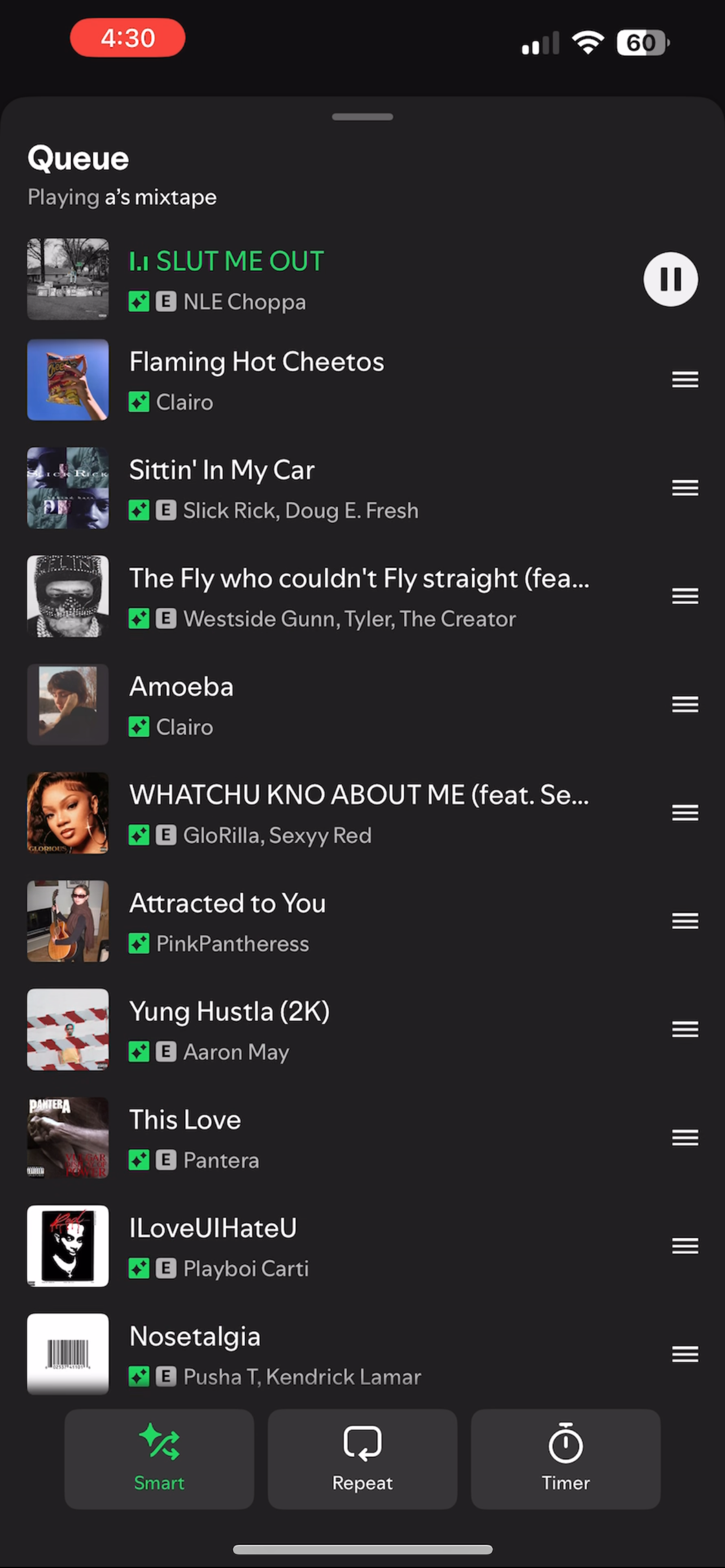

This morning on Windows the first thing I got was "Installing Spotify" after which Smart Shuffle seemed to be working on the laptop until my phone got involved (as in: playing list from PC) then it was back to all sparkle tracks on both devices. iPhone version is still at 9.0.50.511, Windows currently 1.2.65.255.g85e641b4 (I didn't capture that yesterday). To get the PC version behaving properly again I do have to play something from another playlist then switch back to the one I want Smart Shuffle on after killing the app on the phone.

This is a fix, but not a permanent one. If you add one of the recommended songs and then skip it, the system will return to normal, incorporating new songs. However, if you select a song you want to play, it will play recommended songs after that.
Edit: if you select a song from the queue it won't add make all the songs recommended
And as quickly as the defect arrived...it is fixed. I started playing a playlist with only recommendations and then at some point my playlist songs were included again, two to one.

I fixed this by either removing or adding a recommended song.
If I manually select a song from the playlist the issue still comes back, but it's a good temporary solution.
The problem appears to be resolved for me.
Some people reported that the problem came back when they selected a song to play, showing all recommended songs following the song the selected. I tested this and had no problem. I also tried adding and removing songs from my playlist and still had no issue, so it looks like it's truly fixed.
Spotify version 9.0.50.416, running on android.
Thank you!

Hi there folks,
We've been informed that some changes have been made backstage and that this should be resolved now. We're happy to see it's already working for some of you.
If you're still facing similar issues, make sure you're on the latest app version and if the issue persists, reach out via the Help section so we can assist you further.
Cheers!

This has started happening again.


My Spotify has been acting terrible these past few days. I have several complaints but this "smart shuffle" did not exist two weeks ago (not even two weeks ago like a few days ago my Spotify started to fck up) Whenever I click on one of my playlists it does not play a song from my playlist. It plays songs from "Smart shuffle". Also if it actually does play a song from my playlist it plays like five songs in a row from the same artist. But also in my settings there is nothing about "smart shuffle". Whatever is happening is actually pissing me off really badly. I love listening to music but if the platform that I listen to music on isn't working then I cannot listen to music, it's annoying me very much. I have cleared my cache, logged out, deleted the app, and reinstalled it and it's the same. I don't know if this is a test trial that Spotify is trying to do but there's other complaints that I have and it is truly bothering me. I don't have premium btw.
Now, when I start Smart Shuffle, it only queues new songs, without the songs I saved to my playlist