Mobile app freezes upon launch on iOS

We're receiving reports from iOS users that the app is freezing upon launch. Users are unable to tap on anything within the app as it becomes unresponsive.
Comments

Hi!
today I experienced this issue with Spotify.
my current versioni is 9.0.58 I guess is the last one (I’ve tried to reinstall many time today).
I can open the app but I’m not able to tap on any icon.
Please fix it asap 🙏🏻
thank you so much

Hi,
Exactly the same for me.
Thank you.

Same issue happening to me on both my ipad and phone, i have version 9.0.58.558 i’ve re-downloaded the app on both devices around 3-4 times and still nothing, along with resetting devi

Same is happening to me. I am in the most current version and my phone is completely up to date. Tried restarting my phone and the app several times, but cannot click on anything once the app comes up. It freezes. Been like this for about 3 hours now.

フリーズ問題が発生しております。
はやく改善できる事を期待しております。
→今、アプリを再インストールしたら、通常通りに画面タップ出来て、音楽聴ける様になりました!
不具合対策してチームの方々が、何か改善して頂いたんでしょうか。
このまま暫く様子見します。

I’m having the same issue with the app on my iPhone as well. I open it to play music but can’t click on anything and if I leave it long enough the app crashes. The only way that I’ve found to temporarily fix it is to delete the app and reinstall it. I’ve now had to do this 3 times in the past 4-5 days. This is getting really out of hand and I don’t want to have to reinstall every time I want to listen to music. Please fix this! Especially with how much premium users are paying for Spotify to then not be able to use it cause the app is going bonkers

Hi the same here like 3-4 Days.
i have version 9.0.58.558
new download 4-5 times didn’t work.

Same problem: Version 9.0.58.558
tried all kinds of troubleshooting. Restart, logout-login, reinstall.
sometimes problems with webplayer as well
updated on version 9.0.60.632. Problem still exists. Sometimes it works for while then it stops.
Same problem on Ipad device with same version. Maybe a problem with the account in your system?
still no changes. Is that your troubleshooting spotify? Waiting for an update and praying its solving the issue?

I've noticed a bug for the last couple months in the Spotify app. When you have Shuffle or Smart Shuffle selected (happens most to me in my Liked Songs) and you attempt to individually select a song occasionally the app will just do nothing. It won't show the selected song (or any song) where the mobile song banner usually is and the only way I've found to fix the problem is un-installing and re-installing. Just thought your Devs would want to know!

Has been happening on mine for days, as a work around click and hold Spotify icon and open a playlist or search.
Version 9.0.58.558.
iOS 18.5
iPhone 13 Pro Max
Have uninstalled, deleted app data etc still no good. Seems to work fine via Apple car play but.

am having this issue constantly for the last few days
9.0.36.556
iOS 18.5
iPhone 16
Force closing app and reopening temporarily fixes issue but not for long

9.0.58.558
iphone 15
latest iOS
freezes and of not freeze app is Not working at all. 90% of my Podcasts won‘t start
Hey folks,
A new version of the iOS app should be out now. Could you try updating to 9.0.60 to see if everything looks good?
Let us know how it goes 👍

I noticed a bug today that some songs seem to be missing from the Top 50 – Global.
Latest version of Spotify app.
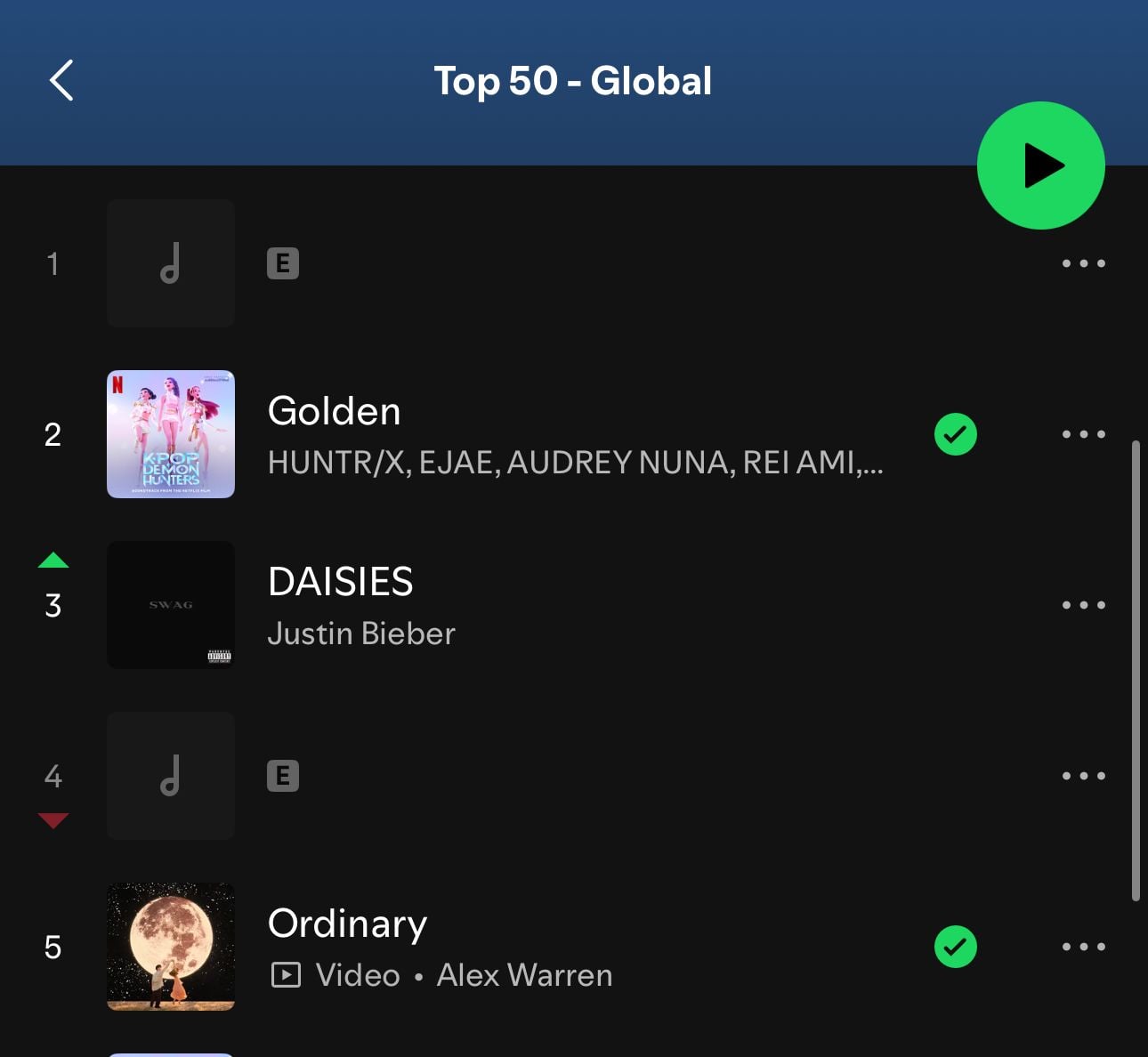

App version: 9.0.60.632
iOS: 18.5
iPhone 16 Pro
still not working. Since 3 days now.
App starts but nothing works. Cannot open any song, playlist or search.
It is annoying right now!

Hello,
same topic here.
My Version is 9.0.62.672
Mainly the app freezes when I start a search. Especially when the search is bigger (e.g a band or audio books). Sometimes the search works when I only search a song.
so far I tried:
- log out
- deleting all teh downloads
- deleting and reinstaling the app
nothing helped. Pleeeease solve the problem, Spotify is quite useless this way. Merci!!
-

I reported this, or added to an existing post, over two months ago. I still see no change in the desktop launch performance speed.

According to me you should try these quick fixes which i have shared below.
Force close and relaunch the app.
Restart your iPhone.
Update Spotify from the App Store.
Clear cache (via Settings > iPhone Storage > Spotify).
Delete and reinstall the app.
Make sure iOS is up to date.
Disable Low Power Mode or VPNs, if active.
Still stuck? Reach out to Spotify Support or test on another iOS device to check if it’s device-specific.
Hi folks,
Thanks for your patience while we investigated the issue.
We're happy to announce this should now be fixed for everyone - just make sure you're running the latest version of Spotify.
If you're still having trouble or need assistance with something else, feel free to reach out in one of our Help boards here.
Cheers 🤘

Hi,
This issue still seems to be occurring on one of my iOS devices. I’ve updated Spotify to the latest version, uninstalled and reinstalled the app, cleared the cache, and updated iOS, but Spotify still freezes. For me, it is limited to opening the app, then clicking on Search and starting a search query, or clicking on an album (20+ songs) through search history, which results in the loading animation continuing indefinitely, and then causing the UI to crash, i.e. becoming unresponsive. This problem has been occurring for around 2 months now.
The Library mostly seems to work fine, usually.
i have faced the issue only 1 time and now its solved

I have the latest version of spotify as of 8-23-25 and my spotify on iPhone 15 does not work about half the time.
It gets stuck on loading a song, I see 3 dots going across and it never starts playing a song.
Sooo annoyed
No, this issue is NOT FIXED. And is still occurring in November 2025, both on desktop and also in the iPhone "playback settings" area.

I’m experiencing this on my iPad. I’ve already tried to offload the app, redownload the app, but it’s still not working.
Hi there,
Our tech folks are currently looking into this. If you're experiencing this issue, make sure to add your vote and share the following details:
Thanks! We'll keep everyone posted here as soon as we have any updates on the matter, so subscribe to the thread from the three dots menu at the top to stay tuned 👍