MacOS, Spotify Crashing Immediately on Startup

Plan
Free/Premium
Country
None of the below information is required. However, the more you provide the easier it will be for us to try and help.
Plan
Premium
Country
Cambodia, but currently in Japan
Device
MacMini M4
Operating System
MacOS 15.5
My Question or Issue
Last night Spotify started glitching (literally, then sound start/stop); I thought initially because my HD was almost full so I quit, cleared some HD space and now it crashes as startup. Unlike other app crashes, there is no MacOS report/reopen window, the app simply disappears. On launch, the window with my library will appear, but then any acknowledgment of it disappears as above.
I’ve have so far:
- Followed clean reinstall instructions from other thread twice (Including caches, application support, etc. and reinstalled from web).
- Restarted 3 times
- Issues continues - after above steps I’m able to login (using QR code scan from phone ) but then as soon it loads Home Screen (it even shows what I’m currently playing from phone), any interaction causes the crash.
Unusable at this point.
Accepted answers
All comments
I went with the simpler Option 3 you did with Intel; seems to be working for now. Will monitor here to see if they have anything fixed. Thanks Patrick for all your work. I'm wondering if this is just us or if others are having the issue.
also, I updated to 15.6 before and it had the same issue; so OS version does not seem to be the issue.

I am having the same issue on Macbook Pro (M1 Pro, Sequoia 15.5) with Spotify version 1.2.70.409.gd4fa4141 (macOS Apple Silicon). It started yesterday and since then I've tried clean reinstalls several times with no success. The app crashes almost immediately (within 1-5 seconds). Hopefully the developers fix this soon!

No problem at all 🙂 Im stubborn when it comes to such weird situations.
Hoped Spotify offered a decent rollback option themselves but sadly they dont.
Nah OS version does not seem to be an issue, its really something of the recent Spotify release.
And well the thing is they dont really push the update hard to everyone at the same time.
I mean; You can have a possible update available, but as long as you dont opt-in (for the lack of a better term) you dont get forced that update. Till they decide at some point hey it will auto install. Never quite understood that update process to be honest.
I expect more people to run into it in the upcoming week. But I hope a new version fixes it outright and we can move to that version at that point.
Always good to note, but as your and my OS where different that should not have mattered. It seems to have crept in a 1.2.70ish version. Still hope it gets resolved ... killing an app on a left click is just stupid to be honest.
Yeah I first thought it was time based as well. But dont do anything and it should not crash. But as soon as you left click ... it gets killed. Hope they fix it soon but you can follow any of the edits for a temp fix. Not idea but at least you can use it on desktop. (which for me is the way I mostly use it (due to various custom setups that rely on it running from the desktop)).
If you run into anything feel free to report back. I'll always see if I can help 🙂
Ok update from my end.
Here at work a co-worker does not have any issue with the latest update. 1.2.70.409.gd4fa4141 does not have the issue. If I update Spotify to it ... well you guessed it the left click issue returns.
Back to Spotify for macOS (Apple Silicon) 1.2.69.449.gfda8591a for now for me.

Hi there folks,
Thanks for reaching out and for all the info provided. Special shoutout to @PatrickD85 for all the replies and patience!
We've started testing this issue on our end, but so far we've been unable to reproduce it. So that we can look into this further, please provide us the following info if you haven't already:
- Is this on all devices or only on Mac?
- Does the web player work on the same Mac?
- Does it happen across different networks?
- The exact makes, models and OS versions of all your affected devices
- The exact Spotify Versions you use.
- A video of the behaviour. If the files are too large to attach here in the Community, you can send them to us via Google Drive or as unlisted YouTube videos.
With this information, we’d be happy to investigate.
We'll be keeping an eye out for your replies.
Hi there Joan;
No problem at all, I tend to be a avid solver of issues due to my profession. But this one seems a bit weird. Luckily we have a workaround for the time being. But real weird that left clicks just kill the app.
Is this on all devices or only on Mac?
Mac only, no issues on iOS. Sadly no Windows devices at my disposal.
Does the web player work on the same Mac?
Web player works fine.
Does it happen across different networks?
Yes, I tested this from my home network, from work, from 4G and from 5G in various locations
The exact makes, models and OS versions of all your affected devices
Apple M1 Pro 2021, OS: 15.6, if you need anything else feel free to let me know.
The exact Spotify Versions you use.
From testing all 1.270. versions seem to have this issue.
As noted 1.2.69.449.gfda8591a works fine.
Video; well I have to do that later.
But description is short and sweet: Left Clicking anywhere makes the application kill itself.
EDIT: https://patrickdankers.nl/20250818-spotiyf-pd-issues.mp4 To give you an idea that it kills it self on each and every left click.
I'll try using a new OSX user profile which has nothing later on as well and get back to you if that changes anything.
PS: Why was my post with some work around options removed it seems?

Plan
Premium
Country
USA
Device
MacBook Pro Nov 2023, Apple M3 Pro
Operating System
macOS 15.6 (24G84)
My Question or Issue
I'm having repeated crashes in desktop client today, never experienced anything like this. It's happening while using app, such as search or just playing music. Please let me know if there're any local crash logs I'm supposed to share.
Spotify version: 1.2.70.409.gd4fa4141
Btw, I saw this post before making a separate one, but my client has not crashed at startup even once, so wasn't sure if it's really the same issue. Mine is entirely during client usage.
Ok I solved it on my end;
It seems to be related to Supercharge [external link removed]
And specifically the options
"Fill window when clicking green traffic light button"
"Hide app when clicking yellow traffic light button"
Not sure why that triggers this behavior in Spotify, but disabling stops the weird behavior.
Enabling them makes it reappear.
I will reach out to Sindre (the author) to check if he can also look into why this happens but ... well for so far it is kinda resolved on my end.
Hey PatrickD85,
I also solved it on my end. I use the app Magnet [external link removed] for window snapping/management. Once I disabled the app, Spotify worked again. So it seems to be window-management apps (or anything similar) that may be the common denominator.
No other troubleshooting has worked so far (several clean reinstalls of the app and updating my macOS to 15.6). It seems to be some conflict between window management apps and Spotify.
For reference, my mac is a Macbook Pro (14in, 2021, M1 Pro) running Sequoia 15.6. The Spotify version is
1.2.70.409.gd4fa4141 (Apple Silicon).
Edited to add:
Re-enabling Magnet will cause the Spotify crashing to occur again. Spotify will work as expected as long as Magnet is disabled.

Dear JAXolotl21,
This is what it was for me too – Magnet. You saved my brain! I hope they get a fix for this soon.
Sidenote: web app does work fine.
Specs:
Mac mini (M1, 2020)
Sequoia 15.6
Spotify: 1.2.70.409.gd4fa4141 (Apple Silicon)

Adding one more: The app "Rectangle", also a window management app, also seems to cause crashes.
I suspect it is because it adds a hover menu over the green window "dot", and Spotify can't cope with that since a recent update.

Hey @aeyi, @z1ffer, @JAXolotl21, @PatrickD85,
Thank you so much for the provided details and cooperation!
It's really helpful that you've shared that disabling the mentioned apps on Mac results in Spotify starting without issues. We'll keep this in mind.
@silversidedown if by any chance you're using such an app as mentioned by the other users in the thread, or any others which may be causing the performance issues you've described, please disable it/them and let us know if it makes any difference. I advise that you also take a look at the article on how to unlink your account from third-party creators here. However, if there's no change, we'd like to look into this further and troubleshoot together.
If anything else comes up in the meantime, the Community's here 🙂
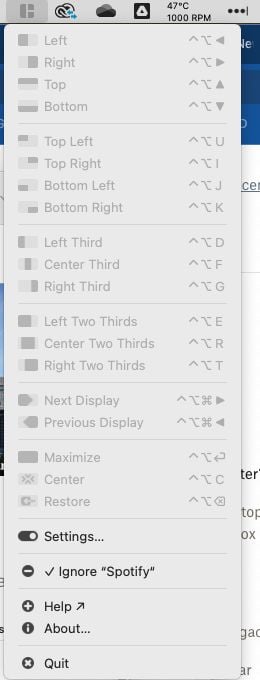
I am a Rectangle user (version 0.89) as well ... without issues when using it with Spotify though. Can you explain a bit what has happened there? PS: I just saw Rectangle has an Ignore Spotify option as well ... hhahaha.
Hey @PatrickD85,
Thanks for returning with this info and question.
Unfortunately, we can't say exactly why the Spotify app crashes in combination with these apps, but we'll forward this behavior to our tech folks just in case.
Don't hesitate to let us know if you're wondering about something else.

Just to add another data point, I also experience the crash with Magnet. Quitting Magnet allows me to open Spotify just fine.
Spotify for macOS (Apple Silicon)
1.2.70.409.gd4fa4141
Magnet 3.0.7
macOS 15.6 (24G84)

**bleep** thank you for posting this! I never in my life thought it would be Magnet, since I've been using both for many years!

Oh good it's not just me, I was going crazy! Can confirm disabling magnet causes spotify to not crash.
Magnet Version 3.0.7
Spotify for macOS (Apple Silicon)
1.2.70.409.gd4fa4141

Just catching up - I also use Magnet, disabled and now Spotify runs. Unfortunately, I need magnet for work productivity, spotify for background and personal so I'll have to use the web player until this is resolved (not ideal). I had Magnet interfere with other apps (Adobe AI or ID); In that case, I was able to have magnet ignore Adobe AI, then could continue to use both, just w/o magnet functionality in the Adobe app (that was ok).
I just tried this with spotify but does not seem to help. Must be something at lower level conflicting. I've not restarted though.
Hi Ivelina, it was more directed towards the other users experiencing the issue. But thanks for the reply though.
I got feedback from the Supercharge author "It's likely an issue with Spotify. I just tried now with Supercharge and the mentioned Spotify version and I'm unable to reproduce. Make sure you are on the latest Supercharge version (1.19.0)."
So perhaps it is more of combination between window managment tools (Magnet/Rectangle) and Spotify.
Yeah it's really weird as prior to 1.2.70 there where no issues, with the same apps (Rectangle and Supercharge and versions) but going beyond that something on leftclick just seems to trigger something which in return kills the app. But if it is various independent apps (magnet, rectangle, and supercharge) that is kinda weird. Hope the team can find anything to resolve this.

JAXolotl21 for the win!! This was doing my head in.

Same for me. Disabling Magnet stops the app from crashing. Really hope there is a fix soon. I use magnet a lot and dislike the web player.

Seems like there is an issue with the Spotify app and the Accessibility API, since most of these tools rely on it. I also had the issue that the Spotify app got killed when doing any left-click on the UI. In my case, when quitting the Homerow App (https://www.homerow.app/) it worked again. I also use Rectangle, but that does not cause it.
Well that would make more sense indeed float111.
Because if it was isolated to just one specific app... well sure. But do hope the Spotify team can look into this.
I'm not using any new window management apps, and Spotify continues to crash more than ever. Are you analyzing crash reports? Can I share any from my system? It's never been as bad as this week and it's really affecting my ability to use the product I pay a lot for monthly. Can I contact support directly to escalate this vs. community support?
Update: I figured out it was also an interaction with a window management app in my case, Moom specifically. However, this is still a new issue and as you can see from this thread, many people are having it, and not just with my app. So it's still up to Spotify to resolve this permanently. I don't want to choose between a critical window management app and Spotify, I need both.
Hi there, I dont post much because frankly I dont need to but I think I have the same thing on M1 Pro.
This morning I tried opening Spotify, once I click anything aka interact with it it auto shuts down / kills the app.
I tried reinstalling multiple times.
I tried removing the caches and application support folders.
Nothing has changed ... even after a reinstall the login prompt when interacted with kills the app. Only phone QR login seems to go through.
Plan
Basic Family
Country
The Netherlands
Device
Macbook Pro M1 (2021)
Operating System
MacOS Sequoia 15.6
If you need any more information please let me know.
PLEASE resolve this as it makes it unusable from a Mac at this point.
😉