Automix feature enabled even when turned off

I have turned off Automix, crossfade, and gapless playback. However on playlists the stupid silver button is still there on 'play', and songs are transitioning to around 20-30seconds into the next. Absolutely infuriating listening experience and I cannot find any way to turn it off.
Accepted answers
All comments

I am having this problem as well!!! I am about to cancel my account of 8 years. I do not want to have songs continue into the next or have new songs start 20 seconds in…Complete BS and messing with my serenity!!!

Same here, started about 2 weeks ago, the silver button showed up and it messes up my playlists. Reinstalled app, cleared cache, turned everything off etc but nothing helps.....
If anyone has a solution, I'm all ears!
I think I've found the solution....
Select a playlist, and to the left of that massive silver playbutton is a settings menu (three dots above each other). Click that, and halfway down is the option 'turn off mix' or a translation of that.
Hit that and the playlist play-button turns back to normal green. That fixed the problem for me.
Not sure if I have to do it for every playlist that has this enabled, but it works!

Hey folks,
Thanks for letting me know about this.
Keep in mind that when the Mixed Playlists feature is active, then the big green Play button changes design. I have attached screenshots of what the difference between the buttons are.

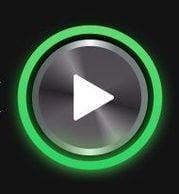
Normal (left) vs Mixed (right)
You can look for the Mix button located at the top of your personal playlists and deactivate it from there.
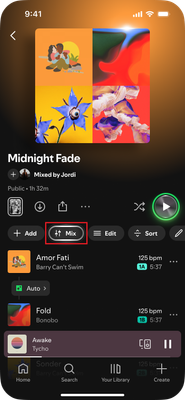
If the playlists were shared with other individuals (as in you didn’t create it), a "Turn off mix" option will be present in the three dots menu which you can use to deactivate the feature.
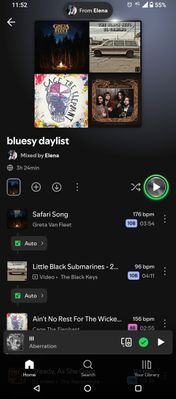
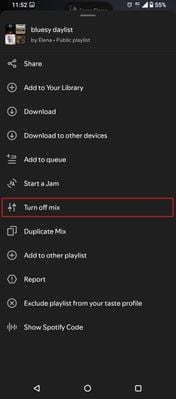
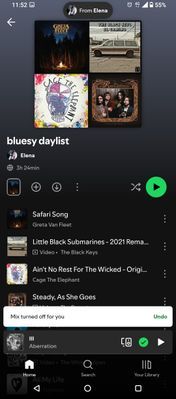
Mix currently toggled on (far left image) and Option to turn the feature off (middle image). Finally, Mix toggled off (far right image)
I hope this was helpful. For your reference, there’s more information on Mixed playlists in this article. Let me know if you need a hand with anything else.

I copied my playlists into new ones by pressing on the three dots on a playlist, then "Add to other playlist", and then "New Playlist". It helped and songs were normal again. For the screenshot, it's the same thing on mobile.


Thanks, that worked 🙂
Hey @__ksdjfkdjfkd, thanks for reaching out to the Community!
Can you try a clean reinstall of the app following these steps? Once you do that, try to customize these settings again to see if that makes a difference. If you’re still having trouble, please let me know the make and model of your device - and current OS version on your device. I’ll take a closer look.
Let me know how this goes!