Now in the US: A new way to preview Albums, Artists, and Playlists on Desktop & Web

Hey!
Luan here, Spotify Star and fellow music lover.
Back in May, I shared this blog regarding a new way to preview Albums, Artists, and Playlists on Desktop & Web!
At the time, I understood that roll out was taking place in the coming months. However, I now know that one market has still been waiting patiently for this feature. With that in mind, I wanted to return with a "part 2" blog today, and a much anticipated update for those of you still waiting.
I'm happy to confirm It’s now officially rolling out to users in the United States!
This brings the mobile preview experience to your desktop, enhanced for bigger screens and more intuitive browsing.
I’ve been putting it through its paces too, and for me, it makes music discovery feel like effortless exploration again!
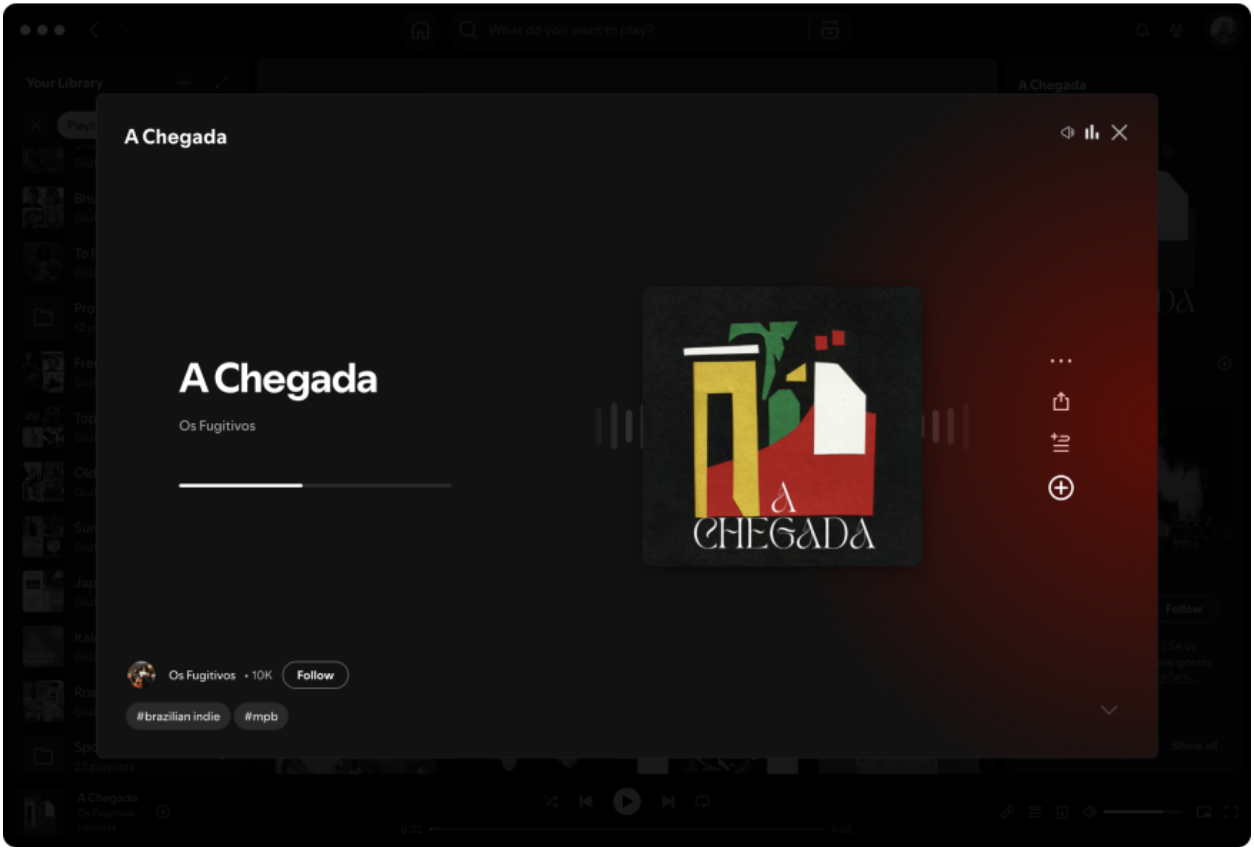
Here are a few of the ways it's changed my routine:
Vibe-Checking a New Playlist:
You know when you need maximum concentration for a few hours of studying and you find a playlist called "Deep Focus Lo-Fi," but you're not sure if the vocals or the beat will be distracting? That’s a constant for me. Before, testing a playlist meant interrupting the song that were already helping me focus. Now, with the preview feed, I can skim through 4 or 5 tracks in under a minute without ever stopping what I'm currently listening to. It’s an instant match; I know right away if that's the right soundtrack for the next few hours of deep work or not.
Conquering My Discover Weekly on Mondays:
My Mondays are always packed, so I rarely had time for my Discover Weekly until the end of the day. Now, I can do a quick sorting session during any break. I save the tracks that hook me immediately for a fuller listen later and find all the week's keepers without ever breaking my rhythm.
Getting an Instant Introduction to a New Artist:
When a friend recommends an artist with a huge back-catalog, it’s easy to feel stuck and not know where to start. Now, I use the preview on their artist page as a crash course. I can get a quick sense of their hits and different eras, making once-intimidating discographies feel accessible.
Crafting the Perfect Playlist Through Radio:
I love using Song Radio to find tracks with a similar feel, but building a playlist from it used to be a stop-and-start process. With previews, I can "mine" the suggestions and cherry-pick the best ones without interrupting the music. It's perfect for crafting a new playlist while I'm cooking on the weekend.
If you’re keen to see how it transforms your listening, you can check out the full “how to” in my first post, but if you’d like the TLDR, stick around and I'll share it below.
How to Launch:
On an album or playlist page, look for the small animation next to the main play button and give it a click.

How to Browse:
Once you're in the preview feed, you can easily navigate between tracks by:
- Scrolling with your mouse or trackpad
- Clicking the on-screen arrow icons
- Using your keyboard’s arrow keys
What You Can Do:
While a track is previewing, you can instantly save it, add it to your queue, share it, or follow the artist.
Good to Know:
Sampling new music won’t disrupt what you're currently listening to. Your queue stays exactly as it is! If you’re keen to see how it transforms your listening, you can check out the full “how to” in my first post, but if you’d like the TLDR, stick around and I'll share it below.
Comments

Thanks for the awesome update, this is such great news! I’ve been really looking forward to this feature finally reaching the U.S., and it sounds like it’s absolutely worth the wait. The idea of being able to preview albums or playlists without interrupting what I’m already listening to is a total game changer.
I especially love how you described using it for “vibe-checking” playlists and quick Discover Weekly sessions, that’s exactly how I’ll be using it too. It feels like Spotify is really leaning into effortless discovery again, and I’m all for it.

IF it's true that you are running ads for ICE Immigration / DHS I will cancel my multiple subscriptions. Just waiting for audio proof...

Thanks for the update, Luan! This new preview feature sounds fantastic — being able to sample albums and playlists without interrupting what’s already playing is such a smart improvement. I love how it makes discovering new music feel effortless, especially for organizing playlists or checking out new artists. Can’t wait to try it out on desktop — this is definitely going to make music exploration smoother and more enjoyable!

That’s an awesome update, Luan! The rollout of the preview experience on Spotify Desktop and Web in the US is a fantastic improvement — it really brings the mobile-style fluidity to bigger screens. Being able to sample tracks, playlists, and artists without interrupting playback is a total win for focused listeners and music curators alike.
Platforms like [removed by Mod] have been highlighting similar user experience innovations — making discovery smoother and more intuitive for creators and audiences. Excited to see Spotify continue refining these kinds of interactive features!

Hi @Luan
Thanks for the awesome update. I appreciate your blogs, great work.
I can preview as many tracks as I want, using the Mobile App but only the first 20 tracks on the Desktop App. Is the desktop functionality going to change?

Is this possible to play Spotify songs in background while playing Counter Strike and checking its stats on Faceit Finder. ?
I have tried many times to paly song on background but my game got stuck, has anyone have idea about it or faced teh same issue please tell me it would really helpful for me .
This is great news, Luan. I have been waiting for this feature for a while, and it sounds really useful. Being able to preview tracks without stopping my current music will make discovering and organizing songs much easier. Thanks for the clear explanation.

Thank you so much for keeping us in the loop! 💜

Yet another feature - restricted to markets.
Still lossless hasn't rolled out properly worldwide, and some countries are not even in the list.

You’re absolutely right it’s frustrating how many “global” features end up limited to just a few regions. It really defeats the purpose of being part of a connected world. Hopefully, they’ll prioritize broader rollout soon instead of keeping core features locked behind markets.

Love this update, the desktop previews make such a big difference! Being able to sample playlists and artists without stopping what I’m currently listening to is a total game-changer. Thanks for the clear breakdown, Luan. Excited to see this finally roll out in the US!
Like the preview but dislike the animation - too distracting visually - hope the animation goes away or the ability to turn it off becomes available