Spotify For IOS 4.2.1

Accepted answers

I just tried today installing it and it worked. I am running iOS 4.2.1 on my iPod Touch. I went to the App Store and downloaded the app. It gave a pop-up saying I have to download a legacy version of Spotify, but this version is still fine.
All comments

It can be done. Just follow the steps in this excellent post to get spotify on your ipod.
I linked to a post below that saying
1. Make USA account (it may work with other countries accounts, but maybe it is important to do it using USA account)
2. Download itunes, install it. Login with usa account
3. download spotify (normal spotify, not ios4 version) on itunes.
4. Connect ipod.
5. Sync Spotify app from itunes with ipod
5. if it does not sync go to appstore on ipod and install spotify using appstore on ipod.
Awesome. Enjoy your music 🙂

Can't find regular spotify on itunes...just pad and phone. Am I missing something? Thanks!!
I have it for everything else but I got an ipod touch with 4.2.1 (won't update further of course so I'm guessing it's gen 2) and am trying to follow the steps but I'm not sure what you mean in step 3. I only see ipad and iphone versions of spotify on the windows itunes store. If I try to get it on the app store on the pod, of course it cancels because I don't have version 6 so I can't do step 3 that way. Probably simple but it's going over my head for some reason.
Aha, no worries. The touch uses the same as the iphone so that's the version you want.

Perfect hint! Everything easy to install.

Amazing thank you so much!
@Joe wrote:I linked to a post below that saying
1. Make USA account (it may work with other countries accounts, but maybe it is important to do it using USA account)
2. Download itunes, install it. Login with usa account
3. download spotify (normal spotify, not ios4 version) on itunes.
4. Connect ipod.
5. Sync Spotify app from itunes with ipod
5. if it does not sync go to appstore on ipod and install spotify using appstore on ipod.

I tried doing this, but it still says that I require a newer software update. Am I missing something? Thanks!

This worked for me.
Thanks a lot.

It's true!!!! Thx a lot!! It's fantastic!!
I just tried today installing it and it worked. I am running iOS 4.2.1 on my iPod Touch. I went to the App Store and downloaded the app. It gave a pop-up saying I have to download a legacy version of Spotify, but this version is still fine.

your a god thx alot

just tried this and it won't work either with itunes or app store?...
on app store, when attempting to download spotify, it simply gives me the error message that I must have 8.0 or higher and then kicks me out...
in itunes, when i search the word "spotify", it doesn't find the app at all.
HELP???? My email is czvirg@yahoo.com

I have been using Spotify v0.4.24.65.gaef36bd1 with a Late 2009 iPod touch 3td gen 8GB (MC086KS, iOS 4.2.1).
But now it doesn't anymore update the playlists like my newer iOS devices do. I can log in but that's it. Any changes I do to the playlists on my Mac (OS X 10.11.6) don't propagate to the old iPod. I have logged out/in, rebooted, reinstalled Spotify but the problem persists.
Has there been a recent change that disables Spotify on old devices like that??

Hi,
I downloaded and installed an older version since i'm using an ipod touch 2gen.
After login with an email (not fb) I get the following screen and nothing changes ....
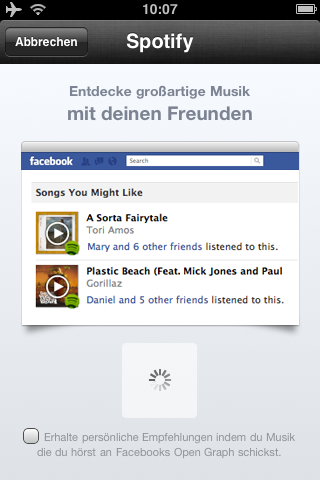
Please help
Regards Philippe

I have excatly the same problem, that i wish to install SPOTIFY on my iPod with iOs 4.2.1. but it doesn't work.
Would be great to get help or a solution ?
I have excatly the same problem, and I'm really **** about the fact that they always want you to buy their latest products and versions.
Suddenly Spotify spontaneously again started to sync playlists in the old iPod touch 3rd gen 8GB (MC086KS, iOS 4.2.1) and in the new LG OLED55B6V smart TV (WebOS 3.0).
So now they work OK again. Maybe it was something in the Spotify's end that caused this.

Thanks for your return.
Is it also possible to register a new account with iOS 4.2.1, because that was my main problem.
See my post from 2017-04-29 09:15 AM
br
Still not possible to login. I'm blocked on the screen with the spinning wheel where it says "discover music and share with your friends" or somewhat 😞

I need to use spotify on my ipod 4gen
How can i do it, help me please

I assume this option is now entire gone when Apple got rid of the last workaround to installing apps on OS's (when they removed the AppStore from iTunes), the last desperate bid to make people replace old hardware that was still working - it would seem that Cupertino aren't happy with just slowing down my old devices, but they REALLY want to block me from using them.... it's just an old iPod Touch Gen2 that I want to keep as a media player at home, but without Spotify the idea of paying for a product that is forcibly retired within 2 years loses its appeal even faster than it did before!
Looks like I'm going to demote my Galaxy S2 to doing this media player role, but it seems a waste since it's running very nearly the latest Android OS, still lasts 2 days on the new battery (£5 and 10 seconds to install) and is actually running faster on Android 7.1.1 (Nougat) than it did when when it was released in 2011 with Android 2.3 (Gingerbread).... I'm not praising Samsung here - I'm praising competition... they just had to offer all those options to me back then, otherwise I would have gone with whoever was offering those features and flexiblity.

4/2/2018 - Reporting this method still works fine. Updated an iPod Touch 2nd Gen to 4.2.1, opened App Store, logged in (to app store) with an account which had previously downloaded Spotify. I was offered an 'older version' after trying to install Spotify from the App Store on the device and accepted the older version. Spotify installed and I was able to log in with my Spotify premium account credentials. Everything seems normal and the app works great! THANK YOU SPOTIFY (and Apple) for maintaining compatibility with older versions!!!!!!!
I linked to a post below that saying
1. Make USA account (it may work with other countries accounts, but maybe it is important to do it using USA account)
2. Download itunes, install it. Login with usa account
3. download spotify (normal spotify, not ios4 version) on itunes.
4. Connect ipod.
5. Sync Spotify app from itunes with ipod
5. if it does not sync go to appstore on ipod and install spotify using appstore on ipod.