Add option to remove the "add to Liked Songs" button on the Windows taskbar thumbnail preview.

Previously the taskbar thumbnail preview in the Spotify app on Windows showed buttons for basic playback options: "Previous, Play/Pause, Next". A new button has been added which clutters the thumbnail when you just want access to the basic playback functions.
Please give users the ability to remove the new button if they wish to retain the 3 button layout to make quick playback control easier.
Comments

Agreed. It's too easy to accidentally remove a liked song, and there's no undo that preserves the original add date.
The remove action does not behave like clicking the circled checkmark icon elsewhere in the app (where a menu opens that is not a destructive action). It just removes the song with no confirmation.
Removing a liked song cannot be such a common action that warrants this level of prominence.
This button is terribly placed; please remove it.

Please remove this button it is so annoying!

I agree. There should be an option to remove this button.
This almost feels like one of those stupid "Dark Patterns" that adds nothing useful to users.

Plan
Premium
Country
Denmark
Device
Desktop
Operating System
Windows 10
My Question or Issue
One misclick and this new button removes the playing song from liked songs. The button is right next to Play/Pause. Please let me disable this button, I did not ask for this. I have already accidentally removed two songs

I would also like the option to remove this button, as I just removed a liked song accidentally for the first time. I usually use an external media controller (Stream Deck), so this hasn't happened to me until now.
After re-liking the song, it's now at the top of the playlist away from the other songs on the album. This wouldn't be quite as annoying if we could set a custom order for our liked songs in the app, as I could put this song back where it belongs.

agreed, i have accidentally unliked so many songs and i dont know their names so they are gone forever.
When I loaded Spotify up today, the button has now moved to the far-left.

I think that this will be much better, so thanks to the devs for making the change.
I have just noticed the change too. I would still prefer to have an option to remove it entirely as I feel it still clutters the thumbnail for very little relevant functionality.
That being said at least it has now been moved furthest away from the buttons which are actually useful.
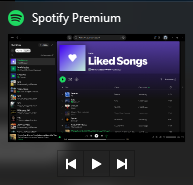
They removed it!


remove ts ong
When hovering the application in the task bar, there are media controls available in the preview window which are extremely handy.
However there is now a liked song toggle in the middle of them, and as a result it is very easy to accidentally like or unlike songs while trying to control your media.
Please move this option outside the media controls, and/or provide an option to toggle it, as this is currently a fairly poor user experience.