Audio cue when a song is not in your Liked Songs

Comments

Hi @kenjmorgan
Thanks for posting in the Spotify Community 😃
Often when I'm playing my 'Liked songs' on smart shuffle, I'll catch a song the gives that 'Oh I like that' moment. That's my cue to check my device.
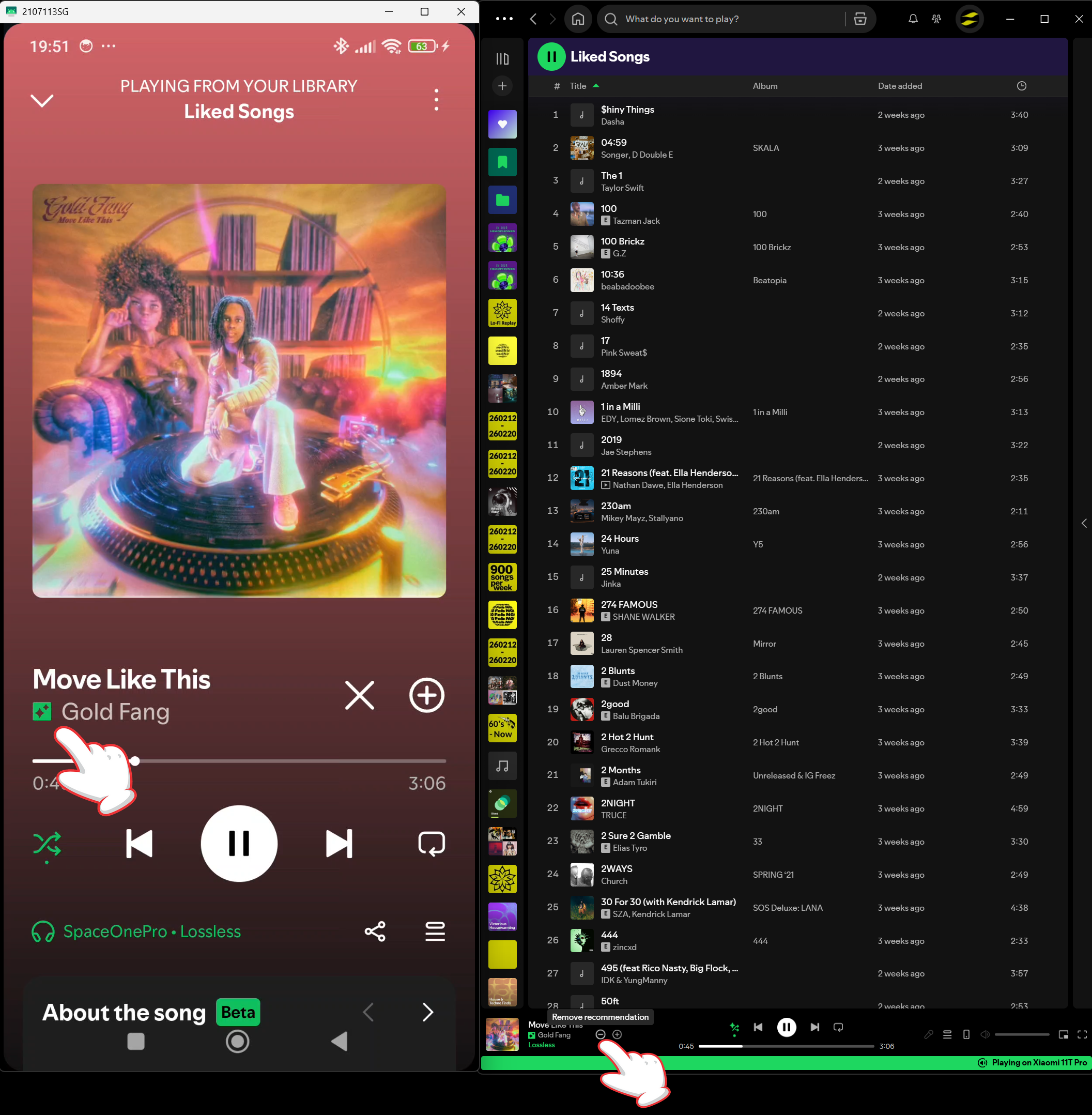
In the Now Playing window, a recommended track shows the smart shuffle icon before the artists name, then to the right of that is "X" and "+". The X is to "Remove recommendation" as shown in the Desktop App ("-") and the "+" button will add this to your "Liked songs"
You can have a lot of fun just pressing skip until something new pops up. I hope this helps.
Have a great day 😃

I agree with TunedIN, its pretty easy to see this. But for the book readers with playlists that they listen to at night or something, and want something new but is not sure that its already there, it would be nice to have some sort of indication of sorts, at least for ones you've either listened to fully before, but not added, or new songs that the Smart Shuffle thinks would fit in your Playlist. 🙂 (This is coming from a guy with a 600+ songs, handcrafted playlist btw)
I actually really love this idea. Maybe not all the time, but in certain contexts, this would be great.